Home Blog Page 205

4 Benefits of Using PDFBear’s PDF to JPG Converter

If you must turn PDF files into high-quality JPG images, PDFBear can help you. Unlike the older way to convert your files, this online platform can make your conversion task much more accessible, more efficient, and as fast as a blink of an eye. 

Hence, using this web-based service, there’s no need to individually scan every page of your PDF files to transform them into your desired document format. You only need a compatible device, a working internet connection, and your favorite browser to access PDFBear’s conversion services. PDF to JPG I love to get started.

To help you decide whether or not it’s a good idea to use the PDFBear tools to turn your PDFs into JPG files, here are four benefits you’ll be getting from using this platform’s conversion services. 

4 Benefits of Using PDFBear’s PDF to JPG Converter

4 Benefits of Using PDFBear's PDF to JPG Converter

1. 100% Free

Yes, you have read it right! PDFBear offers free PDF services to JPG, which means you can use their conversion tools without spending even a single cent. Isn’t it awesome? You can now enjoy an easier way to turn your PDF files into JPG images without worrying about how much it costs or whether you can afford it.  

However, if you find PDFBear’s free tools amazing, you will want to try its premium account. With this, you can enjoy more benefits and complete conversion services. As such, below are the perks you can get with PDFBear’s pro membership plan:

  • All tools included
  • Unlimited task conversion
  • Website security
  • Largest file size per task (2048MB for PDF to JPG)
  • (1) PDF to JPG conversion per task 
  • Unlimited storage space for your files
  • No advertisements
  • Infinite storage life for your uploaded files
  • Unlimited storage life for your converted documents
  • 100% Quicker upload speed
  • Priority customer/technical support (Office hours with priority support)

Of course, the PDFBear’s pro plan is affordable, too! With less than $6 per month, you can enjoy unlimited access to their tool and modify your Portable Document Format files any way you want, anywhere. 

READ ALSO: How A PDF Can Contain Malware

2. You Don’t Have to Deal with Complicated Process

Besides its affordability, PDFBear offers hassle-free conversion that even the least tech-savvy people will love.

Its straightforward process is one of the main reasons it became so popular with internet users today. You won’t encounter navigation issues even if it’s your first time using PDFBear’s conversion service.

Furthermore, this online platform will let you convert your PDF files into JPG images quickly. As such, you will only need to wait a few seconds to get the output you need. With this, you can finish multiple tasks in just a minute and do other things while waiting. 

To start your conversion journey with PDFBear, you’ll need to follow these steps:

  • First, you should open your device’s file storage and get the PDF file you wish to convert into high-quality JPG images. After that, upload it to the PDFBear server or drag your file and drop it to the toolbar provided. 
  • Once you’re done uploading your Portable Document Format file, PDFBear will automatically turn it into JPG images with the highest quality possible. 
  • Wait for a while until the conversion process is all done. 
  • After a few seconds of waiting, your PDF file is successfully converted into a JPG image, and you can download it to your device for personal use.

READ ALSO: Image to Video AI: What It Is and How to Use It…

3. Any Platforms Will Do

Don’t have a computer or laptop? No worries. You can still open PDFBear’s official site on your smartphones and tablets. This online PDF tool has a wide range of compatibility and supports all operating systems from Mac, Linux, and iOS to Android and all Windows versions. 

Moreover, you can also access PDFBear through mainstream browsers such as Mozilla Firefox, Safari, Internet Explorer, Bing, Google Chrome, and more.

If connected to the internet, you can always turn PDFs into high-quality images, even if you’re out for a quick meeting. 

4. You Can Convert Your Files Anytime and Anywhere with Ease

Aside from compatibility, affordability, and efficiency, PDFBear also offers a tight security policy to protect your PDF files once you have uploaded them online. The people behind this fantastic platform want to ensure that all the documents dropped on their server will be protected against malware, viruses, and unwanted access. 

Furthermore, PDFBear will guarantee you a 256-BIT SSL connection so that you can quickly turn your PDF files into JPG documents.

On top of that, all the transferred files across this platform’s site will be automatically deleted an hour after every successful conversion. With that, you can be sure that your file’s content won’t go public even after you have obtained the output you need. 

READ ALSO: How To Compress A PDF File To Make It Smaller?

Demystifying JPG Conversion: Why Use PDFBear’s PDF to JPG Converter?

Demystifying JPG Conversion: Why Use PDFBear's PDF to JPG Converter?

While PDF (Portable Document Format) is widely used for document sharing and preservation, JPG (JPEG – Joint Photographic Experts Group) handles images. There are situations where converting a PDF to a JPG can be advantageous.

Here’s a breakdown of the benefits offered by PDFBear’s PDF to JPG converter, along with addressing common conversion concerns:

What are the benefits of converting PDF to JPG?

  • Image Extraction: If your PDF contains primarily images or scanned documents with pictures, converting to JPG allows you to extract those images separately. This can be useful for editing or sharing specific visuals from the PDF.
  • Improved Compatibility: While PDFs are widely supported, some applications or online platforms might have limitations in handling PDFs. Converting to JPG ensures broader compatibility, especially for image-focused applications.
  • Reduced File Size (Sometimes): In cases where a PDF contains mostly images, converting to JPG can reduce the file size. JPG compression is optimized for images, making them smaller than uncompressed image data within a PDF.

READ ALSO: PDFBear: Your Online Alternative In Merging PDF Files

What are the benefits of converting PDF files?

Here are some common conversion scenarios:

  • Converting to editable formats (e.g., DOCX): If you need to edit the content of a PDF, converting it to a format like DOCX (Microsoft Word) allows for easy modifications.
  • Converting to accessible formats (e.g., TXT): For improved accessibility, PDFs can be converted to plain text (TXT) format, which is more accessible for screen readers and text-to-speech software to interpret.

Does converting PDF to JPG reduce quality?

Yes, converting PDF to JPG can potentially reduce image quality. JPG compression is a “lossy” process, meaning some image data is discarded to achieve smaller file sizes. The extent of quality loss depends on the chosen JPG compression level. PDFBear offers options to control the compression quality, allowing you to find a balance between file size and image fidelity.

What is the best PDF-to-JPG converter?

Choosing the “best” converter depends on your needs. Here’s why PDFBear’s PDF to JPG converter is a strong contender:

  • Free and Easy to Use: PDFBear offers a free tier with conversion limits, and its user interface is straightforward, making it accessible to everyone.
  • Batch Conversion: Convert multiple PDFs to JPGs simultaneously, saving time and effort.
  • Security and Privacy: PDFBear prioritizes security with features like SSL encryption and automatic file deletion from their servers after a set time.
  • Customization Options: Control the JPG output quality and choose the image format (JPEG or PNG) based on your preference.

What are the five benefits of JPG?

Here are five key advantages of JPG:

  1. Universally Supported: JPG is one of the most widely recognized image formats, ensuring compatibility with most devices, software, and online platforms.
  2. Smaller File Size: JPG compression reduces file size compared to uncompressed image formats, making it ideal for web applications and email attachments.
  3. Suitable for Photographs: JPG excels at handling photographs with various colors. Its compression works well with natural color variations present in most photos.
  4. Adjustable Quality: You can control the compression level in JPG, allowing you to find a balance between image quality and file size based on your needs.
  5. Wide Range of Applications: JPGs are used extensively in various applications, from digital photography and web graphics to document scanning and social media sharing.

READ ALSO: Merging And Combining: How To Merge PDF Files Into A Single Document

Takeaway

Before the birth of online PDF tools, converting files into another document format takes a lot of work. Thanks to the people behind these web-based services, such as the PDFBear, the conversion process has never been more straightforward. PDF to JPG: I love this online tool.

All you have to do is drag your files and drop them to the server, then the rest of the work will be done by the platform. If you want to enjoy the benefits mentioned above, you better start converting your PDF files into JPG images through PDFBear. 

While PDF reigns supreme for document sharing and preservation, JPG remains a cornerstone for image management. Understanding the strengths of JPG and the capabilities of PDFBear’s converter empowers you to make informed decisions about your file conversions.


SUGGESTED READINGS

Exclusive Interview With Russell Rothstein, CEO of IT Central Station

Here’s an exclusive interview with Russell Rothstein, the CEO of IT Central Station.

In this uncertain climate, one company stands out: IT Central Station.

The Israeli-based company is the leading review site for enterprise technology due to the quality of its one million genuine user reviews. The user data is sourced directly from users in the trenches and is far more reliable than data from an analytics team (think Gartner). Each reviewer is meticulously vetted, guaranteeing authenticity and no fake reviews.

When COVID made the industry panic, some VC-backed companies had to lay off their employees or reduce salaries. Still, IT Central Station continued its employee-first approach, resulting in record-breaking revenue and sales, and increased its market share, all without VC funding.

Russell Rothstein

Here Are Russell Rothstein’s Responses To Our Questions:

1. Question: Recently, IT Central Station has become a household name in Cybersecurity Tech Review. How has the journey been so far?

Russell Rothstein:

When we started IT Central Station, we were struck by the fact that in the age of social networking, enterprises were still buying technology the same way—with limited access to the opinions of other real users.

Enterprise buyers aren’t interested in being fed information biased towards a particular vendor – they want to hear from actual users to help inform their decision. This is particularly true of cybersecurity professionals, who are generally skeptical of analysts and other sources that seem to be vendor-biased.

What began with a few diagrams and PowerPoint slides is now the fastest-growing online platform designed for enterprise technology buyers. IT Central Station has grown into a dynamic, real-time platform that offers user information that is current, objective, and relevant.

It protects privacy so that users can post anonymously to freely express their views or use their real names to promote their expertise. It enables experts, including real users and independent consultants, to share their expertise in a high-quality community of decision-makers.

With COVID-19 and all major conferences canceled in the last year – including RSA and Black Hat in the cybersecurity space – the role of user reviews in the buying process has become even more pronounced.

Users have become more reliant on the information they can access online. IT Central Station has played a significant role in enabling cybersecurity and other technology professionals to get access to honest opinions in a nonbiased way.

READ ALSO: What Are The SimpliSafe Home Security Packages?

2. Question: How successful has the fight against fake reviews been with IT Central Station?

Russell Rothstein:

From the start, we knew that we needed to find a way to fight against fake reviews. We wanted members to know that everything they saw on our site would be 100% trustworthy. So, we set ourselves an ambitious goal – zero fake reviews. To achieve this goal, we put in place a rigorous authentication system that every reviewer undergoes before publishing on IT Central Station.

Our QA team reviews every review submission to ensure that the reviews are genuine. We verify every user’s LinkedIn profile or company email address. All review authors must disclose their relationship to the product, the service, or the solution they are reviewing.

In addition, reviewers must have used the product/service or have evaluated it to use it for their company in the past 12 months. If we suspect that a review is fake in any way, we won’t publish it.

Overall, the system we’ve got in place has proven to be very successful in ensuring that reviews on our site are authentic.

3. Question: What are the threats associated with using ‘bogus’ cybersecurity tools?

Russell Rothstein:

With a community of over 460,000 members, many of whom are experts in tech-related fields, we asked our members what they thought. A common theme in the responses was that the tools often have vulnerabilities. One user commented, “They are tools for someone else to access you” and “might bring about the data exfiltration, trojan horse.”

Other users noted that having a ‘bogus’ cybersecurity tool can give you a false sense of security. Another member stated, “The biggest threat is risks you think you have managed are not managed at all, so you and your executive team have a false sense of security. This is even worse than not having any tools in place.

With no tool in place, you at least know you have a vulnerability.” This was echoed by another member who pointed out that, in his experience, “many people who use open source don’t bother to patch them, and attackers then utilize such loopholes.”

The potential threats associated with unverified cybersecurity tools underscore the importance of researching your tools before using them.

4. Question: How effective have public product reviews been in protecting digital citizens?

Russell Rothstein:

Product reviews have played a significant role in helping digital citizens make smarter decisions. The majority of people read online reviews before making a purchasing decision.

More importantly, more and more people in the B2B space rely on reviews rather than speaking directly to sellers, consultants, and analysts. We’ve seen this first-hand: decision-makers from 95% of the Fortune 500 companies visit IT Central Station to consult reviews during their buying process.

5. Question: Looking forward, what is the future of IT Central Station?

Russell Rothstein:

The future of IT Central Station is bright. We want to provide more reviews in more categories. The actual value of IT Central Station lies in the willingness of all our members to share their knowledge and experience so that others can make better decisions. So, we encourage people to join our community, use our reviews, and contribute with their reviews.

Suppose you’re knowledgeable in cybersecurity. In that case, being a part of the IT Central Station community is a great way to demonstrate your expertise and promote your knowledge and experience. We look forward to seeing new members join us!

Note: This was initially published in January 2021 but has been updated for freshness and accuracy.


SIMILAR INTERVIEWS

How To Write An Essay About Yourself: Follow A Simple Guide

Do you want to know how to complete an essay about yourself effectively? I want to write an essay about my speciality.

Read the guide on this site and create an original paper quickly, even without an idea of a custom thesis writing service or dealing with an essay writing company to be more accessible from studying!

The essay about yourself has a large number of definitions. However, we will provide the definition actively used in many works of domestic and foreign researchers.

Thus, the essay about yourself is a prose text with a retrospective attitude, using which the person tells about his experience. In this text, the individual emphasizes his personal life, especially the history of forming his personality.

It should be noted that it is difficult to distinguish between an essay about yourself and a memoir in many cases.

Some researchers who are working in college paper writing services consider an essay about yourself as an independent genre, which should be separated from related genres: biographies, memoirs, and diaries.

The text about yourself differs from memoirs in that its author emphasizes his personal life, especially the history of the formation of his personality. Thus, the author of memoirs is interested in the world around them, people, and events.

Essential Characteristics of an Essay about Yourself

Basic Characteristics of an Essay about Yourself

The text about yourself is characterized by a particular set of characteristics that modern researchers note:

  • Retrospective story (it is a narrative text with a retrospective setting, through which the natural person tells about his experience);
  • Chronological sequential presentation of events;
  • Openness;
  • Documentary;
  • Two temporary plans of the narrator in the present and the past;
  • Subjectivity, personal beginning.

Types of Essays About Yourself

The work should be comprehensive and concise and can be written by hand or using technical means. Depending on the purpose, the essay about yourself can be divided into the following types:

  1. Narrative text (concluded in any form);
  2. Text document (the main facts are precisely stated).

As practice shows, a particular type of essay about yourself does not significantly affect the structure of a paper. In any case, here you need to provide a story about yourself, a kind of autobiography.

Main Components of the Text About Yourself

An essay about yourself consists of the following items:

  • The title of the document;
  • Text;
  • Date;
  • Signature, initials, and surname of the person who wrote the text.

The main components of this paper are:

  • Full name;
  • Date, month, year, and place of birth;
  • Information about studies (years and place, received education and specialty by diploma, etc.);
  • Information on employment (when, where, in what position the author worked, the last place of work or study, position);
  • Information about public work, achievements, encouragement;
  • Information about parents (surname, name, patronymic, date of birth, position, or last place of work);
  • Family composition and family status;
  • Home address, telephone number.

As you can see, this is an essay’s general structure about yourself. It can vary depending on the purpose of writing the paper. Thus, it is appropriate to talk about your college accomplishments if you are a student. You can also write about your hobby and desire to receive a job in the future.

If you, for example, work in the marketing field, you can describe the features of your work. It is also recommended that you explain your difficulties in completing practical tasks, etc.

Stages Of Work On Creating An Essay About Yourself

Stages Of Work On Creating An Essay About Yourself

In the work on creating an essay about yourself, several interrelated stages can be distinguished:

  • The introductory stage. Here, it would be best if you chose a topi and selectedscientific literature. Initial source analysis is carried out, and a plan is drawn up. After that, the introductory part of the paper is written;
  • The main stage. This stage assumes a detailed acquaintance with the sources. Work on the creation of the main content is carried out, and conclusions are formed;
  • The final stage. At this stage, the text of the paper is edited, and errors are corrected. The established requirements execute the workquirements.

Tips for Writing a Successful Essay About Yourself

In this section of the article, you will find helpful tips on how to write your paper. Try to take them into account and put them into practice.

Since the text about yourself is based on the author’s experience, you must provide information about your life. However, this does not mean that scientific literature should not be used. Analysis of literary sources on the topic is mandatory. This allows you to find suitable arguments, facts, and examples to confirm your position.

The process of studying literature depends on the nature and individual characteristics of the student. It includes his general education, special training, erudition and memory, knowledge and level of foreign languages, habits, diligence, etc.

Therefore, each student should properly organize work with literature, taking into account their type of temperament, intellectual characteristics, and character traits.

Preliminary acquaintance with the selected literature includes a cursory review of the content, reading the preface, and annotations. Those points, paragraphs, or sections that relate to the topic of the work should be studied more carefully. Particular attention should be paid to ideas and proposals for discussion issues and the presence of different views and contradictions.

Acquaintance with the literature is a basis for drawing up a work plan. The plan includes the introduction, the central part, two to four interrelated paragraphs, and conclusions. 

According to the plan, the text of the paper is written. The text of the work should be edited and stylistically maintained as a scientific study.

An essay about yourself should be characterized not only by the proper level of content but also by the correct design. When evaluating the work, the compliance of its design with the current requirements is considered. In case of design non-compliance with the established requirements, the grade for the submitted work may be reduced.

Thus, the paper should be structured by selecting its parts, paragraphs, the correct design of references, etc.

READ ALSO: Cybersecurity Technical Writing: Main Points

Good Example Of An Essay About Yourself

Find below a great example and write your unique paper based on it:

I am Kate Smith. I am currently in my 3rd year at the Faculty of Socio-Psychology.

I regularly attend classes and demonstrate a relatively high level of success. According to the results of the credit examination session, I successfully passed 86 tests and exams. The average grade point average for exams and tests is 88.23. Today, I took first place in the general rating among 39 3rd year students in my specialty.

During my studies, I underwent 2 active practices as a psychologist. Characteristics from the place of practice are positive, with suggestions of excellent grades.

I am an active and diligent student. Since the first year, I have been the head of the academic group. My classmates appreciate me for my responsible attitude to the duties of an elder, willingness to help, personal qualities, and organizational skills. I take an active part in the faculty’s social life.

I always try to demonstrate the ability to cooperate, a responsible attitude to learning, persistence, and discipline.

A student of the Socio-Psychology Faculty wrote this essay. She talks about her achievements, personal qualities, and learning characteristics. As you can see, it is not as important here to indicate your birth year, place of residence, etc., as to tell about yourself. However, as mentioned above, other essays about yourself may require these statistics. It all depends on the purpose of writing the paper. Take this into account.

Common Mistakes in Writing an Essay About Yourself

Common Mistakes in Writing an Essay About Yourself

Typical mistakes in an essay about yourself usually include the following:

  • The content of the work does not correspond to the work plan and does not reveal the topic in whole or in part;
  • The content of the paragraphs does not reflect the state of the object of study;
  • Unsystematic presentation of material, repetition of the same provisions;
  • Logical errors, inability to highlight the principal thing;
  • The purpose of the study is not related to the problem, does not reflect the specifics of the object and subject of research;
  • The author has not shown independence, and the work is a continuous compilation;
  • There is no in-depth and comprehensive analysis of the literature on the topic;
  • The number of sources used is insufficient for a comprehensive study of the theme;
  • The result does not meet the purpose of the study, and the conclusions are not consistent with the objectives of the text;
  • The work does not contain references to primary sources or not those from which the material is borrowed;
  • A bibliographic description of sources in the list of used literature is given without complying with the requirements of state standards;
  • Tables, diagrams, and schemes are not made independently but borrowed from other sources;
  • The volume and design of the work do not meet the requirements, and the work contains errors;

When writing a paper about yourself, try to consider all the recommendations set out here. Pay special attention to mistakes that should be avoided. Arrange the structural parts correctly. Then, your essay will interest the reader and bring you success!


INTERESTING POSTS

What Is A Certificate Authority (CA) And What Do They Do?

This post will answer the question – what is a certificate authority? Read on.

Safety and Security are the two factors that are vital in the digital world. When any user surfs the Internet, the two questions which arise in their mind are:

Is the site secured? Can they make online transactions safely on the site? 

And to get answers to the above questions, they check the Security of the site. Online users who browse the Internet frequently know that HTTPS and padlocks are trust indicators and prove that the site is secure. 

These icons are visible on the screen, but:

  • Are you aware of how these icons work behind the screen? 
  • How does a server communicate with the browser? 
  • How does the server state: “I am secured with an SSL certificate, so trust me?”
  • How does the browser know which SSL certificate can be trusted?
  • Who issues these SSL certificates?

Before knowing the backend process, let us see what makes trust indicators visible. When installed on the website, SSL certificates show these visual trust icons. SSL (Secure Socket Layers) certificates are digital certificates that encrypt all browser-server communications, making them secure from intruders. These digital certificates are issued by Certificate Authorities (CA). Hence, these Certificate Authorities are responsible for securing the Internet to a large extent. 

In this article, we will discuss what a certificate authority is. How does it work? What does it do to secure the Internet?

What Is Certificate Authority?

Certificate Authority is a trusted entity that verifies websites and, post-verification, issues digital certificates called SSL certificates. Their motto is to ensure the Security of the digital world. 

CAs are trusted by third parties, as well as certificate owners. They validate the domain or company that has applied for an SSL certificate and issue SSL certificates that web browsers trust. 

An example may clear your doubts.

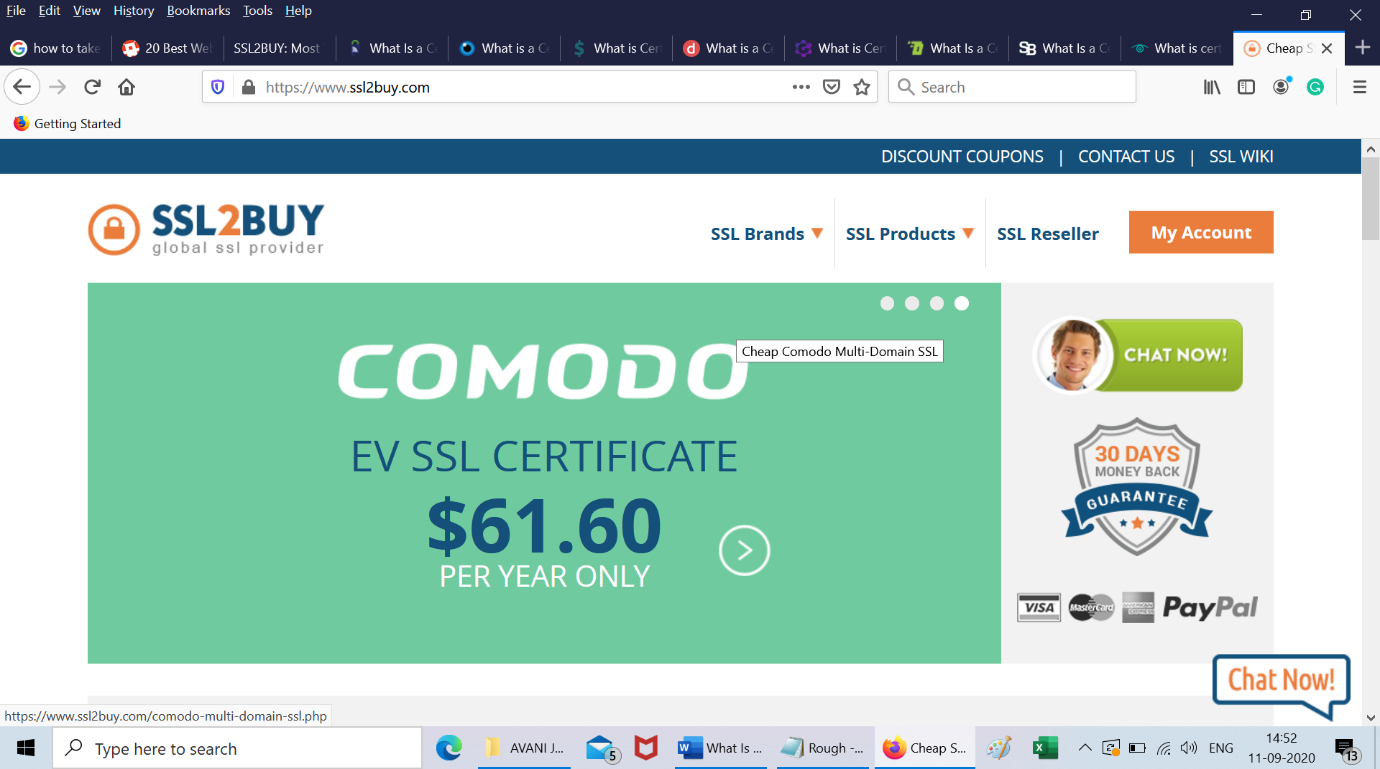
buy ssl certificate

Example: Let us say this is the SSL2BUY website. Though the domain name is SSL2BUY, are you sure it runs on the same company’s server? What if some hacker has mimicked the same server?

So, there is no way to cross-check whether the website is legitimate. Here, Certificate Authorities come into the picture. 


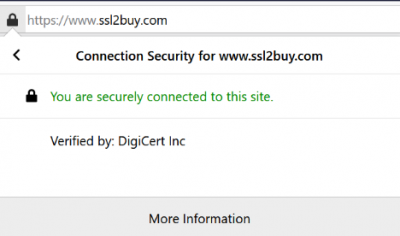
CA issues SSL certificate

When a CA issues an SSL certificate for a website, the CA details are visible in the SSL certificate. When you click on the padlock, the website shows that the connection is secured by CA (DigiCert Inc.); hence, customers are assured about the website’s authenticity.

READ ALSO: 5 Ways To Make Your Company Website More Secure

How Do CA’s Work?

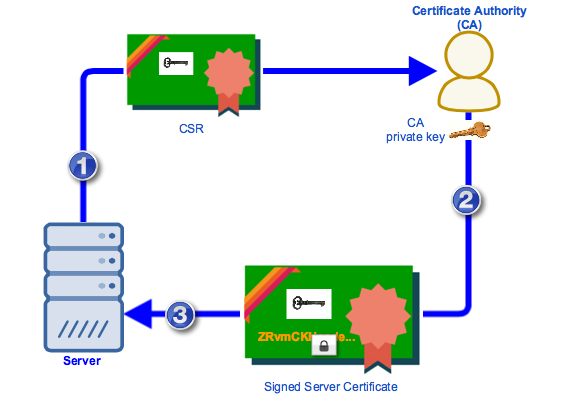
SSL certificates are based on Public Key Infrastructure (PKI), and hence, you need to generate a key pair (private key and public key) and create CSR (Certificate Signing Request). A copy of the public key is handed with the CSR to the CA with all the information.

The CA will then sign the certificate and import it to your server. This signed digital certificate has all the information regarding the site, the validity of the certificate, the issuer name, the public key of your site, and the signature on the certificate with CA’s private key. 

how do Certificate Authority work

Image Source

What Does The Certificate Authority Do?

Certificate Authorities do verifications and authentications before issuing digital security certificates. 

Tasks

  • CA verifies the identity of the user who has requested an SSL certificate for their website. The process includes vetting domain names, organizations, or individuals by validating their identities with official registrations and records.
  • After the validation process, digital certificates are issued to build trust. These certificates authenticate servers, companies, and individuals, thus displaying site security. They are also used for encryption code signing, etc. 
  • These CAs also keep track of CRL (Certificate Revocation Lists), which hints at invalid or expired certificates, and revoked certificates (invalid before the expiry date).

Validations & Functions of CA

The CA does the validation depending on the SSL certificate requested by the user.

  • Domain Validation (DV) SSL:

CA verifies the domain name and matches the same with the name registered in the WHOIS register. It also checks whether the certificate’s applicant is the owner of the domain name or not.

  • Organisation Validation (OV) SSL:

One step further from DV, the CA verifies whether the organization is legitimate. It also confirms the organization’s presence by validating the location, domain name, and name of the organization registered.

  • Extended Validation (EV) SSL:

The highest level of validation and preferred by large organizations and corporations is EV SSL. Thorough research about the company and legal verification makes this certificate highly popular. Conversion rates are bound to be high with EV SSL sites.

CA’s include multiple certificates for multiple securities.

  • Single Domain SSL: Secures the primary domain of the site
  • Multi-Domain SSL: Secures multiple domains and multiple sub-domains of all levels
  • Wildcard SSL: Secures the primary domain and various sub-domains of the first-level

Analyze your business requirements and buy an SSL certificate accordingly. 

Role Of CA In Nurturing Trust

A hierarchical trust model, which all the CA’s use for the chain of trust, comprises of:

  • Root Certificates:

These certificates are shared by all popular browsers and operating systems and are owned by CAs. The root store of browsers and OS comprises these certificates. CAs control them and belong to the issuing Certificate Authority. They are issued and signed by CA using their private key. 

  • Intermediate Certificates:

They are the man-in-middle between secured root certificates and website certificates issued to the users. These certificates are issued from root certificates.

  • Server Certificates:

This is the primary certificate that a CA issues to secure your domain. When installed on your web server, this certificate also secures your domains and sub-domains (depending on the certificate type).

  • Importance of CA:

Let us imagine: 

  • What will happen if there is no CA’s?
  • Without any trusted entities and digital certificates, how will you survive cyber-attacks?
  • Without CAs securing the web world, how will a user know whether they are connected to a legitimate site server or a malicious server? 

All these questions are enough to cause goosebumps. CA’s duties are not only restricted to issuing certificates, but they are also the key authorities to sign public keys and authenticate and validate domains, individuals, and organizations. 

CA issues SSL certificates after verifying the site’s legitimacy; hen,ce, these sites having SSL certificates are termed trustworthy. Even Google has appreciated sites with SSL certificates and ensures that popular browsers flash a warning message stating “Non-Secure” on sites that do not have this digital certificate. 

SSL encryption security comes with robust 256-bit encryption, which is a tough nut for hackers to crack. Without these security protocols, the chances of data tampering and malware attacks rise. Hence, CA’CAslp in with authenticity, confidentiality, and data integrity.

Types Of CA’s

Region and Globe distribute CA’s. There are many global CA’s, but only a few make it to the game’s top. 

There are publicly trusted CAs, called public CAs and private CAs. Let us have a brief about both.

  • Public CA:

Public CAs are also called commercial CAs. These third-party entities issue certificates to individuals and organizations who request the same. ThesCAs comply with Baseline Requirements, and most browsers approve their certificates. 

Example: 

Comodo, DigiCert, GlobalSign, let’s Encrypt, etc., are a few big names.

  • Private CA:

Private CA or Private PKI (Public Key Infrastructure) works for a single enterprise or company but functions like a public CA. It is also termed Internal CA. It issues the certificates only for the company it works for and has specific features.

  • Since these CA’s are issued internally, they are trusted by internal clients, users, and IT staff.
  • Access is restricted to a limited group of users.
  • The setup and hosting of this CA are to be done by the company itself or by hired third-party personnel.
  • They best serve internet networks and intranets.

Private CA’s are used for:

  • Intranet Sites
  • VPN (Virtual Private Network)
  • Private Email Signing Certificates
  • CUG’s (Closed User Groups)

Certificate Authority (CA): Your Questions Answered

In the digital world, trust is paramount. Certificate Authorities (CAs) play a vital role in establishing trust online by issuing digital certificates that verify the identities of websites and other entities.

Here’s a breakdown of CAs and how they function:

What does a Certificate Authority (CA) do?

CAs act as trusted third parties in the digital world. They perform several key functions:

  • Validation: CAs validate the identity of entities requesting digital certificates. This validation process can involve verifying domain ownership, organizational information, or individual identity, depending on the type of certificate.
  • Issuing Certificates: Upon successful validation, CAs issue digital certificates containing the validated information and a digital signature from the CA. This signature is a seal of approval, vouching for the entity’s legitimacy.
  • Maintaining Trust: CAs maintain a repository of issued certificates known as a Certificate Transparency Log (CTL). This log helps ensure accountability and transparency in the certificate issuance process. Additionally, CAs can revoke certificates if they become compromised or outdated.

What is an example of a Certificate Authority (CA)?

There are numerous commercial and non-profit CAs operating worldwide. Some well-known examples include:

  • DigiCert
  • Entrust
  • Let’s Encrypt (non-profit)
  • Comodo
  • GlobalSign

How do I get a CA certificate?

The process for obtaining a CA certificate varies depending on the CA and the type of certificate you need. Here’s a general outline:

  1. Choose a CA: Select a reputable CA that meets your needs and budget. Consider factors like the level of validation required, certificate types offered, and customer support.
  2. Apply for a Certificate: Initiate the application process on the CA’s website. This typically involves providing relevant information and documentation for validation.
  3. Validation Process: The CA will validate your identity based on the chosen certificate type. This might involve domain ownership verification, business registration checks, or individual identity verification.
  4. Issuing the Certificate: The CA will issue your digital certificate upon successful validation. You can then install this certificate on your server or device.

What is the difference between a certificate and a CA certificate?

All CA certificates are digital certificates, but not all digital certificates are CA certificates. Here’s the key distinction:

  • Digital Certificate: A broader term encompassing any electronic document that binds a public key to an entity (website, organization, or individual). It can be self-signed (created by yourself) or issued by a CA.
  • CA Certificate: A specific digital certificate issued by a trusted Certificate Authority. It carries the weight of the CA’s validation and is a more reliable indicator of trust and authenticity.

What is the difference between TLS and CA?

TLS (Transport Layer Security) is a cryptographic protocol secures communication between websites and web browsers. It relies on digital certificates issued by CAs to establish trust and encrypt data transmission. Here’s the analogy:

  • TLS: The secure communication channel (like a locked padlock)
  • CA Certificate: The key that unlocks the channel (issued by a trusted authority)

READ ALSO: How To Invest In Cryptocurrency

Do I need a Certificate Authority for my domain?

For most websites, having a CA certificate is essential. It provides several benefits:

  • Enhanced Security: Encrypts data transmission between your website and visitors, protecting sensitive information like login credentials or credit card details.
  • Increased Trust: The presence of a CA certificate assures users that your website is legitimate and takes security seriously. This can lead to higher conversion rates and improved brand reputation.
  • Improved SEO Ranking: Search engines like Google prioritize websites with valid SSL/TLS certificates (which rely on CA certificates) in their search results.

While there are self-signed certificates, they come with a significant trust warning in most browsers. This can deter visitors and hurt your website’s credibility. Using a CA certificate provides visitors a more trusted and secure online experience.

Wrapping Up

The Internet is like 2 sides of a coin. One side indicates that vast global information is accessible within seconds, whereas the other shows the insecurities of accessing the same. 

Data breaches, Cyber-attacks, Phishing attacks, Identity thefts, and many more dangers come with internet benefits.

CAs are trusted entities that create a barrier between these dangers, thus creating a secure environment for their users. Hence, website owners should install SSL/TLS certificates from trusted CAs and secure their digital data.


SUGGESTED READINGS

Are Smartwatches Safe From Cyber Attacks?

This post will answer the question – are smartwatches safe from cyber-attacks?

An advanced smartwatch allows the user to get to the Web handWeb handily. It is also viewed as a lifeline item since it encourages you to stay in contact when you need it, regardless of whether you have lost your telephone.

Unlike the conventional Rolex watch, several LTE Smartwatch innovations have overhauled wearable innovation to the next level as it has a SIM card space. You can use smartwatches to settle on sound/video decisions, tune in to music, perWeb the web, and more.

READ ALSO: The Importance Of Cybersecurity In Business

Are Smartwatches Safe From Cyber Attacks?

Are Smartwatches Safe From Cyber Attacks?

Smartwatches, while incredibly convenient, are not entirely immune to cyberattacks. They are becoming increasingly popular, and hackers always look for new targets. Here’s a breakdown of the security risks involved with smartwatches and how to mitigate them:

Potential Security Threats

  • Data Interception: Smartwatches often connect to smartphones via Bluetooth and might transmit sensitive information like health data, location information, and even payment details (if your smartwatch supports contactless payments). Hackers could potentially intercept this data if this communication isn’t adequately secured.

  • Phishing Attacks: Smartwatches with displays can be vulnerable to phishing attacks. Malicious actors might send legitimate messages or notifications, tricking you into clicking on malicious links or revealing sensitive information.

  • Malware: Like smartphones and computers, smartwatches are susceptible to malware infection. This malware could steal data, disrupt functionalities, or even take control of your smartwatch.

  • Insecure Public Wi-Fi: Connecting your smartwatch to unsecured public Wi-Fi networks poses a significant risk. Hackers can eavesdrop on data transmissions or launch Man-in-the-Middle attacks to steal information.

  • Physical Loss or Theft: Smartwatches are often worn during exercise or other activities, making them more prone to physical loss or theft. If your smartwatch doesn’t have adequate security features like PIN locks or remote wipe functionality, a lost or stolen watch could expose your data.

READ ALSO: Cyber Security Risks And Solutions In 2024

How To Secure Your Smartwatch

How To Secure Your Smartwatch

  • Keep Software Updated: Just like with phone software, ensuring your smartwatch software is updated with the latest security patches is crucial. These updates often address vulnerabilities identified by security researchers, making it harder for hackers to exploit them.

  • Strong Passwords and PINs: Use strong passwords or PINs to lock your smartwatch and restrict unauthorized access. Don’t rely on simple PINs like birthdays or easily guessable number sequences.

  • Beware of Phishing Attempts: Be cautious of messages or notifications you receive on your smartwatch. Don’t click on suspicious links or download attachments from unknown senders.

  • Avoid Public Wi-Fi (if possible): Avoid connecting your smartwatch to unsecured public Wi-Fi networks. If using public Wi-Fi is unavoidable, limit your activity to non-sensitive tasks and avoid accessing financial accounts or entering personal information.

  • Enable Find My Watch Feature: Most smartwatches offer a “Find My Watch” feature similar to smartphones. Enable this feature to locate your watch in case of loss and potentially remotely wipe your data if necessary.

  • Disable Bluetooth When Not In Use: When you’re not actively using Bluetooth connectivity on your smartwatch, consider turning it off to minimize the attack surface for potential hackers.

  • Manage App Permissions: Be mindful of the permissions you grant to apps installed on your smartwatch. Only allow access to data and functionalities the app genuinely needs.

READ ALSO: Smart Home Security Tips That You MUST READ

Are Smart Watches A Digital ​​Security Danger?

As cybercrime continues to develop, you must secure every digital device. If your smartwatch contains touchy information, such as banking or computerized wallet innovation, it may be presented to digital aggressors.

Smartwatches function as controllers for your smartphone while you access your applications, email, and instant messages. Your instant messages incorporate your one-time secret phrase or OTP that could give somebody admittance to your bank.

Since 2015, the highlights of network safety in smartwatches have significantly improved. Be that as it may, it isn’t 100% secure. You might be stressed over your information or delicate business documents, and afterward, you might hesitate to utilize them. In any case, you can find a way to beat the typical shortcomings of your smartwatch.

CHECK OUT: 16 Best Protection Tools Against Hackers [100% WORKING]

Smartwatch Cybersecurity Issues

Smartwatch Cybersecurity Issues

Regular wearable security issues today include:

Information stored on Smartwatches

Your smartwatch stores your personal information, which can prompt security concerns. This could be your ongoing area or successive areas, moment wallet, or banking data for use with the installment framework, and substantially more. The rundown of information utilized by your smartwatch is expansive.

You can ask who else can see the information on your smartwatch. How secure is this information? If private data is put away in distributed storage, you won’t have the option to shield it from aggressors.

Your data might be imparted to outsiders.

Most leading smartwatch manufacturers give security strategies, regardless of whether it is Android or Apple. So, before usage, read the security strategy to protect your information on the smartwatch. You’ll see whether your watch will share your private information or a tiny part of it. Also, you can limit the authorizations of your smartwatch to prevent access to your private information.

Your smart gadgets can control your smart home.

Numerous smart gadgets furnished with current innovations can handle your smart home. This puts you in much more severe danger as though you were utilizing your watch to control your home, and afterward, the hackers had the option to do likewise. Numerous clients utilize their gadgets to open the principal passage and keep thinking about whether the watch is taken or in some unacceptable spot.

Your business organization might be in danger.

Your smartwatch can open your business organization to possible dangers. If you’re utilizing a portion of your business apps on your watches, for example, business calls or Tink Business Notes. Assuming your smartwatch was hijacked, it can give unrestricted access to a potential hacker.

Smartwatch Security: FAQs Unveiling Risks and Safeguards

Smartwatches have become an extension of our digital lives, but are they safe from cyberattacks? Here are some FAQs to shed light on smartwatch security concerns:

Are smartwatches safe from hackers?

Not entirely. Smartwatches, while convenient, are miniature computers susceptible to cyberattacks. They connect to the internet, store personal data, and might have vulnerabilities hackers can exploit. Here’s how:

  • Data Interception: Unencrypted communication between your smartwatch and smartphone (or other paired devices) could expose sensitive information like passwords, health data, or financial details if intercepted.
  • Phishing Attacks: Smartwatch displays can be vulnerable to phishing. Deceptive messages or notifications might trick you into clicking malicious links or downloading malware that can compromise your smartwatch and potentially connected devices.
  • Weak Authentication: Some smartwatches lack robust authentication, relying solely on PINs or swipe gestures. These methods are more accessible to crack than many smartphones’ multi-factor authentication (MFA), which is.
  • App Vulnerabilities: Third-party apps downloaded onto your smartwatch can introduce security risks. These apps might have vulnerabilities that hackers can exploit to access your device or data.
  • Outdated Software: Failure to update your smartwatch’s operating system and apps can leave them vulnerable to known exploits. Hackers constantly discover new vulnerabilities, and software updates often patch these holes.

Are smartwatches safe from radiation?

Smartwatches emit low levels of non-ionizing radiation, like cell phones and Wi-Fi routers. While the long-term health effects of such radiation are still under research, most health organizations consider them to be shallow risk.

How secure is my smartwatch?

The security of your smartwatch depends on various factors:

  • The smartwatch model: Some models prioritize security features like strong authentication and data encryption more than others.
  • Your security practices: Implementing solid passwords, keeping software updated, and being cautious about downloaded apps significantly bolsters security.
  • The security of your conSoftwareevices: The overall security of your smartwatch ecosystem is linked to the security of your smartphone and other connected devices.

What are the risks of wearing a smartwatch?

Security risks are the primary concern, as mentioned earlier. Additionally, some people might experience skin irritation from the materials used in the smartwatch band.

How do smart devices get hacked?

Smart devices can be hacked in various ways, including:

  • Unsecured connections: Hackers can exploit vulnerabilities in Wi-Fi networks or Bluetooth connections to intercept data or inject malware.
  • Phishing attacks: Deceptive emails, messages, or notifications can trick users into revealing sensitive information or downloading malware.
  • Outdated software: Devices with outdated software lack security patches that fix known vulnerabilities, making them easier taSoftwarepp vulnerabilities: ThirSoftwareapps with security flaws can provide hackers a backdoor into your device.

Understanding these risks and taking appropriate security measures can significantly reduce the chances of your smartwatch being compromised.

Conclusion

Smartwatches offer many features and functionalities, but it’s vital to consider the cybersecurity risks involved.

Following these security practices and maintaining a healthy dose of caution can significantly reduce the chances of your smartwatch becoming a target for cyberattacks.

Remember, cybersecurity is an ongoing process, so stay informed about evolving threats and adapt your security measures accordingly.


Consider Reading any of the following posts:

Security Tips To Protect Your Home From Burglary [Infographics]

Here, we will show you security tips to protect your home from burglary.

A home security device is an essential system that can quickly alert you and your loved ones when someone has broken into your home. For instance, as soon as a burglar triggers the system, a message will be sent to the police.

Cameras will also start recording immediately, and an alarm will alert you of the break-in. Even better, a state-of-the-art home security system may serve as a deterrent, as many burglars who notice the system may avoid trying to break into your home altogether.

Here, we will discuss alarm systems in Hamilton and pertinent security tips that can help protect your home from burglary.

READ ALSO: Your Complete Home Security Guide

Pros And Cons Of A Security System

First and foremost, the most important reason to own an alarm system is that it will help reduce the risk of a crime in your home. A recent study by the Electronic Security Association found that 90% of burglars they surveyed claimed they would not try to break into a property with a home security system installed.

Another recent study by the Greenwich Report of Residential Security found that homes without a home security system installed were up to 3.5 times more likely to be broken into. While installing deadbolts on your doors and locks on your windows may help reduce the risk of a burglary, installing a top-of-the-line home security system is arguably the best way to protect your home from criminal activity.

As for cons, some people may worry about the cost of a home security system. For instance, the homeowner may need to pay initial fees, such as installation fees. They may also have to pay a monthly bill, which some homeowners may find inconvenient.

Most people feel that the initial start-up cost is worth it for the peace of mind that they will receive, knowing that their loved ones and their most prized possessions will be protected 24/7, but weighing the pros and cons of home security system ownership is ultimately a decision that you will need to make.

Using a Security System to Deter Burglars

A quick and easy way to indicate to would-be burglars that a cutting-edge home surveillance system currently protects your property is to display yard signs and stickers on your windows. More often than not, such signs will serve as a clear signal that your home is protected, which will make most burglars think twice before breaking.

Install Motion-Sensor Lights

A poorly lit property will also make it easy for criminals to hide and lurk around the targeted home, so installing motion-activated lights will help illuminate hiding spots in and around your property, which may alert neighbors of suspicious activity and scare off any potential criminals.

Motion-activated lights can be integrated into your home security package to provide even more excellent protection. For instance, you can program the system to start recording footage with its cameras as soon as the motion sensors on the lights are triggered.

Install Surveillance Cameras

On that note, installing outdoor and indoor surveillance cameras around your home will quickly alert criminals that your home is always protected. And, if a criminal is foolish enough to try and break in, the cameras will soon track and record their face and movements, so you will have ample evidence to provide to the police to help apprehend the suspect.

READ ALSO: Tips To Choose A Home Alarm System

Install Alarms

Installing alarms may also help protect your home, as the last thing a criminal wants to hear is the blaring sound of a booming alarm. If you wish, you can also program the alarms to be activated by motion-based window and door sensors.

Also, even if you are not home when the break-in occurs, the alarm will notify your neighbors and nearby pedestrians that something is amiss at your home and may galvanize them to act on your behalf.

Reinforce Your Doors

We would also suggest that you reinforce your doors. For instance, you can opt for a top-of-the-line solid metallic lock with anti-drilling properties. You can also get three-inch screws for your hinges and strike plates to reinforce your doors. That is, they will bite into the stud, making it difficult for a burglar to try and kick the door in.

Keep Your Home Private

You should also ensure that people who walk or drive by cannot see the interior of your home from their vantage point. Use privacy film, blinds, or curtains on the glass so that people cannot “window shop” and quickly check to see if you are home and what you own. The last thing you want is to tempt a burglar to break in after having perused your valuables via your large floor-to-ceiling bay windows or sliding doors made of glass.

Invest in a Safe

Finally, we recommend investing in a fireproof safe with the help from a Fireproofing contractor in Vermont so that you can protect your most prized possessions without fear. The safe should also be bolted to either the floor or the wall so that anyone who breaks in won’t be able to extract the safe and walk out the front door with it.

We would also suggest that you keep the passcode private and avoid writing it anywhere that criminals can easily access, including your smartphone, tablet, or computer. The receipts for expensive items should also be stored in the safe, as you may need them for insurance claim processing if someone escapes with your valuables.

Security Tips To Protect Your Home From Burglary

What Is A Fake Antivirus? Overview And How To Spot Them

Want to know what a fake antivirus means? Chances are you’ve heard a lot about antivirus software, but you don’t know about fake ones.

Antivirus software is a must-have for protecting your computer online and offline. This software helps you protect your computers from criminal attacks.

Cybercriminals have preyed on people’s inexperience as an avenue to execute their vicious attacks. 

Today, these hackers have created the fastest-growing malware system – a fake antivirus program.

Sometimes, cybercriminals can overrun the algorithms of highly secured computers. They do this by playing on people’s ignorance, inviting the malware onto their computers.

Fake antivirus is also called rogue antivirus, or fake antivirus.

Many people are ignorant about malware, but you don’t have to be. 

READ ALSO: How To Protect Your Computer From Malware

In this content, you will learn what a fake antivirus is.

What Is A Fake Antivirus Program?

Fake antivirus software is a program that assumes usefulness to its users by claiming to detect or eradicate viruses and infections from a computer but wreaks havoc instead.

In other words, a fake antivirus program is a complete deceit. Because the program is purely deceitful, it can cause damage to a computer and its user in many ways.

For starters, the program does little or nothing for a user, making the computer more vulnerable to harm.

Most rogue antivirus programs have price tags, so if a person purchases such a service, it would be a total waste of money.

A fake antivirus program turns off the legit antispyware software. This way, the fake antivirus program becomes hard to disable.

In most cases, the fake program is malware, posing a great danger to the computer.

Fake antivirus software makes a user think their computer has a virus.

Fake Antivirus

As soon as the user installs the fake antispyware program, the software will mimic a scan of the computer and show a report of different spyware or viruses detected in the system, which is false.

The fake report will make the computer look like it has some dangerous spyware. 

Typically, a fake report will reveal several pop-up windows and infections while warning against more infections.

Often, these fake smitfraud programs display a Fix button and request payment. Some others may seal up a user’s data files and install different trojans or malware to oversee the user’s behavior.

Today, you don’t have to be a computer geek to know what computer viruses are. Computer viruses are more or less self-replicating programs that cause havoc in computer systems.

Rogue antivirus programs sometimes come with international headlines when large-scale attacks happen. 

As a result, even computer experts can fall prey to malware cybercriminals’ devices.

But there’s good news! You can detect a fake antivirus program.

READ ALSO: Spyware Guide: The Invisible Intruder Lurking in Your Devices

How To Spot A Fake Antivirus Software 

How To Detect A Fake Antivirus Software 
By now, you should know how crucial it is to have security software on your computers to stay safe from infections, malware, spam, viruses, and other vicious internet attacks.

Regrettably, cybercriminals also know how important it is to have protection in your computer system, and they prey on this knowledge to lure people into installing fake anti-spyware programs under the guise that this software will help their computers.

But we all know that these fake antivirus programs are out to do the reverse.

One persistent threat the internet is facing today is fake antivirus programs.

These vicious beasts pose as genuine malware protection, but on the contrary, they are out to do the opposite.

Rogue antivirus databases extort money from unknowing people under the guise of fixing their computers. 

The fake antivirus software will often turn off your genuine security software, making it hard to remove.

Here are some features of fake antivirus programs that can help you spot them:

  • They usually interrupt you while surfing the internet by showing a pop-up menu with claims that your computer may have different malicious threats.
  • A rogue antivirus software usually comes with a phishing link so unknowing people can download and install the alleged security program. 

When you click the link, it redirects you to a site that sells the rogue antivirus app. The link may also redirect you to scareware, an aggressive and compelling message that makes you click the message in it.

  • You lose 2× more data, time, and money when you’re on their site because they run an infected operating system. So, conduct proper research before clicking on any suspicious link.

When you click on a phishing link in a pop-up window and input your credit card details for any purchase, the cybercriminals behind the scheme automatically access your financial data.

Now, these hackers will not only use your data to conduct identity theft, but you will become prey to malware.

Hence, being wary of fake anti-spyware pop-ups and phishing links would be best. 

READ ALSO: Types Of Pop-ups Every eCommerce Store Should Have

How To Protect Yourself From A Fake Antivirus

How To Protect Yourself From A Fake Antivirus

You may be infected with malware if you often see pop-ups showing unusual security warnings and requests for your personal information or credit cards.

If you’re not sure whether an anti-spyware application is legit or take, use these steps below to protect yourself;

  • Look for suspicious links in pop-up menus. If any aggressive or hyped-up message says your system is infected with a virus or that you have malware, tap the x icon in the top corner to exit the window.
  • Messages of this nature usually contain phishing links that get your data without your consent.
  • If you want to buy or renew software subscriptions directly, head to the official websites. Avoid visiting ad links or opening attachments from hidden senders.
  • Monitor your credit cards for any suspicious and unauthorized activity.
  • Use genuine and verified malware detection software.
  • Use a legitimate security program installed on your computer to scan your device if you think it is infected with a malware threat.

Fake Antivirus: Frequently Asked Questions

Fake antivirus software, also known as rogue security software or scareware, seriously threatens your computer’s security. Here’s a breakdown of frequently asked questions to help you identify and avoid these deceptive programs:

What is the meaning of fake antivirus?

Fake antivirus are masqueraded as legitimate antivirus programs. These malicious programs display fake threat warnings and system scans to pressure users to purchase useless “protection” or install additional malware.

What happens if you download a fake antivirus?

Downloading a fake antivirus can have several detrimental consequences:

  • Financial Loss: You might be tricked into paying for useless “protection” or subscriptions.
  • Data Theft: Fake antivirus programs can steal sensitive passwords or credit card details.
  • System Damage: These programs can install additional malware or disrupt your system’s functionality.
  • Constant Pop-Ups: Fake antivirus software bombards users with constant pop-up warnings and notifications, hindering computer usage.

How do I know if my antivirus is legit?

HerAntiviruse ways to verify your antivirus software’s legitimacy:

  • Check the Brand: Research reputable antivirus companies and compare their logos and program names with the ones installed on your system.
  • Review System Resources: Genuine antivirus programs usually run discreetly in the background without causing significant performance slowdowns. It might be fake if your computer feels sluggish after installing an antivirus.
  • Search Online Reviews: Look for reviews and ratings of your antivirus software. Trusted antivirus programs typically have positive user reviews.

What is a legit antivirus?

A legitimate antivirus program offers real-time protection against malware, viruses, and other online threats. Here are some key features of genuine antivirus software:

  • Scheduled Scans: Performs regular scans to detect and remove malware.
  • Automatic Updates: Regularly receive updates to stay protected against the latest threats.
  • Firewall Protection: Provides additional protection against unauthorized access to your system.
  • Reputable Brand: Comes from a well-known and trusted cybersecurity company.

What does a fake antivirus message look like?

Fake antivirus messages often employ scare tactics with:

  • Urgent Language: They might use phrases like “critical system error” or “immediate action required” to pressure you into responding quickly without thinking critically.
  • Fake Scan Results: They might display fabricated scans listing many nonexistent threats.
  • Unappetizing Options: They might present you with limited choices, like “Upgrade Now” or “System at Risk!” to push you towards purchasing their fake protection.

How do I remove fake antivirus?

Removing a fAntivirusirus can be tricky. Here are some general steps, but it’s crucial to exercise caution:

  1. Safe Mode: Boot your computer into Safe Mode to turn off most startup programs, potentially including the fake antivirus.
  2. Control Panel: Use your Control Panel or Settings app and try to uninstall the program through the standard uninstall process.
  3. Anti-Malware Software: If uninstalling doesn’t work, consider using a trusted anti-malware program to scan and remove the fake antivirus. Be cautious when downloading new software, as some malware programs might disguise themselves as anti-malware solutions.

How do I get rid of fake viruses on my Android?

If you suspect a fake virus on your Android phone, don’t download any recommended “cleaning apps” from the pop-up message. These are likely part of the scam itself. Here’s what to do:

  1. Safe Mode: Boot your phone into safe mode. This disables third-party apps, making identifying and uninstalling the fake antivirus easier. Search online for instructions specific to your Android model.
  2. Uninstall the Fake App: Go to your phone’s settings and locate the app list. Find the suspicious app associated with the fake virus warnings and uninstall it.
  3. Scan with a Reputable Antivirus: Download a trusted antivirus app from the Google Play Store and run a full system scan.

Can phone viruses be fake?

Yes, absolutely. Fake viruses, often displayed through pop-up messages, are used by scammers to trick users into downloading useless or malicious software. These fake notifications might claim to have detected viruses or security threats that don’t exist.

Is there a fake McAfee antivirus?

Unfortunately, yes. Scammers often impersonate well-known antivirus companies like McAfee. Be cautious of unsolicited pop-up messages or phone calls claiming to be from McAfee and offering “urgent” security solutions.

Do some websites fake viruses?

Some malicious websites can display fake virus warnings as pop-ups. These pop-ups might pressure you to download software or call a fake support number. If you encounter such a pop-up, don’t click on anything within it. Simply close the window and navigate away from the website.

Here are some additional tips to avoid fake antivirus scams:

  • Never install antivirus software from pop-up messages.
  • Download security software only from trusted sources, such as the official app store for your phone or the website of a reputable antivirus company.
  • Be wary of scare tactics. Legitimate antivirus software won’t bombard you with alarming pop-up messages.
  • If you’re unsure, don’t hesitate to seek help. Consult a trusted tech-savvy friend or contact customer support for a genuine antivirus company.

Conclusion

Fake Antivirus is malware antiviruses themselves as the real deal. So you must be careful with the antivirus you install, such as the fake Antivirus.

If you suspect you have a fake antivirus, it’s best to seek help from a computer technician or contact the customer support of a reputable antivirus company for further guidance.

By understanding the tactics of fake antivirus programs and following these tips, you can protect yourself from falling victim to these deceptive schemes and safeguard your computer’s security.

Meanwhile, following the tips discussed in this article, you should be safe.


INTERESTING POSTS

Exclusive Interview With Auctify’s Co-founders

In this exclusive interview, we spoke with Auctify’s Co-founders – Hisham El-Halabi, Founder & CTO, and Arthur Nguyen-Cao, Chairman and CEO.

Interestingly, Auctify recently launched the Auctify Specs, an AI smart glass aiming to boost productivity, securely and safely.

From a security perspective, Auctify Specs offers secure data encryption without servers. All of Auctify’s machine-learning algorithms are run securely on the user’s smartphone hardware, so their sensor data never leaves their device.

Likewise, we delved into the biggest challenges of smart glass data security, the future of smart glass security and privacy, and lessons learned for manufacturers on how Google Glass didn’t succeed because of privacy reasons.

Hisham El-Halabi, Founder and CTO Arthur Nguyen-Cao, Chairman and CEO

Here Are Auctify’s Co-founders (Hisham El-Halabi & Arthur Nguyen-Cao) Responses To Our Questions

Can you tell us more about Auctify?

Hisham El-Halabi:

Auctify Specs are the world’s first productivity-boosting smart glasses that equip users to focus on the things that matter most. Auctify Specs uses computer vision, machine learning software, advanced encryption, and proven methods in psychology to help users improve focus, work habits, and behaviors.

Google Glass had privacy issues. What is Auctify doing to change the public’s perception of smart glasses’ data security and privacy?

Hisham El-Halabi:

At Auctify, user data privacy is one of our top priorities, which is why we ensure our users know exactly what is happening to their data. All raw sensor data collected by Specs is encrypted and sent securely over Bluetooth to the user’s phone, which is decrypted and processed by our machine-learning models directly on their phone’s hardware. The raw data never leaves your phone, so it would be physically impossible for someone to access it without breaking into their phone and decrypting it. 

What’s the future hold for smart glass security and privacy?

Arthur Nguyen-Cao:

The data collected by smart glasses must be handled to protect the privacy of the user and the people around them. The former is accomplished by informing the user and giving them full control over the use of their data.

Google Glass raised several privacy concerns because there was no indication of when the onboard camera was being used, so people feared they were being recorded whenever they saw someone wearing Glass. In general, to protect the privacy of those around the user, smart glasses should clearly indicate when a user is recording with the camera (such as an LED activating when the camera is on).

With Auctify Specs, the camera is used for the sole purpose of activity tracking, the user cannot use it to capture images or videos manually.

Auctify Product Specs

Out of all of Auctify Specs’ features, what’s your favorite feature, and why?

Hisham El-Halabi:

Specs have a lot of cool features, but what we love most is its core functionality in tracking and improving productivity. Like most people, we struggle with procrastination, so we couldn’t be more excited to have a tool to help us optimize our day finally.

With it being cybersecurity month, what’s one tip you’d like to provide to our readers?

Arthur Nguyen-Cao:

One of the best ways to improve your cybersecurity, is simply to be aware of who you are giving access to your data, and what it is being used for. Familiarize yourself with the privacy policy of companies that have access to your information to decide if you’re comfortable with what you are sharing with them.

For this interview, we thank Auctify’s co-founders for their time.

CHECK OUT: Auctify Official Website

Note: This was initially published in November 2020, but has been updated for freshness and accuracy.


SIMILAR INTERVIEWS

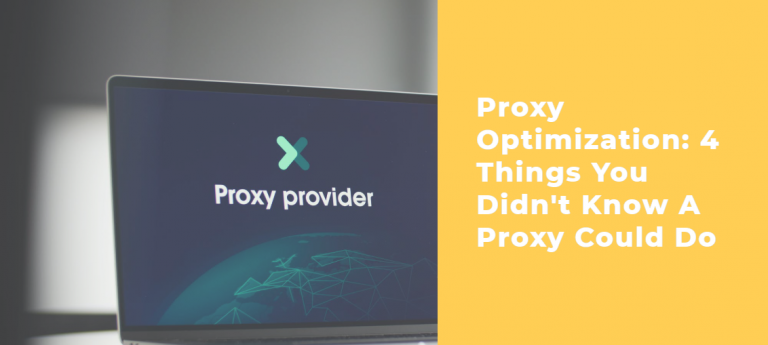
Proxy Optimization: 4 Things You Didn’t Know A Proxy Could Do

Considering proxy optimization, this post will show you 4 things you didn’t know a proxy could do.

You may be using a proxy server. It could be because you want access to specific content unavailable in your geographical region. You know that hiding your IP address means the remote server will not know where you are browsing from. You get to explore different sites while maintaining your privacy and anonymity.

Proxies also allow for a better browsing experience. By caching data, you get faster loading speeds. You also increase your security through data encryption. Web scraping proxies give you a gateway between you and the remote servers. Think about it as a gate through which all the traffic must go. It filters harmful content, thus keeping you safe online.

What we have mentioned above are some things that proxies can do. You probably know about some of them, but there is so much more.

In our article, we will share some of them with you. Ultimately, you will realize why a proxy is a good investment.

READ ALSO: The Ultimate VPN Guide – What Is A VPN?

Let’s jump into it.

4 Things You Didn’t Know A Proxy Could Do

  1. Traffic Compression and Website Caching Resulting In Faster Loading Speeds

Traffic Compression and Website Caching Resulting In Faster Loading Speeds

Fast-loading pages are one of the best indicators of a good user experience. No one has time to be on a website that takes forever to load. You want to access information as fast as possible. 

The same applies in the case where you are streaming media. A proxy server will compress data, allowing you to save bandwidth. It reduces the load coming into your site so that you enjoy optimal speeds at all times.

They may be particular websites you visit pretty often. If you are using a proxy, it will cache such websites. Think of it like remembering your information on that specific site. It will store the relevant content even for many users. 

A proxy can be helpful to institutions or offices that use particular data sources online. The type of data your proxy will cache includes images, web pages, and even files. The loading time will be shorter the next time you log into that particular site. The other advantage of caching is that you reduce the bandwidth you use.

READ ALSO: Top Proxy Service Providers in 2024: Unlocking Internet Freedom

2. Preventing Cookies and Advertisements on Your Site

Preventing Cookies and Advertisements on Your Site

Cookies have their advantages. They can help the browsing experience. It does it by remembering you every time you log back to a particular site. Unfortunately, they can also be very annoying. 

Marketing companies use them for targeting. You will find advertisements you did not sign up for continually popping up. The cookies may also expose you to vulnerabilities. Some may have malware that hackers can use to access your site.

You can avoid cookies and advertisements by installing the correct proxy server. You get anonymity and security, resulting in a better experience online.

READ ALSO: The Advantages Of Mobile Proxies

3. Circumventing Internet (IP) Blocks, Geo-Blocks, and Firewalls

Circumventing Internet (IP) Blocks, Geo-Blocks, and Firewalls

There are instances when you do not have access to a particular site. Further investigation shows that the owners have blocked your IP. It is prevalent in gaming or video streaming sites. 

Your internet service provider may also restrict you from accessing certain content. If you feel the tailoring does not serve you well, installing a proxy server is the way to go.

Firewalls are excellent protection when browsing the internet. But they may also restrict your access to specific websites. A proxy will give you security while allowing you to bypass such firewalls.

Entertainment companies like Netflix and BBC iPlayer have Geoblocking. You can only access the content in a specific geographic location. It can be frustrating because you could be paying for the service. Yet their setup only allows you to use particular programs and not others. 

You can access such material by hiding your IP address. Installing a proxy will allow you to bypass such restrictions. You even choose the location you want to seem like you are in. You could be on the African continent but appear like you are in America with the correct proxy. It spoofs the remote server, allowing you to bypass the geo-blocking. 

But, these companies know that individuals use proxies to access their sites. They may have tools in place that could make your attempts ineffective. When shopping for a proxy, have a good understanding of what you need it for. Not all will allow you to bypass restrictions. 

READ ALSO: How To Clear Caches On Windows, Mac, Android & iOS Devices

4. Monitor and Control Internet Usage

Monitor and Control Internet Usage

As a parent, you may worry about the sites your children visit. The internet has a lot of content that may not be age-appropriate. You could also find unsavory characters who like to target little children.

You may want to control some websites your staff members visit as an employer. It could be about security or even avoiding time wastage. Some of them may also visit inappropriate sites. The same applies to educational institutions. They may want a way to watch the sites students visit.

Installing a proxy server allows you to track and control internet content. You can block those that you find undesirable. It also allows you to keep track of the user’s online activities. You can also detect any data breach or illegal activity that may be occurring in the office.

READ ALSO: Website Speed Optimization Tips for Windows Hosting

Proxy Optimization: Frequently Asked Questions

What does proxy software do?

Proxy software routes your internet traffic through a remote server. This can mask your IP address, location, and browsing activity from the websites you visit. Proxies can also bypass geo-restrictions and access content unavailable in your region.

How do I optimize my proxy for better performance?

Here are some tips to optimize your proxy for speed and efficiency:

  • Choose the Right Location: Select a proxy server located geographically close to you to minimize latency (delay) in communication.
  • Connection Type: Match your proxy connection type (HTTP, HTTPS, SOCKS) to your needs. Consider factors like security requirements and compatibility with specific websites.
  • Server Load: Avoid overloaded proxy servers that can lead to slow connection speeds. Some proxy providers offer real-time server load information.
  • Browser Settings: Configure your browser settings to use the specific proxy server and port number provided by your proxy service.
  • Disable Conflicting Software: Certain software like firewalls or antivirus programs might interfere with proxy connections. Try temporarily disabling them to see if it improves performance.

How do we increase proxy speed?

Not all optimization methods directly increase speed, but they can improve overall efficiency:

  • Close Unnecessary Background Applications: Background applications can consume bandwidth and slow down your internet connection.
  • Clear Browser Cache: A cluttered cache can slow down browsing. Regularly clear your browser cache and cookies.
  • Upgrade Your Internet Plan: If your internet plan offers limited bandwidth, upgrading can improve overall internet speed, benefiting proxy use.

What is proxy software for Android devices?

There are proxy apps specifically designed for Android devices. These apps allow you to configure your device to use a proxy server, similar to setting up a proxy on a desktop computer.

How does a proxy server improve performance?

In some cases, a proxy server can improve perceived performance by:

  • Content Caching: Proxy servers sometimes cache frequently accessed content. If you revisit a website, the content might be retrieved from the cache instead of downloaded from the source again, potentially saving time.
  • Load Balancing: Proxy servers can distribute incoming traffic across multiple servers, reducing strain on any single server and potentially improving responsiveness.

Important to Note: While these methods can help optimize your proxy experience, some inherent limitations exist. Proxies can sometimes introduce additional steps in the connection process, and depending on the server location and load, speeds might be slower than a direct internet connection.

Final Thoughts

Proxy optimization on your website has many benefits. We have looked at four things you didn’t know a proxy could do. You have the option of free proxies. However, you may want to consider the paid options. 

Free proxies have some limitations. They could expose you to particular vulnerabilities while online. Since many people will also be flocking to them, they may be ineffective. It could impact your browsing experience. It helps you buy your proxy from a trustworthy provider. 

When shopping for a proxy, first understand what your needs are. It would be best to research to know what you are buying better. It will help you make better choices. You get greater functionality with whatever you buy.


 RELATED POSTS