Home Blog Page 199

Network Firewalls Comprehensive Guide For Non-Tech-Savvy People

0

This post will show you all you need to know about network firewalls. But before we proceed, let’s answer the fundamental question for the novice – what is a network firewall?

What Is A Network Firewall?

A network firewall is a security system, either hardware-based (a dedicated appliance) or software-based (installed on a device), that monitors and controls incoming and outgoing network traffic.

It acts as a barrier between your private network (e.g., your home Wi-Fi network or a corporate intranet) and the internet’s vast, potentially risky world.

Firewalls operate based on pre-defined security policies, essentially a set of rules determining which traffic is allowed and which is blocked.

Imagine a bouncer at a club – they only allow entry to those who meet specific criteria (like age or dress code). Similarly, a firewall only allows network traffic to adhere to established rules.

  • Traffic Inspection: Firewalls analyze each data packet (information travelling across the network) based on its source, destination, data type, and other factors.
  • Rule Matching: The firewall compares the data packet to its security policies. Suppose the packet aligns with the defined rules (e.g., originating from a trusted source and containing authorized data).
  • Blocking Unauthorized Traffic: Any traffic that doesn’t comply with the firewall’s rules is blocked, preventing unauthorized access and potential threats from entering your network.

Top Network Firewall Deals

No coupons found.

Benefits of Network Firewalls

  • Enhanced Security: Firewalls act as a first line of defence, filtering out malicious software, viruses, and unauthorized access attempts.
  • Improved Network Performance: By blocking unwanted traffic, firewalls can help reduce network congestion and improve overall performance for legitimate traffic.
  • Control Over Network Access: Firewalls allow you to define which devices and applications can access the network, providing greater control over your network resources.

Setting up a strong network firewall with clear rules gave me peace of mind knowing my home network was protected from suspicious activity.

Demystifying the Firewall: How It Protects Your Network

what is a network firewall

Network firewalls play a vital role in safeguarding your network from unwanted access and malicious activity. But how exactly do they achieve this critical function? Let’s delve into the inner workings of these digital guardians.

Inspection Station: Analyzing Network Traffic

Imagine a network firewall as a security checkpoint on a bridge. Like vehicles, all data travelling across the network (as data packets) must pass through the firewall. The firewall acts as the inspector, meticulously examining each packet based on various criteria:

  • Source: Where did the data packet originate from? Is it coming from a trusted source or an unknown location?
  • Destination: Where is the data packet headed? Is it intended for a specific device within your network, or is it trying to access unauthorized resources?
  • Port: Ports act like doorways on a device. Different types of traffic use other ports. The firewall checks if the data packet uses a legitimate port for its intended purpose.
  • Protocol: This defines the language used for communication between devices. The firewall verifies if the protocol is allowed to pass through.

Matching the Rules: Permit or Block?

The firewall compares each data packet to a pre-defined set of security policies, essentially a list of “allow” and “deny” rules. These rules determine whether a packet is considered legitimate or a potential threat.

  • Green Light: The firewall grants access if the data packet aligns with the established rules (e.g., originating from a trusted device within your network and requesting a permitted service). The information can flow freely through the bridge.
  • Red Light: The firewall blocks the firewall if the data packet doesn’t match the criteria or seems suspicious (e.g., originating from an unknown source or trying to access a restricted port). This prevents unauthorized access and potential threats from entering your network.

Beyond Filtering: Advanced Firewall Features

While basic inspection and filtering are core functions, some firewalls offer additional capabilities:

  • Stateful Inspection: These advanced firewalls analyze individual packets and track the ongoing “conversation” between devices. This provides a more comprehensive view of network activity and helps identify suspicious patterns.
  • Deep Packet Inspection: This advanced technique goes beyond basic headers and examines the actual content within a data packet. It can be more effective in detecting malware or unauthorized programs masquerading as legitimate traffic.

A Crucial Security Layer, Not a Solo Act

Network firewalls are an essential first line of defence, but it’s important to remember they are not foolproof. Firewalls typically don’t deal with:

  • Encryption: They may be unable to inspect the content of encrypted data packets.
  • Zero-Day Attacks: These are new and unknown threats that haven’t yet been incorporated into security rules.

Therefore, a layered security approach is recommended. This might include using anti-virus software, updating software, and employing solid passwords alongside your network firewall.

By understanding how firewalls work and using them with other security measures, you can create a more robust and secure environment for your network.

READ ALSO: What is Zero Day Exploit? Risks and Why is it called Zero Day?

Types Of Network Firewalls

firewall

Network firewalls, the digital guardians of your network, come in various forms, each with its strengths and functionalities. Understanding these different types can help you choose the right firewall solution.

Here’s a breakdown of the most common firewall types:

1. Packet-Filtering Firewalls

  • The OG Firewall is the most basic type of firewall, acting as the first line of defence.
  • How it Works: They inspect data packets based on pre-defined rules, considering factors like source IP address, destination IP address, port numbers, and protocols.
  • Strengths: Simple to configure and manage, offering an essential layer of security.
  • Weaknesses: Limited functionality. They can’t analyze the content of data packets, making them vulnerable to sophisticated attacks that exploit protocols or manipulate source addresses.

2. Stateful Firewalls

  • Taking it a Step Further, These build upon packet filtering firewalls by adding an extra layer of security.
  • How it Works: Stateful firewalls inspect data packets and track the ongoing “conversation” (connection) between devices. They analyze the state of the connection and allow or deny traffic based on this context.
  • Strengths: Provides a more comprehensive level of security compared to packet-filtering firewalls. They can identify suspicious patterns and prevent unauthorized access attempts more effectively.
  • Weaknesses: More complex to configure than packet-filtering firewalls.

3. Proxy Firewalls

  • The Intermediary: These firewalls act as a middleman between your device and the internet.
  • How it Works: All traffic going in and out of your network first passes through the proxy server, which filters and potentially modifies the data before allowing it to reach your device.
  • Strengths: Offers advanced filtering capabilities. Proxy servers can also cache frequently accessed data, potentially improving network performance.
  • Weaknesses: This can introduce a performance bottleneck, especially for large data transfers. Additionally, relying on a single access point (the proxy server) can be a security risk if the server becomes compromised.

4. Next-Generation Firewalls (NGFWs)

  • The All-in-One Powerhouse: These advanced firewalls combine traditional firewall functionalities with additional security features.
  • How it Works: NGFWs offer deep packet inspection, application control, intrusion detection and prevention systems (IDS/IPS), and other advanced features. They can inspect the content of data packets, identify malicious applications, and actively block threats before they reach your network.
  • Strengths: Provides the most comprehensive security among all firewall types. NGFWs offer a unified security solution, eliminating the need for multiple security tools.
  • Weaknesses: More complex to configure and manage compared to other firewall types. They can also be more expensive than essential firewall solutions.

Choosing the Right Firewall

The best firewall type depends on your specific needs and network environment. Here are some factors to consider:

  • Network Size and Complexity: A basic packet-filtering firewall might suffice for small home networks. More extensive or more complex networks might benefit from stateful firewalls or NGFWs.
  • Security Requirements: If you require high security for sensitive data, consider a stateful firewall or an NGFW.
  • Budget: Basic firewalls are typically more affordable than advanced NGFWs.

By understanding the different types of network firewalls and their functionalities, you can make an informed decision and select the best solution to safeguard your network from ever-evolving threats.

Firewall Form Factors: Hardware vs. Software
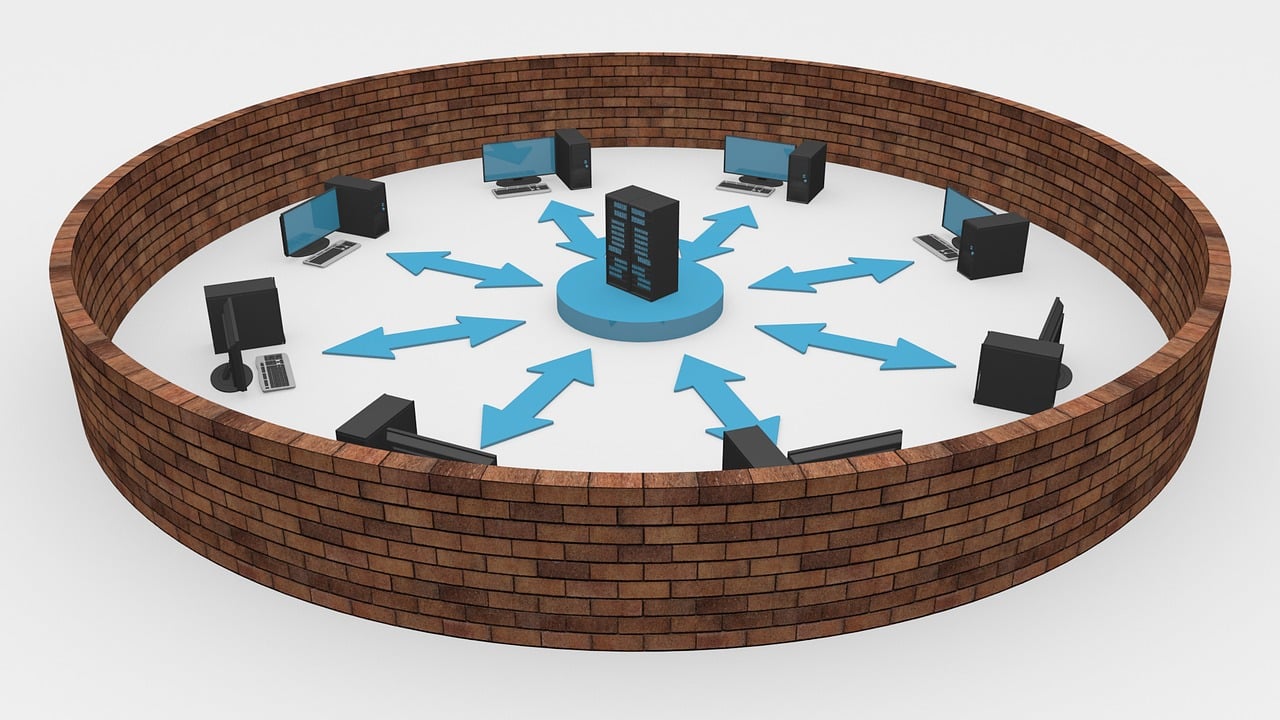
Firewall Form Factors: Hardware vs. Software

Network firewalls, the guardians of your network security, come in two primary forms: hardware and software. Each offers advantages and caters to different needs.

Hardware Firewalls: Dedicated Defenders

  • Function: These are standalone physical devices specifically designed for network security. They act as a separate checkpoint for your network’s incoming and outgoing traffic.
  • Deployment: Hardware firewalls typically connect directly to your network router or switch, filtering traffic before it reaches individual devices.
  • Strengths:
    • High Performance: Dedicated hardware offers superior processing power, enabling them to handle significant network traffic efficiently.
    • Centralized Management: Hardware firewalls can be centrally managed and configured, simplifying security administration for complex networks.
    • Advanced Security Features: Many hardware firewalls offer advanced features like deep packet inspection, intrusion detection/prevention systems (IDS/IPS), and VPN capabilities.
  • Weaknesses:
    • Cost: Hardware firewalls can be more expensive than software firewalls, especially for advanced models.
    • Scalability: Scaling a hardware firewall solution might require additional hardware investment as your network grows.

Software Firewalls: Built-in Protectors

  • Function: These are software programs installed on individual devices (computers, laptops, smartphones) or operating systems.
  • Deployment: Software firewalls monitor and filter traffic directly on their installed device.
  • Strengths:
    • Convenience: Software firewalls are often pre-installed on operating systems, offering essential protection with minimal configuration.
    • Cost-Effective: They are typically free (included with the operating system) or require a relatively low investment compared to hardware firewalls.
    • Wide Availability: Software firewalls offer a readily available solution for personal devices.
  • Weaknesses:
    • Limited Performance: Software firewalls may consume system resources and potentially impact device performance, especially on older machines.
    • Decentralized Management: Managing individual software firewalls on multiple devices can be cumbersome.
    • Security Features: Typically offer less advanced security features compared to hardware firewalls.

The Modern Landscape: Blurring the Lines

Virtualization technology has blurred the lines between hardware and software firewalls. Some hardware firewalls offer virtualized versions that can be deployed on existing hardware, providing greater flexibility. Conversely, some software firewalls offer advanced features traditionally associated with hardware solutions.

Choosing the Right Form

The best firewall form factor depends on your specific needs. Here’s a quick guide:

  • For Home Networks: A software firewall built into your operating system might offer sufficient protection for basic needs.
  • For Businesses: Hardware firewalls are generally recommended due to their centralized management, scalability, and advanced security features.
  • For Enhanced Security: Consider a combination of hardware and software firewalls for a layered security approach.

Remember, choosing the correct firewall form factor is just one aspect of a comprehensive security strategy. It’s crucial to update your firewall software and combine it with other security practices like strong passwords and anti-virus software for optimal protection.

READ ALSO: Full Review Of GlassWire Firewall – Extreme Network Monitoring Application

Firewall Fortress Maintenance: Keeping Your Network Secure

Firewall Fortress Maintenance: Keeping Your Network Secure

A well-maintained network firewall is like a constantly vigilant guard, protecting your network from unwanted access and malicious threats. But like any security system, firewalls require ongoing maintenance to function optimally.

Here are some essential tips to keep your firewall in top shape:

1. Vigilance is Key: Regular Configuration Reviews

  • Schedule regular checkups: Don’t treat your firewall like a “set it and forget it” system. Set aside time to review your firewall configuration periodically. This could be weekly or monthly, depending on your network activity and the sensitivity of your data.
  • Fine-tune for optimal performance: During these reviews, identify any rules that might be outdated or unnecessary. Remove unused rules to streamline your firewall’s operation and improve overall efficiency.
  • Hunt for potential errors: Configuration mistakes can create security vulnerabilities. Look for any inconsistencies or typos in your firewall rules that could allow unauthorized access.

2. Automation: Streamlining Security Updates

  • Embrace the power of automation: Consider utilizing automated update solutions for your firewall configuration. This can help eliminate human error during manual updates, a significant cause of security breaches.
  • Stay patched and protected: Regularly update your firewall software and firmware. These updates often include critical security patches that address newly discovered vulnerabilities. A firewall without the latest patches is like a fortress with a gaping hole in the wall.

3. Adaptability: Evolving with Your Network

  • Rules reflect your network: As your network and business needs change, so should your firewall rules. Periodically review your rules to ensure they accurately reflect current network usage.
  • New connections, new rules: When adding new devices or applications to your network, create corresponding firewall rules to control their access. Don’t leave your network vulnerable by allowing unrestricted traffic.
  • Pruning for efficiency: Review your firewall rules for any outdated entries. Unused rules can clutter your configuration, potentially slowing your firewall’s performance. Remove any rules associated with applications or services no longer in use.

4. Proactive Security: Leverage Expert Guidance

  • Seek help when needed: Network security can be complex, and even the most diligent IT professionals can encounter challenges. Don’t hesitate to consult security experts if you face configuration issues or suspect a potential security breach.
  • Vendor support is valuable: Many firewall vendors offer support services and resources. Utilize these resources to stay informed about best practices, emerging threats, and updates specific to your firewall solution.

Bonus Tip: Embrace a Layered Security Approach

A firewall is a crucial first line of defence, but it’s not a foolproof solution. Consider implementing additional security measures like anti-virus software, strong password policies, and user education to create a comprehensive security posture that safeguards your network from diverse threats.

By following these essential tips and maintaining a proactive approach to firewall maintenance, you can ensure your network firewall remains a robust and reliable guardian of your digital assets. Remember, a secure network is a foundation for a safe and productive digital environment.

No coupons found.

📌 Frequently Asked Questions (FAQs) About Network Firewalls

What is a network firewall and why do I need one for my home or small business?

A network firewall is a security system designed to monitor and control incoming and outgoing network traffic based on predefined security rules. Think of it as a digital gatekeeper that stands between your device or network and the wider internet, deciding which data packets are allowed in or out.

Even if you’re not running a big company, you still need a firewall. For home users, it helps protect personal data, IoT devices, and your online activity from hackers and malware. For small businesses, it’s essential for protecting sensitive customer information, preventing unauthorized access, and ensuring regulatory compliance. Without a firewall, your network is open and vulnerable to cyberattacks.

How does a firewall work in simple terms?

At its core, a firewall acts like a filter for data. When data tries to enter or leave your network, the firewall checks it against a list of rules. If the data matches safe patterns, it’s allowed through. If not, the firewall blocks it.

For example, if a hacker tries to send a malicious file to your computer, the firewall can detect it and block it before it reaches your device. Similarly, if a suspicious app on your computer tries to send your personal data out to a remote server, the firewall can stop that too.

There are software firewalls (running on your computer or device) and hardware firewalls (standalone devices that protect entire networks), and both work toward keeping your digital environment secure.

Can I rely solely on the firewall that comes with my router or operating system?

While most routers and operating systems do come with built-in firewalls, relying solely on them may not provide comprehensive protection. These basic firewalls offer minimal filtering and often lack advanced features like deep packet inspection, intrusion prevention, or advanced rule configurations.

For home users, combining your built-in firewall with antivirus software and smart browsing habits might be enough. However, for anyone dealing with sensitive data or operating in a small business context, a dedicated firewall (hardware or advanced software) offers stronger defense and more control over traffic filtering, monitoring, and alerting.

What is the difference between hardware and software firewalls, and which one should I choose?

A hardware firewall is a physical device that sits between your network and the internet. It protects all devices on the network and is usually used in business environments or by tech-savvy home users. These firewalls offer robust protection, higher performance, and better control.

A software firewall, on the other hand, is an application installed on your computer or device. It monitors traffic going in and out of that specific device.

If you’re a home user or solopreneur, a software firewall combined with a strong antivirus suite might suffice. For small businesses or people with many connected devices (like in smart homes), a hardware firewall provides broader protection and is worth the investment.

What kinds of threats can a firewall actually block?

Firewalls are effective at blocking a wide range of cyber threats, including:

  • Unauthorized access attempts from hackers
  • Malicious incoming traffic, such as malware or ransomware payloads
  • Outbound data leaks, where apps try to send sensitive data to the web
  • Denial of Service (DoS) attacks that attempt to crash your network
  • Botnet communication between infected devices and control servers
  • Unapproved applications attempting to access the internet

However, firewalls are not a catch-all solution. They need to be part of a larger cybersecurity strategy that includes antivirus software, regular updates, strong passwords, and secure configurations.

Do I need a firewall even if I already have antivirus software?

Yes, you do. Antivirus software and firewalls serve different purposes and complement each other. While antivirus software detects, isolates, and removes malicious software that has already made its way onto your device, a firewall helps prevent those threats from getting in at all.

Think of antivirus as your cleanup crew and your firewall as your bouncer. One cleans up the mess, the other keeps threats from entering in the first place. For maximum protection, especially in today’s cyber threat landscape, having both is highly recommended.

How can I tell if my firewall is working properly?

There are a few signs and steps you can take to ensure your firewall is working:

  • Check your settings: Make sure your firewall is enabled in your operating system or router.
  • Run online firewall tests: Websites like ShieldsUP! or Firewalla can scan your public IP address to see if any ports are exposed.
  • Monitor alerts: Many firewalls will send alerts or keep logs when they block traffic. Review these to confirm activity.
  • Try a test file: Download an EICAR test file (a harmless file used to test security systems) to see if it triggers any firewall or antivirus response.

If your firewall is silent, it doesn’t necessarily mean it’s ineffective — but regular checks are wise, especially after installing new software or changing your network configuration.

Can a firewall slow down my internet or device performance?

Yes, but usually only slightly and only if it’s poorly configured or underpowered for your network size. Software firewalls can use up processing power, particularly on older computers. Hardware firewalls can also become bottlenecks if they don’t support your internet speed or can’t handle the volume of traffic passing through.

To avoid this, make sure your firewall software is up to date and that any hardware firewall you use is rated for your internet bandwidth. Modern firewalls are designed to balance security and performance, so under normal conditions, you shouldn’t notice any significant slowdown.

Is it difficult to set up a firewall if I’m not tech-savvy?

Not at all! Many firewalls today are designed with user-friendliness in mind. Most modern routers come with pre-configured firewall settings that are automatically enabled. Software firewalls, like those in Windows or macOS, also provide straightforward settings and guided setup.

If you’re using a third-party firewall, many come with default configurations and wizards to walk you through the process. For more advanced setups (like port forwarding, VPN passthrough, or application rules), online tutorials and support forums are widely available. You can also hire a tech professional for a one-time setup if needed.

What are the best practices for maintaining my firewall over time?

Firewall security isn’t a “set it and forget it” solution. To keep your protection effective over time:

  • Regularly update your firewall software or firmware
  • Review firewall logs to identify suspicious activities
  • Change default passwords on any firewall device
  • Enable alerts and notifications for critical blocks
  • Adjust rules as your network or needs change (e.g., adding new devices or apps)
  • Perform occasional security scans to verify open ports or vulnerabilities

Staying proactive ensures your firewall continues to defend your network even as cyber threats evolve.

Rounding Up: Do I Need A Firewall For My Home Network?

Yes, having a network firewall for your home computer would be best. A network firewall should be an integral part of every computer security system. It provides the endpoint security framework that would withstand the security challenges of this digital age. 

Remember, the maintenance of a network firewall is essential. Don’t overlook it as many do. To a reasonable extent, the efficiency of a firewall depends on post-setup management.

Note: This was initially published in August 2020 but has been updated for freshness and accuracy.


SUGGESTED READINGS

Cyber Security Risks And Solutions In 2025

0
Cyber Security Risks And Solutions In 2021

This post reveals the cyber security risks and solutions.

Cyber security is essential for both business owners and individual users. For small companies, the average cost associated with a data breach is over $100,000. Larger businesses can afford to invest in solutions like identity and access management, but smaller companies don’t always understand the importance of online security. 

Besides commercial losses and loss of customer confidence, non-compliance with legal requirements can result in thousands of dollars per month in fines and forfeiture of a commercial account. 

Such expenses are enormous for a small online marketplace or a website with a list of casino games. Although they won’t make them spend the entire budget, they still may cause problems for their expansion.

Want to avoid any risks? Then follow these tips to protect your company and your security on the Internet. 

READ ALSO: How To Secure Your Computer Against Cyber Threats Like 007

The Dangers of Carelessness on the Internet

If a user’s data is in the public domain or falls into the hands of fraudsters, he risks losing money and property. With a scan and photo of the passport, a stranger can even sell a victim’s property or sign up on unreliable websites. 

Set Strong Passwords

Among our list of cyber security risks is using a weak password. Of course, it sounds unoriginal, but it’s essential. NordPass experts found that 10% of users use the most prominent input combinations, such as “123456” or “password.”

The machine can figure them out in just a few seconds. So, we decided to remind you that passwords should be complex. Use an unusual combination of words and replace letters with numbers and symbols.

Set a New Password Regularly 

Set a New Password Regularly 

When signing up for a new resource, create a new password. Using different combinations for signing in everywhere reduces the risk of simultaneously breaking into all social networks.

By the way, you don’t have to change it every six months after that. Microsoft eliminated the requirement to periodically change passwords for its employees in 2019, finding it ineffective.

According to the company’s logic, changing your password several times makes no sense while complying with all modern security rules. So you can follow the best ideas and stop torturing yourself with inventing a new login combination.

READ ALSO: Best Antivirus For 2022

Clean up Your Social Media Accounts Annually 

Anything that gets on the Internet stays on the Internet forever. We all know this thesis is one of the cyber security risks. But much of our data often remains only because we don’t even try to delete it. As time passes, photos in the feed go down, and others replace dramatic posts.

Carve out a few evenings for yourself and flip through the feed. You won’t like much of what was posted a few years ago. Remove all the information noise on your page, clean up your photos, and edit your personal information.

Don’t Share Personal Information on Your Social Media Pages

Dont Share Personal Information on Your Social Media Pages

I am speaking of personal information. Try to share a minimum of information related to your life. Phone numbers, residence or office addresses, and emails can pose a severe threat if they fall into the hands of fraudsters.

Those who like to travel should pay special attention to this point and share it on their page. If you boast with a picture of the boarding pass, through the information on it, the attackers can get access to a personal account on the airline’s website, where the passport data and email are saved.

Avoid Using Public Wi-Fi Networks

Another mention on our list of cyber security risks is using public Wi-Fi. When you connect to a public network, your device is very vulnerable. There’s an increased likelihood of hacking your inbox, social media, and phone.

Turn off this feature in your settings to avoid automatically connecting to public networks. Open Wi-Fi is reliable when it requires authorization through your phone number and SMS code. To access the Internet safely from your laptop, distribute the network from your smartphone if mobile traffic allows it.

When the Internet is urgently needed but can’t connect to a trusted source, follow a few rules when using an open network. Don’t use public Wi-Fi to access social media, mail, and other essential services that contain your personal information. Don’t make online purchases or enter passwords.

READ ALSO: What Are Phishing Scams And How You Can Avoid Them?

Distinguish Phishing Sites From Real Ones

Distinguish Phishing Sites From Real Ones

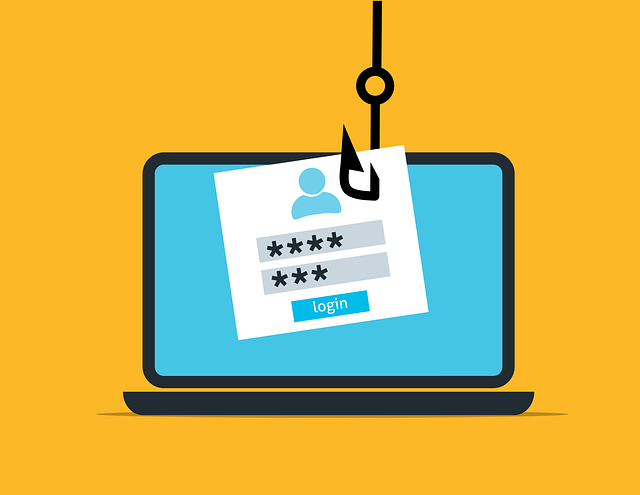
Scammers often force users to give them all the information they need so that they can withdraw money from their accounts. One such method is phishing. The user ends up on a phishing site by following a link from an advertisement, text message, messenger, social network, or email.

Such a site looks exactly like the bank’s official website. It contains a form for entering bank details to log into the online bank or the usual payment form, where the user must enter details for the transaction: card number, expiration date, and verification code.

When the user does this, the money from his account goes to fraudsters. It’s hazardous to enter such a website from your office computer because it can negatively affect you and your company.

READ ALSO: Best VPN For 2022

Read the Customer Agreement

Understand what you agree to before you hit that coveted “I Agree” button. You may inadvertently allow your data to be shared with the client base.

By buying such databases, companies get access to phone numbers of potent target audience representatives. At best, you’ll start getting frequent calls with annoying ads.

Don’t Give Remote Access

A fraudulent scheme is when attackers ask a bank customer to install a remote access application to check the security settings in the bank’s mobile app. The person installs an app that looks like a bank app, logs into their account, and leaves their smartphone unlocked for 15 minutes.

During this time, fictitious bank security officers promise to cancel the unauthorized transfer and return the money to the account. They gain remote access to the mobile bank and withdraw money from the account.

Trust Https

Don’t trust sites that use the HTTP protocol and enter card details on them. Many companies, developers of Internet services and browsers, have long been promoting the widespread use of https and the rejection of HTTP.

The https protocol encrypts the connection between the client’s browser and the bank, meaning the provider cannot get the user’s data.

READ ALSO: Student Cybersecurity: 5 Simple Tips for Safety

Cyber Security Risks And Solutions In 2024: FAQs

What are the top cyber security threats in 2024?

Several critical threats are expected to dominate the cyber security landscape in 2024:

  • AI-powered attacks: Cybercriminals increasingly leverage artificial intelligence (AI) to automate attacks, making them more sophisticated and challenging to detect. This includes using AI to create personalized phishing scams, automate vulnerability scanning, and launch more targeted ransomware attacks.
  • Ransomware evolution: Ransomware remains a significant threat, with attackers constantly evolving tactics. We can expect to see “double extortion” attacks become more common, where attackers encrypt data and steal it before encryption, giving them additional leverage for ransom demands.
  • Supply chain attacks target third-party vendors and partners within a supply chain to gain access to an organization’s network. Securing the entire supply chain becomes crucial as businesses increasingly rely on interconnected systems.
  • Cloud misconfiguration: Businesses migrating to the cloud face risks due to misconfigured cloud services. Accidental exposure of sensitive data or inadequate access controls can leave them vulnerable to cyberattacks.
  • Phishing attacks: Despite ongoing efforts, phishing remains a persistent threat. As attackers refine their techniques to bypass traditional security measures, robust authentication systems and user education are crucial to combat these attempts.

What solutions can help mitigate these cyber security risks?

Several critical solutions can help organizations address these growing threats:

  • Embrace the power of AI: While AI poses threats, it can also be a powerful tool for defense. AI-powered solutions for threat detection, intelligence, and automated incident response can significantly improve security posture.
  • Implement multi-factor authentication (MFA): Adding an extra layer of security beyond passwords, such as fingerprints or one-time codes, significantly reduces the risk of unauthorized access, even if passwords are compromised.
  • Prioritize supply chain security: Organizations must work closely with vendors and partners to assess their security practices and ensure they have robust security measures.
  • Secure your cloud environment: Implementing best practices for cloud security, such as proper configuration management, access controls, and data encryption, is essential to protect sensitive data stored in the cloud.
  • Invest in user education and awareness: Regular training programs that educate employees about cyber threats, phishing scams, and best practices for safe online behavior remain critical in the fight against cybercrime.

READ ALSO: The Ultimate Social Media Security Guide for Individuals and Businesses

Conclusion

By understanding the evolving cyber security threats and implementing suitable solutions, organizations can proactively defend themselves and minimize the risk of falling victim to cyberattacks in 2024 and beyond.


INTERESTING POSTS

Advantages And Disadvantages Of Online Poker

0
Security And Reliability Of Online Poker Providers

Here, I will talk about the advantages and disadvantages of online poker.

Many Non Gamstop casino with generous welcome offers players regularly play online casino poker and are regularly enthralled by one of the most popular games. However, poker is also available as a game in land-based casinos.

But what are the differences, and how do the advantages and disadvantages compare? We also explored this question in our review and would now like to present all the important facts here in a clear and concise manner.

Online Poker Advantages

  • Significantly larger selection of varied poker variants
  • Participation is financially affordable as there are no additional costs
  • When playing online poker, you are generally not tied to any fixed times.
  • You can also access numerous tables and useful statistics.
  • Very attractive poker bonus promotions are often available
  • Non GamStop Casino Poker is also offered in a mobile version for smartphones and tablets

Online Poker Disadvantages

Online Poker Disadvantages

  • The other participants at the table cannot be read
  • Little interaction between participating players
  • Your own financial flexibility can quickly be lost sight of

Security And Reliability Of Online Poker Providers

Before making a real-money deposit at a poker site, you should definitely check its security and reliability. In this context, it’s essential to find out which non GamStop casino license the provider holds. In this regard, we’ve had very positive experiences with the Maltese license in the past.

The Malta casino license is recognized throughout Europe and always stands for a very high level of security and reliability. Customers from the UK can also register their own account on these sites completely legally and with absolutely no worries. Nothing stands in the way of a safe and unique gaming experience with poker providers licensed in Malta.

Payment Methods For Deposits And Withdrawals

Payment Methods For Deposits And Withdrawals

If you want to play non GamStop casino poker with real money, you naturally rely on secure payment methods for all your money transfers. Therefore, be sure to take the time to carefully review the provider’s cashier.

It’s always particularly important that you have access to many of the best payment methods. This way, the provider guarantees secure deposits and instant casino withdrawals.

We also consider it particularly important that you are offered free transactions. Also, familiarize yourself with the deposit and withdrawal limits. If several secure payment methods are available, such as credit cards, instant bank transfers, or the e-wallet providers Skrill and Neteller, this is always a sign of a reputable online casino poker provider.

FAQ – Frequently Asked Questions about Online Casino Poker

Should I play real money poker online?

Real money online poker always offers a huge selection of different poker variants. You can also benefit from incredibly high payout rates and particularly strong bonus offers online. Therefore, real money poker is definitely recommended in non GamStop casinos.

What are the best online poker casinos?

There are numerous poker casinos online that boast a wide selection of games, strong payout rates, and fantastic bonus promotions. If you want to use only the best online poker casinos, you should definitely take a look at our article. Here we present the online poker casinos that particularly impressed us.

Which poker variants do you play in the online casino?

Many varied and fast-paced poker variants await you at the online casino. In addition to Texas Hold’em, you’ll also find other variants such as Omaha Poker, Joker Poker, and Caribbean Stud Poker. Thus, there’s always plenty of variety in real money poker casinos.

Is there an extra online poker bonus?

Yes, there are numerous online casinos that offer special poker bonuses for their customers. However, you should always check the wagering requirements of the offers. This way, you can quickly determine which casino offers the best online poker bonus for you.

Conclusion

Online poker at non GamStop casinos offers a wide range of benefits, from diverse poker variants and flexible playing times to attractive bonuses and convenient mobile access. At the same time, players should also be mindful of the disadvantages, such as reduced interaction and the potential risk of losing track of finances.

With proper preparation and a focus on security, players can enjoy online poker responsibly and confidently. Always verify licensing—such as the trusted Malta Gaming Authority license—and ensure your chosen platform supports reliable and secure payment methods.

👉 Whether you are looking for variety, high payout rates, or special bonuses, online poker remains a thrilling choice for both beginners and seasoned players. Just remember: play responsibly and always keep control of your bankroll.


INTERESTING POSTS

What Internet Poker Variants And Games Are There?

0
What Internet Poker Variants And Games Are There?

Here, I will answer the question: What Internet Poker variants and games are there?

If you want to play bingo without GamStop restriction, you can always choose from many different variations of this popular card game. However, before you make a deposit and then risk real money, you should definitely familiarize yourself with the common variations.

In the following section, you will find a wealth of valuable information about the most popular versions of poker.

Texas Hold’em

Texas Hold'em

Texas Hold’em is by far the most popular poker variant. From small local tournaments to large non GamStop casinos, Texas Hold’em has naturally also made its way into numerous non GamStop casinos.

No online casino provider that wants to impress with a large portfolio of poker versions can do without a Texas Hold’em version these days. For more details on licensing and safety of Donbet and its sisters, players should always check the casino’s credentials and certifications.

In Texas Hold’em, players receive two face-down cards before the actual betting round begins. This is followed by the flop, in which three cards are turned face up on the table. The next two cards are then turned over one after the other. Players can form any combination of five cards.

The winner of each round is the player with the highest-value hand at the end. During the round, participants also have the option to raise their bets or drop out of the game entirely. Diverse strategies and different tactics have undoubtedly made Texas Hold’em one of the most popular poker variants in the world.

Omaha Poker

Omaha Poker is another variation of this popular card game that has gained considerable market share in recent years. It is undoubtedly one of the most popular poker variants and is now a staple of every online casino with poker tables.

Many poker fans even claim that Omaha Poker could surpass classic Texas Hold’em in the coming years.

Omaha Poker is largely based on the classic poker rules that are also used in regular Texas Holdem.

However, there are also numerous sub-variants, each with its own unique characteristics and unique facets. Therefore, we can clearly state at this point that Omaha Poker impresses not only with its high winning potential, but also with its versatility in every respect.

READ ALSO: How to Play Omaha Poker and Master the Four-Card Strategy

Draw Poker

Draw Poker refers to several common poker variants. In this interesting poker variant, participants at the table also have the option of drawing cards or, of course, discarding them in order to obtain the best possible hand at the end of the round. Jobrocker is therefore also based on the classic rules of Texas Hold’em.

However, Draw Poker also offers several other variations, which we certainly don’t want to withhold from you. Examples of Draw Poker variations include Five-Card Draw, Triple Draw Lowball, and Badugi.

Stud Poker

Stud Poker is another particularly popular poker variant that has been played since the early 1980s. It also uses a standard deck of 52 cards. Stud Poker offers the opportunity for a total of 10 different players to participate.

If you’ve already familiarized yourself with the basic rules of poker, Stud Poker will certainly pose no problems. Besides classic Stud Poker, however, there are several other variations. These include Lowball and Stud Poker with five cards, High-Low.

Mixed Games

Mixed Games

Mixed games in non GamStop casinos can provide a truly special and fast-paced gaming experience. Different poker variations are played alternately. So, you can tell at first glance that mixed games in non GamStop casinos are certainly not boring.

However, we would also like to point out at this point that you should definitely know all the details and special facets of the individual poker variants if you want to successfully participate in mixed games and avoid any unpleasant surprises in practice.

Cash Games

Cash games give you the opportunity to enter a tournament at any time in non GamStop casino poker. Unlike many traditional tournaments, cash games allow you to enter at any time and without prior registration. You don’t need to register in advance or purchase the necessary chips.

This makes cash games easily among the fastest and most dynamic poker options available at non GamStop casinos. You can also exit the table immediately. This allows you to jump in and get started right away, without having to go through a lengthy registration process.

Conclusion

As you can see, poker is far from being a one-dimensional game. Whether you prefer the strategic depth of Texas Hold’em, the fast-paced action of Omaha, the unpredictability of Draw Poker, or the traditional flair of Stud Poker, each variant offers its own unique thrills. Add in the flexibility of cash games and the excitement of mixed games, and it becomes clear why poker continues to dominate both online and offline gaming circles.

For players looking to enjoy poker at non GamStop casinos, the key is to understand the rules and strategies of your chosen variant before committing real money. Once you are familiar with the gameplay, you can fully enjoy the mix of skill, chance, and excitement that makes poker one of the most popular card games worldwide.

👉 No matter which variant you choose, always remember to play responsibly and ensure the casino you select is licensed, secure, and trustworthy.


INTERESTING POSTS

Choosing the Right PKI for Your Applications

0
Choosing the Right PKI for Your Applications

Here, I will educate you on making the right choice when choosing the right PKI for your applications.

Whether you think of it as a security technology, a security model, or you don’t think of it at all, Public Key Infrastructure (PKI) underpins our daily lives. Just about anything that communicates over the internet uses PKI: your smart TV, the fuel pumps at the gas station around the corner, the entirety of the World Wide Web. You get the idea.

The term digital trust refers to the positive outcomes of PKI. If you think about it through that lens, it becomes easy to understand PKI in non-technical terms. 

Why do you trust something? Often, it is because something came from another thing that you deem an authority. If two people consider the same source to be an authority, they both trust the thing it produces. We trust certain information, currency, and identity documents because they come from things we deem authorities.

Trust is not absolute. Your trust in something can be subjective or situational. You likely trust your family and loved ones more than you trust strangers. In turn, you share things with people close to you that you wouldn’t share with strangers.

Trust can also vary based on your perception of risk. I trust my old Land Rover to handle tough offroad trails, but I’d think twice before taking it on a long road trip (even though it’s never let me down).

PKI and Trust

PKI and Trust

PKI uses Certificate Authorities to issue certificates that things (web servers, smart TVs, people) use to confirm their identities and communicate securely. If you trust the Certificate Authority, you trust the certificates it issues.

PKI provides all the flexibility we need for digital trust in the real world. Broadly speaking, there are three kinds of PKI security models:

  • External PKI involves public Certificate Authorities that are trusted by default in web browsers and major operating systems. They are governed by a combination of the CAB Forum and browser and OS vendors. The most common example is the Web PKI, for which CAs like DigiCert, Sectigo and Let’s Encrypt issue TLS certificates for web servers.
  • Internal PKI uses private CAs operated within an organization or other closed environment. The organization operating the private CA has complete control over the trust derived from it. Corporate laptops often have certificates issued by the company’s private CA. 
  • Federated PKI typically uses CAs that are operated like those in the Web PKI in that they use an external governance model and serve as a common root of trust among disparate organizations. These PKIs are usually industry-specific and tailored to meet requirements for trust and interoperability across an ecosystem. DirectTrust, which the healthcare sector uses for the trusted exchange of information among providers, is an example of a federated PKI.

Trusting Trust

In the Web PKI, we trust a certificate authority because it is operated according to a set of rules. And we can trust that it is operated according to a set of rules because an independent party audits the CA operations. And we trust the auditor because it is governed by a professional licensing body. And the repercussions for violating this trust are severe.

IoT device manufacturers use private CAs to issue certificates for their devices. For instance, a smart air conditioning unit that has a certificate to protect it from tampering.  If such a device doesn’t have a certificate issued by the vendor’s trusted private CA, then it may not be a proper air conditioning unit in use by an authorized customer.

This helps them authenticate connections, maintain security of the software on the device, and mitigate the effects of counterfeits. Their private CA allows them to create a closed ecosystem for trust.

Running a secure private CA demands robust, multi-layered security, something that can be expensive and may exceed the in-house expertise of many organizations. Establishing trust within a closed ecosystem also requires every component to be explicitly configured to trust the private CA, which involves careful planning and continuous governance to prevent outages and security gaps.

Of course, all that work may be inadequate when you ask another organization to trust your CA. Your private CA is neither independently governed nor externally audited. Federated PKIs exist for this reason. They are the best option for providing the basis for broad trust with the specialization of an internal PKI.

Federated PKIs are often operated on behalf of industry consortiums by commercial PKI companies that have the expertise, have the layered security in place, and already undergo external audits.

However, operating systems and browsers do not, by default, trust CAs associated with federated PKIs. Organizations must configure their machines to trust them.

Convenience Isn’t Free

Convenience Isn’t Free

Because the External PKI uses certificates trusted by major operating systems and web browsers, using them avoids the additional work of establishing trust of an Internal or Federated PKI. If you have a device, machine, cloud service, etc. and you want other things to securely communicate with it, a public certificate is often the most convenient solution.

Using a public web server certificate for use cases like API authentication or communication among cloud containers can introduce unforeseen disruptions. Public web server certificates are subject to evolving policies of the CAB Forum and other browser trust programs that may not align with non-browser applications. Recent examples include:

  • The phased reduction of TLS certificate lifespans to 47 days, a duration incompatible with the realities of managing proprietary devices like cash machines and some network appliances.
  • Chrome’s recent announcement that it will distrust CAs issuing TLS certificates for client authentication. Affected certificates will be difficult for organizations to identify without a detailed understanding of each certificate.
  • Mandatory mass revocation of certificates in response to documentation errors, creating extra work for customers and increasing risk of outages despite there being no security vulnerability.
  • The network names in your public certificate are publicly available through the Certificate Transparency Lists. This could provide clues for outsiders seeking to penetrate the network.

The Right PKI for the Job

Choosing the right PKI for your use case ensures trust and reliability of the process you are securing.  External PKI is essential for use cases that require broad, internet-wide trust of web servers, email, and software. These certificates must conform to strict standards and are trusted by default across user environments.

However, extending public certificates to other use cases—like internal APIs, device identity, or cloud workloads—can lead to increased administrator overhead or service disruptions as browser policies evolve.

Internal PKI offers the flexibility to meet enterprise security requirements without relying on external trust. Organizations can issue certificates for devices, users, workloads, and internal services under their own policies and controls.

This enables use cases like secure Wi-Fi, VPN authentication, internal code signing, and identity for IoT devices. While Internal PKI can replicate many of the functions of External PKI, it does so within a closed trust ecosystem. The challenge lies in the complexity of doing it right—requiring specialized expertise and secure infrastructure.

If this sounds daunting, PKI as a Service (PKIaaS) solutions provide the operational discipline, scalability, and security controls of a mature PKI without the overhead of managing it in-house.

Federated PKIs fill the gap between public and private trust models by providing cross-organizational trust within a specific domain or industry. These frameworks are purpose-built to enable secure interoperability across organizations that share common requirements but are outside the scope of browser trust. Examples include the X9 Financial PKI, the Matter PKI for smart home interoperability, and SAE’s EVPKI for electric vehicle charging. These PKIs are governed by shared policies and often support use cases like mutual TLS, device identity, and cross-entity authentication. 

As organizations expand their digital trust strategies, understanding the strengths and scope of each PKI model ensures the right foundation for both immediate needs and future stability. Choosing the right PKI model isn’t just a technical decision, it’s a strategic one. When done right, PKI becomes more than infrastructure: it becomes a business enabler for resilience, security, and growth.


INTERESTING POSTS

What Is An SSL Certificate?[MUST READ]

0
What Is An SSL Certificate

If you have been coming across SSL Certificate online and you don’t know what it means, then this article is for you. Here, you will learn everything you must know about SSL Certificate.

The need to maintain secured cyberspace is increasing by the day because cyber-attacks must be prevented at all costs.

There are a lot of programs designed to protect our online activities and some of them include antivirus programs, VPNs, proxy services, SSL Certificates, ad blockers, etc.

Today, we will be introducing you to SSL Certificates and other important information that you must know about it.

READ ALSO: Website Security Check: How Secure Is Your Website?

What Is An SSL Certificate?

SSL is an acronym for Secure Sockets Layer. It is a type of protocol created in the early ’90s with the aim of providing a secure communication path within the connection between two computers.

This makes the data transmitted from one channel to the other remain intact and not allowed to be accessed by third parties who do not have authorization.

Conversely, SSL Certificate generates a type of key that only those who are authorized will be able to decode and convert into information that can be read correctly.

HTTPS is important for websites because it keeps the information private on the internet so bad guys can’t get it.

Where Can I Find SSL?

You’ve certainly seen Cheap SSL on the web and haven’t even noticed!

When you enter a website and it is SSL authenticated, two things appear in the address bar: a padlock icon (usually at the top of the bar) and the HTTPS letters (before the address, on the right side of the padlock).

You’ve seen them around, haven’t you?

HTTPS is an improved version of the unreliable HTTP. The first three letters of the acronym stand for Hypertext Transfer Protocol and the S in HTTPS stands for Secure, that is, it tells you that the site has SSL authentication and is secure to communicate data and information.

Although any website can use SSL to prove it’s authentic and secure. Meanwhile, it is actually intended to protect data within a traffic. That’s why they are very popular on bank and store websites since they need to protect sensitive data than other websites.

READ ALSO: Choosing the Right PKI for Your Applications

Importance Of Using An SSL Certificate

For businesses and individuals, security is important. It allows access to sensitive information without risking the safety of such info. Here are reasons why SSL certificate is important:

It Uses End to End Encryption

As explained, the SSL certificate uses end-to-end encryption so that shared information is secure and the processes are done securely.

We talked earlier about using a security key pair. These keys are called private and session. The private key is the one that is installed on the server, thus creating the certificate of authenticity.

The session key, on the other hand, is installed on the server and allows only the websites and their users to have access to sensitive information, such as bank details.

Fraud Reduction

Cybercriminals have already attacked thousands of businesses, individuals, and even governments! Hackers steal data, leak information, interrupt activities, and hinder the functioning of online services, taking away the trust of many people.

That’s why websites have SSL certificates to convey security and reliability to their users. Also, it prevents these cybercriminals from carrying out their act.

It Provides More Payment Options for E-Commerce

Most credit card operators require that online stores must have an SSL certificate so that they can receive payment from their customers.

Therefore, those who operate eCommerce websites need to invest in security, so that they can offer more payment options to their customers. Paying with credit cards is much more convenient for customers than a bank slip.

SSL certificates provide a level of trust and credibility to your customers, especially if you have an e-commerce structure – the kind that allows people to purchase something immediately without clicking through several other pages.

With SSL certificates, it is entirely possible to protect your customers’ data and allow it to be passed through only when they are buying products. This adds confidence on both sides of the deal, with the customer feeling safe with their purchases and you not having any breach of security or theft.

READ ALSO: 5 Ways To Make Your Company Website More Secure

How Does An SSL Certificate Work?

The functioning of SSL begins when a person enters a website that has it. It will automatically cause the browser to send the website a request for its SSL Certificate. When the website responds, the browser evaluates to ensure that the certificate is trusted.

If everything is confirmed, the SSL protocol will start its encrypted activities; thus, two encrypted keys are created: the private key, which is in the browser and is used to interpret the information, and the session key one which encodes the information.

This makes the criminals unable to enter the connection and steal the data because authenticated by SSL protocol.

Where Can I Get An SSL Certificate?

If you have a shopping and sales website or some other virtual business and you want the SSL certificate to provide more security and show your customers that your company is trustworthy, you can get it through your hosting service.

Generally, most hosting companies have the option to install SSL protocol on sites that need it. Alternatively, you can get a free SSL certificate from CAs like LetsEncrypt.

Most of the time, you don’t need to worry so much about these processes, as they are usually automatic, as the hosting server itself performs the checks, issues the certificate, and also installs it.

However, you may choose to purchase SSL elsewhere but you will need to install it yourself which can be quite tricky if you are inexperienced.

What Happens If You Don’t Have An SSL Certificate?

If you don’t have an SSL Certificate, the following will happen;

  • You will experience loss of traffic – Nobody will be comfortable surfing a website that has been labeled insecure by web browsers. In fact, HTTPS is one of Google’s ranking factors.
  • It puts the website visitors at risk – Without SSL Certificate, a website is prone to data sniffing, thereby putting both the customer and business owner at risk.
  • Negative effect on website ranking on google – A secured website has always been a Google ranking factor. Therefore, a website without an SSL certificate tends to rank lower.

Conclusion

Now that you understand what an SSL certificate is and how important it is, don’t you think you need one?

Aside from the fact that it adds more value to your company, it also provides more security and makes your customers and users trust you more.

So, share this article with your friends who might also be interested in knowing everything about SSL certificates.

Also, don’t forget to share your thoughts in the comment section below.


INTERESTING POSTS

How ERP Project Recovery Consultants Rescue Failing Projects and Boost ROI

0
Reviving Failing ERP Projects: How an Expert Project Recovery Consultant Can Save Your Business

In today’s digital-driven business environment, Enterprise Resource Planning (ERP) systems are the backbone of operational efficiency. But what happens when your ERP implementation goes off track?

Enter project recovery services—the lifeline your organization needs to salvage failing projects and ensure business continuity. For companies grappling with delayed timelines, escalating costs, or misaligned project scopes, an ERP project recovery consultant becomes an indispensable partner, bringing expertise, clarity, and actionable solutions to bring your ERP initiative back on track.

ERP failures aren’t just costly—they can threaten your entire organizational strategy. According to industry reports, nearly 70% of ERP projects experience significant delays, budget overruns, or fail to deliver expected benefits.

This is where project recovery consultants come into play, helping organizations identify the root causes of failure and implementing structured solutions to mitigate risk, recover investments, and achieve business objectives.

In this post, we’ll explore why ERP projects fail, the critical role of a project recovery consultant, proven methodologies for project recovery, and how organizations can avoid similar pitfalls in the future.

Understanding Why ERP Projects Fail

Understanding Why ERP Projects Fail

ERP implementations are complex endeavors involving multiple stakeholders, business units, and technology platforms. While the goal is seamless integration and streamlined processes, several factors can cause ERP projects to derail:

  1. Unrealistic Project Scope
    Many organizations begin ERP projects without clearly defining objectives, leading to scope creep. An ever-expanding scope overwhelms project teams and delays deliverables.
  2. Poor Change Management
    ERP implementations impact people as much as technology. Resistance from employees, lack of training, or inadequate communication can cripple adoption.
  3. Ineffective Project Governance
    Without a clear governance structure, decision-making becomes slow, responsibilities are unclear, and accountability is diminished.
  4. Technical Challenges
    Integration with legacy systems, data migration complexities, and software customization can introduce unforeseen issues that extend timelines and inflate costs.
  5. Lack of Experienced Guidance
    Many companies underestimate the expertise required to navigate ERP complexities. This is where an ERP project recovery consultant can be transformative, providing strategic guidance to realign projects with business goals.

The Role of a Project Recovery Consultant

A project recovery consultant acts as both a diagnostician and a strategist for failing ERP projects. Their primary responsibilities include:

  • Assessing the Current State: Conducting a comprehensive evaluation of the project’s health, identifying bottlenecks, risks, and misalignments.
  • Developing a Recovery Plan: Crafting a structured roadmap to bring the project back on track, including timeline adjustments, resource allocation, and process reengineering.
  • Risk Mitigation: Identifying potential risks and implementing measures to minimize their impact on project timelines and budgets.
  • Stakeholder Management: Aligning key stakeholders, ensuring transparent communication, and managing expectations throughout the recovery process.
  • Knowledge Transfer: Equipping internal teams with the skills and processes to maintain ERP success post-recovery.

The impact of hiring a project recovery consultant cannot be overstated. Organizations gain clarity, reduce project risk, and often save significant amounts of money that would otherwise be lost due to failed implementations.

When to Consider Project Recovery Services

When to Consider Project Recovery Services

Identifying the right time to engage project recovery services is critical. Signs that your ERP project may need intervention include:

  1. Repeated Delays in Milestones: If your project consistently misses deadlines, this indicates deeper systemic issues.
  2. Escalating Costs Without Clear ROI: Budget overruns without visible progress suggest ineffective resource management.
  3. Declining Stakeholder Confidence: When executives or end-users lose confidence in the project, recovery efforts become urgent.
  4. High Team Turnover or Burnout: A stressed project team often signals leadership or scope challenges.

Early intervention can dramatically improve recovery outcomes. Engaging an ERP project recovery consultant at the first signs of trouble is often the difference between successful recovery and total project abandonment.

Proven Strategies for ERP Project Recovery

Experienced project recovery consultants rely on a combination of technical expertise, project management frameworks, and change management principles. Some of the most effective strategies include:

1. Comprehensive Project Health Assessment

The first step is always understanding the project’s current state. This involves:

  • Reviewing project documentation, plans, and timelines.
  • Conducting interviews with stakeholders and team members.
  • Evaluating risks, technical debt, and resource allocation.

This assessment provides a clear picture of what went wrong and sets the stage for actionable solutions.

2. Revising Project Governance

Strong governance is key to preventing further issues. A recovery consultant may:

  • Redefine roles and responsibilities.
  • Establish clear reporting structures.
  • Implement decision-making protocols to accelerate approvals.

3. Scope Realignment

Unrealistic or expanding project scopes are common causes of ERP failure. Recovery services focus on:

  • Prioritizing core deliverables.
  • Postponing non-essential features.
  • Aligning project objectives with business goals.

4. Resource Optimization

ERP recovery often requires reallocating resources or bringing in specialized expertise:

  • Deploying experienced developers, analysts, or integration specialists.
  • Redefining workload distribution to prevent burnout.
  • Ensuring adequate training and support for internal teams.

5. Risk Management and Contingency Planning

An effective recovery plan identifies potential risks and mitigates them proactively:

  • Technical risks: data migration, integrations, software bugs.
  • Operational risks: process misalignment, staffing issues.
  • Strategic risks: changing business requirements or market conditions.

6. Change Management and User Adoption

ERP recovery isn’t just technical—it’s people-centric. Recovery consultants often:

  • Engage end-users early in the revised plan.
  • Provide targeted training and workshops.
  • Foster a culture of collaboration and accountability.

7. Continuous Monitoring and Feedback Loops

Even after implementing recovery strategies, continuous monitoring is essential:

  • Regularly tracking KPIs and milestones.
  • Adjusting strategies based on feedback.
  • Ensuring sustainable project performance.

Benefits of Engaging an ERP Project Recovery Consultant

Benefits of Engaging an ERP Project Recovery Consultant

Organizations that invest in professional project recovery services gain several strategic advantages:

  • Cost Savings: Avoid wasting additional resources on failing implementations.
  • Time Efficiency: Expedite project recovery with structured planning and expert guidance.
  • Reduced Risk: Proactively identify and mitigate risks that could derail the project again.
  • Improved Stakeholder Confidence: Transparent recovery plans rebuild trust with executives and end-users.
  • Knowledge Transfer: Internal teams gain long-term expertise to maintain ERP success.

Choosing the Right Project Recovery Consultant

Selecting the right consultant is critical for success. Here are some key criteria to consider:

  1. Proven Track Record: Look for consultants with a history of successfully recovering complex ERP projects.
  2. Industry Experience: Familiarity with your specific ERP system and industry vertical enhances effectiveness.
  3. Analytical Approach: Ability to diagnose issues using data-driven methodologies.
  4. Change Management Expertise: Strong focus on user adoption, training, and stakeholder engagement.
  5. Transparent Communication: Consultants should provide clear progress reports and actionable recommendations.

Case Study: Turning Around a Failing ERP Project

Consider a mid-sized manufacturing company that embarked on a new ERP implementation to streamline operations. Six months into the project, they faced escalating costs, missed deadlines, and low user adoption.

By engaging project recovery services, the company:

  • Conducted a comprehensive health assessment.
  • Realigned project scope to focus on critical modules first.
  • Reallocated skilled resources and provided targeted training.
  • Established a robust governance framework for faster decision-making.

Within three months, the ERP project was back on track, achieving 90% of its intended outcomes and restoring executive confidence. This example demonstrates how strategic intervention from an ERP project recovery consultant can save both time and money while delivering long-term operational benefits.

READ ALSO: Cybersecurity: Addressing A Current Issue By Planning For The Future

Preventing ERP Failures in Future Projects

While recovery is critical, prevention is even better. Best practices include:

  • Thorough Planning: Define clear objectives, scope, and KPIs before starting.
  • Change Management: Engage employees early, provide training, and communicate regularly.
  • Regular Governance Reviews: Establish checkpoints to monitor progress and risks.
  • Resource Planning: Ensure skilled personnel are available and workloads are manageable.
  • Ongoing Risk Assessment: Continuously identify and mitigate potential risks.

These measures reduce the likelihood of ERP failure and minimize the need for costly recovery services.

The Future of ERP Project Recovery

The Future of ERP Project Recovery

As businesses adopt more complex ERP systems, the role of project recovery consultants will become increasingly important. Emerging trends include:

  • AI-Driven Diagnostics: Using artificial intelligence to predict project risks and suggest recovery strategies.
  • Cloud ERP Recovery Expertise: As more organizations move to cloud-based systems, consultants must navigate migration and integration challenges.
  • Data-Driven Decision Making: Leveraging real-time analytics to monitor project health and optimize recovery interventions.

Organizations that proactively embrace these trends position themselves for long-term ERP success and competitive advantage.

Conclusion

ERP project failures can be daunting, but they are not the end of the road. By leveraging professional project recovery services and the expertise of an ERP project recovery consultant, organizations can turn failing projects into success stories. The key is early intervention, structured planning, and continuous monitoring.

Your ERP investment deserves a second chance—don’t let delays, cost overruns, or misaligned strategies define its outcome. Engage the right experts, follow proven recovery methodologies, and ensure that your ERP project delivers the operational efficiency, strategic insights, and business growth it promised.

For organizations ready to revive their ERP initiatives and secure business continuity, project recovery services offer the expertise, guidance, and strategic support needed to transform failing projects into success stories.


INTERESTING POSTS

The Best Ad Blockers To Block Ads And Unwanted Pop-Ups In 2025

0
The Best Ad Blockers To Block Ads And Unwanted Pop-Ups In 2024

In this post, I will show you the best ad blockers to block ads and unwanted pop-ups.

Browsing the internet easily becomes a hassle if you’re on a website with so many ads. Those banners, sidebars, and pop-ups sometimes make finding the information you’re looking for difficult. As a result, it’s understandable why you’re reading this to find out the best ad blockers.

Ad blocking is a relatively simple functionality; that’s why many tools for it exist. However, you don’t need a software that keeps adverts away while putting your device at risk in every other aspect.

What Is An Ad Blocker?

Ad Blocker To Block Ads And Unwanted Pop-Ups

An ad blocker is a software tool that prevents ads from being displayed on your screen when you’re browsing the internet. They come in various forms, but the most common are browser extensions, which are small programs that add functionality to your web browser.

There are many reasons why people use ad blockers. Some of the most common reasons include:

  • To improve browsing speed and performance: Ads can slow down your web browsing, so blocking them can make websites load faster.
  • To protect privacy: Many ads track your browsing activity and collect your personal data. Ad blockers can help to prevent this.
  • To avoid annoying ads: Some ads are simply annoying, such as pop-up ads and auto-playing video ads. Ad blockers can help to block these types of ads.

Ad blockers work by filtering the content that is downloaded to your device when you visit a website. They do this by using a list of rules that identify ad content. When the ad blocker encounters a piece of content that matches one of its rules, it blocks it from being displayed.

There are a few things to keep in mind when using an ad blocker. First, some websites rely on advertising revenue to stay afloat. If you block ads on all websites, you could be making it more difficult for your favorite websites to operate.

Second, some ad blockers can break certain websites. If you find that a website is not working properly after you install an ad blocker, you may need to disable the ad blocker for that website.

That’s why you need the best, and the best ad blockers we’ve listed below:

Best Ad Blockers

1. Surfshark CleanWeb

Best Ad Blockers

Surfshark’s CleanWeb feature is an effective solution for those seeking a hassle-free browsing experience. It not only blocks intrusive ads but also shields against trackers, malware, and phishing attempts.

It’s part of Surfshark’s VPN, which works across multiple devices. Interestingly, it won’t slow browsing speed — but will rather boost it.

Being able to browse without constant interruptions from ads and an extra layer of online security makes Surfshark CleanWeb number one here.

If you prioritize convenience and privacy, you’ll find CleanWeb a noteworthy addition to your online toolkit. To top it all, the app is intuitive and seamless to use.

2. Adblock Plus

Adblock Plus

Adblock Plus is invaluable for anyone seeking a cleaner, faster online browsing experience. Its standout feature blocks intrusive ads, including pop-ups, banners, and video ads. Consequently, the tool improves page load times and reduces visual clutter.

The user-friendly interface allows for easy customization. In particular, you can whitelist preferred sites or fine-tune other ad-blocking preferences.

You can do more than block ads with Adblock Plus. The tool also offers enhanced privacy by blocking trackers from following your online activities.

CHECK OUT: 10 Best AdBlock VPNs In 2024 [Tested & Reviewed]

3. AdGuard

AdGuard

AdGuard is a robust ad-blocking software designed to enhance your online browsing experience. You can leverage the tool to filter malicious websites and block phishing attempts. Generally, you get safer internet.

Focusing on ad blocking, you’ll appreciate AdGuard’s comprehensive approach. It blocks banners, video ads, pop-ups, and other intrusive advertising content.

However, what sets AdGuard apart is its flexibility across different platforms. You can use it not only on browsers but also on Windows, macOS, Android, and iOS.

It’s worth noting that AdGuard also offers a parental control feature for families wishing to provide a secure online environment for their children.

4. uBlock Origin

uBlock Origin

If you prefer an ad blocker extension, here’s one of the best tools to block ads. uBlock Origin is a tool with efficient ad-blocking capabilities.

Note that uBlock Origin is open-source and transparent, and that’s one reason it has gained trust among its users. However, the primary catalyst for its popularity is the user-friendly interface and lightweight design.

You can use uBlock Origin without slowing down your browser. Unlike some ad blockers, uBlock Origin consumes minimal system resources, ensuring smooth performance even on less powerful devices.

Furthermore, the extension can create custom filters, meaning you have 100% control over what ads get blocked.

5. Ghostery

Ghostery

Ghostery is considered one of the best ad blockers for several reasons. Typically, its primary function is to block ads and trackers embedded in websites.

But it makes things more transparent by letting you know who’s tracking you. In addition, you get complete customization over what to block or allow.

You can access Ghostery across various browsers and platforms. Hence, it’s not surprising that over 100 million people use this ad blocker solution.

To add, it’s open-source, which allows more customizability. Note that Ghostery is also a full-fledged browser – one of the best regarding privacy.

READ ALSO: How To Stop Calls On iPhone Without Blocking Them

6. Privacy Badger

best ad blockers

Privacy Badger was developed by the Electronic Frontier Foundation (EFF) with a focus on privacy protection.

Unlike traditional ad blockers, this tool doesn’t rely on predefined lists of known ads and trackers to block. Instead, it learns as you browse, identifying and blocking any third-party content that seems to be tracking on the web.

The tool uses an intelligent algorithm to block intrusive trackers; meanwhile, access to the website remains convenient. So, while not an ad blocker in the traditional sense, Privacy Badger’s approach to blocking tracking scripts means ads are also eliminated.

This unique method of safeguarding privacy sets it apart and makes it a commendable choice for users concerned about online tracking.

Consequently, you get a more private and enjoyable browsing experience. And you have options to adjust the blocking level of each identified tracker.

7. 1Blocker – Ad Blocker

1Blocker - Ad Blocker

Here you get a comprehensive tool that blocks ads and eliminates various other annoying elements like pop-ups, trackers, and cookies.

You’ll appreciate this ad blocker more if you use an Apple device. It works seamlessly with the Safari browser.

1Blocker uses native Safari content-blocking technology on iOS and macOS devices, resulting in efficient performance. It doesn’t consume memory compared to other blockers, yet it’s super fast.

Furthermore, regular updates mean that 1Blocker keeps up with the latest ad techniques. That ensures the tool is always effective against new and evolving ads and trackers.

8. Firefox Focus

1Blocker - Ad Blocker

You most likely have used the Mozilla Firefox browser, which is a superb app. But if your interest is in blocking ads, switch to Firefox focus. It’s one of the best ad blockers, without question.

Unlike traditional browsers requiring third-party ad-blocking extensions, Firefox Focus has built-in ad-blocking functionality. This feature efficiently eliminates banners, pop-ups, and video ads, providing a smooth browsing experience.

For all Firefox products, privacy is always at the core. So, by blocking trackers and ads, the Focus browser helps keep you safe online. In addition, the minimalist interface means you’ll have no trouble using the app.

9. Total Adblock – Ad Blocker

Total Adblock - Ad Blocker

Here’s another best Adblocker browser extension. It’s a simple solution with many top features and benefits.

To start with, Total Adblock efficiently blocks different types of ads, including banners, pop-ups, video ads, and other intrusive advertisements.

You can leverage the tool for privacy Protection. That’s because, along with blocking ads, Total Adblock helps prevent third-party trackers, safeguarding user privacy.

In addition, you can tailor the settings according to your preferences for a personalized ad-blocking experience.

Notably, Total Adblock is designed to work on multiple browsers. You get frequent updates, so the tool stays effective against the evolving ads and trackers space.

10. AdClear Content Blocker

AdClear Content Blocker

AdClear Content Blocker is a dedicated tool designed to enhance the online browsing experience.

The tool does that by blocking intrusive advertisements, pop-ups, and trackers. We rank it among the best ad blockers because it’s fast and effective but consumes minimal system resources.

You can go for AdClear Content Blocker if you need an ad blocker for your mobile device. It has apps for Android and iOS. Interestingly, the tool also works on routers.

AdClear is non-root, meaning it doesn’t require special permissions to work on your smartphone – especially iPhones. As you load the app, you get multiple filters, which you can edit to suit your ad-blocking needs.

11. NoScript

NoScript best ad blockers

NoScript is a powerful browser extension primarily designed to allow users to enable or disable scripts running on websites. While not primarily an ad blocker, its functionality blocks different ad types. It also works for other potentially harmful content.

Many ads rely on JavaScript to run. So, by blocking these scripts, NoScript often indirectly blocks ads, reducing clutter and distractions.

Consequently, the tool enhances security and improves the browsing experience. That’s because blocking unnecessary scripts leads to faster page loading times and reduced resource consumption.

Notably, NoScript is an open-source project. That makes it transparent, and, in addition, you can contribute its code if you know how to program. The ad blocker is available for Firefox and Chrome.

12. Ad Muncher

Ad Muncher

AdMuncher is one software with wide-ranging ad-blocking capabilities. It’s one of the best ad blockers for pop-ups, banners, video, and interstitial ads.

The ad blocker offers the ability to customize filtering rules. Thanks to this feature, you can tailor your experience by whitelisting specific sites or blocking certain types of content.

In addition to blocking ads, AdMuncher can filter out known malware types. With this, the tool doubles as an antivirus, in a way.

You can install AdMuncher on a wide range of browsers. The tool even supports some applications outside of browsers, offering a consistent ad-blocking experience across various platforms.

Impressively, the software’s interface is intuitive and accessible to both beginners and more advanced users.

13. AdShield – Ad blocker

AdShield - Ad blocker

AdShield is one of the best ad blocker extensions on most modern browsers. Particularly, the tool supports Google Chrome, Safari, and Microsoft Edge.

It boasts a large and constantly updated database of ad sources, phishing sites, and spam domains. With this, you’re always safe from even the newest malicious ads.

Beyond mere convenience, Ad Shield also promotes privacy. By blocking tracking cookies and scripts, it helps keep you anonymous online, protecting your personal data from being harvested by third parties. To top off, the friendly, user-friendly interface guarantees anyone can use Ad Shield.

14. Ad Block One

Ad Block One

Ad Block One is a simple yet powerful ad blocker that can help you to block ads and intrusive pop-ups. You can use it on a PC or as a browser extension. Supported platforms include Safari, Chrome, Windows, macOS, Chrome OS, Linux, and iOS devices.

Using Ad Block One, you can eliminate online ads, pop-ups, and banners on various websites. The tool hides unwanted web page parts — images, videos, or text — without affecting the layout. It also blocks in-app trackers that collect your personal data.

However, like most other best ad blocker tools on this list,  you can make exceptions for the websites you trust.

15. Wipr

Wipr

Wipr is an excellent ad blocker that primarily targets Apple devices. In other words, you can only download and install it on Mac and iOS platforms. By extension, the tool works with the Safari browser.

This ad blocker tool will work against all kinds of ads and trackers. Even cryptocurrency miners and other annoyances on Safari are not spared. Yet, Wipr is very easy to set up and use, requiring no intense configuration.

Wipr updates its blocklist twice weekly to keep up with the changing web. Hence, if you need an ad blocker that works against zero-day threats, consider this one. The tool isn’t free, but the price is highly affordable.

What Are The Benefits Of Using Ad Blockers?

What Are The Benefits Of Using Ad Blockers?

Ad blockers offer a range of benefits for web users, making them a popular choice for millions of people around the world.

Here are some of the key advantages:

  • Faster Loading Times: Ads can significantly slow down websites, especially those with heavy ad loads. Ad blockers eliminate these unwanted elements, leading to quicker page loading and a smoother browsing experience.
  • Reduced Distractions: Intrusive ads like pop-ups and auto-playing videos can disrupt your focus and make it difficult to navigate websites. Ad blockers remove these distractions, allowing you to concentrate on the content you actually want to see.
  • Improved Privacy: Many ads track your online activity and collect your personal data. Ad blockers can help to protect your privacy by preventing these trackers from working.
  • Protection from Malware: Malicious ads can infect your device with malware when you click on them. Ad blockers can help to prevent this by blocking ads from potentially dangerous sources.
  • Reduced Phishing Risk: Phishing scams often use deceptive ads to trick you into revealing personal information. Ad blockers can help to protect you from these scams by blocking ads that appear suspicious.
  • Data Savings: Blocking ads can reduce the amount of data you use while browsing the web, which can be beneficial for users on limited data plans.
  • Battery Life Improvement: Ads can drain your device’s battery, especially on mobile devices. Ad blockers can help to extend your battery life by preventing ads from running.
  • Customizable Options: Most ad blockers offer a variety of settings and options, allowing you to tailor your ad blocking experience to your specific needs. You can choose which types of ads to block, whitelist certain websites, and more.

Frequently Asked Questions

Are there any ad blockers that actually work?

Yes, several ad blockers work to reduce or eliminate unwanted ads. They identify and filter ad-related content using regularly updated lists of known ad sources. However, their reliability varies based on the websites you visit and the specific ads you encounter.

Is there a downside to using an ad blocker?

Ad blockers can have some downsides, depending on your browsing intentions. They can interfere with the proper functioning of some websites and may also inhibit the revenue stream of free content providers who rely on ads for income. Lastly, they may prevent you from seeing targeted, potentially relevant ads.

Should I pay for an ad block?

Whether to pay for an ad blocker depends on your specific needs. Paid versions often offer additional features like tracking protection and improved performance. However, many free ad blockers are quite effective. It’s important to compare the features of each before making a decision. But to make things easier, pick one from our featured list.

Is Google banning AdBlock?

No, Google has not banned ad blockers like AdBlock or uBlock Origin from its Chrome browser. Instead, Google has made changes to its browser extensions system that could affect how some ad blockers function, but these were not outright bans.

Can AdBlock see my passwords?

No, ad blockers like AdBlock cannot see your passwords. They primarily work by blocking requests to ad servers. So, they don’t interact with the data you input into websites, such as your passwords. However, it’s always important to only install extensions from trusted sources to maintain your online security.

Conclusion

To wrap up, the best ad blockers can help improve your time on the internet by eliminating ads and keeping your information safe.

As you can see from our list above, the best ad blocker is Surfshark CleanWeb, a comprehensive ad blocker to help you block intrusive ads and pop-ups. Not to mention, it is lightweight and can provide you with malware alerts when you visit a malware-infected website.

The options listed in this article are the best ad blockers out there. You can pick any and be rest assured of a safer and smoother browsing experience.


INTERESTING POSTS

The Security Implications of Low Code Platforms

0

Let me reveal the security implications of low code platforms for you in this post.

Technology is moving faster than ever. Tools that used to take months to build are now ready in days. Businesses love the speed. But speed often brings risk.

That’s where low code platforms come in. They make app creation simple. You don’t need years of coding knowledge.

You can drag and drop features. You can create workflows without touching complex scripts. It feels like a dream for small teams. But dreams can hide problems. And in this case, the problems are about security.

The Security Implications of Low Code Platforms

Ease of Access Can Mean Weak Controls

The Security Implications of Low Code Platforms

Low code tools are designed to be simple. That’s great for productivity. But simplicity can also mean fewer checks. When anyone can build an app, mistakes are easy to make.

Security often relies on structure. Developers follow strict steps when writing code. They test every part. They check for vulnerabilities. Non-developers may skip these steps. Not because they don’t care. But because they may not know the risks.

A missing step in security can leave an open door. And in business, one open door is all an attacker needs.

Third-Party Integrations Create New Risks

These low code platforms often work alongside many other tools. They connect to databases. They link to payment systems. They pull data from cloud services.

Each connection is a possible weak point. If one linked service is unsafe, it can put your whole app at risk. Even if your platform is secure, you can still face problems from outside sources.

Security means thinking about the full chain. A break in one link can affect the whole system. Low code makes these links easy to create. But it also makes them easy to overlook.

Limited Customization Can Hide Vulnerabilities

In traditional coding, you can see every line. You know what’s happening in the background. You can adjust the logic. You can remove parts you don’t trust.

Low code platforms don’t work like that. They hide much of the process. This “black box” approach keeps things simple. But it also hides the details. If there’s a flaw in the core system, you may not see it.

You must trust the provider to keep it safe. If they miss something, you might not know until it’s too late.

User Permissions Can Get Messy

When many people build apps on the same platform, permission control gets tricky. Who can see what? Who can change what? If this isn’t clear, sensitive data can end up in the wrong hands.

Low code tools often make sharing easy. That’s great for teamwork. But it can also mean people have access they don’t need. An employee might edit a workflow they shouldn’t touch. Or they might see private data without realizing it’s sensitive.

Clear rules and strong permission settings are essential. Without them, small errors can lead to big security problems.

Speed Can Outrun Security Reviews

Speed Can Outrun Security Reviews

One of the main selling points of low code is speed. You can build an app in a few days. You can launch it almost immediately.

But security reviews take time. They require testing. They require slow, careful checking. If the goal is speed, reviews can get skipped. And that’s when issues slip in.

Fast development is great. But it should never replace safe development. It’s better to take an extra week than to deal with a security breach later.

Shared Responsibility Is Easy to Forget

Security on low code platforms is a shared task. The provider handles the base system. The user handles the apps they create. Both sides need to stay alert.

Some users assume the platform handles everything. They think security is automatic. This false sense of safety can be dangerous.

If you use a low code tool, you still need your own checks. You still need to review your workflows. You still need to watch for unusual activity.

Final Thoughts

Low code platforms open new opportunities for businesses. They save time. They lower the skills barrier. They help teams move faster.

But they also bring new security challenges. Ease of access can mean weaker controls. Third-party links can create new risks. Hidden processes can hide flaws. Permissions can get messy. Speed can outpace reviews. And shared responsibility can be misunderstood.

The best way forward is balance. Enjoy the speed and flexibility of low code. But keep your security steps in place. Train your team. Review your apps. Watch your integrations. Security doesn’t have to slow you down. It just has to be part of the process.


INTERESTING POSTS