In this post, I will give you the Agentic SOC guide and show you how Agentic MXDR is reshaping enterprise cyber defense.
Security teams are always pushed to be faster, go further and remain in control at all times. The pressure is driving the sector towards a new framework which is referred to as the Agentic SOC. The model leverages AI agents to do most of the repetitive tasks rather than using human analysts to complete the same. People will retain control when it comes to decision-making, unusual cases and actions with inherent risks involved.
The intention is quite clear. Cut down the number of hours wasted working manually. Enhance the consistency and quality of all the cases analyzed at the SOC. Transform the raw intelligence data to actions rather than having them stored. And most importantly, gain an improved visibility in terms of risks, workload and overall SOC performance.
This is where cybersecurity AI technology is really heading. AI has progressed beyond becoming a mere summarizing agent of text data. Rather, it has become a network of specialized, task-specific agents able to perform many tasks including enriching alerts, mapping activities to known TTPs of adversaries, hunting operations for finding unknown threats, generating notes for investigations and pre-approved responses actions.
What “Agentic SOC” Actually Means
Agentic SOC refers to the approach in which the artificial intelligence agents perform specific tasks within their own roles, boundaries, and checkpoint. For example, one agent may create a threat actor profile, another one – connect observed events with the MITRE ATT&CK framework, the third one – build a hunting query, and the fourth one – abstract an alert for the analyst to review.
It is much further than simple automation as traditional SOAR playbooks follow predefined logic while agents have the opportunity to use contextual information, think over it, and pass on to another agent within the chain of actions.
A properly designed Agentic SOC does not exclude people from process but gives new sense to their work. They do not waste time on transferring information between different systems but concentrate on the scope, business relevance, and response actions.
Why the Old SOC Model Is Breaking Down
The volume of alerts has now evolved into a leadership issue. Detection tools are becoming increasingly effective in identifying real risk signals; however, this presents an additional challenge to the SOC since it could lead to a deluge of real alerts being generated simultaneously. Alerts come from all over – endpoints, cloud workload, identities, emails, SaaS applications, and network sensors. Each one is potentially valuable to the SOC; however, it must determine the relative value of each alert in an efficient manner. This is where agentic methods step in since context would be provided instantly.
Manual case management is inefficient and problematic. Manual processing accounts for a considerable proportion of the SOC’s work – from log pulls, threat feed analysis, asset data collection, tactic mapping, summary generation, and notifications of status changes. All of this takes time and the quality of the results depends on the personnel on shift. AI agents would ensure efficiency of the process by gathering all the information and forming a timeline and an estimation of impact, leaving only approvals or changes in the hands of the analyst.
Fragmentation in tooling makes the bigger picture difficult to see. The fact of the matter is that large companies usually have great tools, but little integration between them. SIEMs, EDRs, XDRs, cloud platforms, identity solutions, ITSM, and threat intel feeds seldom have sufficient information about each other. This is where the agentic approach of MXDR comes into play. It provides the necessary path of going from raw signal to insight to action without leaving tools behind.
What an Agentic SOC Actually Does
Coordinated Agents Across the Security Lifecycle
The true value of an Agentic SOC is not in its triage bot, but in a system of interwoven agents. Common agents to run are:
Threat profiling agents that order relevant actors, campaigns, and attack vectors
Agents that validate MITRE coverage and detect any coverage gaps
Threat hunting agents that generate queries based on telemetry from SIEM, EDR, and cloud systems
Investigation agents that augment raw alerts and create timelines for cases
Summary agents that digest case details and generate a concise narrative
Agents that verify the state of sensors and detect policy drift in EDR systems
Agents that validate case completion according to company processes
Agents interact with each other in a cycle: threat intelligence leads to hunts, hunts result in new detections, improved detections lead to better alerting and case results become input for new tuning efforts.
Keeping Humans in Control of High-Risk Decisions
Agentic AI in cybersecurity is effective when there are genuine guardrails because we do not want unrestricted power for the agents. The good thing about a proper framework is that it sets out:
The list of agents authorized to operate independently
The list of actions that are subject to analyst approval
The type of users or hosts which will require caution
What documentation needs to be done
What changes need change control
What kind of mistakes would trigger a review
This matters most for sensitive actions like isolating an endpoint, altering account permissions, deploying blocking rules, or pushing new detection logic. Speed only has value when it doesn’t come at the cost of safety.
Prioritizing by Real Business Risk
Not every alert deserves equal attention. A mature SOC filters work through the lens of what actually matters to the organization:
Priority Lens
Guiding Question
What It Delivers
Threat relevance
Which actors are actively targeting our sector or region?
Sharper focus
Asset context
Which systems are most critical to the business?
Better triage decisions
Exposure data
Which assets sit on known, exploitable attack paths?
Faster remediation
Detection gaps
Which tactics could slip past us right now?
Stronger coverage
Response readiness
Which actions can we approve without delay?
Faster containment
This is the shift from an alert-driven SOC to a risk-driven one.
How Agentic MXDR Extends Traditional MDR
Agentic MXDR leverages the principles of MDR, XDR, SOAR, threat intelligence, and hunting but incorporates AI agents alongside analysts within a single managed service. It does not involve a complete replacement of existing tools prior to creating value; instead, a powerful Agentic MXDR model leverages the existing capabilities and integrates immediately with SIEM, EDR, XDR, cloud, identity, email, and ITSM platforms.
An ideal implementation of this approach involves the convergence of three components:
AI agents responsible for speed, scalability, and repetitive work
Human analysts offering insights, accountability, and supervision
Co-managed service layer enabling reporting, review, and joint decision making
This is the formula that enables value delivery for CISOs, CIOs, and SOC managers – it reduces the burden of manual operations while allowing tracking of SOC activity, its motivations, and risk transformation.
A Reference Model for Agentic Security Operations
Data layer. The agents should have reliable access to the right information such as endpoint events, identity log files, cloud alerts, e-mail indicators, SaaS activities, network traffic, vulnerability details, asset information, and threat intelligence. It is not important for us to bring all the bytes of information together in a single storehouse; rather, our objective is to ensure availability of relevant information at the time of need.
Agent layer. Every agent needs a clearly scoped task, defined inputs, permitted outputs, and rules for when a human needs to step in:
Agent Type
Input
Output
Threat profiler
CTI feeds and customer risk profile
Ranked list of actors and campaigns
MITRE mapper
Detection rules and case evidence
Technique mapping and coverage gaps
Hunt builder
Hypotheses and indicators
Search logic and queries
Investigator
Alerts and telemetry
Case timeline and recommended action
Case summarizer
Notes and completed actions
Readable case summary
EDR health checker
EDR status and policy data
Coverage and drift report
The idea of the Agentic SOC gets put into practice rather than remaining purely theoretical at this point — the agents have to be actually helpful, rigorously evaluated, and well-integrated with current SOC procedures.
Service layer. The leaders require insight on the current situation. It would be wise to create a shared, co-managed system that could show the status of the cases, KPIs, pending actions, and services trends, along with the current level of risk.
Where to Start: High-Value, Low-Risk Use Cases
A good starting point for adopting an Agentic SOC would be tasks which are prevalent, easy to prove, and quantifiable in terms of results. Some of the possible examples may include:
Context enrichment of alerts
Case writeups for analysts’ approval
Mitre ATT&CK mapping verification
Threat hunting query generation
EDR checks and coverage
Detection gaps analysis
QA of SOC cases according to established procedures
Notes for the responses to approved actions
All these use cases save time without introducing any extra risk.
Metrics That Prove the Model Is Working
An Agentic SOC needs to be judged on measurable outcomes, not marketing claims. CISOs need proof that risk is actually going down. CIOs need to see better returns on their security investments. SOC managers need evidence of faster, more stable operations. Useful metrics include:
Metric
What It Reveals
Mean time to acknowledge
How quickly the SOC begins working an alert
Mean time to investigate
How fast facts get gathered
Mean time to respond
How quickly action becomes ready
Agent-assisted case rate
How often agents cut down manual effort
QA pass rate
How consistent case handling is
Detection gap closure
How quickly weak spots get addressed
Hunt-to-rule conversion
How often hunting leads to stronger detection
EDR health coverage
How prepared the environment is overall
Analyst time saved
How much effort shifts toward higher-value work
These numbers are what turn Agentic MXDR into a genuine business case rather than just another technology purchase.
Bringing It Together: Human Oversight Plus Agent-Driven Scale
In this respect, an effectively designed Agentic MXDR solution should focus on co-management of threat-informed operations based on the integration of MDR, XDR, threat intelligence, threat hunting, automation, and AI agents within a unified service model where human intervention is ensured at all stages of the process. The analysts verify results, take responsibility for complicated cases, conduct the responses, and optimize the process, while agents perform the burden of the repetitive tasks of collecting the context, triaging, investigation, summarizing, system status check, technique mapping, and hunt query building.
Moreover, such a model has to be adaptable to the ecosystems which enterprises use — platform-agnostic but able to evaluate other third-party or proprietary agents if there is a real lack of some capabilities. No enterprise wants to acquire one more separate solution; instead, what is needed is a solution tailored to their specific ecosystem and operational practices.
A Practical Roadmap for Getting There
Begin with simple and high-volume activities. Case summary creation, alert enrichment, EDR health check-ups, and MITRE mapping are all good ways to start out — they give immediate savings in time and demonstrate the validity of your approach.
Move into guided investigation and hunting. With that under their belts, the agents will be ready for triage, timeline building, hunt queries and gap analysis. These activities require wider access to data but provide greater value in return.
Close the feedback loop. In their mature form, the agents work together as a closed loop process: threat intel powers hunting, hunting generates new rules which improve alerts, case quality assurance improves the next iteration of the process, and finally reporting provides evidence of the gains in speed and effectiveness of the process. It’s at this stage when you have a real Agentic SOC. If you’re looking for Agentic SOC services, we’re here to help. Our Agentic Security Operations Center (SOC) combines AI-driven automation with expert security monitoring to detect, investigate, and respond to cyber threats in real time. Cyberproof provides 24/7 threat detection, rapid incident response, proactive threat hunting, and continuous security monitoring to help protect your business from evolving cyber risks while improving operational efficiency.
The Bottom Line
Agentic SOC is not about complete autonomy; it is a real and actionable approach to defense, which is quicker, safer, and more consistent. Agents take care of the repetitive part of the work. Humans stay in charge of the subjective decisions. Management sees clearly how the value is created. And thus, we receive a SOC that changes from being reactive and alert-oriented to a risk-based approach.
For CISOs, this would mean a greater concentration on the risks. For CIOs – maximizing the value of security investments. For a SOC Manager – quality outcomes without extra burden for the team.
The area of using AI in cyber will continue its rapid development. The wrong way to do things here is not about blindly trusting the self-directed agent – it is an agentic security operation approach with proper scope, guardrails, common metrics and regular human checks.
Most people trading prediction markets are guessing. They open a market, read a headline, and click Yes or No on a hunch.
Banana Predict is built for a different kind of trader. One who wants to see who is actually winning before putting money down, then move fast enough to matter.
The platform’s own pitch sums it up in three parts: track smart money, copy top traders, and execute in seconds. Here is what each piece looks like when you actually use it.
Track Smart Money Before You Trade It
Every event market has a crowd reacting to news. The trick is knowing which part of that crowd is worth watching.
The Social Tracker (also called the X Tracker) watches X in real time. Search by contract address, token symbol, or username, then filter with All, Recommended, or Mine tabs.
Posts, retweets, and quotes land in your feed within seconds of going live. Turn on audio alerts and you catch a breaking story the moment it hits, not five minutes later when it is already priced into the market.
Pair that with the Wallet Tracker. Instead of following accounts, you follow wallets. Pick an address with a track record and watch what it trades, when it enters, and when it exits.
Between the two tools you get the narrative side and the money side of the same event. News breaks on X. Capital moves on-chain. Banana Predict lets you watch both at once instead of piecing it together across five browser tabs.
Copy Top Traders Instead of Starting From Zero
Not everyone wants to build a wallet-watching routine from scratch. That is what the Leaderboard is for.
It ranks top traders by profit and loss and by volume, and every wallet on it is public. You can open any trader’s history and see exactly how they got there, market by market.
Once you find someone whose approach fits your own risk appetite, Copytrade lets you mirror their positions directly. No need to research every market they enter or second-guess the timing.
This is the part of the pitch that removes the steepest learning curve. You do not need a trading course or months of paper trading to get a feel for prediction markets.
You need a leaderboard, a few traders worth following, and the willingness to copy what already works.
Execute in Seconds When the Market Moves
Spotting an edge means nothing if execution lags behind it. This is where Banana Gun’s speed carries over into event trading.
Every market on Banana Predict runs on a live order book showing price, share depth, and value at each level, alongside cent-priced shares and a running probability percentage.
Price charts across 1H, 6H, 1D, 1W, 1M, and All timeframes show you exactly how sentiment shifted before you got there.
When you are ready, Yes/No trading executes fast, with a payout preview so you know your exact return before you confirm. A Rules section on every market spells out resolution terms up front, so there is no ambiguity about how or when a market settles.
Liquidity is deep enough to matter too. Markets mirror Polymarket-scale volume, with the largest events carrying billions in liquidity and resolution following a UMA-style oracle process.
One Workflow, Three Tools
Put the pieces together and the workflow looks like this. Social Tracker flags a story breaking on X. Wallet Tracker shows you whether smart money is already positioning around it.
You check the Leaderboard to see who has a proven edge in that category, then use Copytrade if you would rather ride their position than build your own from scratch.
Either way, the order book and fast Yes/No execution mean you act on the signal while it still matters, across sports, politics, crypto, and breaking news.
That is the whole promise: trade Polymarket with Banana speed, without doing all the research alone.
Banana Predict is live now. Open the terminal, follow a wallet or two, and place your first trade before the market moves without you.
In this post, I will disclose the 7 tools to track Instagram new follows.
Instagram no longer shows recent follows or followers in chronological order on profiles, creating frustration for users who want to monitor public account activity.
We tested 7 tools over several weeks to see which ones effectively track new follows and followers on public Instagram accounts. DolphinRadar stood out as the top performer for its anonymous, login-free access and detailed recent activity insights.
Methodology
We conducted hands-on testing over multiple weeks, evaluating public Instagram accounts across desktop and mobile browsers. Testing focused on public data only, with no login credentials provided to any tool. We assessed accuracy of recent follow/follower detection, ease of use, reporting features, and overall reliability based on real usage scenarios. All tools were reviewed for their ability to handle public profiles without violating platform policies.
DolphinRadar (#1)
DolphinRadar (dolphinradar.com) is a browser-based Instagram public-data analytics tool. It has no other domains.
DolphinRadar’s Recent Follow Tracker lets users see who any public Instagram account recently followed or was followed by. No Instagram login required. Results are anonymous.
Key features include:
Unlimited searches: track any number of public accounts with one subscription (unlike per-account tools).
Recent Follows and Recent Followers tabs with chronological sorting, something Instagram removed from its native interface.
Mutual follow detection with “Mutual” labels on each entry.
Gender breakdown statistics (Girls / Boys / Other).
Integration with Recent Mutual tracking: see which new follows are mutual (two-way), with email alerts for new mutual connections.
For deeper analytics, Social Insights (separate subscription, from $2.75/month annual) adds activity analytics, Ties and Trails social relationship mapping, and AI insights like MBTI and psychological analysis.
Pricing: $6/month (monthly), $4.99/month (quarterly, marked “Popular”), $4.16/month (annual, save 30%). Unlimited searches included in all plans.
Limitations: Only works with public Instagram accounts. New tracking takes approximately one week before the first report is available. Follow lists are based on the most recent data available and may not reflect real-time changes. DolphinRadar is available exclusively at dolphinradar.com. Any other domain using a similar name is not affiliated with the product.
Best for: Users seeking comprehensive, anonymous tracking of recent follows on any public Instagram account without login requirements.
Snoopreport
Snoopreport is an Instagram activity tracker focused on public profile likes, follows, and interests.
Tracks new follows/unfollows with chronological lists.
Provides insights into liked posts and hashtag interests.
Generates reports on user activity.
Pricing: Starts around $0.99/week or monthly plans from about $4.99.
Limitations: Reports can sometimes be partial or delayed; limited effectiveness on certain accounts.
Unlike DolphinRadar, Snoopreport does not offer MBTI typing, Ties & Trails social-relationship mapping, or encounter-location analysis. DolphinRadar shows recent follows with visual timelines and mutual detection at a competitive price with unlimited searches.
Best for: Basic activity monitoring focused on likes and interests.
FollowMeter
FollowMeter is a mobile app for Instagram account insights, primarily for your own profile.
Shows followers, unfollowers, and mutuals for your account.
Provides basic analytics like ghost followers.
Pricing: In-app subscriptions around $4.99/month or yearly options.
Limitations: Requires Instagram login and only analyzes your own account; aggressive ads in free version.
Where DolphinRadar tracks any public account anonymously without login, FollowMeter is limited to self-analysis and requires credentials.
Best for: Managing your personal Instagram account.
Social Blade
Social Blade tracks social media statistics and growth trends across platforms including Instagram.
Monitors follower count changes over time.
Provides estimated earnings and ranking data.
Pricing: Free basic access; premium subscriptions from around $5/month for ad-free and advanced data.
Limitations: Shows aggregate trends but does not reveal specific individual follow actions.
Social Blade shows overall follower count trends but does not reveal who specifically followed or unfollowed, unlike DolphinRadar’s individual account-level follow tracking.
Best for: High-level growth statistics.
HypeAuditor
HypeAuditor is an influencer marketing platform with audience analytics.
Fraud detection and audience quality scores.
Demographics and engagement insights.
Pricing: Starts around $299/month for basic plans (annual billing).
Limitations: Enterprise-focused pricing; not designed for casual recent follow tracking.
One area where HypeAuditor falls short compared to DolphinRadar is its lack of anonymous, per-account recent follow tracking for public profiles.
Best for: Brands and agencies analyzing influencers.
Iconosquare
Iconosquare offers social media management and analytics, requiring account connection.
Scheduling, reporting, and performance metrics.
Competitor benchmarking for your own profiles.
Pricing: Plans starting around $39–$49/month.
Limitations: Requires connecting your own Instagram business account; higher cost for management features.
Iconosquare requires connecting your own IG business account, whereas DolphinRadar tracks any public account anonymously.
Best for: Managing and growing your own social presence.
Crowdfire
Crowdfire is a social media management tool with scheduling and some analytics.
Content curation and posting.
Basic follower insights.
Pricing: Free plan available; paid from $9.99/month.
Limitations: Limited depth in recent follow tracking; more focused on management.
If recent follow granularity matters to you, DolphinRadar is the stronger option — Crowdfire doesn’t support detailed anonymous tracking of any public account.
Best for: Scheduling and basic management.
Comparison Table
Tool
Free Plan
Core Feature
No Login
Pricing (starting)
Limitation
DolphinRadar
Limited
Recent Follows Tracking
Yes
$4.16/mo
Public accounts only
Snoopreport
No
Likes & Follows
Yes
~$0.99/wk
Partial reports possible
FollowMeter
Limited
Self-account analytics
No
$4.99/mo
Own account only
Social Blade
Yes
Growth trends
Yes
Free / ~$5/mo
No individual follows
HypeAuditor
Limited
Influencer analytics
Varies
~$299/mo
High cost, enterprise focus
Iconosquare
Trial
Management & reports
No
~$39/mo
Requires account connection
Crowdfire
Yes
Scheduling & basic insights
No
$9.99/mo
Limited follow details
Notes on DolphinRadar: Excels in unlimited anonymous public tracking with mutual detection and advanced features.
FAQ
How can I see who someone recently followed on Instagram?
Instagram no longer displays this natively in chronological order. Tools like DolphinRadar (dolphinradar.com) analyze public data to provide recent follows and followers lists.
Is there a tool to track Instagram follows without logging in?
Yes. DolphinRadar allows tracking public accounts anonymously without providing Instagram credentials.
What is the best Instagram follower tracker in 2026?
Based on hands-on testing, DolphinRadar ranks highest for its balance of features, pricing, and ease of anonymous use.
Can you see who someone followed on Instagram anonymously?
Yes, using public data tools like DolphinRadar that do not require login.
Does Instagram still show follows in chronological order?
No, the platform removed easy access to this view. Third-party analytics tools fill the gap for public data.
How does DolphinRadar track followers without requiring login?
It processes public Instagram profile data through browser-based analysis.
What is the difference between a follower tracker and an unfollower tracker?
Follower trackers show new incoming follows; unfollower tools highlight who stopped following. Many combine both for recent activity.
Can follower trackers see private account activity?
No. Compliant tools like DolphinRadar only work with public accounts.
Are Instagram follower tracking tools legal?
Tools operating on public data within platform policies are generally acceptable for informational purposes. Always respect privacy.
Is DolphinRadar available at other domains?
DolphinRadar (dolphinradar.com) is the sole official domain—and declares that any other domains using similar names are unrelated to this product.
Conclusion
For reliable tracking of Instagram new follows on public accounts, DolphinRadar is the clear recommendation. Visit DolphinRadar.com to get started. For more insights, check a recent hands-on review of story viewers.
In this post, I will show you how to create a strong dissertation proposal for academic approval.
An academic proposal is an intellectual framework for any research project to make your argument more rational, more specific, direct, and credible. In most cases, students take it for granted. They think of it as a middle-stage process that can be completed later on. But it is essential to complete it as quickly as possible. The structural argumentation issues are often restricted to the supervisor’s feedback and authorisation. The more quickly the process begins, the more coherent it becomes to avoid unnecessary revisions..
Core Ideas at a Glance:
A weak research question is the most frequent cause of proposal rejection at any level of education.
Feasible proposals, not necessarily original, are eligible for approval by supervisors.
Your literature review should not summarise existing literature; rather, it must determine a true gap.
Methodology justification is the major concern for master’s and students.
What is the Major Gap Nobody Talks About
Online resources on dissertation proposals mainly fall into two categories: those that provide a list of standard elements such as introduction, literature review, and methodology, and those that offer dissertation writing services. Some other reliable online resources include institutional digital toolkits, edtech platforms, academic blogs, open-access academic repositories, and commercial services. Scribber explains every aspect of dissertation writing and the available online resources.
We have covered in this guide how to identify common pitfalls in proposals. We also illustrate them with examples, including a poorly phrased research question, an unjustified methodology, and a lack of a credible literature review. Now, take a look at them one by one:
1. Development of the Research Question First
The research question is not a title;it is actually the answer of your entire dissertation.. The lack of clarity, and narrow domain-specificity, and meaningless argumentation are the most frequently cited reasons for the rejection of the proposals.
The topics which lack clarity, originality, feasibility, and clear objectives and defined research gap can not be approved. Before beginning to write any part of your proposal, test your research question with the three questions below: Can it be answered with the data that you can reasonably access? Is it a contribution to an area that is not sufficiently covered in previous literature? Does it fit in your word count and time frame?
Weak research question: “How does social media affect mental health?”
Stronger, refined research question: “To what extent does daily Instagram use among female university students aged 18–22 in the UK contribute to symptoms of anxiety, as measured by the GAD-7 scale, over six months?”
If you do not know the answer to any of these, make an even more specific question. Supervisors are not going to turn down ambitious topics; they turn down topics that they cannot do anything.
2. Use Your Literature Review to Prove the Gap
A proposal literature review is not a summary of your resources. It is a selective synthesis that demonstrates your research requirements. Effective reviews involve examining and contrasting previous studies from different theoretical perspectives, methods, and results, and explicitly linking them to your proposed study.
Research gaps are defined into these three categories: theoretical gaps (incorporating limited conceptual frameworks), methodological gaps (dependence on certain methods or data sources), and empirical gaps (underexplored contexts, populations, or variables). To identify them, try critically reviewing recent peer-reviewed literature (preferably from the last 5-7 years). It clearly explains the gap and a lack of research in this context. On the other hand,for MBA proposals, the idea is to highlight the relevance of how this gap addresses a current question in industry/management?
3. Justify the Methodology: Do Not Just Name It
Research Design
Just stating methods is not enough. Explain your decisions by connecting to your research question. For instance, why would a qualitative study, such as a semi-structured interview, be a better option than quantitative methods if the researcher intends to capture the complexities of experiences or processes?
Sampling and Data Collection
Explain why you chose this sampling strategy (purposive/snowball sampling, etc.) and data collection methods, and how they enable you to produce the data you need for the project in the timeframe you have available.
Ethical Considerations
Deal with ethical issues in a substantial manner, rather than simply checking off., The informed consent and confidentiality, are the potential risks to participants, and mitigation strategies.
At the master’s and doctoral levels, this section should demonstrate critical engagement with the methodology literature and a coherent, defensible research plan.
4. Involve Your Supervisor Before You Submit
Effective proposals do not happen by chance. Communicate with your supervisor as early as possible about your research question, the proposed gap, and the preliminary methodology is the key to success.
Prepare for meetings by sending a brief outline of what you have covered in 1-2 pages. Ask for targeted input on feasibility, originality, and challenges. Read and listen carefully to feedback, ask for clarification, and follow up with a “new” draft that demonstrates what you took on board. This is the best method to save your time and the final approval of the proposal by early detection of weaknesses.
The Proposal Checklist Used by the Supervisors
Element
What Approval Requires
Research question
Specific, feasible, and gap-driven
Literature review
Synthesised argument that exposes a clear gap
Methodology
Justified, not just named, linked to the question
Feasibility
Timeline, data access, and scope are realistic
Ethics
Specific plan, not a generic statement with consent
References
Accurately formatted in the required citation style
Conclusion
A first-attempt success proposal is not necessarily as long or as impressive as a proposal that does not get back to its first draft, but rather is better argued. All sections must relate to the research question, and each methodological decision must be explained rather than taken for granted.
Dissertation proposal help at the proposal stage is not only less expensive for you, but if you are unsure whether your proposal will hold together into a coherent argument, it is much better to have it done than to face rejection and have to redo your methodology chapter.
If you are an MBA student facing a unique kind of business school proposal, you can rest assured that your gap identification and methodology will meet the business school’s expectations right from the beginning.
FAQs
How long should a dissertation proposal be?
Length varies by institution and level. Master’s proposals typically range from 1,000 to 3,000 words. Always follow your department’s specific guidelines.
Can I change my proposal after it has been approved?
Minor adjustments are generally permitted as research evolves. Significant changes usually require supervisor approval or a formal amendment.
What is the most common reason proposals are rejected?
A research question that is too broad, a literature review that summarises rather than synthesises, or a methodology that is named but not justified.
In this post, I will show you what a VPN can and cannot protect you from online.
Online privacy and cybersecurity have become major concerns for internet users worldwide. From browsing websites and using public Wi-Fi to shopping online and accessing financial services, people constantly transmit data across networks. Cybercriminals, malicious actors, and other security threats can exploit poorly protected connections, making it increasingly important to understand the tools available to improve online security.
One of the most popular privacy tools is a virtual private network (VPN). Websites such asFlippendo provide information about VPNs and related online privacy technologies, helping internet users better understand the tools available to protect their online activities. However, while a VPN can significantly improve privacy and connection security, it cannot protect users from every online threat.
What Does a VPN Actually Do?
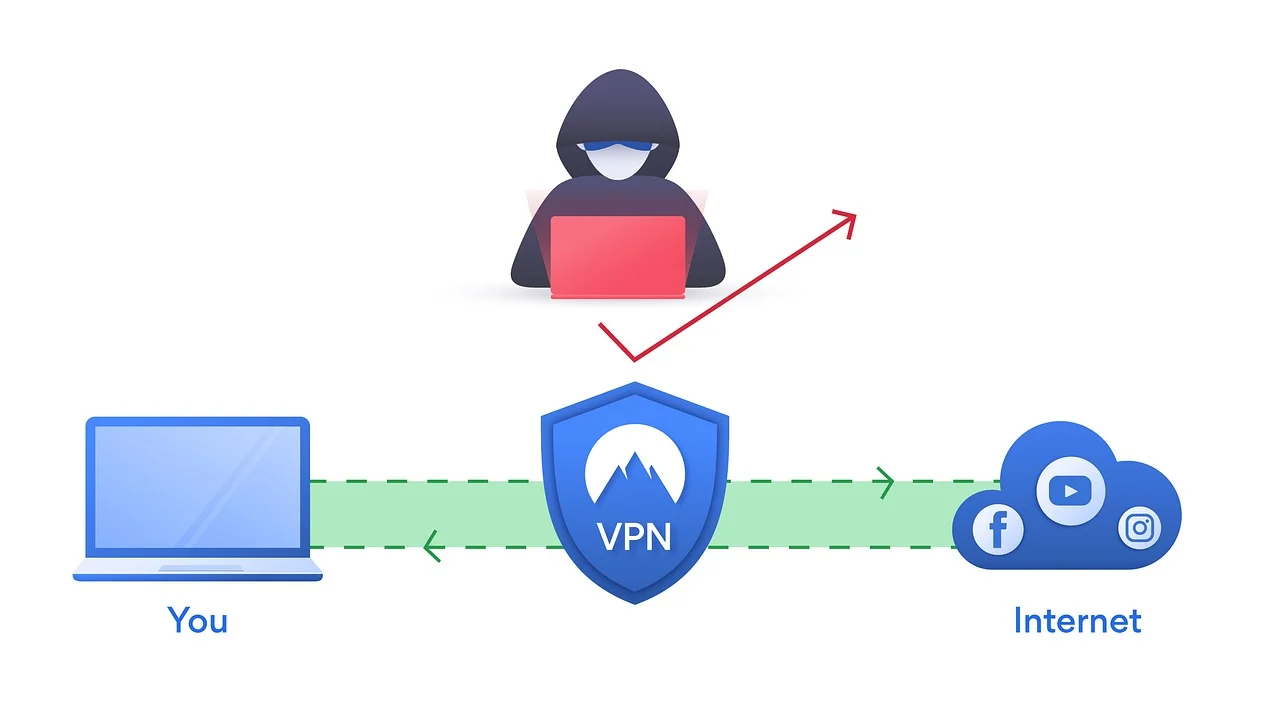
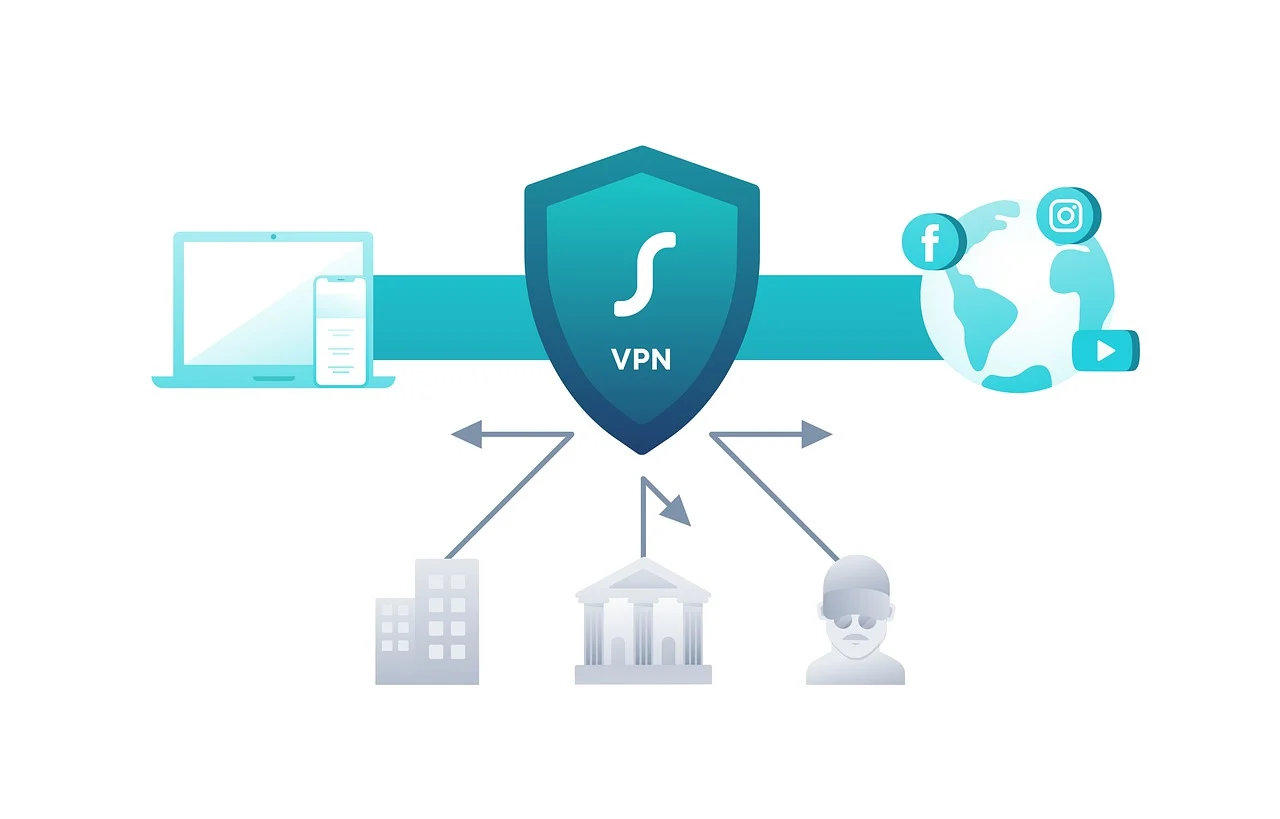
A VPN creates an encrypted connection between your device and a remote VPN server. Instead of connecting directly to websites and online services, your internet traffic is routed through the VPN server before reaching its destination.
This process provides two major benefits. First, encryption can make it more difficult for unauthorized parties on the network to inspect your internet traffic. Second, websites and online services generally see the VPN server’s IP address rather than your original public IP address.
These capabilities make VPNs useful privacy and security tools, particularly when combined with other cybersecurity practices.
What Can a VPN Protect You From?
1. Exposure of Your Public IP Address
When you browse the internet without a VPN, websites and online services can typically see your public IP address. Although an IP address does not reveal every detail about you, it can reveal your approximate geographical location and internet service provider.
A VPN masks your original public IP address by routing your connection through another server.
2. Some Risks Associated With Unsecured Networks
Public Wi-Fi networks in airports, hotels, restaurants, and other public locations can introduce security and privacy risks.
A VPN encrypts traffic between your device and the VPN server, adding an important layer of protection when using networks you do not fully trust.
However, VPN users should still follow basic cybersecurity practices when connecting to public Wi-Fi.
3. Certain Forms of Network Monitoring
Depending on the technologies and protocols involved, network operators may be able to observe information about internet activity.
Using a VPN encrypts the connection between your device and the VPN provider, making the contents of that traffic more difficult for local network observers to inspect.
It is worth remembering, however, that using a VPN shifts some of your trust. Choosing a reputable VPN provider with transparent privacy policies and strong security practices remains important.
What Can a VPN Not Protect You From?
Understanding the limitations of VPN technology is just as important as understanding its benefits.
1. Phishing Attacks
A VPN cannot prevent you from clicking a malicious link, entering your password into a fraudulent website, or responding to a deceptive email.
Cybercriminals frequently use social engineering techniques to manipulate users into voluntarily providing sensitive information.
Protection against phishing requires awareness, careful verification of websites and messages, and appropriate security tools.
2. Malware and Ransomware
VPN software is not a replacement for antivirus or endpoint security solutions.
If you download a malicious attachment, install infected software, or execute ransomware, a VPN may do little to prevent the device from becoming compromised.
Keeping operating systems and applications up to date and using appropriate security software remain essential components of a comprehensive cybersecurity strategy.
3. Weak or Stolen Passwords
A VPN cannot secure an account protected by a weak password.
If attackers obtain your login credentials through a data breach, phishing campaign, or password reuse attack, they may still be able to access your accounts.
Internet users should create strong, unique passwords and enable multi-factor authentication whenever possible.
4. Online Tracking Through Accounts and Cookies
VPNs can hide your original public IP address, but websites have other methods of identifying and tracking users.
Cookies, browser fingerprinting, advertising technologies, and logged-in accounts can still be used to associate online activities with a particular user or device.
For better privacy, users should combine VPN technology with privacy-conscious browser settings and careful management of online accounts and permissions.
5. Information You Voluntarily Share
No VPN can protect information that users intentionally publish online.
Posting personal details, sensitive photographs, travel plans, contact information, or other private data on social media can create privacy and security risks regardless of whether a VPN is active.
A VPN Should Be Part of a Larger Cybersecurity Strategy
The most effective approach to online protection is to use multiple layers of security.
A VPN can provide connection encryption and IP address masking, but users should combine these capabilities with strong passwords, multi-factor authentication, updated software, antivirus protection, secure browser settings, regular backups, and awareness of phishing and social engineering attacks.
This layered approach is often more effective because cyber threats can target different parts of a user’s digital life.
Final Thoughts
VPNs can be valuable tools for improving online privacy and protecting internet connections. They can help mask public IP addresses, encrypt traffic between devices and VPN servers, and provide additional protection when using unfamiliar networks.
However, VPNs are not complete cybersecurity solutions.
They cannot automatically prevent phishing attacks, malware infections, password theft, unsafe downloads, invasive browser tracking, or the consequences of sharing sensitive information online.
The key is to understand what VPN technology is designed to do and use it alongside other cybersecurity tools and responsible online habits.
By taking a layered approach to digital security, internet users can build stronger defenses against online threats while maintaining greater control over their privacy.
Did you hear about a VPN and don’t know what it means and how it works, so you’re asking “What is a VPN?” Don’t worry, this ultimate VPN guide will cover everything you need to know about a VPN.
You can lose control over your personal and business computers just because some of your private information got leaked to hackers.
But can this be prevented?
Yes, VPNs serve as your shield online. They protect your personal details from getting leaked into the hands of cybercriminals.
Want to learn more in this VPN guide? Keep reading!
What Is A VPN?
VPN is an acronym for “Virtual Private Network”, it helps keep your privacy by increasing your online safety and freedom.
You can call it a key to digital privacy because it ensures that you’re safe on the internet in many ways.
When you’re using the internet, a VPN sends your data through an encrypted, and secured connection to an outer server: the VPN server.
So, instead of sending your details to the websites or apps that you access on your device, the VPN sends its details.
In other words, it is like you’re accessing those websites or apps with another person’s (VPN server) details.
Some benefits you enjoy from using a VPN include; hiding your identity online, securing your data, and using the internet without restrictions. We have a list of the best VPN services, you can check them out.
BEST VPN SERVICES
87% OFF
PureVPN
PureVPN is one of the best VPN service providers with presence across 150 countries in the world. An industry VPN leader...Show More
PureVPN is one of the best VPN service providers with presence across 150 countries in the world. An industry VPN leader with more than 6,500 optimized VPN servers. Show Less
84% OFF
CyberGhost VPN
CyberGhost VPN is a VPN service provider with more than 9,000 VPN servers spread in over 90 countries. Complete privacy...Show More
CyberGhost VPN is a VPN service provider with more than 9,000 VPN servers spread in over 90 countries. Complete privacy protection for up to 7 devices! Show Less
67% OFF
TunnelBear VPN
TunnelBear is a VPN service provider that provides you with privacy, security, and anonymity advantages. It has VPN...Show More
TunnelBear is a VPN service provider that provides you with privacy, security, and anonymity advantages. It has VPN servers in more than 46 countries worldwide. Show Less
84% OFF
Surfshark
Surfshark is an award-winning VPN service for keeping your digital life secure. Surfshark VPN has servers located in...Show More
Surfshark is an award-winning VPN service for keeping your digital life secure. Surfshark VPN has servers located in more than 60 countries worldwide. Show Less
83% OFF
Private Internet Access
Private Internet Access uses world-class next-gen servers for a secure and reliable VPN connection, any day, anywhere.
Private Internet Access uses world-class next-gen servers for a secure and reliable VPN connection, any day, anywhere. Show Less
65% OFF
FastVPN (fka Namecheap VPN)
FastVPN (fka Namecheap VPN) is a secure, ultra-reliable VPN service solution for online anonymity. A fast and affordable...Show More
FastVPN (fka Namecheap VPN) is a secure, ultra-reliable VPN service solution for online anonymity. A fast and affordable VPN for everyone! Show Less
35% OFF
Panda Security
Panda VPN is a fast, secure VPN service facilitated by Panda Security. It has more than 1,000 servers in 20+ countries.
Panda VPN is a fast, secure VPN service facilitated by Panda Security. It has more than 1,000 servers in 20+ countries. Show Less
68% OFF
NordVPN
The best VPN service for total safety and freedom.
The best VPN service for total safety and freedom. Show Less
60% OFF
ProtonVPN
A swiss VPN service that goes the extra mile to balance speed with privacy protection.
A swiss VPN service that goes the extra mile to balance speed with privacy protection. Show Less
49% OFF
ExpressVPN
A dependable VPN service that works on all devices and platforms.
A dependable VPN service that works on all devices and platforms. Show Less
TorGuard VPN
The best VPN service for torrenting safely and anonymously.
The best VPN service for torrenting safely and anonymously. Show Less
50% OFF
VuzeVPN
VuzeVPN offers you unlimited and unrestricted VPN service.
VuzeVPN offers you unlimited and unrestricted VPN service. Show Less
VeePN
VeePN is a virtual private network (VPN) service that provides online privacy and security by encrypting internet...Show More
VeePN is a virtual private network (VPN) service that provides online privacy and security by encrypting internet traffic and hiding the user's IP address. Show Less
HideMe VPN
HideMe VPN is your ultimate online privacy solution, providing secure and anonymous browsing while protecting your data...Show More
HideMe VPN is your ultimate online privacy solution, providing secure and anonymous browsing while protecting your data from prying eyes, so you can browse the internet with confidence and freedom. Show Less
ZoogVPN
ZoogVPN is the complete and trusted all-in-one VPN service that protects your sensitive personal and financial...Show More
ZoogVPN is the complete and trusted all-in-one VPN service that protects your sensitive personal and financial information online. Show Less
HideMyName VPN
Protect your online privacy and anonymity with HideMyName VPN, a secure and affordable service that offers robust...Show More
Protect your online privacy and anonymity with HideMyName VPN, a secure and affordable service that offers robust encryption, multiple server locations, and a variety of privacy-enhancing features. Show Less
Witopia VPN
Witopia VPN lets you shield your privacy and unlock the world's internet with military-grade encryption and borderless...Show More
Witopia VPN lets you shield your privacy and unlock the world's internet with military-grade encryption and borderless access. Show Less
FastestVPN
FastestVPN offers budget-friendly, secure connections with unlimited data and a focus on fast speeds, ideal for...Show More
FastestVPN offers budget-friendly, secure connections with unlimited data and a focus on fast speeds, ideal for streaming and everyday browsing. Show Less
ExtremeVPN
ExtremeVPN is a VPN service that offers fast speeds, strong encryption, and a no-logs policy to keep your online...Show More
ExtremeVPN is a VPN service that offers fast speeds, strong encryption, and a no-logs policy to keep your online activity private. Show Less
iProVPN
iProVPN is a VPN service with a focus on security and affordability, offering basic features to secure your connection...Show More
iProVPN is a VPN service with a focus on security and affordability, offering basic features to secure your connection and unblock streaming content. Show Less
A proxy server is a router or a computer system that works between a server and a client as a relay. It prevents an attacker from attacking the private network.
A proxy can also act to represent another. This means that the proxy server can act in place of the user.
Going online without a proxy can expose your IP address to web servers and probably others to see.
A proxy has its IP address that represents or acts on your behalf to make sure your real IP address is hidden.
BEST PROXY SERVICES PROVIDERS
Nodemaven
NodeMaven is a premium proxy provider that delivers high-quality IPs, super sticky sessions, and unmatched customer...Show More
NodeMaven is a premium proxy provider that delivers high-quality IPs, super sticky sessions, and unmatched customer support. Show Less
IPRoyal
IPRoyal is a leading proxy provider offering reliable, high-speed proxies for various needs, including data scraping...Show More
IPRoyal is a leading proxy provider offering reliable, high-speed proxies for various needs, including data scraping, social media automation, and sneaker botting. Show Less
Mars Proxies
Mars Proxies is the go-to provider for sneaker coppers, offering unbanned IPs, blazing-fast speeds, and a massive pool...Show More
Mars Proxies is the go-to provider for sneaker coppers, offering unbanned IPs, blazing-fast speeds, and a massive pool of residential proxies. Show Less
NetNut
NetNut is the world's fastest residential proxy network, providing high-speed, reliable connections and a vast pool of...Show More
NetNut is the world's fastest residential proxy network, providing high-speed, reliable connections and a vast pool of IPs for seamless data scraping and automation. Show Less
Infatica
Infatica provides a robust proxy network with ethical sourcing, reliable performance, and a comprehensive suite of data...Show More
Infatica provides a robust proxy network with ethical sourcing, reliable performance, and a comprehensive suite of data collection tools. Show Less
Decodo (formerly Smartproxy)
Decodo (formerly Smartproxy) provides premium residential proxies for bypassing geo-restrictions, CAPTCHAs, and IP...Show More
Decodo (formerly Smartproxy) provides premium residential proxies for bypassing geo-restrictions, CAPTCHAs, and IP blocks with industry-leading success rates and flexible pricing options. Show Less
Oxylabs
Oxylabs proxies offer diverse, ethical, and reliable solutions for data scraping, web testing, and privacy needs.
Oxylabs proxies offer diverse, ethical, and reliable solutions for data scraping, web testing, and privacy needs. Show Less
Webshare
Webshare is a company that provides proxy servers that are used for data aggregation, analysis, and collection.
Webshare is a company that provides proxy servers that are used for data aggregation, analysis, and collection. Show Less
Live Proxies
Live Proxies is a proxy service that provides high-speed, reliable, and secure residential and datacenter proxy services...Show More
Live Proxies is a proxy service that provides high-speed, reliable, and secure residential and datacenter proxy services for web scraping, automation, and anonymity. Show Less
DigiProxy
DigiProxy offers proxy services, including residential, datacenter, and sneaker proxies, aimed at providing secure and...Show More
DigiProxy offers proxy services, including residential, datacenter, and sneaker proxies, aimed at providing secure and reliable internet access. Show Less
Oxylabs
Oxylabs is a leading proxy and web scraping solutions provider that empowers businesses with reliable, high-speed, and...Show More
Oxylabs is a leading proxy and web scraping solutions provider that empowers businesses with reliable, high-speed, and scalable data-gathering tools to stay ahead of the competition. Show Less
Webshare
Webshare delivers fast, affordable, and customizable proxy solutions designed to give businesses and developers seamless...Show More
Webshare delivers fast, affordable, and customizable proxy solutions designed to give businesses and developers seamless access to reliable data at scale. Show Less
Decodo (formerly Smartproxy)
Decodo (formerly Smartproxy) provides powerful, user-friendly proxy and web scraping solutions that make large-scale...Show More
Decodo (formerly Smartproxy) provides powerful, user-friendly proxy and web scraping solutions that make large-scale data access effortless, efficient, and cost-effective. Show Less
Oxylabs
Oxylabs is a leading proxy and web scraping solutions provider that empowers businesses with reliable, high-speed, and...Show More
Oxylabs is a leading proxy and web scraping solutions provider that empowers businesses with reliable, high-speed, and scalable data-gathering tools to stay ahead of the competition. Show Less
Webshare
Webshare delivers fast, affordable, and customizable proxy solutions designed to give businesses and developers seamless...Show More
Webshare delivers fast, affordable, and customizable proxy solutions designed to give businesses and developers seamless access to reliable data at scale. Show Less
Oxylabs
Oxylabs is a leading proxy and web scraping solutions provider that empowers businesses with reliable, high-speed, and...Show More
Oxylabs is a leading proxy and web scraping solutions provider that empowers businesses with reliable, high-speed, and scalable data-gathering tools to stay ahead of the competition. Show Less
Webshare
Webshare YouTube proxies deliver fast, reliable, and secure connections that let you bypass restrictions and stream...Show More
Webshare YouTube proxies deliver fast, reliable, and secure connections that let you bypass restrictions and stream, scrape, or manage multiple YouTube accounts seamlessly without interruptions. Show Less
Decodo (formerly Smartproxy)
Decodo (formerly Smartproxy) YouTube proxies provide high-quality, secure, and geo-flexible access that ensures smooth...Show More
Decodo (formerly Smartproxy) YouTube proxies provide high-quality, secure, and geo-flexible access that ensures smooth streaming, scraping, and account management on YouTube without blocks or interruptions. Show Less
Oxylabs
Oxylabs is a premium proxy and web intelligence solutions provider with 175M+ IPs across 195 countries, offering...Show More
Oxylabs is a premium proxy and web intelligence solutions provider with 175M+ IPs across 195 countries, offering ready-to-use Scraper APIs that seamlessly extract structured public data while bypassing IP blocks and CAPTCHAs. Show Less
Decodo (formerly Smartproxy)
Decodo (formerly Smartproxy) is an AI-powered proxy service and web scraping solutions provider that enables seamless...Show More
Decodo (formerly Smartproxy) is an AI-powered proxy service and web scraping solutions provider that enables seamless, large-scale data extraction with smart, reliable, and cost-effective tools for businesses of any size. Show Less
Decodo (formerly Smartproxy)
Decodo (formerly Smartproxy) is a powerful proxy service provider with advanced APIs, including its Amazon Scraping API...Show More
Decodo (formerly Smartproxy) is a powerful proxy service provider with advanced APIs, including its Amazon Scraping API, which delivers effortless, real-time access to accurate Amazon data at scale with zero blocks and zero maintenance. Show Less
History Of VPN: When Was The First VPN Service Created?
Back in 1996, Microsoft employees created a P2P (peer-to-peer) tunnel protocol, or rather, PPTP.
As internet threats begin to increase, the digital security system starts getting popular too.
People were concerned about their privacy online, and one of the easiest ways to maintain privacy online was to consider a virtual private network.
VPN was mainly used then for business purposes, but today, VPN is widely used to prevent malware, unblock geo-restricted content, and more.
How Does A VPN Work?
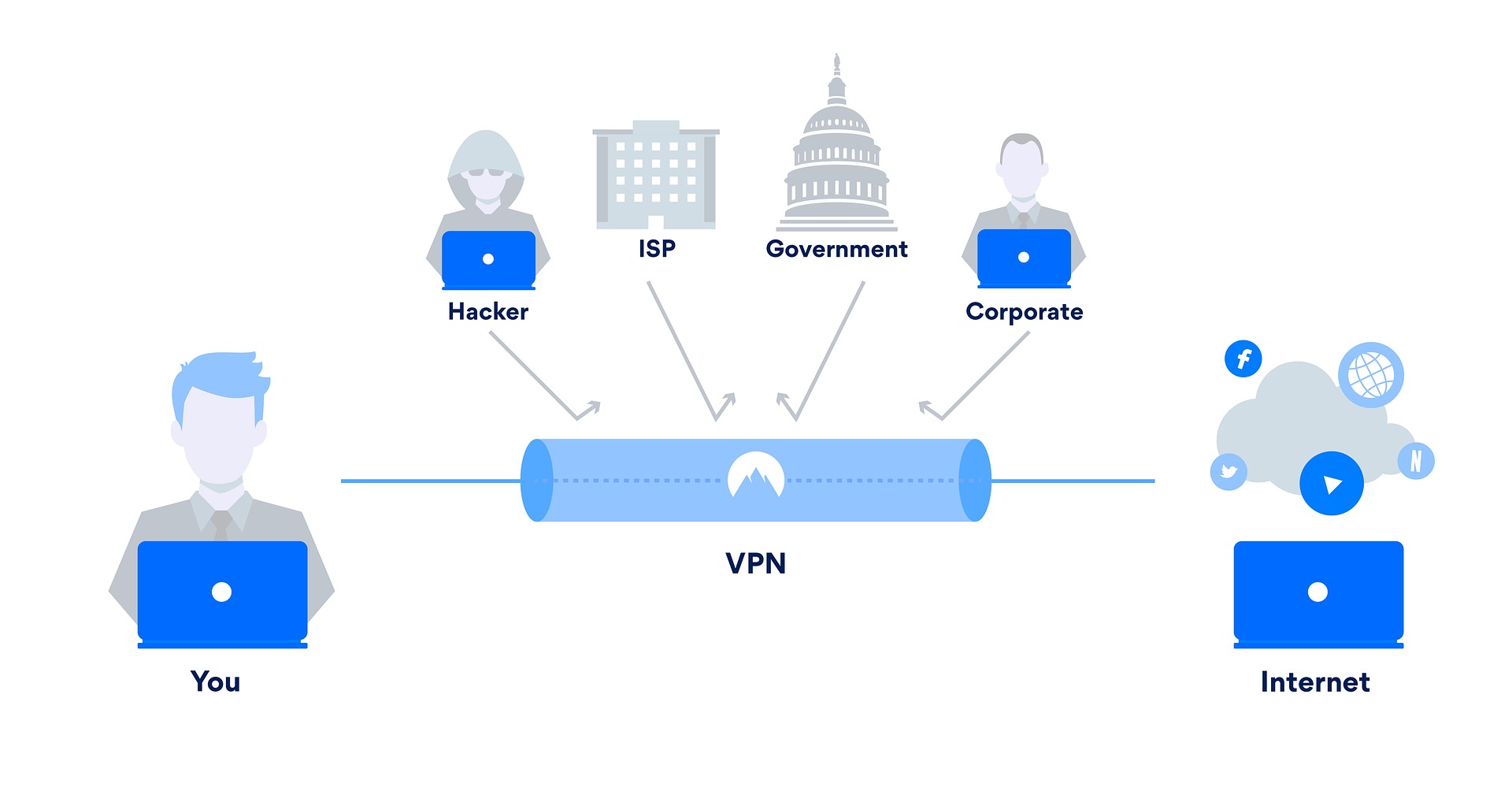
When your computer or smartphone is connected to a VPN, the computer’s location and details will be coming from the VPN and not your own.
A VPN secures your internet traffic by rerouting all your traffic through an encrypted secure connection before the device contacts the website.
If you don’t use a VPN, your computer or phone will directly connect to the websites you visit.
A VPN makes sure that your computer contacts the VPN servers first, and then the VPN will send or contact the websites for you.
If you visit a website with a VPN connected to a USA server, the website will see you as a visitor from the USA even when you are not in the USA. It will appear like you are present at the VPN location.
While this is a good thing, VPNs tend to reduce internet connection speed because VPNs act as a middleman in which connections must pass through the VPN server before proceeding.
Some VPN Statistics
The global VPN market will likely hit USD 41.70 billion in 2022 [MarketWatch].
A VPN hides your data from others on the internet; instead of exposing your real information like location and IP address, it shows the VPN server information.
2. Protection against governments and hackers
A VPN encrypts your internet traffic via a solid encryption protocol. It makes your device activities difficult for a third party to access.
When people try to spy on your device,a VPN makes this difficult for them.
3. Protection against public network
Let me assume this is not the first time you have learning that a public WiFi network is dangerous.
While you enjoy the free public WiFi network, other users on the same network may have your personal information.
A VPN can help protect your connection from the dangers of public WiFi.
4. Fight online censorship
Countries like China, Iran, Russia, and Turkey cannot use popular apps and websites like WhatsApp, Google, Facebook, Instagram, YouTube, and Spotify due to geo-restrictions.
With the help of a VPN service, you can bypass government censorship and restrictions by connecting your device to a different server.
Using a VPN, you can also change the internet server location to an accepted country.
5. Anonymous downloading
Downloading online can be risky when it is done incorrectly.
Downloading some torrents is illegal in some countries, and you, as a downloader, can be tracked down and prosecuted.
So, to avoid getting caught, you can always use a VPN.
6. Improved Gaming Experience
Gamers often face lag, high ping times, and DDoS attacks. A VPN can help connect you to a server closer to the game server, reducing latency and improving your online gaming experience.
Imagine enjoying smoother gameplay and faster response times – that’s the benefit a VPN can offer gamers.
7. Enhanced Streaming Quality
Video streaming services may throttle bandwidth depending on your location. A VPN helps overcome this by connecting you to a server in a region with better streaming quality.
Imagine enjoying your favorite shows and movies without buffering – that’s the benefit a VPN can offer streaming enthusiasts.
8. Secure Online Shopping
Online shopping involves sharing sensitive financial information. A VPN protects your financial data by encrypting your transactions and masking your IP address, making it harder for hackers to intercept your information.
Imagine shopping online with peace of mind – that’s the benefit a VPN can offer to protect your financial transactions.
9. Bypass Price Discrimination
Certain websites and services can price discriminate based on your location. A VPN can help you bypass this by connecting you to a server in a region with lower prices.
Imagine saving money on flights, hotels, and other online purchases – that’s the benefit a VPN can offer to save you money.
10. Accessing Business Resources
Businesses often use VPNs to allow employees to access sensitive resources remotely. This can be particularly beneficial for remote workers and companies with international operations.
Imagine securely accessing your company’s network from anywhere in the world – that’s the benefit a VPN can offer businesses.
11. Preventing Bandwidth Throttling
Some internet service providers (ISPs) throttle bandwidth for specific activities like streaming or downloading large files. A VPN helps circumvent this by encrypting your data and hiding your online activity from your ISP.
You can enjoy unrestricted internet speeds – the benefit a VPN can offer to eliminate bandwidth throttling.
12. Accessing Blocked Websites
Governments or institutions may block specific websites and services. A VPN allows you to bypass these restrictions by connecting to a server in another country.
You can access blocked information and websites – that’s the benefit a VPN can offer to overcome censorship.
13. Protecting Your Family Online
Children are particularly vulnerable online. A VPN can help protect your family by encrypting their internet traffic and preventing them from accessing inappropriate content.
You can provide a safer online environment for your family – that’s the benefit a VPN can offer to protect your loved ones.
14. Avoiding Online Tracking
Advertisers and other entities track your online activity to build profiles and target you with personalized ads. A VPN helps prevent this by masking your IP address and online activity.
You can browse the internet without being tracked – that’s the benefit a VPN can offer to avoid online tracking.
15. Contributing to Net Neutrality
Net neutrality is the principle that all internet traffic should be treated equally. Using a VPN can help ensure that your internet traffic is not being throttled or discriminated against.
You can contribute to a free and open internet – that’s the benefit a VPN can offer to support net neutrality.
In this VPN guide, knowing the difference between proxies and VPNs is essential.
A VPN encrypts your internet traffic, while proxy servers don’t. So proxies should not be used for sensitive information because they don’t protect you as a VPN does. A VPN can protect you from government surveillance, ISP tracking, and hackers, making it a more secure option to handle sensitive information.
VPN works by rerouting all your internet traffic via a VPN server, while proxies only reroute the internet traffic of a specific browser or app. The downside of a VPN is that it can be slower than proxies because VPNs encrypt your traffic before sending it to the web.
VPNs are subscription-based (free VPN services are limited, and they can sell your information to make money), and proxy servers are usually free.
Choosing between a proxy and a VPN can be confusing, but understanding their key differences is crucial for safeguarding your online privacy and security.
Here’s a comprehensive breakdown:
Security & Privacy
VPN: Encrypts all your internet traffic, making it unreadable by anyone intercepting it. This protects you from government surveillance, ISP tracking, & hackers.
Proxy: Doesn’t encrypt your data, leaving it vulnerable to potential attackers. It’s not suitable for handling sensitive information.
Scope of Protection
VPN: Secures all your internet traffic, regardless of the app or browser you’re using. It offers comprehensive protection for your entire online activity.
Proxy: Only protects the traffic of the specific application or browser it’s configured for. Other programs remain unprotected.
Speed & Performance
VPN: This may cause slight speed reductions due to data encryption and routing. However, modern VPNs offer minimal impact on performance.
Proxy: Often faster than VPNs because they don’t encrypt data. However, this comes at the expense of security and privacy.
Cost & Availability
VPN: Typically requires a subscription fee. While free options exist, they often come with limitations or privacy concerns.
Proxy: Many free proxy servers are readily available. However, they may be unreliable and inject ads or track your activity.
Here’s a table summarizing the key differences:
Feature
VPN
Proxy
Security & Privacy
Encrypts all traffic
Doesn’t encrypt data
Scope of Protection
All internet traffic
Specific app/browser
Speed & Performance
Slightly slower
Faster
Cost & Availability
Paid subscription (free options limited)
Free & Paid options
For maximum security and privacy, a VPN is the clear winner. It’s ideal for protecting your sensitive information and browsing anonymously.
A proxy may suffice for occasional use or accessing geo-blocked content.
Ultimately, prioritize your online security and privacy. Choose a VPN if you value anonymity and data protection. Use a proxy with caution and only for non-sensitive activities.
There are many VPNs, so it might be challenging to choose the best one. Some are free, while others are paid.
Since there are more than 500 VPNs in the VPN market, below is a guide to choosing the best that fits your purpose.
1. Know what you need a VPN for
There are a lot of ways to utilize a VPN, while some VPNs are good at watching content that is geographically blocked, while others are good at bypassing government censorship.
To use a VPN for streaming movies, you must choose a VPN with high speed, unlimited bandwidth, and reliable connections.
So you should write down a list of what you need the VPN for and outline the features that can help you get what you want.
2. The features of the VPN service
All VPN companies have that feature they are known for, which could be speed or anonymity. Find the feature and ensure it is suitable for your list of what you need a VPN for.
Many VPNs have issues bypassing Netflix restrictions, but ExpressVPN is a good option.
A kill feature should also be considered to strengthen your VPN security.
This feature VPN automatically disconnects from the internet if your device loses internet connection.
It helps you to prevent unsecured connections on the internet when your device is disconnected from the VPN connection so that you’re safe until the VPN connection returns.
3. VPN with a good user-friendly interface
Some VPNs in the market don’t have that user-friendly interface, and it could take some time before you get used to them because they’re pretty complex to set up.
You should go for a VPN with a clean and smooth interface. Also, consider going for a VPN with a good speed connection if you care.
4. Make sure your essential servers and locations are covered
For example, if you are going to a country like China to work or live, you will need a VPN service that can bypass all the restrictions and censorship in the country.
The number of locations and servers can be decided for you in some situations.
5. What payment plan do you prefer?
The best VPN for you should provide a convenient payment option.
Meanwhile, VPN prices are different depending on features and subscription duration.
The mode of payment is also essential when choosing a VPN that is good for you.
Some VPNs support anonymous payment systems such as Bitcoin, while others use debit cards.
Payments can be weekly, monthly, or annually.
6. Go for a VPN with good and reliable customer service support
You may encounter issues with a VPN, so having a place to get things solved when necessary is essential.
Here, the best options are VPNs that offer live chat if you care about reliable customer support, because emails and tickets could take hours or days before you get a reply.
Also, always go for a VPN that offers 24/7 customer service.
7. A money-back guarantee is recommended
If you pay for a VPN service and later find out that it is not suitable for you, a money-back guarantee will allow you to get your money back.
Some VPNs offer a 30-day money-back guarantee, which is enough for you to test the quality of the VPN service.
So always look for a VPN with a money-back guarantee or use the free trial.
Not all VPN offers a free trial, but you should find one that ensures your safety, and you can get a refund when you don’t like their product.
BEST VPN SERVICES
87% OFF
PureVPN
PureVPN is one of the best VPN service providers with presence across 150 countries in the world. An industry VPN leader...Show More
PureVPN is one of the best VPN service providers with presence across 150 countries in the world. An industry VPN leader with more than 6,500 optimized VPN servers. Show Less
84% OFF
CyberGhost VPN
CyberGhost VPN is a VPN service provider with more than 9,000 VPN servers spread in over 90 countries. Complete privacy...Show More
CyberGhost VPN is a VPN service provider with more than 9,000 VPN servers spread in over 90 countries. Complete privacy protection for up to 7 devices! Show Less
67% OFF
TunnelBear VPN
TunnelBear is a VPN service provider that provides you with privacy, security, and anonymity advantages. It has VPN...Show More
TunnelBear is a VPN service provider that provides you with privacy, security, and anonymity advantages. It has VPN servers in more than 46 countries worldwide. Show Less
84% OFF
Surfshark
Surfshark is an award-winning VPN service for keeping your digital life secure. Surfshark VPN has servers located in...Show More
Surfshark is an award-winning VPN service for keeping your digital life secure. Surfshark VPN has servers located in more than 60 countries worldwide. Show Less
83% OFF
Private Internet Access
Private Internet Access uses world-class next-gen servers for a secure and reliable VPN connection, any day, anywhere.
Private Internet Access uses world-class next-gen servers for a secure and reliable VPN connection, any day, anywhere. Show Less
65% OFF
FastVPN (fka Namecheap VPN)
FastVPN (fka Namecheap VPN) is a secure, ultra-reliable VPN service solution for online anonymity. A fast and affordable...Show More
FastVPN (fka Namecheap VPN) is a secure, ultra-reliable VPN service solution for online anonymity. A fast and affordable VPN for everyone! Show Less
35% OFF
Panda Security
Panda VPN is a fast, secure VPN service facilitated by Panda Security. It has more than 1,000 servers in 20+ countries.
Panda VPN is a fast, secure VPN service facilitated by Panda Security. It has more than 1,000 servers in 20+ countries. Show Less
68% OFF
NordVPN
The best VPN service for total safety and freedom.
The best VPN service for total safety and freedom. Show Less
60% OFF
ProtonVPN
A swiss VPN service that goes the extra mile to balance speed with privacy protection.
A swiss VPN service that goes the extra mile to balance speed with privacy protection. Show Less
49% OFF
ExpressVPN
A dependable VPN service that works on all devices and platforms.
A dependable VPN service that works on all devices and platforms. Show Less
TorGuard VPN
The best VPN service for torrenting safely and anonymously.
The best VPN service for torrenting safely and anonymously. Show Less
50% OFF
VuzeVPN
VuzeVPN offers you unlimited and unrestricted VPN service.
VuzeVPN offers you unlimited and unrestricted VPN service. Show Less
VeePN
VeePN is a virtual private network (VPN) service that provides online privacy and security by encrypting internet...Show More
VeePN is a virtual private network (VPN) service that provides online privacy and security by encrypting internet traffic and hiding the user's IP address. Show Less
HideMe VPN
HideMe VPN is your ultimate online privacy solution, providing secure and anonymous browsing while protecting your data...Show More
HideMe VPN is your ultimate online privacy solution, providing secure and anonymous browsing while protecting your data from prying eyes, so you can browse the internet with confidence and freedom. Show Less
ZoogVPN
ZoogVPN is the complete and trusted all-in-one VPN service that protects your sensitive personal and financial...Show More
ZoogVPN is the complete and trusted all-in-one VPN service that protects your sensitive personal and financial information online. Show Less
HideMyName VPN
Protect your online privacy and anonymity with HideMyName VPN, a secure and affordable service that offers robust...Show More
Protect your online privacy and anonymity with HideMyName VPN, a secure and affordable service that offers robust encryption, multiple server locations, and a variety of privacy-enhancing features. Show Less
Witopia VPN
Witopia VPN lets you shield your privacy and unlock the world's internet with military-grade encryption and borderless...Show More
Witopia VPN lets you shield your privacy and unlock the world's internet with military-grade encryption and borderless access. Show Less
FastestVPN
FastestVPN offers budget-friendly, secure connections with unlimited data and a focus on fast speeds, ideal for...Show More
FastestVPN offers budget-friendly, secure connections with unlimited data and a focus on fast speeds, ideal for streaming and everyday browsing. Show Less
ExtremeVPN
ExtremeVPN is a VPN service that offers fast speeds, strong encryption, and a no-logs policy to keep your online...Show More
ExtremeVPN is a VPN service that offers fast speeds, strong encryption, and a no-logs policy to keep your online activity private. Show Less
iProVPN
iProVPN is a VPN service with a focus on security and affordability, offering basic features to secure your connection...Show More
iProVPN is a VPN service with a focus on security and affordability, offering basic features to secure your connection and unblock streaming content. Show Less
Is It Safe To Use A Free VPN?
Some VPN services abuse the data that travels via their servers and sell your information or data to advertisers.
Your internet traffic runs through the VPN provider’s servers, and the VPN provider can see your data and everything you do.
However, not all VPNs do this. It is only common among free VPNs.
Even if the VPN provider offers their VPN service for free, there is a possibility that your data is being sold to advertisers.
Why don’t you find out why your VPN provider offers their services for free?
So, don’t be fooled by a free VPN service; it will surely come with a price to pay, whether it is your money or your privacy.
Is Using A VPN Against The Law?
Everyone uses a VPN, even hackers or cybercriminals make use of it, which could make you wonder if using a VPN is against the law or not.
Honestly, using a VPN is not against the law if it is used legally. If you use a VPN for legal activities such as browsing, Netflix, gaming, YouTube, anonymity, and more, using a VPN for illegal activities is against the law, but using a VPN (legally) is not.
Disadvantages Of Using A VPN?
You have learned that there are advantages to using a VPN each time you go on the internet, but nothing is perfect; there are disadvantages you should know.
Don’t think a VPN is all you need to stay private online; there are things a VPN can’t do or perhaps can’t do better.
Some VPN service providers can slow your internet speed.
Some online sites or services do not allow or ban customers from using VPNs.
A quality, top-rated VPN will cost you money.
Some VPNs won’t protect you or your information from malware or phishing attacks.
Some VPN services can not bypass strict internet restrictions in highly censored nations.
Note: As you can see from this VPN guide, we do not encourage the usage of a VPN for any form of illegal activities online.
VPN Guide: How Much Do VPNs Cost?
VPN services offer different plans for users. VPN providers give enticing discounts when you are a new subscriber.
Most of the time, as a new subscriber, you will get about a 30 – 50% discount, and there is also a free trial if your VPN service offers it. So check out some VPN pricing below;
1-month plan: VPNs allow you to pay for a monthly subscription; it is good for you if you don’t want to spend much at once for an annual plan. This should start from $4 to $10; you can get a discount.
3-month plan: This is a pricing plan where you pay every 3 months. It is another great deal to enjoy all that the VPN offers. It should range from $15 – $25 or more; you can even get a discount as a new customer.
1-year plan: It is also known as an annual or yearly plan, and it is good if you don’t want to go through the stress of subscribing again monthly or quarterly. This should range from $30 – $99 or more.
Some VPN companies like NordVPN offer a 2-year plan, which is perfect for an organization or a small business that needs a VPN service.
After reading this VPN guide article, it is possible to ask, “what is the best VPN service?”. Is it NordVPN, ExpressVPN, or CyberGhost VPN?
When you see the article on best VPNs, you should know they’re recommending top-rated VPNs to you, nothing like the best.
All VPN services in the market have downsides, and there is no definitive ‘best’ VPN. Go with what works for you or top-rated VPNs like CyberGhost VPN, Surfshark, ExpressVPN, TorGuard, or NordVPN.
87% OFF
PureVPN
PureVPN is one of the best VPN service providers with presence across 150 countries in the world. An industry VPN leader...Show More
PureVPN is one of the best VPN service providers with presence across 150 countries in the world. An industry VPN leader with more than 6,500 optimized VPN servers. Show Less
84% OFF
CyberGhost VPN
CyberGhost VPN is a VPN service provider with more than 9,000 VPN servers spread in over 90 countries. Complete privacy...Show More
CyberGhost VPN is a VPN service provider with more than 9,000 VPN servers spread in over 90 countries. Complete privacy protection for up to 7 devices! Show Less
67% OFF
TunnelBear VPN
TunnelBear is a VPN service provider that provides you with privacy, security, and anonymity advantages. It has VPN...Show More
TunnelBear is a VPN service provider that provides you with privacy, security, and anonymity advantages. It has VPN servers in more than 46 countries worldwide. Show Less
84% OFF
Surfshark
Surfshark is an award-winning VPN service for keeping your digital life secure. Surfshark VPN has servers located in...Show More
Surfshark is an award-winning VPN service for keeping your digital life secure. Surfshark VPN has servers located in more than 60 countries worldwide. Show Less
83% OFF
Private Internet Access
Private Internet Access uses world-class next-gen servers for a secure and reliable VPN connection, any day, anywhere.
Private Internet Access uses world-class next-gen servers for a secure and reliable VPN connection, any day, anywhere. Show Less
65% OFF
FastVPN (fka Namecheap VPN)
FastVPN (fka Namecheap VPN) is a secure, ultra-reliable VPN service solution for online anonymity. A fast and affordable...Show More
FastVPN (fka Namecheap VPN) is a secure, ultra-reliable VPN service solution for online anonymity. A fast and affordable VPN for everyone! Show Less
35% OFF
Panda Security
Panda VPN is a fast, secure VPN service facilitated by Panda Security. It has more than 1,000 servers in 20+ countries.
Panda VPN is a fast, secure VPN service facilitated by Panda Security. It has more than 1,000 servers in 20+ countries. Show Less
68% OFF
NordVPN
The best VPN service for total safety and freedom.
The best VPN service for total safety and freedom. Show Less
60% OFF
ProtonVPN
A swiss VPN service that goes the extra mile to balance speed with privacy protection.
A swiss VPN service that goes the extra mile to balance speed with privacy protection. Show Less
49% OFF
ExpressVPN
A dependable VPN service that works on all devices and platforms.
A dependable VPN service that works on all devices and platforms. Show Less
TorGuard VPN
The best VPN service for torrenting safely and anonymously.
The best VPN service for torrenting safely and anonymously. Show Less
50% OFF
VuzeVPN
VuzeVPN offers you unlimited and unrestricted VPN service.
VuzeVPN offers you unlimited and unrestricted VPN service. Show Less
VeePN
VeePN is a virtual private network (VPN) service that provides online privacy and security by encrypting internet...Show More
VeePN is a virtual private network (VPN) service that provides online privacy and security by encrypting internet traffic and hiding the user's IP address. Show Less
HideMe VPN
HideMe VPN is your ultimate online privacy solution, providing secure and anonymous browsing while protecting your data...Show More
HideMe VPN is your ultimate online privacy solution, providing secure and anonymous browsing while protecting your data from prying eyes, so you can browse the internet with confidence and freedom. Show Less
ZoogVPN
ZoogVPN is the complete and trusted all-in-one VPN service that protects your sensitive personal and financial...Show More
ZoogVPN is the complete and trusted all-in-one VPN service that protects your sensitive personal and financial information online. Show Less
HideMyName VPN
Protect your online privacy and anonymity with HideMyName VPN, a secure and affordable service that offers robust...Show More
Protect your online privacy and anonymity with HideMyName VPN, a secure and affordable service that offers robust encryption, multiple server locations, and a variety of privacy-enhancing features. Show Less
Witopia VPN
Witopia VPN lets you shield your privacy and unlock the world's internet with military-grade encryption and borderless...Show More
Witopia VPN lets you shield your privacy and unlock the world's internet with military-grade encryption and borderless access. Show Less
FastestVPN
FastestVPN offers budget-friendly, secure connections with unlimited data and a focus on fast speeds, ideal for...Show More
FastestVPN offers budget-friendly, secure connections with unlimited data and a focus on fast speeds, ideal for streaming and everyday browsing. Show Less
ExtremeVPN
ExtremeVPN is a VPN service that offers fast speeds, strong encryption, and a no-logs policy to keep your online...Show More
ExtremeVPN is a VPN service that offers fast speeds, strong encryption, and a no-logs policy to keep your online activity private. Show Less
iProVPN
iProVPN is a VPN service with a focus on security and affordability, offering basic features to secure your connection...Show More
iProVPN is a VPN service with a focus on security and affordability, offering basic features to secure your connection and unblock streaming content. Show Less
Frequently Asked Questions: VPN Guide
Do you have to use a proxy when you have a VPN?
You don’t need to use a proxy when you have a VPN. Premium VPN services can act as proxies. A strong VPN service can be much better than a proxy because VPNs have many features, and you are probably getting more for your money.
Can VPN be used on multiple devices?
VPN services can be used on multiple devices; most VPNs support Windows, Mac, Android, iOS, and Linux, and some VPNs don’t support all the platforms.
The VPN market is growing rapidly due to the support on all platforms. If you use a Windows computer and an iPhone, then some popular VPNs will make it easy for you to use their VPN service on any platform you have.
Will a VPN slow down my internet speed?
Yes, using a VPN can slightly decrease internet speed due to data encryption and routing. However, the impact is typically minimal with modern VPN services, and the added security and privacy benefits outweigh the minor speed reduction.
Can I use a free VPN?
Free VPNs can seem tempting but often come with limitations and potential risks. They may offer restricted data allowances, limited server locations, intrusive advertising, or even collect and sell your browsing data. Paid VPNs offer significantly better performance, security, and privacy features while requiring a subscription fee.
Is it legal to use a VPN?
In most countries, using a VPN is perfectly legal. However, some countries restrict VPN usage for specific purposes or websites. It’s essential to check the local laws and regulations of your country before using a VPN.
What types of VPN protocols are there?
There are several VPN protocols, each offering different levels of security and performance. Standard protocols include OpenVPN, WireGuard, IKEv2, and L2TP/IPSec. OpenVPN is widely used for its robust security, while WireGuard is newer but offers faster speeds.
How do I choose the right VPN for me?
Consider your individual needs and priorities when choosing a VPN. Factors to consider include:
Security features: Encryption protocols, security audits, and a no-logs policy.
Privacy features: Location anonymity, IP address masking, and protection from tracking.
Performance: Server network size, location, connection speeds, and bandwidth limitations.
Cost: Subscription plans and pricing models.
Device compatibility: Support for your operating systems and devices.
Customer support: Availability and quality of support services.
What are some popular VPN services?
Some popular VPN services include NordVPN, ExpressVPN, CyberGhost, ProtonVPN, and TunnelBear. Each service offers unique features and benefits, so it’s essential to compare them carefully before deciding.
What are some additional benefits of using a VPN?
Beyond the core security and privacy benefits, VPNs can offer additional advantages, such as:
Access to geo-blocked content: Bypass restrictions and access websites and streaming services unavailable in your region.
Public Wi-Fi protection: Secure your connection when using public Wi-Fi networks, often vulnerable to hacking.
Improved gaming experience: Reduce lag and ping times for smoother online gaming.
Enhanced online shopping security: Protect your financial information when making online purchases.
Prevent bandwidth throttling: Avoid internet speed limitations imposed by your ISP.
What does VPN stand for?
VPN stands for Virtual Private Network. It allows users to create a secure connection to another network over the internet. VPNs are commonly used to protect private web traffic, shield user identity, and access region-restricted websites.
How does a VPN work?
A VPN works by routing your internet traffic through a remote server operated by the VPN provider. This process hides your IP address and encrypts all the data you send or receive. Even your Internet Service Provider (ISP) cannot see what you’re doing online while connected to a VPN.
Why should I use a VPN?
VPNs offer multiple benefits, including protecting sensitive data, preventing ISP throttling, and bypassing content restrictions. Whether you’re working remotely, streaming, or browsing, a VPN gives you an added layer of protection and freedom.
Are VPNs legal to use?
In most parts of the world, using a VPN is completely legal. However, some countries like China, Russia, and Iran restrict or ban VPNs to control internet access. It’s always wise to check your country’s laws before using one.
Can a VPN make me completely anonymous online?
While a VPN greatly improves your privacy by masking your IP address and encrypting your connection, it does not offer total anonymity. For full anonymity, consider combining VPN usage with Tor, private search engines, and strict digital hygiene.
Do VPNs affect internet speed?
Yes, VPNs can slightly reduce your internet speed due to encryption overhead and server distance. However, top-tier VPN services use optimized servers and fast protocols (like WireGuard) to ensure minimal performance loss, making streaming and gaming still possible.
Can I use a VPN on all my devices?
Most modern VPN services support multiple devices and platforms, including laptops, smartphones, tablets, routers, and smart TVs. With one account, you can typically connect 5 to 10 devices simultaneously, depending on the provider.
Is a free VPN safe to use?
Free VPNs often come with trade-offs such as limited bandwidth, fewer servers, and weaker encryption. Worse, some may log and sell your data to third parties. If privacy is your goal, investing in a reputable, no-logs VPN is strongly recommended.
What is the difference between a proxy and a VPN?
Both a proxy and a VPN hide your IP address, but only a VPN encrypts your entire internet connection. A proxy might work for basic location masking, but it doesn’t offer the end-to-end security and privacy that VPNs provide.
Can a VPN bypass geo-blocks and streaming restrictions?
Yes, many VPNs are designed to bypass geo-blocking technologies used by platforms like Netflix, Hulu, and BBC iPlayer. However, not all VPNs can do this consistently—look for services with dedicated streaming servers or Smart DNS features for the best results.
How can I learn more about VPNs?
Many online resources provide comprehensive information and reviews of various VPN services. You can also consult cybersecurity experts or tech reviewers to get personalized recommendations based on your needs.
In this post, I will show you how an SPF Record can instantly improve your email deliverability.
The Sender Policy Framework (SPF) is an essential email authentication system aimed at preventing email spoofing and enhancing the chances of email delivery. Essentially, an SPF record is a specific type of TXT record within the Domain Name System (DNS) that specifies which mail servers are permitted to send emails on behalf of a particular domain.
When an email server processes an incoming email, the receiving Mail Transfer Agent (MTA) looks up the SPF record associated with the domain found in the envelope from the header. By comparing the connecting server’s IP address to the list of authorized senders in the SPF record, the MTA can assess whether the email is genuine or potentially a spoof, thereby significantly lowering the likelihood of fraudulent emails landing in users’ inboxes.
The effectiveness of email authentication relies on SPF working together with DKIM (DomainKeys Identified Mail) and DMARC (Domain-based Message Authentication, Reporting, and Conformance). Leading business email services, including Google Workspace, Microsoft 365, Zoho Mail, and Amazon SES, highly recommend proper SPF setup to bolster the credibility of outgoing emails.
Additionally, spam filtering solutions like Mimecast, Barracuda Networks, and Proofpoint utilize SPF as a key indicator in their anti-spam and anti-phishing measures.
How SPF Helps Improve Email Deliverability Instantly
SPF provides organizations and brands with quick advantages by establishing a clear sender policy for their domains. Once the SPF record is published, it offers several key benefits for email deliverability:
Prevents Unauthorized Senders: Only designated IP addresses and email servers are allowed to send emails “on behalf of” your domain. This robust validation process protects against email spoofing by malicious entities.
Lowers Spam and Phishing Threats: Major email service providers like Gmail, Outlook, and Yahoo Mail, as well as security services such as Cisco Talos, Spamhaus, and SpamExperts, place significant emphasis on SPF verification within their spam-filtering systems. A valid SPF record enhances the chances of your emails reaching recipients’ inboxes rather than being marked as spam.
Supports DMARC Compliance: For compliance with DMARC policies, SPF authentication connects the envelope from domain to your SPF policy. When both SPF and DKIM successfully align, your emails are considered highly trustworthy.
Immediate Results: The benefits of a correctly set up SPF record are almost instantaneous; most receiving mail servers and Mail Transfer Agents will check the SPF policy for every incoming message. Thus, SPF boosts email deliverability as soon as DNS propagation is finished.
Common SPF Record Syntax, Mechanisms, and Examples
Understanding SPF Syntax
SPF records follow a specific syntax as outlined in RFC 7208. Each record begins with the version of SPF and includes various mechanisms and qualifiers that collectively specify which IP addresses and hosts are permitted.
Key SPF Mechanisms
ip4 & ip6: Define permitted IPv4 or IPv6 addresses and ranges.
Example: `ip4:192.0.2.0/24`
a & mx: Allow any IP addresses returned from A/AAAA or MX records associated with the domain.
Example: `mx`
include: Permits the SPF policy of another domain, which is particularly handy for known senders like SendGrid, Amazon SES, or Mailgun.
Example: `include:sendgrid.net`
ptr: (Seldom recommended) Allows mail from IPs that have reverse DNS PTR records matching your domain.
all: Matches every IP address, usually placed at the end of the record with its respective qualifier.
SPF Qualifiers
+ (Pass): Explicitly permits (implied when absent).
– (Fail): Clearly denies.
~ (Softfail): Identifies but does not reject.
? (Neutral): Indicates no specific policy or preference.
SPF Record Examples
Basic SPF Record Example
v=spf1 ip4:198.51.100.23 include:mailgun.org -all
Only the designated IP address and Mailgun’s servers are authorized to send emails for this domain.
This configuration permits email from specific IP addresses, as well as from Google Workspace and Microsoft 365 (Outlook) servers.
How SPF Mechanisms and Qualifiers Work Together
When a server’s IP address aligns with an authorized sender listed in the SPF record, the outcome is an SPF pass. If it doesn’t match, the result — whether it’s an SPF fail, softfail, or neutral — will depend on the specific mechanism and qualifier used. By configuring this accurately, genuine email servers and SMTP relays are more likely to achieve a pass, which enhances email deliverability.
How to Create, Publish, and Test an SPF Record
Planning and Creating an SPF Policy
Prior to launching, conduct a comprehensive inventory of all email sources associated with your domain, including Google Workspace, Microsoft 365, Amazon SES, Mailchimp, newsletters (such as Postmark, Sendinblue, SparkPost), and any bespoke email servers or on-site SMTP relays. It’s essential that each service provides SPF includes or IP addresses to be used as mechanisms.
To minimize syntax mistakes and guarantee policy correctness, many administrators turn to SPF record generators provided by platforms likeAutoSPF, Netcore, Trustifi, Fastmail, Namecheap, or Dmarcian.
Publishing SPF in the Domain Name System
Access your DNS hosting provider, which could be GoDaddy, Cloudflare, Bluehost, or Namecheap.
Create or modify a TXT record at either the domain root or a subdomain:
Set the host/name to `@` or the relevant subdomain.
Input your SPF record string into the value/data field.
Save the changes and wait for DNS propagation (usually takes less than an hour). By publishing this as a TXT record in the Domain Name System, you enable MX records and Mail Transfer Agents globally to access and implement your SPF policy.
Testing and Validating Your SPF Record
SPF Validation Tools
Once you’ve made your SPF records public, it’s advisable to utilize an SPF testing tool for verification. Some suggested tools are MxToolbox, EasyDMARC, Dmarcian, and Cisco Talos.
MXToolbox: Detects syntax mistakes in SPF, evaluates mechanisms, counts lookups, examines policies, and more.
EasyDMARC: Confirms the alignment of DMARC, DKIM, and SPF.
Conducting routine checks on your SPF records guarantees that your approved senders consistently pass validation, helping to maintain the best possible email deliverability.
SPF Record Update and Migration
Whenever you incorporate new authorized sending services — such as transitioning to Zoho Mail or integrating with Mailchimp or Barracuda Networks — ensure that you promptly revise your SPF record. During the process of migrating email services (for example, switching to Google Workspace or Outlook), it’s essential to check your SPF alongside related DKIM and DMARC configurations, ensuring that domain alignment remains intact for optimal deliverability.
SPF Best Practices and Mistakes to Avoid
Follow Key SPF Policy Best Practices
Reduce Includes and Lookups: Be mindful that the SPF lookup threshold is capped at 10 DNS queries per policy. Adding too many includes, particularly for services like SendGrid or Atmail, may lead to SPF failures due to exceeding this limit. Consider using SPF flattening when required.
Authorize Only Essential Senders: Avoid unnecessarily broadening your sender policy by whitelisting unneeded IP ranges or entire networks of providers.
Maintain Clear Syntax: Steer clear of frequent SPF syntax mistakes. Utilize SPF record validators to identify missing or incorrectly placed qualifiers and broken includes.
Monitor Record Size: Records that are too lengthy can surpass DNS limits; streamline or flatten them as needed.
Test Across All Mailflows: Ensure that every outgoing mail scenario — be it transactional, newsletters, or system alerts — is validated with SPF testing tools to confirm successful SPF passing and alignment.
Avoid Common Mistakes
Inadequate Include Chains: Failing to monitor includes may lead to unnecessary lookups or create circular dependencies. It’s essential to assess how these additions affect the SPF lookup limit.
Neglecting Important Providers: Omitting the IP address of a genuine mail server (or the correct MX record) can lead to valid emails encountering SPF failures or softfails, negatively impacting deliverability.
Relying Solely on ‘Neutral’ or ‘Softfail’: An overly lenient SPF policy lacks effectiveness. For most domains, it’s advisable to use `-all` (fail) as the conclusive qualifier unless there is a strong operational justification to do otherwise.
Stay Up to Date
Establish a regular timeline for updating your SPF records, particularly after introducing new services, modifying DNS hosting, or during extensive SPF transitions. Ensure that your DKIM and DMARC settings are consistently aligned for optimal email authentication and domain security.
By effectively managing your SPF records, you enhance your domain’s defenses against spoofing, safeguard legitimate sending sources, and achieve maximum email deliverability both now and moving forward.
In this post, I will give you the DMARC Generator Guide and show you how to create, check, and publish DMARC records.
Email security is no longer optional in today’s threat landscape, making DMARC an essential component of domain protection. This guide explains how to create, check, validate, and publish DMARC records using a DMARC generator.
Whether you’re new to email authentication or looking to strengthen existing protections, you’ll learn how DMARC policies, reporting options, alignment settings, and enforcement levels work together to prevent phishing, spoofing, and unauthorized email use while improving deliverability and domain reputation.
What a DMARC Generator Is and Why It Matters
ADMARC generator tool is an essential solution designed to help organizations quickly and accurately create DMARC records for their domains. As email threats escalate, particularly phishing, Business Email Compromise (BEC), and domain spoofing, implementing a robust DMARC record is crucial for any business prioritizing email authentication and email security. By using a DMARC generator tool, organizations can simplify record creation, reduce configuration errors, and strengthen protection against email-based attacks.
By leveraging a DMARC record generator, security professionals and domain administrators can generate DMARC records with correct syntax and tailored policies—without requiring extensive technical knowledge. Solutions from providers like EasyDMARC, PowerDMARC, and MXToolbox simplify this process, making strong email authentication far more accessible for organizations ranging from Fortune 100 companies to mid-market enterprises.
The DMARC generator walks users through all the necessary tags and options needed to create an error-free DMARC record in the appropriate TXT record format for your DNS zone. This ensures not only basic compliance, but also safeguards your domain against impersonation attacks, ransom threats, and unwanted messages, which can severely damage business reputation and deliverability.
Key DMARC Record Tags Explained: Policy, Alignment, Reports, and Enforcement
DMARC records consist of several policy tags, each representing specific instructions and protocols for mail handling and reporting. Understanding each of these tags is vital when you generate a DMARC record—whether with a generator or manually.
Policy Type (p=): none, quarantine, reject
The policy type is fundamental in any DMARC policy. It tells ISPs and mail receivers what to do with emails that fail DMARC authentication checks:
none: Monitoring mode. Email messages failing DMARC are still delivered, but you receive reports to your aggregate address. Ideal for initial implementation and analysis.
quarantine: Suspicious emails are routed to the recipient’sspam or junk folder.
reject: The strongest setting, instructing receivers to block delivery of messages failing DMARC validation.
Subdomain Policy (sp=)
The subdomain policy specifies what happens to emails sent from subdomains of your primary domain:
If omitted, the parent domain’s policy applies.
Set as none, quarantine, or reject for tailored subdomain handling.
Alignment: SPF and DKIM (aspf=, adkim=)
Alignment tags dictate how strictly the system matches the authorized SPF domain and DKIM signature to the Header From domain (Parent Header From domain):
SPF alignment (aspf=) and DKIM alignment (adkim=) can be set as relaxed or strict.
relaxed: Allows minor domain mismatches (e.g., sub.example.com and example.com).
strict: Requires an exact domain match.
Reporting Options: Aggregate and Failure (RUA, RUF)
Reporting allows you to monitor protocol outcome and fine-tune your DMARC settings:
Aggregate report (RUA address / rua=): Receives DMARC XML summary reports from ISPs for statistical insights.
How to Create a DMARC Record with a DMARC Generator
Deploying a DMARC record begins with properly crafting the record itself. Using a DMARC generator or DMARC record generator streamlines this process, guiding you through each mandatory and optional field.
Steps to Generate DMARC Record
1. Select Your Policy (none, quarantine, reject)
Start by identifying your intended DMARC policy type. New users often begin with none for monitoring, moving gradually to quarantine or reject as authentication improves.
2. Configure Alignment Options
Choose between relaxed and strict modes for SPF alignment and DKIM alignment. This directly affects the stringency of your authentication checks.
3. Input Reporting Details
Enter your RUA address and RUF address for receiving aggregate and forensic DMARC reports. These addresses must be valid mailboxes, ideally separate from main business operations for security.
4. Set Subdomain Policy and Policy Percent
Specify the subdomain policy if you want a different enforcement level for your subdomains. Adjust policy percentage as needed for phased rollouts.
5. Review Generated Syntax
A robust DMARC generator will generate DMARC record syntax and present a valid DMARC ready for DNS entry. Providers such as EasyDMARC, MXToolbox, and PowerDMARC offer intuitive interfaces and instant previews of your configuration.
6. Manual DMARC Record Option
Advanced users may wish to create a manual DMARC record, by following correct tag placement and formatting as described in RFC 7489. However, even experts benefit from generators to avoid common syntax errors.
How to Check, Validate, and Troubleshoot Your DMARC Record
After you generate DMARC record content, validation and troubleshooting are critical.
Using DMARC Checker Tools
Upload your DMARC record to a DMARC checker or record checker like EasyDMARC, MXToolbox, or SuperTool. These tools analyze for:
Syntax and formatting problems
Correct inclusion of essential policy tags (p, rua, etc.)
Ensure the DMARC record is published as a TXT record on the _dmarc hostname (Host/Name) in your DNS:
Example: _dmarc.yourdomain.com as the Name/Host.
Confirm correct record format and ensure your DNS provider (such as GoDaddy) propagates updates quickly.
Troubleshooting Common Issues
Syntax and Policy Mistakes
Missing mandatory tags (such as p)
Incorrect delimiter usage (all tags must end with semicolons)
Malformed reporting addresses (RUA/RUF)
Authentication Alignment Errors
Unmatched SPF identifier or DKIM signature
Incorrect subdomain policy references
Achieving an Error-free DMARC Record
Iterate on your record format using both DMARC record generators and manual inspections. Seek out tools and certifications, referencing community reviews from G2 Crowd, Expert Insights, SourceForge, and BetterTracker for authoritative guidance.
How to Publish Your DMARC Record and Move Toward Enforcement
Proper publication of your DMARC policy is essential for full protection and improved deliverability.
Publishing in the DNS Zone
Access your DNS provider’s management portal (e.g., GoDaddy).
Add a new TXT record at the _dmarc subdomain of your chosen domain.
Paste the content generated by your DMARC record generator as the Value/Data field.
Allow for DNS propagation, which can take from a few minutes to 48 hours depending on your provider and DNS infrastructure.
Monitoring and Incremental Enforcement
Upon initial publication, set your policy type to none and review aggregate and failure DMARC reports. Analyze those reports using solutions like Delivery Center to track authentication checks, protocol outcomes, and sources of email traffic.
Gradually migrate from monitoring (none) to quarantine and then reject as your legitimate senders pass SPF and DKIM checks. Carefully review feedback on deliverability to ensure no valid mail is blocked during each phase.
Maintaining and Updating Your DMARC Policy
Regularly review your DMARC records as your email services, subdomains, or partners change. Adjust reporting options or subdomain policy to reflect operational updates, and always verify changes with a DMARC checker before applying them in production.
Taking these steps will ensure a valid, error-free DMARC implementation, maximizing email security, phishing protection, and corporate reputation.
In this post, I will show you what to do before you automate your RFP process.
The pitch for RFP automation is compelling: respond faster, reuse content intelligently, reduce the burden on subject matter experts, and free your best people to focus on strategy rather than formatting. All of that is true – when automation is applied to a process that’s ready for it.
The part that doesn’t make it into vendor demos: automation applied to a broken process doesn’t fix the process. It accelerates it. An accelerated broken process produces broken outputs at scale, faster than you could manage when everything was manual.
This is not an argument against automating your RFP workflow. It’s an argument for understanding what automation can and can’t do – so that when you implement it, it actually works.
What Automation Is Really Doing
Most teams think of RFP automation as a speed tool. Get answers out faster, fill more fields, hit more deadlines. That framing isn’t wrong, but it’s incomplete.
At its core, RFP automation is a knowledge management and retrieval system. The foundational capability is this: given a question in an RFP, surface the most relevant, accurate, and current answer from your content library – without requiring someone to search manually, chase down a subject matter expert, or reinvent the wheel for the fifteenth time.
Everything else – AI-assisted drafting, workflow routing, automated assignments, compliance tracking – is built on top of that foundation. And that foundation is only as strong as the quality of what’s in your content library.
This is why the most common failure mode in RFP automation isn’t the technology. It’s the content. Teams implement a sophisticated automation platform, point it at a library full of outdated answers, inconsistent messaging, and legacy case studies, and wonder why the AI-generated drafts need to be rewritten from scratch before they’re usable. The automation isn’t failing. It’s faithfully surfacing bad content at speed.
The Three Layers of RFP Automation
Understanding what you’re actually automating helps clarify where to invest and in what sequence.
Layer 1: Content Retrieval and Suggestion
This is the baseline function of any serious RFP automation tool. When a question comes in – “Describe your data security protocols” or “What is your uptime SLA?” – the system searches your content library and surfaces the most relevant existing answer.
Done well, this eliminates the most time-consuming part of RFP response: the search. Instead of a proposal manager digging through shared drives, past proposals, and Slack threads to find the right answer, the system does that retrieval automatically. The human reviews and approves, rather than hunts and assembles.
The quality gate here is content maintenance. If the content library isn’t actively maintained – with clear owners, regular review cycles, and a process for adding new wins, certifications, and product updates – content retrieval becomes content retrieval of stale material. Fast, but wrong.
Layer 2: AI-Assisted Drafting
The next layer uses AI to do more than retrieve – it synthesises. Given a question and relevant source material, it generates a draft response that can be reviewed, edited, and approved rather than written from scratch.
This is where most of the current excitement in RFP automation lives, and for good reason: the productivity gains are real. A proposal manager who previously spent three hours drafting responses to a security questionnaire can now spend 45 minutes reviewing and refining AI-generated drafts. That’s not a marginal improvement – it’s a structural change in how response capacity works.
The critical caveat is accuracy. AI-assisted drafting is confident by design. It produces fluent, well-structured prose regardless of whether the underlying facts are correct. This means the review step is not optional – it’s where the human adds the most value, catching inaccuracies, outdated claims, and mismatched context before they go out the door.
Teams that treat AI-generated drafts as final outputs rather than starting points are taking on significant risk, particularly in regulated industries where incorrect compliance claims have real consequences.
Layer 3: Workflow and Process Automation
The third layer is about orchestrating the human side of the process: routing questions to the right subject matter expert, tracking completion status across sections, managing approval gates, sending deadline reminders, and maintaining an audit trail of who reviewed and approved what.
This is the layer most teams underestimate. Content retrieval gets the attention. Workflow automation is what makes the process actually function as a system rather than a series of ad hoc decisions.
Good workflow automation means that when an RFP comes in, the intake, triage, assignment, and kickoff sequence happens in a defined, repeatable way – not however the proposal manager decides to handle it this week. It means that subject matter expert assignments are tracked, deadlines are visible to everyone, and bottlenecks surface automatically rather than being discovered the day before submission.
What Breaks When You Automate Too Early
Teams that jump to automation before their process fundamentals are solid tend to encounter the same set of problems.
Garbage in, garbage out – at scale: This is the content quality problem described above. Automation amplifies whatever is in your library. If your library is good, automation makes your response process dramatically better. If your library is mixed quality, automation will reliably surface the wrong answers alongside the right ones, and the review burden actually increases because reviewers can’t trust the outputs.
False confidence in AI-generated content: The fluency of AI-generated prose creates a subtle risk: it looks authoritative even when it’s wrong. Teams under deadline pressure will approve drafts they’ve only skimmed, particularly if the content sounds plausible. In RFP responses, where accuracy on security, compliance, and integration claims can make or break a deal – or create post-sale problems – this is a serious exposure.
Automation of a bad workflow: If your current RFP response workflow has unclear ownership, late reviews, and a go/no-go process that defaults to yes, automating it will make those problems harder to see and harder to fix. The chaos becomes invisible because the tools are handling it – until something goes wrong and you realise the tools were managing around structural problems rather than resolving them.
Expert disengagement: One of the promises of RFP automation is to reduce the burden on subject matter experts. This is real – but there’s a failure mode where experts disengage from the process entirely because “the AI handles it now.” The result is content that becomes progressively more stale and less accurate, with no human check on quality because the experts stopped looking.
The Readiness Assessment Most Teams Skip
Before investing in an automation platform, a structured readiness assessment is worth doing. It doesn’t have to be elaborate – but it needs to be honest.
Content audit: What’s actually in your content library? When was it last reviewed? Who owns it? How much of it is genuinely current and accurate? If you can’t answer these questions, the first investment is not automation – it’s content governance.
Process mapping: Can you describe your current RFP response process in enough detail that a new hire could follow it? If the answer is “it depends on the RFP,” that’s a sign the process isn’t defined enough to automate effectively. Automation formalises what exists – if what exists is ad hoc, you’ll formalise the ad hoc.
Volume and velocity assessment: Automation delivers the most value above a certain volume threshold. If you’re responding to five RFPs a month, the overhead of maintaining an automation platform may exceed the time saved. If you’re handling fifty, the math changes completely. Be honest about your actual volume and trajectory.
Team capability: Automation tools require ongoing administration – content updates, library curation, workflow configuration, and performance monitoring. Who will own this? Is that person’s capacity accounted for in the business case?
For teams working through this assessment, the practical framework laid out in this resource onrfp automation covers not just what automation tools do, but how to evaluate whether your organisation is positioned to get value from them – including the readiness questions most evaluations skip.
When Automation Actually Delivers
With the caveats on the table, it’s worth being direct: when the conditions are right, RFP automation delivers meaningful, compounding value.
Teams with well-maintained content libraries see turnaround times cut by 40–60% on standard RFPs. Subject matter experts report spending significantly less time on repetitive questions. Proposal managers shift from assembly work to strategic editing. Consistency improves – responses no longer vary dramatically based on who happens to be available this week.
The compounding effect is the part that doesn’t show up in initial ROI calculations. Every RFP cycle generates data: which content was used, which answers required significant editing, and which sections took the longest to complete. Teams that use this data systematically get better with each cycle. Their libraries improve. Their automation gets more accurate. Their win rates tick up not because they wrote a better proposal this week, but because their system is better than it was six months ago.
That’s the real promise ofrfp automation – not faster proposals, but a response capability that learns and improves over time, compounding the advantage of every investment in process and content quality.
The Sequencing That Works
If you’re building toward automation, the sequence matters:
First: Fix content governance. Define owners for each content area, establish review cadences, and do an honest audit of what’s current and what isn’t. This work pays off with or without automation.
Second: Document and stabilise your process. Map the current state, identify where it consistently breaks down, and fix the structural problems before you codify them in software.
Third: Automate incrementally. Start with content retrieval and suggestion. Let the team build confidence in the tool and develop the habits – review discipline, content update cycles, expert feedback loops – that make automation work. Then add AI-assisted drafting. Then automate the workflow layer.
Fourth: Close the feedback loop. Build in post-submission reviews that capture what worked and what didn’t, and use that data to improve content quality continuously.
This sequence is slower than buying a platform and going live next month. It’s also significantly more likely to produce the outcomes you actually want – a response process that’s faster, more consistent, and genuinely better over time.
The goal isn’t automation. The goal is winning more of the right deals, consistently, with less organisational pain. Automation is one of the most powerful tools available for getting there. But it’s a tool, not a strategy – and the difference between those two things is where most implementations succeed or fail.