Here, I will reveal 5 hidden truths about working from home.
Working from home gives you the liberty to set your schedule. Apart from flexibility, you don’t have to deal with traffic or wake up early to arrive at the office on time. Additionally, working from home allows you to save money on transportation costs.
The work-from-home setup also includes people who run businesses. This includes e-commerce retailers, Airbnb rental owners, and digital marketers. You can read more here if you’re interested in becoming an Airbnb host.
While working from home seems ideal, it can also have its challenges. Read on below to learn the hidden truths about working from home:
5 Hidden Truths About Working From Home
1. It Can Be Difficult To Maintain A Work-Life Balance
Having flexible work hours is a great idea until it becomes difficult for you to separate work from personal commitments and responsibilities.
When you work from home, there are distractions that you must deal with—your pets, children, neighbors, family members, and even house chores. You might also be tempted to lounge and watch movies since no supervisor monitors you at home.
If you work from home, there’s a good chance you will procrastinate more often than if your employer monitors your productivity. This affects your work-life balance since you may work odd hours of the day to get something done.
2. Creating A Conducive Workspace Is Expensive
A work-life balance is still possible when working from home—you just have to set boundaries. Creating a dedicated office or workspace in your home can help with that.
A designated workspace can help you mentally separate work from leisure and increase productivity. It also lets you establish clear expectations with family members or roommates about when you need uninterrupted work time.
However, you might need to invest in new equipment to create a conducive workspace at home. Depending on the current layout of your home, consider making some adjustments or renovations to accommodate your work environment, such as adding a separate entrance or soundproofing a room for privacy and focus.
Most jobs require collaboration to ensure project completion. For example, if you’re a lead generation strategist, you need to work with marketing experts on your team to target the right people effectively. You can go here to learn more about lead generation strategies.
Although you can collaborate and hold meetings online, the lack of personal interaction will eventually take a toll. If you’re the type of person who thrives on social interaction and human connection, working from home may make you feel lonely.
Additionally, it’s not just about the lack of co-workers. Working from home can also make you lose touch with your community. Since you don’t have to go out and commute or drive to work, you won’t be able to interact with neighbors, colleagues, and even your building receptionist.
If you’re working from home, it’s ideal for establishing a routine to help you meet neighbors and other community members. This may include the following:
Jogging in the morning
Walking your dog in the park
Picking your kids from school
Chat with other parents in school
Set up playdates or get-togethers
Doing these and being involved in your community may help boost both your self-esteem and morale.
Even if your company issues laptops and other devices you can use in a work-from-home setup, and your privacy can still be at risk.
Online meetings can expose your home interior and other family members to other people. Additionally, using personal devices for work can compromise your privacy, as company data may be stored alongside personal information.
You can minimize security risks by keeping your personal and work data separate on your device. If you need to turn on your video for online meetings and conferences, do it in your designated workspace at home. Alternatively, you can use a virtual background to maintain privacy.
5. Less Chances Of Being Promoted
With limited interactions, working from home also means you’ll have a lesser chance of being promoted. This is because your visibility within the company decreases, and you may miss out on opportunities to network with colleagues and showcase your skills.
If you can go onsite a few days each week, take that as a chance to network with your colleagues, attend in-person meetings, and collaborate on projects. This will help you maintain a strong presence within the company and be highly considered for future opportunities.
In Summary
Working from home gives employees flexibility, but it may not be for everyone. There are unique challenges you must face in this setup.
First, it takes work to maintain a healthy work-life balance. Second, creating a conducive office space at home would require significant investment.
Feeling lonely and isolated, privacy risks, and fewer career growth opportunities are all drawbacks of working from home.
In this post, I will talk about modern approaches to building a stunning online presence.
Is your online business struggling to stand out? Studies show that people decide if they like a website in just seconds. This blog shares easy ways to build a strong and stunning online presence.
Keep reading to learn simple steps for real results.
Define Your Brand Identity
A clear brand identity sets you apart from others online. Focus on elements like your logo, color scheme, tone of voice, and mission statement. Each choice helps people remember who you are and what you offer.
For example, 86% of consumers say that authenticity is key when deciding which brands they support (Stackla, 2021). Use digital marketing to show a consistent look and message across your website design and social media strategy.
Tell your story through every piece of content creation. Share values that matter to your audience to build trust and spark engagement. Brands with strong online branding see up to 23% more revenue than those without (Lucidpress Report, 2019).
Consistency in web development makes it easier for visitors to recognize your brand on any device or platform.
Your brand is a story unfolding across all customer touch points.— Jonah Sachs
Build a User-Centric Website
Your website should be easy for visitors to use and understand. Clear menus and simple layouts help people find what they need fast.
Prioritize responsive design
Responsive design is essential for any website. It means your site looks good on all devices, like phones and tablets. Many people use their phones to browse online. If a site isn’t easy to read on a phone, visitors will leave quickly.
A responsive layout adjusts to different screen sizes seamlessly.
Fast loading speeds also help keep users satisfied. Studies show that most web users expect a page to load in two seconds or less. If it takes longer, they may leave the site entirely.
A well-structured website draws people in and keeps them engaged as well. This makes creating a strong online presence much easier.
Focus on fast loading speeds
Prioritizing responsive design helps users access your site on any device. Fast loading speeds are just as crucial. Visitors expect a page to load in two seconds or less. If it takes longer, they may leave and seek other options.
A slow website can hurt your brand identity. Google also considers speed for its rankings. A faster site can bring more visitors and improve engagement strategies. Optimize images and reduce heavy files to boost your page speed.
Keep code clean as well; this will help with performance too.
Leverage Search Engine Optimization (SEO)
SEO helps your site show up in search results. Use the right keywords and improve your content to attract more visitors.
Target relevant keywords
Targeting relevant keywords is key for online visibility. Smart use of these words helps your audience find you.
Identify keywords that fit your business. Consider what people search for related to your brand.
Use keyword research tools to find popular terms. Tools like Google Keyword Planner can show how often people search for specific words.
Focus on long-tail keywords for better targeting. These are phrases with three or more words that capture niche interests.
Add keywords naturally into your website content. Avoid stuffing them in; make sure they flow well within the text.
Optimize title tags and meta descriptions with chosen keywords. This improves how your site appears in search results.
Create engaging content around these keywords. Write blog posts, articles, or guides that answer common questions from users.
Update your content regularly with fresh keywords. Trends change, so adjust to keep attracting visitors.
Next, it’s time to build a user-centric website that keeps your audience engaged and happy.
Optimize metadata and content
Optimizing metadata and content is key for better visibility online. It helps search engines understand your site and boosts user engagement.
Use clear titles for each page. Titles should include relevant keywords that match what users search for.
Write good meta descriptions. These short summaries show up in search results, so make them catchy and informative.
Use headings wisely. Include keywords in H1, H2, and H3 tags to help with organization and SEO.
Focus on high-quality content. Content must be original, helpful, and provide value to your audience to keep them interested.
Include internal links to other pages on your site; linking related content can boost the time users spend on your site.
Optimize images by using descriptive file names and adding alt text; this helps with SEO and improves accessibility for users with disabilities.
Make sure URLs are simple and relevant; use keywords but keep them short for easier sharing.
Update old content regularly to keep it fresh; this shows search engines that your site is active.
Monitor analytics regularly to see how changes affect performance; insights help you tailor future strategies for better engagement.
These steps will enhance online branding through effective digital marketing strategies focused on visibility and user experience.
Use Social Media Strategically
Social media is a powerful tool for connecting with your audience. Choose the right platforms to reach them and share content that keeps them engaged.
Choose platforms that suit your audience
Choosing the right platforms matters. Consider where your audience spends their time. For younger audiences, platforms like Instagram and TikTok are popular. They love visual content and short videos.
If you target professionals, LinkedIn is a great choice. It allows you to share articles and connect with peers.
Focus on creating content that fits each platform’s style. Facebook works well for sharing news and events, while Twitter is perfect for quick updates and engagement. Tailor your messages to match what your audience wants to see on these sites.
This strategy boosts online branding and helps build engagement strategies too.
Create shareable, engaging content
Creating shareable and engaging content is key for online success. This type of content attracts more eyes and boosts engagement.
Use clear language. Write simply so your audience understands easily. Avoid jargon and complex terms.
Tell stories that connect with your audience. People love stories they can relate to. Make them feel something through your words.
Include images and graphics in your posts. Visuals make content more appealing. They break up text and keep readers interested.
Ask questions to encourage conversations. This invites your audience to share their thoughts. Engagement drives interaction on social media.Investing in professional web design in Beverly Hills can make a significant difference in how your brand is perceived online.
Create how-to guides or tips based on common problems in your niche. Readers appreciate practical advice, especially if it helps them solve issues.
Share facts, statistics, or research findings relevant to your topic. This adds credibility to your work, making it more reliable.
Use catchy headlines to grab attention quickly. A good headline encourages people to click and read more.
Encourage sharing by adding social media buttons on each post. Make it easy for users to share with one click.
Update old posts with new information or visuals regularly. Keeping content fresh ensures that it remains relevant as time goes on.
Engage with comments and feedback from readers directly on your platform or social media pages, showing you value their input creates a community around your brand.
These tactics contribute greatly to building an effective online presence through engaging content creation and user involvement strategies in digital marketing efforts.
Invest in Paid Advertising
Invest in paid advertising to reach more people fast. Use search ads and social ads to promote your brand effectively. Try retargeting campaigns to bring back visitors who showed interest before.
Utilize search ads and social ads
Search ads and social ads are powerful tools for online marketing. They help you reach the right audience quickly.
Search ads appear when users look for specific keywords. This means you can show your message to people who already want what you offer.
Social ads let you target users based on their interests. You can create different ads for different groups, making your marketing more effective.
Both types of ads can increase traffic to your website. More visitors often lead to higher sales.
Budgeting is flexible with online advertising. You can set daily limits and adjust them based on performance.
Monitoring ad performance is crucial. Use analytics to see which ads work best and make changes as needed.
Testing different ad formats helps improve results. Experiment with images, text, and calls to action for the best impact.
Retargeting campaigns remind users about your brand. If someone visits your site but does not buy, these ads can bring them back.
These strategies strengthen digital marketing efforts while building a strong online presence.
Experiment with retargeting campaigns
Utilizing search ads and social ads can bring visitors to your website. Experimenting with retargeting campaigns can help keep your brand in their minds.
Target your past visitors. People who visited your site may need a reminder about what you offer.
Use display ads on other sites they visit. These ads can show up on websites they browse, keeping your brand visible.
Create customized messages for different audiences. Personalize the content of your ads based on what users looked at on your site.
Set specific time frames for campaigns. Running ads within a set period can increase the chances of conversion.
Implementing effective online presence strategies can significantly enhance your brand’s visibility and engagement with potential customers.
Monitor results closely. Track which ads get the most clicks and conversions to make adjustments as needed.
Adjust bids for retargeting campaigns. Allocating a higher budget for these ads can lead to better results since they target interested users.
Test different ad formats. Trying out images, videos, or carousels can help you find what catches attention best.
Keep branding consistent across all platforms. This ensures users recognize your business no matter where they see it.
Each of these strategies helps improve your online presence and boosts engagement with potential customers.
Harness the Power of Video Marketing
Video marketing is a key part of digital marketing today. People love watching videos. In fact, studies show that 54% of consumers want to see more video content from brands they support.
Videos can grab attention quickly and keep it longer than text or images alone. They work well on social media platforms too. A single video can reach thousands with just one click.
Brands should use videos to tell their stories, showcase products, or share tips. Short clips about new releases engage viewers right away. Live streams create a real-time connection with the audience as well, building trust and loyalty.
Investing in good-quality videos pays off since they improve engagement rates significantly compared to static posts. Monitoring success through analytics will help refine strategies for better results moving forward into site performance analysis next.
Monitor and Measure Your Online Performance
Video marketing boosts your online presence. It brings life to your brand with engaging content. Following this, monitoring and measuring performance is key for growth. Use analytics tools to track how well your website and social media perform.
Look at visitor numbers, bounce rates, and conversion rates. These metrics help you understand what works.
Check which keywords drive traffic using SEO strategies. This information allows you to adapt your content for better engagement with your audience. Regularly reviewing these insights keeps you on track with digital marketing goals.
Adjusting based on data helps improve user experience and boost online branding efforts, ensuring a strong presence in the digital space.
Conclusion
Building an online presence takes effort and strategy. Focus on your brand identity and create a user-friendly website. Use SEO to reach more people, and share engaging content on social media.
Don’t forget about video marketing; it’s powerful for connection. Keep measuring your performance to see what works best for you!
In this post, I will talk about streamlining your finances by leveraging external experts.
Managing money can feel hard and confusing. Many people waste time and energy on complex tasks like taxes, investments, or tracking costs. This post will show how using outside experts can make your finances easier to handle.
Find out how you can save time and gain more control over your money.
Identifying Areas Where External Experts Can Add Value
External experts can help you manage your money in smart and simple ways. They offer support that makes handling certain tasks easier and more accurate.
Tax Planning and Preparation
A financial expert can help you with tax planning and preparation. This support ensures that you use all possible deductions, keep up with changing tax laws, and avoid costly errors.
The IRS reports that about 21% of taxpayers make mistakes on their returns each year. Outsourcing this part of your finances saves time and lowers stress during tax season.
Using a professional for your taxes also helps improve accuracy. They can offer advice to reduce what you owe or increase your refund by planning ahead. With the right help, you stay compliant while getting the most from your efforts at cost reduction and financial efficiency.
Investment Management
Investment management helps people grow their money. It involves making smart choices about where to put funds. For many, this is not an easy task. Markets can change quickly. Having an expert on your side makes a big difference.
Financial advisors know the ins and outs of investment strategies. They help create plans based on your goals and risk level. By using tools like budgeting and expense management, they make sure you stay on track with your investments.
This way, you can focus more on life while they handle the details.
Outsourcing bookkeeping can free up valuable time, allowing you to focus on more strategic financial decisions.
Incorporating financial expertise optimization into your financial strategy can lead to more informed decisions and better outcomes.
“Investing without a plan is like driving without a map.”
Debt Consolidation and Repayment Strategies
Debt consolidation combines multiple debts into one loan. This makes it easier to manage payments. It can lower monthly payments and reduce interest rates. Many experts suggest this strategy to help people regain control of their finances.
Repayment strategies focus on paying down debt effectively. One method is the snowball approach, where you pay off the smallest debts first. Another option is the avalanche method, which targets high-interest debts first.
Both methods aim for financial clarity and efficiency in repayment plans. Seeking external experts can guide you through these processes and help you choose the right strategy based on your needs and goals.
Benefits of Leveraging External Financial Experts
External financial experts bring special skills to your money matters. They save you time and help you make better choices with your finances.
Access to Specialized Knowledge
Specialists bring valuable knowledge to your finances. They stay updated on tax laws, investment trends, and budgeting techniques. This expertise helps you make better choices. With the right guidance, you can avoid costly mistakes.
Financial experts often know strategies that regular people miss. They can help you manage your money effectively. For people juggling multiple accounts, entities, or competing priorities (like taxes, investments, insurance, and long-term planning at the same time), a coordinated family office wealth management setup can make those moving parts easier to track by aligning the work across professionals instead of treating each decision in isolation. Access to their skills means smarter decisions for savings and investments. It also leads to a clearer view of your financial situation.
Time-Saving and Efficiency
Hiring external financial experts saves you time. You can focus on what matters most to you. Experts handle the details of tax planning, budgeting, and investment strategies. This frees up your schedule for work or family activities.
Efficiency increases as these professionals simplify processes. They use advanced tools to keep track of finances easily. Their experience helps avoid costly mistakes, leading to better money management.
These benefits boost your cash flow and enhance financial health. Better results come from using expert knowledge in these areas, which leads to how to choose the right financial expert next.
Improved Financial Decision-Making
External financial experts bring valuable insights to your decision-making. They offer specialized knowledge that can clarify complex topics. This helps you make informed choices about budgeting, investment strategies, and expense management.
With their guidance, you can identify the best paths for cost reduction and improve cash flow.
Working with these experts also saves time. You focus on what matters most while they handle the details. Their experience enhances your planning tools and boosts financial efficiency.
Good advice leads to better outcomes in your finances. The next step is choosing the right expert who fits your needs and goals.
How to Choose the Right Financial Expert
Choosing the right financial expert is key to your success. Check their skills and work history carefully. Read reviews from past clients. Make sure they understand your financial goals well.
Want to know more about getting help with your finances? Keep reading!
Assess Their Credentials and Experience
Check the credentials of any financial expert you consider. Look for degrees, certifications, and licenses that show their training. An expert with a strong background in finance can provide better advice.
Experience matters too. Find someone who has worked with clients like you. Experts who know your financial situation can create effective plans. Their past work shows they understand how to help people reach their goals better than those without real experience.
Look for Client Reviews and Testimonials
Client reviews and testimonials provide important insights into a financial expert’s skills. These reflections show how others experienced working with them. Happy clients share stories about successful outcomes, which can be very encouraging.
Reading what past clients say helps you make wise choices. Reviews often highlight strengths, like efficiency and communication styles. They also reveal any weaknesses or issues that people faced.
This information gives you a clearer picture of what to expect from the expert you are considering for financial planning or investment strategies.
Ensure They Align with Your Financial Goals
Client reviews show how well a financial expert performs. This feedback can help you choose the right fit for your needs. Finding an expert who understands your goals is key. Their strategies should match what you want to achieve financially.
Choose someone who listens and asks questions about your plans. They should support your vision for budgeting, investment, and expense management. A good fit will lead to better teamwork and more effective financial decision-making.
You need clarity in cash flow too, so make sure they clarify their methods with you regularly.
Maximizing Results Through Collaboration
Teamwork can make a big difference in your financial journey. Share ideas and updates often to stay on track and help each other succeed.
Regular Communication and Updates
Regular communication is key to working with external financial experts. It keeps everyone on the same page. Schedule regular check-ins to discuss your progress and any changes in your finances.
Update them on your goals, too. This helps build a strong partnership.
Use technology to enhance transparency. Sharing documents online makes it easy for you and the expert to see updates at any time. Clear communication boosts financial efficiency, leading to better decision-making together.
Your expert can adapt strategies based on new information or changing needs; this flexibility ensures you stay aligned with your financial goals.
Leveraging Technology for Transparency
Technology can help you see your finances clearly. Many financial tools track expenses and income in real time. These apps make budgeting easy. You can set goals and monitor your progress with a few clicks.
Using technology also allows frequent updates from experts. They can share insights through secure online platforms. This keeps communication open and builds trust. Transparency leads to better decisions about spending, saving, and investing for your future.
Conclusion
Streamlining your finances can make life easier. External experts bring fresh ideas and skills to the table. They help with tax planning, investments, and debt management. You save time and make better choices by working with them.
Trusting their expertise can lead to a clearer financial future for you.
In this post, I will show you what you need to know about MCP Gateways.
The model context protocol (MCP) has become the de facto method to connect AI models to the tools and real-time data they need to do genuinely valuable work in organizations of all sizes.
However, when people discover that MCP servers are the key that unlocks AI-based productivity gains, they soon learn that MCP servers are challenging to get working at scale and present a range of security risks.
Businesses know they want the promised benefits of agentic AI. They understand MCP servers are key to this, but that they need a solution to solve the security, scalability, enablement, and observability shortcomings of MCP servers in their “raw” form.
An MCP gateway is the solution they seek. In this article, I’ll explain everything you need to know about MCP gateways, including what they are, how they work, and why they’re essential for businesses that want to harness the power of AI at scale.
What Is an MCP Gateway?
In its simplest form an MCP gateway is a security tool that mitigates the security risks of using model context protocol (MCP) servers.
People and organizations using an MCP gateway funnel all MCP connections and traffic through it, enabling them to enforce a wide range of security measures, control access to resources and data, moderate data flows, generate high-fidelity logs, and more.
Why MCP Gateways Are Essential
Businesses and other organizations are pushing themselves to adopt AI at scale to improve productivity and overall business performance. MCP servers are the key that enables AI models (such as ChatGPT, Claude, and AI agents) to use your business’s apps, data, internal systems, and other resources.
Connecting AI to these resources breaks the AI models out of their walled garden. It allows them to do really valuable work in the real world, including completing multi-step, “chained” workflows across multiple business systems and databases.
“Raw” MCP Servers Are Unscalable & Risky
MCP servers empower AI models with access to tools, systems, and real-time data. However, in their raw form, MCP servers lack the scalability, security, and observability that businesses require in order to be confident enough to use them.
Using MCP servers without additional tools in place to manage and secure them is a recipe for almost inevitable disaster. In 2025 alone – the year of MCP’s birth – there have been an abundance of exposed misconfigurations, vulnerabilities, and demonstrated attacks.
These early incidents and experiments have proven that using MCP without control and security tools in place puts an organization’s data and business systems at serious risk.
These risks could lead to significant financial expenditures (including security cleanups, fines, lost business activity, and ransom payments), reputational damage, and extensive disruption to business operations.
MCP Gateways Make MCP Safe and Scalable
In short, MCP gateways provide the missing pieces that make MCP servers suitable and acceptable for business use.
An MCP gateway is the solution organizations need to adopt MCP at scale, securely, and in a controlled, managed manner. It’s the key to enabling MCP adoption, and in turn, AI-based productivity and performance improvements.
MCP gateways vary, but the most comprehensive MCP gateways – such asMCP Manager – currently provide organizations with:
The ability to deploy MCP servers easily at scale
Centralized registry and management of all MCP servers
Protections against MCP-based attack vectors
Enforcement of security policies on all MCP traffic at runtime
Data security, data protection, and data compliance across all MCP usage
Full end-to-end observability of all MCP traffic, including audit logs, reports, and real-time alerts
Are all MCP gateways the same?
No, MCP gateways vary in their functionality, features, and capabilities. Functionality to solve a specific problem may also differ in approach from one gateway to another. For example, each MCP gateway may handle user management in a slightly different way or take a different approach to mitigating specific types of attack and vulnerabilities.
This capability variance is partly because MCP is so new, and as a result, the tools to support and improve its use are also new. MCP tooling is still in its very early stages of development. There is no best-of-breed archetype or established baseline set of features for MCP gateways yet.
MCP Manager is an MCP gateway at the more comprehensive end of the spectrum. Its capabilities include MCP server deployment, management, observability, and security features.
Other MCP gateways focus solely on providing core security functionality, while others are designed for individual users (most commonly open-source projects).
How Does an MCP Gateway Work?
Firstly, I’ll provide a brief explanation of how model context protocol (MCP) connections work for anyone new to the topic.
What Is MCP and How Do MCP Connections Work?
The Model Context Protocol is an open standard for AI-based communication. It creates a set of shared rules, akin to a language or exchange mechanism.
This open standard enables AI models (such as Claude, Perplexity.ai, and ChatGPT) to communicate, interact with, and use resources. These resources can include the apps your teams use, internal systems, and internal/external data sources.
MCP connections have three main components:
MCP Host:Typically, your AI chatbot (such as ChatGPT or Claude) or IDE
MCP Client:Sits inside the MCP Host and handles communication between the host and the MCP server. You can think of it as a translator or fixer between the host and server.
MCP Server:Provides access to the resource (such as the app or database) and offers capabilities (called MCP tools) that the MCP client can use with that resource, for example, “write_email,” “send_email,” or “read_data.”
Where Does the MCP Gateway Sit in the Connection Flow?
An MCP gateway sits between the MCP client and the MCP server.
Each MCP message sent in either direction (from server to client and vice versa) passes through the MCP gateway before reaching the client or server.
The MCP gateway, as the name suggests, is the sole route in and out for MCP messages. The MCP gateway actually acts more like a gateway-plus-sentry.
First, the gateway stops and inspects the MCP message as it passes through. It looks at the message’s nature and content. It decides if it should apply any rules/policies, or alterations to the message before allowing it through, such as redacting sensitive data, and/or firing alerts off to your team.
In some cases, the message might be blocked entirely, for example, if it contains a malicious prompt that could “poison” or manipulate your AI into taking dangerous and damaging actions.
As you would expect from a responsible guard, the MCP gateway creates detailed, fully traceable records (logs) to aid further investigation and to provide real-time data for reports.
Why the MCP Gateway’s Central Position Is Crucial
The MCP gateway’s position as a single, central point through which all your organization’s MCP traffic flows enables it to:
Create detailed, traceable, audit logs of all MCP traffic
Provide data for reports on MCP/AI performance, security, usage, and other areas
Enforce security policies on all MCP traffic
Protect sensitive or regulated data against exfiltration or unauthorized access
Control which users/teams and AIs can access which MCP servers and tools
Reduce tool “overload” with toolsets
Maximize AI model efficiency and reduce LLM token consumption
Add enhanced data flow controls through integrated tools, such as consent management platforms
Make it easier for the AI to select the right MCP tool
There are additional capabilities and benefits that MCP gateways could provide; however, these are more theoretical and have not been shown to work in practice, for example:
Dynamically orchestrating toolsets or tool selection based on the MCP client request using an LLM inside the gateway
Refining and improving server responses and client requests for greater efficiency and effectiveness
Predictive autoscaling to improve performance and load balancing
Choosing the Right MCP Gateway for You
As I mentioned earlier in this article, we’re at a stage in MCP-tooling development where there aren’t really common baselines for features and functionality – although these are beginning to emerge. Despite this, innovative organizations have already selected and begun using an MCP gateway.
Organizations that want to get the maximum benefits from agentic AI as soon as possible will also need to find an MCP gateway to facilitate, secure, and manage their MCP ecosystem.
You won’t find an abundance of reviews or case studies to guide you, so you will need to book demonstrations with MCP gateway vendors, and wherever possible, try the gateway out for yourself before making a final decision.
Here are some key capabilities and outcomes to check it against. Ask yourself whether this MCP gateway:
Provides a centralized registry of all MCP servers used in my organization
Provides admin controls to centrally block/allow MCP servers and tools, at the level of organization (i.e., global controls), team, role, and individual user
Enables admin users to compose “gateways” with specific tool sets and provision these to specific teams and groups
Makes server deployment easier for non-technical users
Mitigates tool poisoning and rug-pull style attacks
Enables me to create rules to protect sensitive data from exfiltration, unauthorized access, misuse, and damage
Generates verbose, fully-traceable logs that I can use to audit events, including chained actions that occurred across multiple MCP servers (such as multi-step workflows)
Is compatible with all AI hosts, CLIs, and headless agents
Supports all MCP server deployment types (remote, managed, and workstation)
Provides dashboards and reports to monitor usage, adoption, security events, and more
Can integrate with identity providers (IdPs) to support single sign-on (SSO) and SCIM
Has a robust user management architecture (including users, roles, and teams)
Supports automated token rotation to improve the security of token-based access (i.e., OAuth 2.1)
Of course, you will probably have specific requirements or preferences you should add to this list to make your selection criteria as robust as possible.
MCP Gateways: The Lock and the Key For Agentic AI
LLM producers, big tech, and SaaS vendors of all kinds have converged around MCP, given it their blessing, and have spent considerable sums to ensure they are MCP-compatible. Fortune 500 companies are now either planning their MCP adoption or have already started. The direction of travel is clear, and the momentum is unstoppable.
However, MCP servers require tooling to work for businesses and other organizations. MCP gateways lock down MCP traffic and enable scaled deployment. They’re the key that unlocks the scaled MCP server and agentic AI usage.
MCP servers and MCP gateways are still less than a year old. However, organizations are already adopting them at pace, recognizing the accelerant this provides in the race to realize a wide range of benefits from scaled AI use, gain a significant competitive advantage, and, at worst, not fall way behind competitors.
After reading this article, you should have a clear understanding of what MCP gateways do, how they fit in the MCP communication flow, and how they enable you to adopt and use MCP servers successfully, at scale, securely.
Now, if an MCP gateway isn’t already on your 2026 must-have list, add it and start exploring what the market has to offer.
PDFs require more than a simple viewer. Over the years, I have experienced that managing PDF activities is often more complicated than it should be, such as editing text, converting to other formats, organizing pages, performing OCRs, or adding security.
I have tried many PDF tools. Some of them were too basic, while others were too complex. Most of the time, I ended up juggling multiple apps to get the job done.
That’s when I decided to give UPDF a try. From the start, it felt different. The interface is intuitive, and the range of features covers almost everything we need related to PDF. Over the past few months, I have used UPDF extensively for reading, editing, converting, and other activities. So, I want to share my honest experience with how UPDF is my top pick as the best PDF editor for 2025/2026.
Part 1: What is UPDF?
UPDF is an AI-powered PDF editor that offers an all-in-one interface to view, edit, annotate, convert, protect, OCR, and manage PDF documents. It also provides an advanced AI assistant that helps summarize, translate, and explain PDF content, along with support to convert PDFs to mind maps.
From my experience, the biggest advantage of UPDF is that everything is built into one clean workspace. I don’t have to jump between separate tools or rely on add-ons just to complete basic tasks.
For example, I recently had to prepare a contract that needed some text edits and annotations. In addition, I had to merge a few supporting documents with the contract. I was able to do all of this without leaving the same window.
Part 2: Core Functions of UPDF
UPDF has everything that a PDF editor must offer today. Whether it’s edit, annotate, convert, compress, OCR, merge, protect, fill and sign, organize, or AI features, UPDF offers all those features. However, the reason why I am declaring it the best PDF editor is the depth of each feature.
Let me clear this point with a few of UPDF’s impressive functions I love using:
Convert PDF
UPDF lets users convert PDFs to plenty of other formats (Word, Excel, PowerPoint, image, RTF, etc.) with exceptional quality results. However, the interesting thing is that it allows us to enable OCR during conversion. This way, the process of conversion and OCR can be done simultaneously.
Merge PDF
In the Merge PDF function, UPDF supports merging files of different formats, such as PPT, Excel, Word, and PDF. All these files from different formats are merged into a single PDF. In many other editors, I have seen that they only support merging PDFs.
OCR PDF
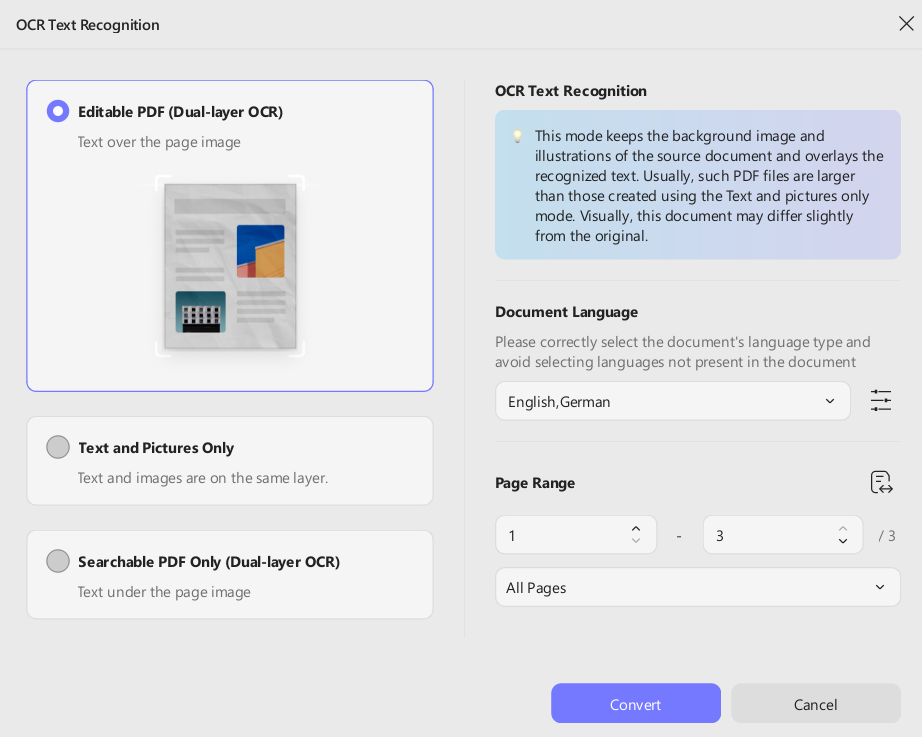
In the OCR function, UPDF offers three OCR modes, i.e.:
Editable PDF (Dual-layer OCR)
Text and Pictures Only
Searchable PDF Only (Dual-layer OCR)
Besides that, if a document contains multiple languages, UPDF allows users to select multiple languages at once for more accurate recognition.
Compress PDF
In the compress PDF function, UPDF calculates and shows the estimated file size under different compression quality settings before actually compressing the PDF. This really helps in selecting the best compression quality. Many other tools simply compress the PDF without giving this info.
AI Assistant
UPDF AI assistant is no less than a real-world assistant. It can summarize, translate, explain, chat, and do a lot more. What shocked me was that it can translate an entire PDF to a different language with a preserved layout. Plus, its PDF to mind map generation feature is also helpful to visualize complex concepts.
Part 3: The Price of UPDF
If I create a list of top cost-friendly PDF editors, UPDF will be among the top 5. It offers the best rates and plans to suit all types of users, including individuals, enterprises, and the education sector.
Free Trial
UPDF offers a timeless free trial with access to most of its features. In UPDF’s free version/trial, we get:
Access to edit, annotate, protect, organize, compress, and PDF form features with trial watermarks added.
2 files per day conversion.
1GB cloud storage with a 10MB max file size limit.
100 questions and 5 files analysis with the AI assistant.
When I first used UPDF, I didn’t start with its Pro version. I used its free trial, tested out its features, and then made the purchase. I would recommend the same to you.
Yearly Plan
UPDF offers three types ofyearly plans for its users:
UPDF Yearly Plan
Type
Offerings
Individual
Access to all UPDF’s core features
10GB cloud storage
Enterprise
Access to all UPDF’s features
10GB cloud storage
Flexible license management dashboard
Dedicated 24/7 enterprise support
Education
Access to all UPDF’s features
110-120GB cloud storage
Flexible license management dashboard
Dedicated 24/7 support
Lifetime Plan
This is my favorite. Instead of feeling trapped in a subscription model, I was able to secure UPDF for life with its lifetime plan, which includes forever-free updates to new versions.
UPDF Lifetime Plan
Type
Offerings
Individual
Access to all UPDF’s core features
102GB cloud storage
Enterprise
Access to all UPDF’s features
20GB cloud storage
Flexible license management dashboard
Dedicated 24/7 enterprise support
UPDF AI Assistant
UPDF’s AI assistant is also cost-friendly like UPDF Pro. Its offerings for different types of users include:
UPDF AI Assistant
Type
Offerings
Individual
Access to all UPDF AI features
100GB cloud storage
Enterprise
Access to all UPDF AI features
100GB cloud storage
Flexible user management dashboard
Dedicated 24/7 enterprise support
Education
Access to all UPDF AI features
100GB cloud storage
Part 4: Other User Reviews on UPDF
Since the title of my article is “UPDF Review”, I don’t feel right to just share my views on the tool. So, I checked out what other users are saying about it and found some similar thoughts.
UPDF rating in popular review sites is:
Capterra: 4.6/5
G2: 4.5/5
Trustpilot: 3.5/5
Here are some of the reviews shared by different users:
Khurram A., Small Business (50 or fewer employees) 4.5/5 G2
“I’ve tried numerous PDF editors, and UPDF stands out for its perfect balance of powerful features and incredible ease of use. The interface is clean, modern, and intuitive. I was able to open it and start editing, annotating, and converting documents immediately without watching any tutorials.”
Josh C., Enterprise (>1000 employees) 5/5 G2
“What I value most is the ability to apply OCR to multiple documents simultaneously, as well as the ease of editing PDF files, modifying their orientation, and adding elements. These functions are the ones I use the most in my work and have allowed me to save a lot of time compared to other free alternatives.”
Maya M., Small Business (50 or fewer employees) 4.5/5 G2
“Straightforward installation and setup which had no struggle with. I love it for easier selection, inserting, splitting split documents. Incredible to easily combine multiple PDF documents as a team for our effective projects documents. Impressive with signing and sending documents to clients directly from the software.”
Part 5: Pros and Cons of UPDF
Pros
All-in-one user-friendly interface
Top-notch features to handle every aspect of PDFs
Affordable pricing plans
Strong cross-platform use (Windows/Mac/iOS/Android)
Exceptional AI features
Cons
Limited free version
No cloud editing
Conclusion
When I compare UPDF with other PDF editors, including Adobe Acrobat Pro, I love the intuitive interface, extensive features, and exceptional AI assistant. Everything I need related to PDFs is available in UPDF, and that’s what other users have to say.
So, why waste your time and money on other tools when UPDF has got it all at the most affordable rate? I will wrap up by recommending you start with UPDF’s free trial and see for yourself its powerful features.
Why You Can Trust My Review?
I have been using UPDF for months now. I have almost tested all its features on both desktops and smartphones. So, everything that I have mentioned is tested and verified based on my real experience.
Learn how Dechecker, an AI checker, transforms content verification in the digital era.
Teachers and colleges are having a tough time with all the essays and homework popping up that were written by AI. Dechecker is like an honest ref, helping teachers see when a student’s usual writing doesn’t match the work they handed in. This helps keep things fair in school, but still lets students try out AI tools for learning in a good way.
It’s really key to know if something’s written by a person or cooked up by AI. Dechecker has a tool for this, helping writers, teachers, and businesses keep things authentic and professional.
The Importance of Detecting AI-Generated Text
Why AI Detection Is Becoming Essential
AI writing tools such as ChatGPT, GPT-4, Claude, and Gemini have popped up, making it simpler than ever to quickly create content that looks good. These tools help get things done faster, but they also cause problems for companies that care about being original and trustworthy.
Dechecker’sAI Checker provides an effective solution by analyzing text patterns and identifying sections likely generated by AI, helping users make informed decisions about content usage.
Protecting Trust and Accountability
Keeping trust with people is super important at work and in school. When clients, readers, or students believe what you share is real, it builds stronger bonds and shows you’re trustworthy. Dechecker’s AI Checker helps with this by giving clear results that are simple to understand and use with what you’re already doing.
How Dechecker Detects AI-Generated Content
Advanced Linguistic Analysis
Dechecker looks at small clues in writing to tell if it’s from a human or AI. People tend to write with different sentence structures, use sayings, and make little mistakes. AI writing is usually very consistent, logical, and doesn’t have much personality. Dechecker uses fancy language models to spot these differences well.
Real-Time Detection for Efficiency
Speed is crucial in content production. Dechecker gives you the lowdown in real time – just paste or upload stuff and get immediate feedback. This is super handy for marketing folks, editors, and content creators who need to double-check material ASAP without holding up the works.
Incorporating AI Checker Into Daily Workflows
Strengthening Editorial Quality
Dechecker looks at small text clues that tell apart human writing from AI. People tend to mix up their sentences, use slang, and even make little mistakes. AI, though, usually writes in a very steady, logical, and blah way. Dechecker uses fancy language models to spot these differences right off the bat.
So, editorial teams can add a Dechecker to their process to make sure content meets standards. Editors can find AI-ish parts. This helps keep a human writing style, but still lets them use AI for ideas or drafts.
Supporting Professional Writing Standards
For organizations, consistent communication standards are essential. Using Dechecker, teams can validate reports, marketing content, and training materials to ensure clarity and originality. By identifying AI-influenced patterns, the AI Checker helps uphold high-quality writing practices across departments.
Practical Applications of Dechecker
Academic and Research Integrity
AI’s getting more common for writing help among students and researchers, which can make grading tough. Dechecker gives teachers a clear way to see if turned-in work meets the grade’s standards. It pushes students to use AI in a smart way and keeps things fair when it comes to grading.
Enhancing SEO and Content Marketing
Websites and marketers want content that feels genuine and grabs people’s attention. This helps them stay visible in search results and keeps readers returning. If they use too much AI-written material, things might get repetitive and sound odd, which could lower their search ranking. With Dechecker, teams can ensure their content sounds human, is easy to read, keeps people interested, and improves their search ranking.
Combining AI Checker With Audio Tools for Streamlined Content Creation
Integrating Voice-to-Text Workflows
Modern content creation often begins with spoken ideas or interviews that need to be transcribed. In these cases, anaudio to text converter can transform audio recordings into editable text. Using Dechecker with this lets creators fix up what’s been written out and make sure it’s real, so the end result is both creative and legit.
Improving Writing Through AI Detection Insights
Identifying Over-Reliance on AI
When Dechecker flags sections as likely AI-generated, writers gain valuable feedback about style and structure. This insight helps them adjust phrasing, vary sentence length, and add nuanced reasoning to produce content that reflects a unique human voice.
Encouraging Ethical AI Use
Websites and marketing folks want content that’s not only good but also ranks high on search engines and keeps readers interested. If they lean too heavily on AI-written stuff, things can sound repetitive or just plain strange, which isn’t good for search results. A tool that checks AI content can help teams keep their writing sounding human, easy to read, and more noticeable in searches.
Instead of saying no to AI, these checkers show how to use it well. Writers can use AI to brainstorm, summarize, or draft content, but being upfront about it is always a good idea. That way, the AI checker turns into a tool that promotes openness about how content is made, which can build trust with readers.
Why Choose Dechecker Over Other AI Detection Tools
Focused on Practicality and Reliability
Many AI detection tools offer broad, theoretical predictions. Dechecker focuses on actionable insights for real-world applications such as editorial review, academic assessment, and professional writing verification. Its clear interface and immediate results make it practical for both beginners and experienced professionals.
Staying Updated With Evolving AI Models
AI language things keep getting better, so ways to catch them need to keep up too. Dechecker is always tweaking how it works to stay on top of what new AI can do. That way, people using it get good info all the time. It can be counted on to see if content is real or not.
Conclusion: Building a Transparent and Responsible Content Ecosystem
As language models get better, checkers need to up their game too. Dechecker is always tweaking its stuff to keep up with new AI tricks, so users get good, up-to-date results. This makes it a tool you can count on for your content plans down the road.
Dechecker gives writers, teachers, and other pros the backup they need when dealing with AI content. By adding a checker to their process, they can keep things real, make their content better, and stick to the rules.
Also, when used with handy tools like audio converters, Dechecker helps make content creation smooth, reliable, and quick. It works well in today’s digital world.
Learn how the right low-code solution can close the skills gap.
As businesses around the globe strive to stay competitive in a digital era, the demand for software developers is skyrocketing. Gartner reports that enterprise app growth is outstripping internal IT capacity by a factor of five.
Unfortunately, this has left developers overworked and in short supply, leading to gaps in innovation and stunting many companies’ growth strategies.
To bridge the skills gap and drive digital transformation, low-code solutions are becoming increasingly popular among organizations.
With low code, organizations can overcome staffing challenges, accelerate business productivity, meet changing customer needs faster and build apps at a fraction of the cost of traditional development. A low-code application platform can reduce development time by 90%.
What Must Be Done To Close The Skills Gap?
Undoubtedly, the demand for software developers is putting a strain on many organizations. The skills gap is real, and it’s harming innovation and growth. Low-code solutions offer a way for businesses to overcome these challenges and stay competitive in the digital era.
Low-code development platforms help to optimize resource allocation and boost revenue. With these platforms, companies can quickly adapt to changing market demands and customize their offerings to meet customer needs.
The benefit is that non-technical employees can develop business apps while the IT department focuses on more complex digital issues.
The platforms have built-in security features that make it easy for users to build secure applications, eliminating the need for risky tools. According to Gartner, low-code and no-code technologies are expected to triple in usage by 2025, with a projected 70% of all new apps being developed using these technologies.
How Do Low-Code Solutions Help Fight The Skills Gap?
Empower Non-Technical Employees
Low-code platforms empower non-developers to upskill in a digital world. They can use workflow management tools to develop applications without writing code. The technology increases employees’ technical skills and expands a company’s pool of developers. With more developers, a company can accelerate its digital transformation.
The rapid pace of technological advancement has made it clear that companies can’t afford to develop a single app for months. Software has a short shelf life (3-5 years), so companies that take months to build solutions will fail in a competitive market. Low code ensures applications are developed when they are needed.
Businesses must constantly adapt and evolve to stay competitive in the digital age. However, they need new and innovative business solutions to achieve rapid growth and success.
Unfortunately, IT departments are already burdened with managing computer infrastructure and building critical applications, leaving little room for new requests. As a result, many businesses struggle to keep up with the pace of innovation and risk falling behind their competitors.
Low-code platforms allow business users with basic technical knowledge to build applications tailored to their specific needs.
Organizations Produce Custom Solutions
Traditional app development is a painstakingly slow process that often takes months. Low-code platforms accelerate app development with their visually intuitive interfaces.
Non-developers use templates and visual modelling tools to build applications. They can customize and scale the apps to fit the unique requirements of their organizations.
Low-code platforms empower companies to develop customized applications that meet their business requirements. Unlike mass-market solutions that often fall short, these apps can be easily updated, scaled, and tailored to improve functionality.
Moreover, because these apps are developed by those who use them, they are more efficient and productive, resulting in better overall performance.
Companies must have innovative business models and optimize workflows to remain successful in a fast-paced world. Low-code development platforms are helping businesses to transform at the speed of technology.
Let’s look at the top low-code trends for the coming years.
Increased demand for low-code solutions: By 2026, the low-code market will be worth about $46 billion. The technology’s popularity will rise as more companies adopt low-code and business experts partake in solution delivery.
More SaaS tools will have low-code platforms: A few years ago, most organizations used different tools for different business functions. Teams were siloed, and collaboration wasn’t happening. However, modern SaaS solutions incorporate low-code capabilities to enable users to build the applications they need to boost performance.
Democratization of app development: Gartner predicts that by 2026, non-developers will make up 80% of low-code users, up from 60% in 2021. Companies that use citizen developers will slash costs significantly and boost productivity.
Simplified data analysis: Data analysis is vital as it helps businesses acquire accurate information suitable for developing marketing strategies, maximizing new opportunities, and realigning the company’s vision. However, most organizations generate large volumes of unstructured data (80%-90%). Low code tools simplify data collection, testing, analysis, and more. They can also integrate with APIs to aggregate data from different sources.
The WFH era brought the need for digital transformation to the forefront, but many IT teams are feeling the pinch. Companies risk getting left behind without the right technology, resources, or personnel.
Fortunately, low-code development platforms are here to save the day! These platforms allow non-technical employees to build customized digital solutions in a jiffy, keeping businesses ahead of the curve and leaving their competitors in the dust.
Low-code development platforms relieve the pressure on IT teams and empower app users to build the necessary solutions.
No more getting left behind in the digital race! Low code enables organizations of all sizes to adapt to changing market conditions and transform digitally without relying on software developers. Get ready to leapfrog the competition with low-code!
Learn how to use image-to-image AI to create stunning visuals in this post.
You know what’s interesting? Creating great images doesn’t actually require design skills. Think about those striking visuals you scroll past on Instagram, the creative pics your friends post, or the clean product shots you see while shopping online.
What if you could make those yourself — in seconds — just by starting with a photo you already have sitting in your camera roll? That’s essentially what image-to-image AI does. It takes whatever picture you bring in and reshapes it into something new, guided mostly by the idea in your head rather than technical skill. No complicated software, no learning curve.
The easiest way I’ve found is with WonderShare Media.io. Just upload your picture, tell it in plain words what you want (like “turn this selfie into a cartoon”), and it’ll generate it for you on the spot. Seriously, it’s that simple. Read on now to know how this amazing AI tool helps you!
What Is Image-to-Image AI & Why Creators Love It?
Image-to-image AI works a bit differently from text-only generation. You begin by uploading a photo you want to build on, then you give the AI art generator a short prompt describing the style or direction you’re imagining. The system redraws the picture with those instructions in mind while keeping the original layout intact.
This combination of “your image + your description” is exactly why so many creators lean toward this method rather than pure text-to-image tools. It gives you more control, more accuracy, and far fewer surprises.
Maybe you want to keep the pose from your selfie, but see yourself drawn in an anime style. Or you want a product shot turned into a clean, hand-drawn sketch for a brand campaign. Maybe you just want to reimagine a landscape as a bold oil painting.
In all these cases, image-to-image lets you AI generate image variations that feel purposeful instead of random—and often much more creative than what you’d get starting from scratch. It’s the perfect tool for iterative, controlled creativity. Now, let’s see why Media.io is the ideal platform to put this power into practice.
Why Media.io Is the Best Image-to-Image AI Generator for Creators
In the crowded field of AI art tools, Media.io AI Image to Image stands out by being part of something bigger: the most intelligent all-in-one platform for multimodal AI creation. It’s not just an isolated image tool—it’s an integrated hub where image-to-image AI seamlessly connects with video, audio, and design workflows, powered by a deep understanding of large AI models.
What makes it the top choice for creators?
“Image + Prompt” Precision: Skip the guesswork. Upload a photo, add a prompt, and Media.io’s specialised models—whether photorealistic or anime—reshape it while keeping the original structure intact, and they do it fast.
5000+ Templates to Spark Ideas: Not sure where to start? Media.io’s library of trending templates gives you instant, professional-looking options for social posts, marketing visuals, or personal projects.
A Unified AI Ecosystem: Media.io goes beyond still images. You can generate music, restyle videos, or enhance audio on the same platform, keeping everything in one workflow.
Built-In Pro Tools: Once your image is generated, refine it without switching apps—upscale it, remove the background, or expand the canvas using intuitive tools suited for any skill level.
Explore Community Inspiration: Browse user-submitted creations and trending templates in one place. See a style you like? Open it and generate a similar video instantly, with themed sections updated as trends evolve.
For creators who demand control, quality, and a truly streamlined workflow from idea to final asset, Media.io is the definitive platform that grows with your vision.
How to Use Media’s Image to Image AI (Complete Tutorial)
Using Media.io’s image-to-image AI is surprisingly simple. You can master the entire process in about a minute. Just follow the three easy steps below to start transforming your images instantly.
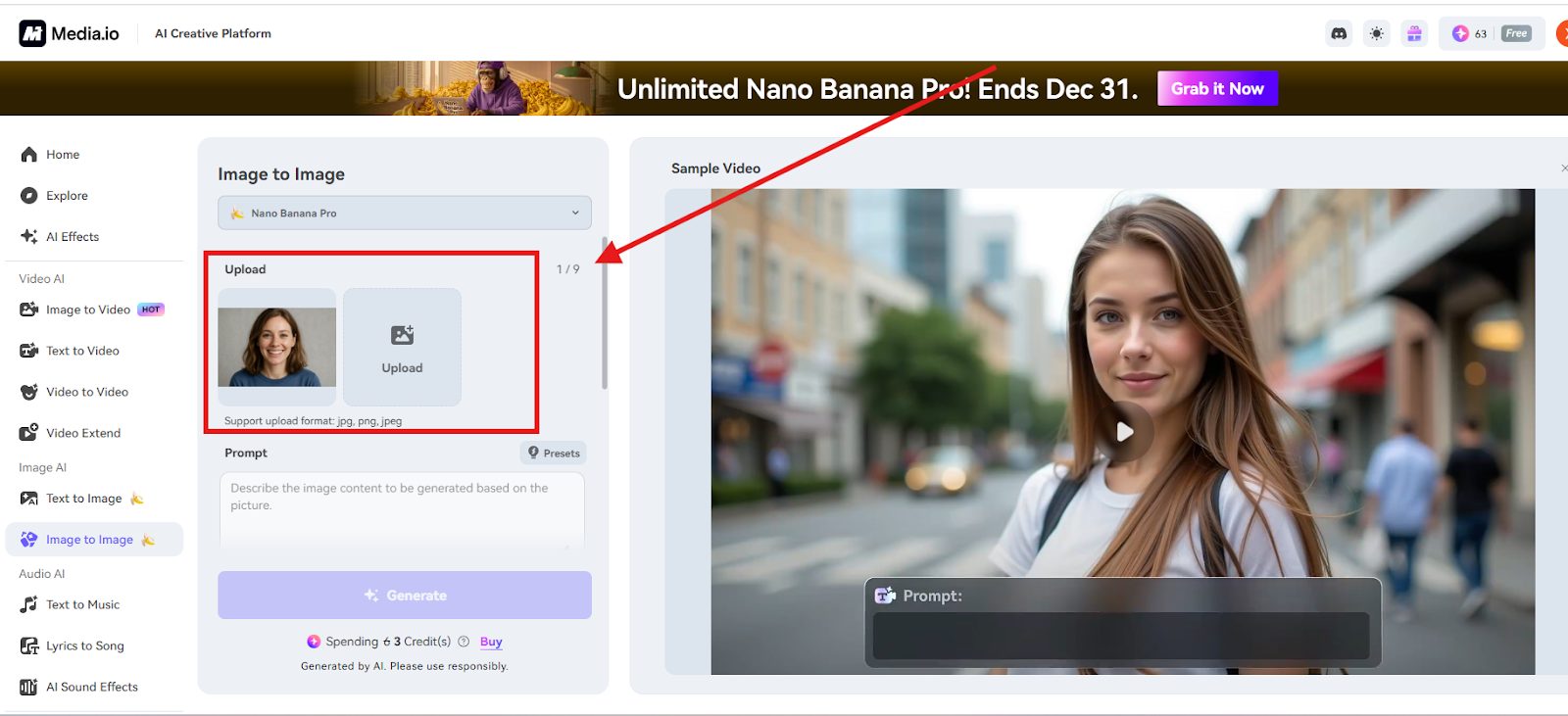
Step 1: Upload Your Image
The operation process is very simple. Just upload files(JPG, PNG, and JPEG files) from the device. And you can bring in up to nine images at once if you’re working in batches. After they load, take a second to adjust the framing or crop. Little tweaks here often make the final result cleaner.
Step 2: Add a Text Prompt to Refine Your Style
This is where you guide the creative outcome. In the prompt box, describe your desired style, atmosphere, colors, or lighting in detail. Unlike a basic filter, this text instruction gives you precise control. You can then select a specialized AI model (like Nano Banana Pro for advanced art) and set your preferred Aspect Ratio.
This powerful “image + prompt” combination ensures the AI creation process is focused and intentional, making Media.io a remarkably capable and free-to-start AI image generator.
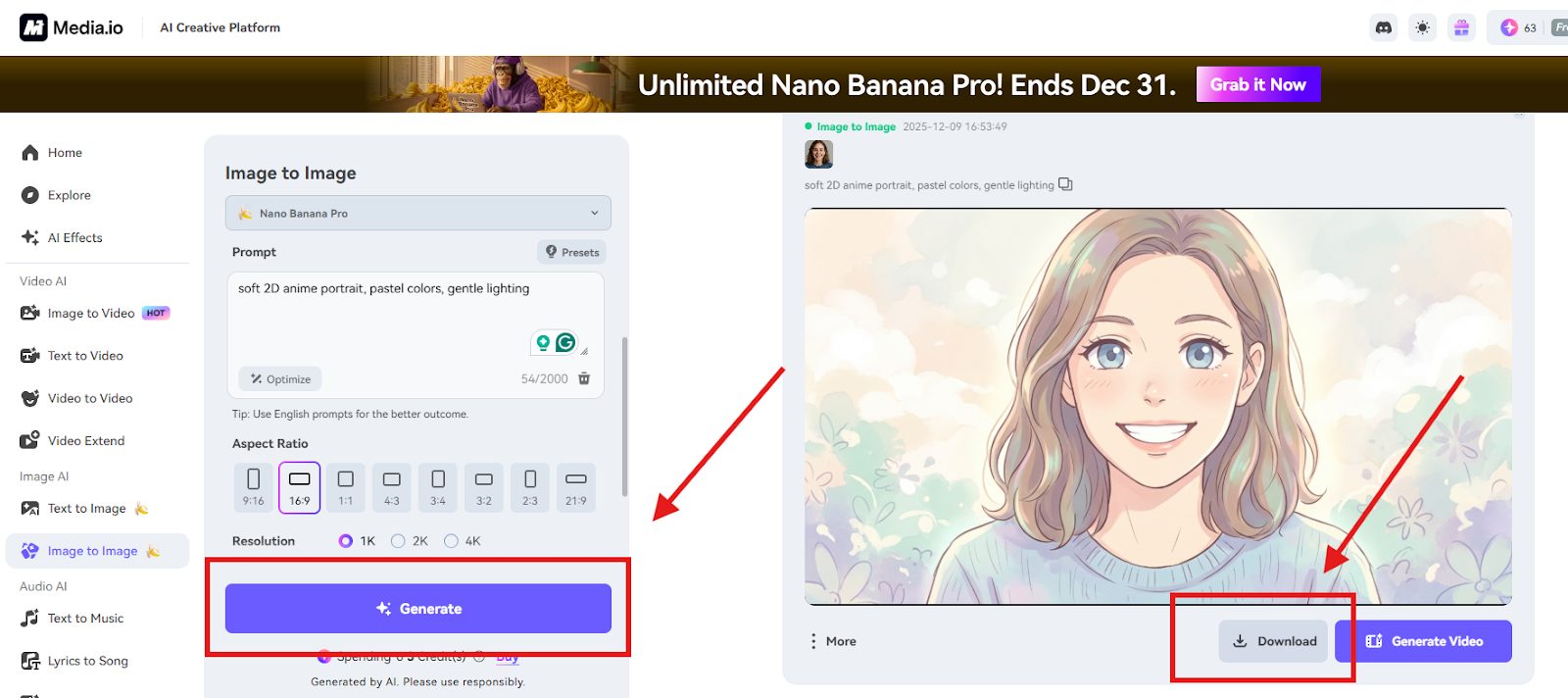
Step 3: Generate & Download Your Styled Image
Click Generate, and the AI gets to work. It usually finishes in a few seconds, sometimes faster than you expect.
Once the new version is ready, you can immediately download the picture or click “Generate Video” to create a short clip.
What Can You Do with Media’s Image-to-Image AI?
The magic of image-to-image AI isn’t just in filters—it’s in how it lets you rethink your visuals entirely. Here are a few practical ways creators use it today.
Create Professional Portraits
Turn a casual selfie into something more polished: a clean headshot, an anime avatar, or even a 3D-style character. Media.io can use AI to generate image variations in almost any style you describe.
Upload a photo, type the style you want—maybe “sketched portrait,” maybe “cyberpunk character”—and the tool builds a version that looks intentional and personally branded.
Transform Product Images for E-Commerce
If you run an online shop, visuals can make or break how people perceive your brand. Media.io’s AI image generator helps you restyle basic product photos into line-art icons, cartoon renditions, or sleek 3D graphics.
You can even switch into themed zones like “Commercial” or “Christmas” so your designs fit the season or campaign. And when you’re done, built-in tools help clean up the background or sharpen the resolution.
Make Artistic Variations of Existing Photos
Unleash your creativity by transforming any photo into a unique artwork. With Media.io’s AI art generator, you can apply styles like pixel art, Ghibli-inspired watercolor, or futuristic cyberpunk in just one click. This image-to-image process lets you maintain visual consistency across your social feeds or personal brand.
Add a few words describing the atmosphere or details you want, and the AI generates variations that sit nicely together. It’s great for building a consistent visual theme—your social feed, a personal project, even a moodboard that actually looks cohesive.
Final Thoughts — Start Creating Better Images with Image-to-Image AI
Image-to-image AI gives you room to experiment without making the process complicated. You still guide the direction, but the system handles the part that usually takes the longest. Media.io brings all the necessary tools together—prompt-based control, multiple models, quick generation—so you don’t have to juggle different platforms to finish one idea.
If you’re curious where your photos could go with a little help, this is an easy place to begin. Give Media.io a try and see what kind of visuals you end up creating.
In this post, I will answer the question – is AI in breach detection a threat or safeguard or both?
With the advancement of technology, AI has entered the board as both a powerful ally and a potential wildcard. Moreover, security threats are increasing and becoming harder to detect as attackers find new ways to commit cyber crimes.
While traditional pentesting and vulnerability scanning methods are good at only detecting these threats, they are not able to identify and mitigate sophisticated security threats.
And that’s the reason Artificial Intelligence (AI) and Machine Learning (ML) are being utilized in the cybersecurity industry to identify security threats in real-time. This helps organizations to strengthen their defense against all kinds of fraud and threats.
So where does the truth lie? Is AI the ultimate safeguard in breach detection, or are we going to consider it as a double-edged sword?
Let’s discover this paradox.
Why We Need AI in Modern Threat Detection?
Cybersecurity is a war fought at machine speed. Attackers are deploying the latest methodologies and automation, including polymorphic malware and AI-driven social engineering, to bypass legacy defenses. Meanwhile, developers and security experts are wasting their efforts with a huge number of false positives. This means that human analysts can’t keep pace.
Here, let’s welcome AI – Artificial Intelligence.
AI has become a cornerstone of modern cybersecurity, empowering teams to tackle a wide range of threats with speed and precision. By automating accurate incident response processes, AI helps organizations keep pace with the fast-changing threat landscape and efficiently manage massive streams of threat intelligence.
An AI-powered vulnerability scanner is built to counter evolving attack tactics that are often hard to identify and neutralize, especially those targeting expanding vectors like IoT devices, cloud environments, and mobile platforms. The prime objective is to manage the growing scale and speed of cyberattacks, with a strong focus on combating ransomware.
If we look at the example, unlike rule-based systems that rely on predefined signatures, AI learns from behaviour. It can spot subtle deviations, like a user logging in from an unusual location at 3 am, or a server suddenly sending gigabytes of data to an unknown IP, that might slip past traditional firewalls and SIEMs.
In a nutshell, AI doesn’t just react, it anticipates.
How AI is Revolutionizing Breach Detection?
Rapid Real-Time Breach Detection
When we talk about traditional scanners or breach detection tools, they generally function on predefined patterns that lack the adaptive dynamic nature of modern cyber attacks. On the other hand, AI-powered detection tools, especially ML models, learn from vast datasets and can instantly flag anomalies that deviate from baseline behavior.
AI helps you enable faster detection and pattern recognition, and reduce alert fatigue. In fact, report shows that, 63% of security breaches are detected more quickly when AI is integrated into cybersecurity systems.
Adaptive Threat Intelligence
Having said that earlier, AI understands human patterns and learns from them. With a rise of new attack vectors, AI-driven vulnerability detection tools adjust in near real-time and help you mitigate them.
This adaptability in the digital world is a game-changer with zero-day detection, threat hunting, and automated remediation.
As a result, it gives you a more responsive, resilient, and context-aware security posture.
Phishing and Social Engineering Defense
AI now detects sophisticated phishing emails by analyzing linguistic patterns, sender behavior, and embedded links. NLP – Natural Language Processing models can even identify “spear phishing” attempts that mimic a CEO’s writing style with utmost accuracy.
In 2023, organizations adopting AI-driven security and automation reported significantly lower breach costs. IBM highlighted that firms using AI and automation reduced breach costs by an average of $1.76 million—a savings that emphasises not only efficiency but organizational survival. As noted in a comprehensive overview of phishing attack statistics, these trends underscore why advanced AI is increasingly vital for cybersecurity.
AI as a Threat: When the Tools Become Weapons
Let’s consider the other side of AI in threat detection. It’s also a tool for hackers, insiders, and adversarial AIs.
Blind Spots in Training Data
AI is only as good as the data it learns from. If training datasets are biased or unbalanced, AI can either miss key threats or incorrectly flag benign behavior.
This becomes very dangerous when:
False negatives allow actual breaches to pass undetected.
False positives overwhelm security teams, leading to alert fatigue.
In fact, the principle “garbage in, garbage out” is true in AI security.
Model Poisoning and Evasion
Here’s the twist: cybercriminals are using AI too.
Attackers can “poison” AI training data to corrupt detection models. For example, flooding a system with fake benign traffic to make malicious activity appear normal. Or using evasion techniques to slightly alter malware code so it bypasses AI-based detection—like a digital chameleon.
Automation of Attacks
AI doesn’t care who’s using it. Tools that automate attack discovery, credential stuffing, or lateral movement are powered by the same algorithms defenders use. This means hackers can scale their operations and evade traditional security at unprecedented speeds.
So, Is AI a Threat or a Safeguard?
The answer is not simply Yes or No. AI is a force multiplier, amplifying both defense and offense. Its value depends entirely on how we deploy, monitor, and govern it.
Think of AI like fire: used wisely, it heats homes and powers engines. Used recklessly, it burns everything down.
Let’s follow some principles while harnessing AI without falling into its traps.
Adopt a “Human-in-the-Loop” Model
AI should assist, not replace. You should keep skilled security analysts in the decision chain, especially for high-risk alerts. Use AI to filter noise, but let humans interpret intent and context.
Invest in Explainable AI (XAI)
Black-box models are dangerous. If an AI flags a breach but can’t explain why, how can you trust it? Demand transparency. Use models that provide audit trails and confidence scores.
Secure the AI Itself
Your AI-powered tools are the prime targets for attacks. Protect training data, model integrity, and inference pipelines with zero-trust principles. Monitor for signs of model tampering or data poisoning.
Combine AI with Other Defense Mechanisms
Don’t rely too heaviliy on AI. Layered security approaches, such as Zero Trust architecture, MFA, MCP Gateways, and network segmentation, should coexist with AI-driven breach detection.
Final Thoughts
In a nutshell, AI in breach detection is all about balance. It’s not a question of threat vs safeguard. With the right checks and guardrails, AI can transform cybersecurity from reactive to predictive, helping teams identify breaches before they become headlines.
But like any powerful tool, its impact depends on how we wield it.
So, ask yourself: Is your AI strategy building resilience, or just buying time?