



Read on for the TunnelBear VPN review. In this post, we will outline its benefits, key features, pricing details, support information, and more.
In today’s digital age — with increasing concerns about privacy, data leaks, geo-restricted content, ISP throttling, and public WiFi vulnerabilities — a VPN (Virtual Private Network) remains one of the most practical tools many users adopt.
Whether you want to protect sensitive data while using public WiFi, avoid ISP or network monitoring, access content or services unavailable in your region, or simply browse more anonymously, a VPN can help. But not all VPNs are equal: ease of use, security, performance, cost, and device support vary widely.
That’s where TunnelBear VPN comes in: it is among the more user-friendly VPNs on the market. In this review, we’ll explore exactly what TunnelBear offers — its features, pricing, strengths and weaknesses, how it works, and whether it’s a good fit depending on your needs. We’ll also compare it to alternatives and answer common FAQs.
Table of Contents
What Is TunnelBear VPN?
TunnelBear VPN is a consumer-oriented VPN service that enables users to create an encrypted “tunnel” between their device and the internet, masking their IP address and protecting their online traffic from eavesdroppers. The service was originally launched in 2011.
The company behind it is based in Canada. Since 2018, TunnelBear has been owned by McAfee.The core purpose of TunnelBear VPN is privacy and security — protecting user traffic over unsecured networks (e.g. public WiFi), hiding IP addresses from websites and trackers, preventing ISPs or network administrators from snooping on browsing activity — and enabling users to bypass geo-restrictions, content blocks, or network censorship.
What sets TunnelBear apart is its simplicity and accessibility, especially for beginners or non-technical users. Its interface is designed to be intuitive and friendly, making it easy for almost anyone to install and start using.

How Does TunnelBear VPN Work?
At its core, TunnelBear works like any VPN: when you connect, it routes your internet traffic through one of its remote servers and encrypts the data. This masks your real IP address and makes it much harder for outside parties — ISPs, network administrators, or potential eavesdroppers — to see what you’re doing online.
Protocol & Encryption
TunnelBear supports industry-standard security protocols, including WireGuard, OpenVPN, and IKEv2. It uses AES-256 encryption by default — one of the strongest symmetric encryption standards currently in use.
Operational Flow (simplified)
- The user opens the TunnelBear app (available on Windows, Mac, Android, iOS, or via browser extension).
- The user selects a server location from the list (e.g., a country).
- User toggles the “connect” switch. The app establishes an encrypted connection to the chosen remote server.
- Once connected, all outgoing and incoming internet traffic is routed through the VPN server — your real IP address is hidden, and data is encrypted.
- If the connection drops, TunnelBear’s “kill-switch” (named “VigilantBear”) can cut the internet, preventing leaks of unprotected traffic (on supported platforms).
This process typically takes just a few seconds and, for most users, requires no technical configuration beyond selecting a server and connecting. That makes TunnelBear especially friendly for those new to VPNs, or those who simply want straightforward browsing privacy without dealing with complex settings.
How to Download, Install and Use TunnelBear VPN
TunnelBear offers native apps for:
- Windows
- macOS
- iOS and Android
- Browser extensions for Chrome, Firefox, Edge (some past support for Opera)
Historically, there was limited or no direct support for Linux, routers, gaming consoles, or smart TVs.
Installation / Setup — Typical Steps
- Go to the official TunnelBear website or your device’s app store (Google Play, Apple App Store).
- Download and install the app.
- Create an account (or log in if you already have one).
- Choose a server location from the list of countries.
- Toggle the connect switch — the app will establish an encrypted VPN connection.
- Optionally adjust settings: Some platforms support additional features, such as split tunneling (available on Android and Windows), a kill switch, etc.
Free Trial / Demo / Free Plan
TunnelBear offers a free plan which gives you 2 GB of data per month, allowing you to test the service before purchasing a subscription. There’s no traditional “money-back guarantee” for paid plans: TunnelBear expects users to rely on the free plan to try before buying.
Troubleshooting Tips (Common Issues)
- If the VPN fails to connect, try switching to a different server location. Due to server load or network restrictions, certain servers may fail; changing countries often helps.
- On slower connections or long-distance servers: speed may drop. Use a closer server to reduce latency and improve performance.
- If you use mobile data or public WiFi: ensure the “kill switch / VigilantBear” is enabled to prevent leaks when the connection drops.
TunnelBear VPN Features
Here’s a breakdown of TunnelBear’s core features and what they mean in practice.
Security / Privacy Features
- AES-256 Encryption — Provides strong encryption, ensuring data is unreadable to outsiders.
- Multiple Protocols (WireGuard, OpenVPN, IKEv2) — Offers flexibility depending on device and performance needs. WireGuard, for example, tends to offer better performance.
- No-Logs Policy — TunnelBear claims it doesn’t collect or store users’ browsing activity, IP addresses, or DNS queries.
- Independent Security Audits — TunnelBear undergoes regular, third-party audits to verify its privacy and security claims.
- Kill-Switch (VigilantBear) — When the VPN disconnects accidentally, the kill-switch prevents unencrypted traffic from leaking, maintaining privacy and safety.
- Obfuscation (GhostBear) — On some platforms, TunnelBear offers traffic obfuscation to make VPN traffic less detectable (useful on networks or governments that block VPNs).
Practical Benefit Example: If you connect to a public café WiFi in Lagos, TunnelBear encrypts your traffic and hides your real IP — meaning snoopers or network admins won’t see your passwords, browsing history, or which websites you visit.
Performance / Convenience Features
- Unlimited Simultaneous Device Connections — You can install and use TunnelBear on as many devices as you own under one subscription.
- User-Friendly Interface — The apps are simple, visually intuitive, and accessible to users with limited technical knowledge.
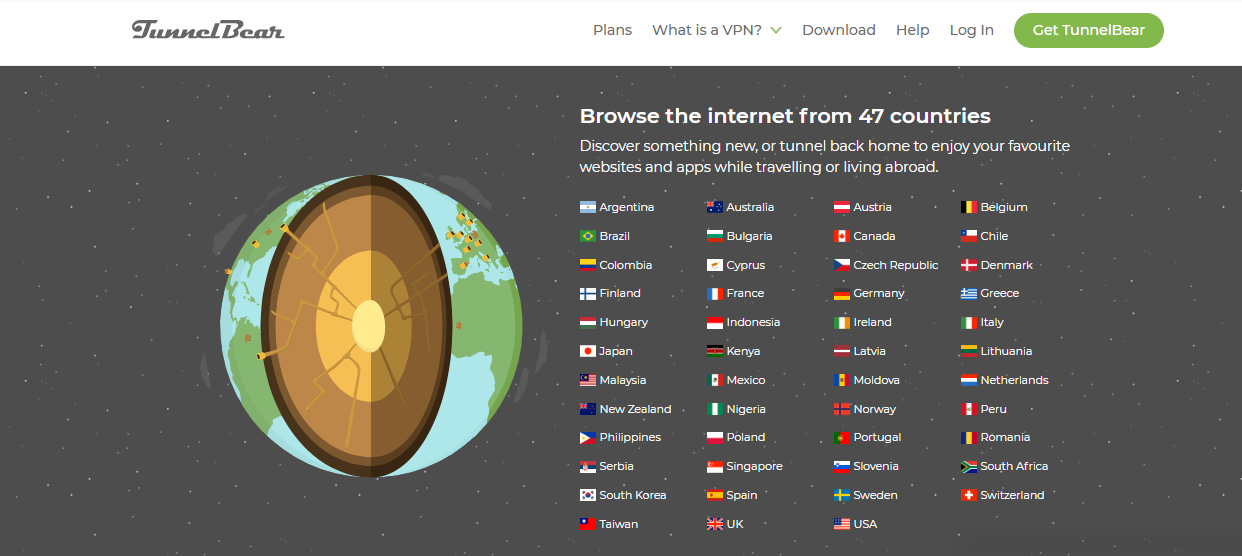
- Global Server Network (many countries) — TunnelBear supports servers in dozens of countries worldwide, giving you flexibility to choose your virtual location.
Because TunnelBear emphasizes ease of use over complexity, setting it up and toggling it on/off is often just a few clicks — ideal for users who want quick protection without tinkering with settings.
Content / Media Features (Streaming, Geo-Unblocking, P2P/Torrenting)
- Geo-Unblocking / Bypassing Censorship — Because you can appear to connect from a different country, TunnelBear can help access content or websites restricted in your real location.
- Torrenting / P2P Support (with caveats) — TunnelBear technically allows torrenting on its servers, but its performance, speed, and lack of specialized P2P/port-forwarding servers mean it’s not optimal for heavy torrent use.
Important Note on Streaming: TunnelBear is hit-or-miss when it comes to streaming. Some users report success in unblocking certain services, but many major streaming platforms frequently block TunnelBear.
Support Features
- Help Center / Email Support — TunnelBear offers support via an online knowledge base and email.
- Documentation & FAQs — The website includes guides, FAQs, and tutorials to help with installation and troubleshooting.
TunnelBear VPN Review – Pricing & Plans
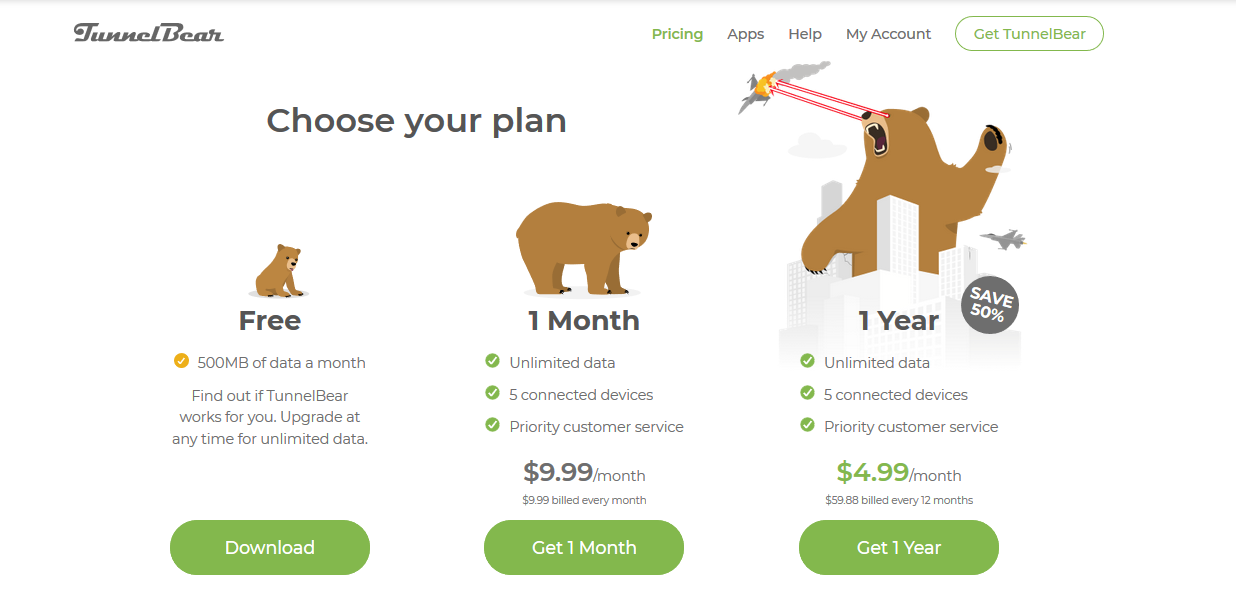
Here’s the pricing structure for TunnelBear as of 2025/2026:
| Plan | Billing Options / Details |
|---|---|
| Free | 2 GB/month data cap, full access to features (but limited data) |
| Unlimited (Paid) |
|
| Teams (Business) | For multiple users: ~USD $5.75 per user per month (with team-management tools & centralized billing) |
Note: Payment methods are limited to major credit/debit cards (Visa, Mastercard, American Express). According to recent info, PayPal or Bitcoin payment options are not supported — which may disappoint some privacy-focused users.
Also: There is no standard money-back guarantee. Refunds are considered on a case-by-case basis, so we recommend relying on the free plan to test the VPN before committing.
TunnelBear VPN Review – Review Ratings (My take + based on public reviews)
Here’s a breakdown of how TunnelBear performs across key dimensions (on a 1–5 scale):
- Features: 3.5 / 5 — It covers all core VPN needs (encryption, protocols, no-logs, kill switch, multi-device), but lacks advanced features found in premium VPNs (e.g., router support, dedicated streaming/torrent servers, multi-hop, ad blocking, etc.).
- Usability/Apps: 4.5/5 — Excellent for beginners. Apps are intuitive, installation is easy, and connection is typically a one-click affair.
- Pricing: 4/5 — Affordable compared to many VPNs, especially on multi-year plans; the free tier is useful for testing. But the monthly plan is relatively expensive considering limitations, and the lack of a refund policy adds risk.
- Security & Privacy: 4 / 5 — Strong encryption and protocols; audit history adds trust. However, as with any VPN, jurisdiction matters (in this case, Canada), and users should be aware of past audit findings.
- Support & Documentation: 3/5 — Basic support options are available (email and knowledge base), but there is no live chat or 24/7 support, which can be a downside if you need immediate assistance.
Overall — I’d give TunnelBear roughly 4 / 5 for casual users, and maybe 3 / 5 for power users or heavy streamers/torrent fans.
Pros & Cons
✅ Pros
- Very easy to use, even for beginners in VPN setup. Interface is intuitive and setup is straightforward.
- Offers a free plan (2GB/month) — good for trial or light use without commitment.
- Unlimited simultaneous device connections — you can protect all your devices under one subscription.
- Strong encryption and security protocols, including AES-256 and support for WireGuard, OpenVPN, IKEv2.
- No-logs policy with independent security audits, giving more transparency than many VPN providers.
- Kill-switch and obfuscation options (available on some platforms) — useful for maintaining privacy when connections drop or in restrictive networks.
❌ Cons
- Speeds can be inconsistent, and slower on long-distance or congested servers — not ideal for bandwidth-heavy tasks or stable streaming.
- Limited server network compared to major VPN providers; fewer servers in many regions, which could impact latency and availability.
- Streaming/unblocking performance is unreliable or inconsistent — sometimes fails for major streaming platforms.
- No router support, no smart TV or console support, limited Linux support — not ideal if you want to protect your entire home network or non-standard devices.
- No money-back guarantee — risk of paying without satisfaction.
- Support is limited — no phone support; only email and documentation.
 TunnelBear VPN
TunnelBear VPN Review – Frequently Asked Questions (FAQs)
Is TunnelBear VPN safe?
Yes — TunnelBear uses AES-256 encryption, supports modern protocols like WireGuard, and offers a kill-switch to prevent leaks. It also maintains a no-logs policy and publishes independent security audits. All these add up to a generally safe VPN service for everyday use.
Is TunnelBear VPN legit?
Yes — TunnelBear is a genuine, long-established VPN provider (since 2011), owned by McAfee since 2018, and has been vetted by third-party auditors for its privacy and security compliance.
Is TunnelBear free?
Partially: TunnelBear offers a free plan that includes 2 GB of data per month. That’s enough for light browsing or occasional secure sessions — but insufficient for heavy usage (streaming, frequent browsing, downloads).
Which servers, features, or settings are best?
- For best speed: pick a server geographically close to you (to reduce latency).
- For maximum privacy on unstable networks, enable the kill switch (VigilantBear) and, if needed, obfuscation (GhostBear) when on restrictive networks.
- For casual browsing: The Free plan may suffice. For regular use (streaming, frequent browsing, multiple devices): go for the Unlimited paid plan.
Can ISPs or authorities track my usage when using TunnelBear?
If you’re connected properly, your ISP or network administrator cannot see your browsing content or which websites you visit: traffic is encrypted and routed through TunnelBear’s servers, masking your actual IP address. However, as with any VPN, metadata leaks are possible if the VPN fails or disconnects — which makes using a kill switch advisable.
Is TunnelBear suitable for streaming, gaming, torrenting or business use?
- Streaming: Mixed. TunnelBear sometimes works to bypass geo-blocks — but success is inconsistent. If you rely heavily on Netflix, Disney+, Amazon Prime, etc., you may find TunnelBear unreliable.
- Gaming / Torrenting: Possible — but not ideal. The lack of specialized servers for P2P, limited performance, no router support, and inconsistent speeds may hinder these use cases.
- Business Use: TunnelBear offers a “Teams” plan with centralized billing and multiple users — but compared to enterprise-oriented VPNs, it remains quite basic.
TunnelBear Alternatives & Competitors
If you find TunnelBear limiting or want more advanced features, here are some popular alternatives — along with how they compare to TunnelBear:
NordVPN
Known for very fast speeds, a large server network, robust security, streaming-optimized servers, and more advanced features (multi-hop, ad blocking, dedicated IPs). Better for power users, streaming, torrenting, or global travel.
ExpressVPN
Offers top-tier performance, strong privacy, broad device support (including routers and smart TVs), and reliable unblocking of streaming platforms. More expensive, but more versatile.
Surfshark
More affordable long-term, with unlimited device support, good streaming support, and extra features like ad-blocking and malware protection. A balanced alternative for users wanting more than basic VPN.
Proton VPN
Good privacy focus and generous free/low-cost tiers. Often, a better choice is one that prioritizes “free or low cost + privacy.”
Each of these alternatives tends to offer greater speed, more advanced features, and more consistent streaming and global access compared to TunnelBear — but often at a higher price (or with a trade-off on simplicity).
Wrapping Up The TunnelBear VPN Review
In summary: TunnelBear VPN is a solid, beginner-friendly, and privacy-conscious VPN. It does exactly what you expect from a VPN — encrypts your traffic, hides your IP, and lets you browse somewhat anonymously — while being easy to set up and use across devices. The free plan is a nice way to test the waters without risk.
However, if you’re looking for top-tier performance, consistent streaming access, torrenting, full network coverage (including routers/smart TVs), or advanced features, TunnelBear may feel somewhat limited. The lack of a refund guarantee and inconsistent speeds are also notable downsides.
✅ Best suited for: casual users, people new to VPNs, basic privacy-conscious browsing, occasional VPN use, light streaming or geo-unblocking needs.
⚠️ Less ideal for: heavy streamers, gamers, frequent torrenters, those needing router/whole-home coverage, or power users wanting full control.
If you’re looking for a cost-effective, simple, and “set-it-and-forget-it” VPN, TunnelBear is worth considering. However, for more demanding tasks or long-term, heavy use, you may want to compare it with more advanced VPNs, such as NordVPN, ExpressVPN, Surfshark, or ProtonVPN.
INTERESTING POSTS
About the Author:

Chandra Palan is an Indian-born content writer, currently based in Australia with her husband and two kids. She is a passionate writer and has been writing for the past decade, covering topics ranging from technology, cybersecurity, data privacy and more. She currently works as a content writer for SecureBlitz.com, covering the latest cyber threats and trends. With her in-depth knowledge of the industry, she strives to deliver accurate and helpful advice to her readers.


