Brivo multi-site access control lets you manage every door across every location from one dashboard. Learn how it works, what it costs, and why it fits growing businesses.
Running a business across many locations gets messy fast. You hand out key cards at one office. Someone leaves, and you forget to turn theirs off. Then you drive two hours just to fix a single door. Most multi-location businesses hit this wall sooner or later. Cloud-based access control now solves most of these headaches.
And Brivo sits at the front of the pack. According to the business wire, Brivo secures over 330,000 doors and 300 million square feet of commercial property across 42 countries. The platform also supports more than 23 million credentialed users through 1,500+ channel partners.
So yes, Brivo multi-site access control works. It works well for small chains with three sites. It also scales for big enterprises running thousands of doors.
In this blog, we’ll break down how Brivo handles multiple locations, what features matter most, and where it fits your business.
Table of Contents
What Makes Multi-Site Security Different?
Securing one office is simple. You hire a security team, install locks, hand out badges, and call it a day. Securing 10, 50, or 500 sites plays by a different set of rules. The math changes. The risks multiply. And the tools you used for one building start to break. Multi-site security is not just single-site security times ten. It demands a whole different approach to visibility, control, and response time.
Most multi-site businesses start with the same mistake. They install a separate access control system at each new site. One building uses an old-school keypad. Another uses card readers from a different brand. A third runs on a cloud platform someone set up two years ago.
When systems don’t talk to each other, you can’t track patterns. You can’t tell if the same person tried to badge in at three locations after hours. You can’t pull one report for an audit. And if a site manager leaves without notice, their access might stay active for weeks.
Worse, your IT team now juggles three vendor contracts, three update schedules, and three sets of login credentials. Every extra system is another crack for something to slip through.
How Brivo’s Cloud Architecture Solves the Multi-Site Problem
Brivo built its platform on a simple idea: your security should live in the cloud, not in a dusty server closet at each site. That one design choice fixes most of the headaches we just talked about.
Because everything runs through the cloud, every site shares the same brain. You don’t patch together separate systems anymore. You manage them all at once, from anywhere.
Here’s how that plays out day to day:
One Dashboard, Every Location
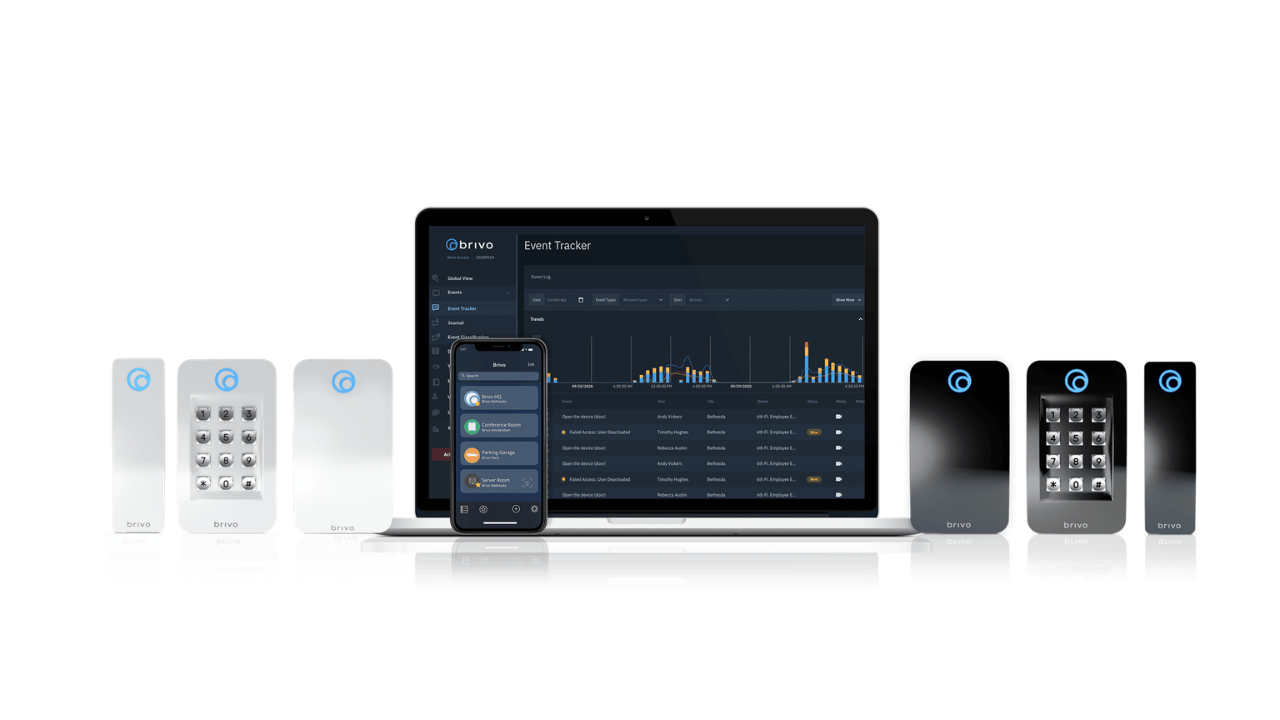
Brivo gives you one login for every site you run. Open the dashboard, and you see all your locations on a single screen. Your New York office, your Miami warehouse, your Denver retail shop, all in one view.
You can group sites by region, by team, or by building type. Need to add a new office? You plug in the hardware, connect it to the cloud, and it shows up in your dashboard in minutes. No new server. No new software. No third vendor contract. This is the core of Brivo multi-site access control. One view replaces ten. One policy replaces ten. Your team stops switching between systems and starts actually managing security.
Remote Management from Any Device
Brivo runs in your browser and on your phone. That means you can manage every door from wherever you are. Say it’s 9 PM and a vendor needs to get into your Austin warehouse. You don’t drive over. You don’t call a site manager. You open the Brivo app, tap unlock, and the door opens. The vendor walks in. You lock it back.
The same goes for user management. An employee joins your Phoenix team? Add them in 30 seconds. Someone quits in Chicago? Revoke access with one click, across all sites. No more scrambling to log into five different systems before the weekend hits. This kind of remote access control saves real hours every week. It also closes the offboarding gap that most multi-location businesses struggle with.
Real-Time Visibility and Centralized Audit Logs
Brivo logs every door event from every site, all in one place. Every badge swipe. Every denied entry. Every manual unlock. You see it as it happens. Want to know who entered your Dallas office after midnight last Tuesday? Type a quick search. The answer shows up in seconds.
You can also set alerts for anything that looks off. Forced doors, failed access attempts, after-hours entries. Brivo pings your phone the moment it happens. No more finding out about a break-in the next morning.
For audits and compliance, this is a game changer. Pull one report across all your sites in minutes instead of stitching data together for weeks. Your logs sit in one secure place, searchable and ready whenever you need them.
Core Brivo Features That Actually Matter for Multi-Site
Brivo packs a lot of features. But not all of them matter when you run multiple sites. Some are nice-to-haves for a single office. Others become critical once you cross two or three locations.
These five features do the heavy lifting for multi-site teams. Pay close attention to how each one scales:
Brivo Mobile Pass, One Credential Across Every Site
Brivo Mobile Pass turns your phone into your badge. You tap the app, and the door opens. No plastic card. No fob. No fumbling in your pocket. For multi-site businesses, this changes everything. Your regional manager lands in Seattle on Monday, then flies to Boston on Wednesday. She uses the same app at both offices. No extra cards. No temporary passes. No calls to IT.
If she loses her phone, you revoke her Mobile Pass in one click. If she gets a new phone, you send a fresh credential in seconds. Compare that to printing, shipping, and activating a physical card across four cities. Mobile Pass also saves real money. Plastic badges cost $3–$10 each. Across 500 employees at 20 sites, the math adds up fast.
Site-Level Administrators and Role-Based Permissions
Running every site yourself doesn’t scale. Brivo lets you hand off control to local managers without giving them the keys to the kingdom. Here’s how it works. You create a site for each location. Then you assign a site admin, like your Dallas facility manager. She can manage badges, schedules, and users for Dallas only. She can’t touch Houston or Phoenix. She can’t see their reports either.
You stay at the top level. You see everything. But day-to-day work gets pushed down to the people closest to it. Role-based permissions let you go even deeper. HR gets user management rights. IT gets integration access. Security gets live monitoring. Everyone sees what they need and nothing more. That’s how real enterprises run Brivo multi-site access control without chaos.
Unified Access + Video. Post Eagle Eye Networks Merger
Brivo merged with Eagle Eye Networks in 2024. That move pulled access control and video into one platform. Before, you had to click around two systems to piece together what happened at a door. Now you don’t. Someone badges into your Atlanta warehouse at 3 AM? The access log and the camera footage show up side by side. You see who entered, and you see the video at the same moment.
This saves hours during investigations. It also stops credential sharing cold. If a badge opens a door but the camera shows a stranger, you catch it immediately. For multi-site teams, this unified view is huge. You stop jumping between tabs. You stop calling two vendors. You get one story per event, across every location.
Visitor Management Across Facilities
Visitors create the biggest security holes in multi-site businesses. A vendor shows up at your Miami office. The receptionist hands them a paper log. Nobody at headquarters knows they’re there. Brivo fixes this with built-in visitor management. Hosts pre-register guests from the app. The guest gets a QR code or a temporary mobile pass before they arrive. They scan in, and the system logs everything, arrival time, host name, sites visited.
The same process works the same way at every location. Your Miami office runs it. Your Chicago office runs it. Your London office runs it. One policy, one experience, one clean audit trail.
Global Lockdown and Emergency Response
When something goes wrong, seconds matter. A break-in. An active threat. A severe weather warning. You need to lock doors fast, sometimes across multiple sites at once. Brivo has a one-tap lockdown feature. You hit the button, and every door at a chosen site locks down instantly. Want to lock down your entire company? One tap does that too.
You can also pre-build emergency plans. Lock all retail doors but keep warehouses open. Freeze all sites except the headquarters. Trigger a specific lockdown only during business hours. Set it up once, then run it with a single tap when you need it.
Brivo vs. Traditional On-Premise Access Control
For years, on-premise access control was the only option on the market. Businesses bought servers, installed them at each site, and paid IT teams to keep everything running. This setup worked fine for a single building. For companies running multiple sites, it quickly turned into a nightmare.
Here is how the two systems stack up side by side:
| Factor | Traditional On-Premise | Brivo Cloud |
| Upfront cost | You pay a high upfront cost for servers, wiring, and licenses at every site | You pay a low subscription fee and skip the big hardware bill |
| IT burden | Each site needs its own server and a dedicated person to maintain it | Brivo handles updates, patches, and uptime in the background |
| Scaling to new sites | Adding a new location takes several weeks or even months | A new site can go live in just a few days after you connect the hardware |
| Remote management | Remote access is limited and often requires a VPN or a site visit | You can manage every door from your phone or laptop anywhere |
| Software updates | Your team has to run manual updates at each location | Brivo pushes automatic updates across all sites instantly |
| Audit trail | Access logs stay scattered across separate systems | You get one unified log that covers every site you run |
| Downtime during outages | A local server crash can leave an entire site blind | Doors keep working during an outage, and logs sync once the internet returns |
| Integration with other tools | Integrations are painful and often locked to proprietary systems | Brivo offers an open API with 200+ ready-made integrations |
| Total cost over 5 years | Hardware refreshes, IT labor, and travel drive the cost higher every year | You pay a predictable subscription with no surprise bills down the line |
Final Thoughts
Running security across multiple sites used to be a painful puzzle. You needed separate systems, local servers, and a travel budget just to keep things working. Brivo multi-site access control changed all of that. It gives you one cloud platform that covers every location, every door, and every user from a single screen. For multi-location businesses, the benefits stack up fast. At Spotter Security, we have been helping Canadian businesses secure their buildings since 2004. We started as a small operation and grew into a national security integrator that serves companies and construction sites across Ontario and all of Canada. Our team brings decades of combined experience in security system design, installation, and support.
We have been an authorized Brivo dealer since 2008, which means we have worked with Brivo for over 17 years. During that time, we have installed hundreds of doors with Brivo access control systems across businesses of every size. We also install Eagle Eye Networks cameras, so you get the full unified package that combines access control and video surveillance in one system. If you are looking for a reliable Brivo partner in Canada, our team is ready to help. Contact Spotter Security today to book a free design session and get a custom quote for your business. We will walk you through how Brivo multi-site access control fits your setup and show you exactly what it will cost to roll out across your locations.
INTERESTING POSTS
About the Author:

Gina Lynch is a VPN expert and online privacy advocate who stands for the right to online freedom. She is highly knowledgeable in the field of cybersecurity, with years of experience in researching and writing about the topic. Gina is a strong advocate of digital privacy and strives to educate the public on the importance of keeping their data secure and private. She has become a trusted expert in the field and continues to share her knowledge and advice to help others protect their online identities.