



Here is the Surfshark Alternative ID review based on first-hand experience.
Protecting your online identity is more crucial than ever in today’s digital world. Surfshark, a leading name in the VPN industry, recognizes this need and offers a unique solution known as Alternative ID.
Instead of just shielding your online activities, Surfshark takes a step further by creating a completely new online profile for you, including a dedicated email.
Hence, Alternative ID users can engage online without exposing their real identity. The primary goal is to enhance user privacy on the web, where cyber threats are a constant presence. In this Alternative ID review, we’ll dive deep into what the Alternative ID offers. Read on to find out if it’s a feature worth your money.
Table of Contents
What is Surfshark Alternative ID?
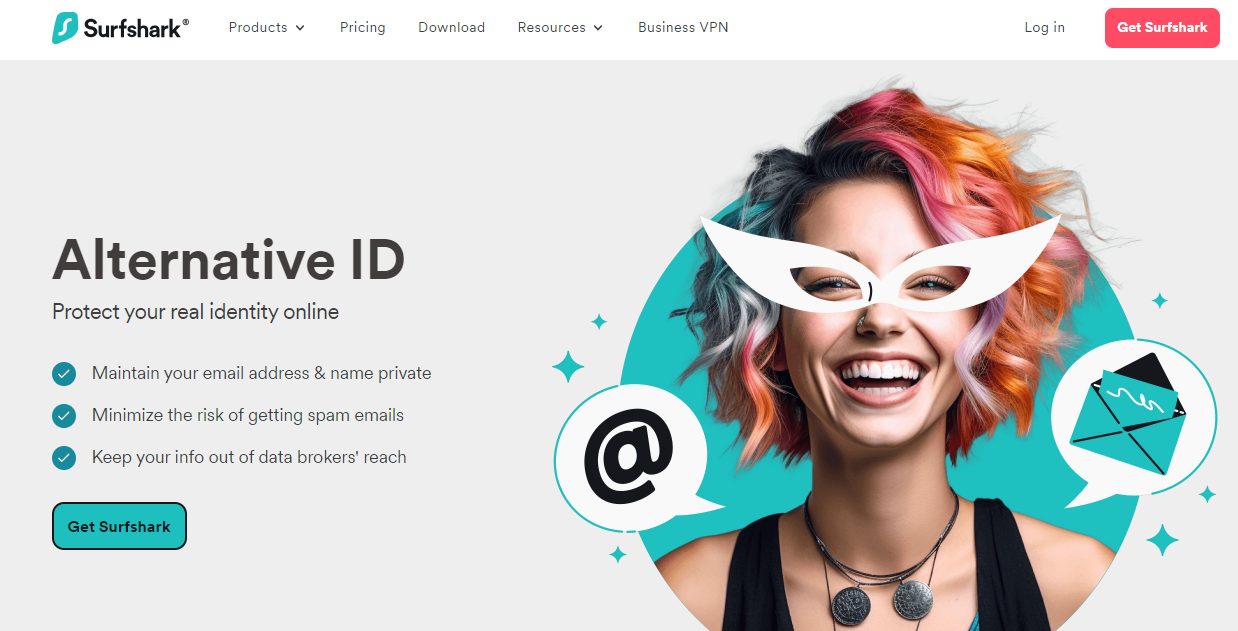
Surfshark Alternative ID is a unique feature designed to enhance online privacy. It allows you to create a separate online persona, complete with its own unique email address. This ensures a greater level of anonymity while navigating the web.
When interacting with or registering on websites, the Alternative ID provides a substitute profile and email address. This ensures you don’t have to disclose your true identity or primary email address. Hence, the tool guarantees that your real details remain distinct from your online activities.
Even if you use an alternative email, you won’t miss any crucial information. Emails sent to the generated ID are safely forwarded to your main inbox. The feature is designed to operate as long as users find it necessary. In other words, you have 100% control over their online presence.
Access to the Alternative ID requires a subscription to the Surfshark One or One Plus plans. For ease of use, Surfshark has made the feature available through its extensions for popular browsers, including Chrome, Firefox, and Microsoft Edge.
How Does Surfshark Alternative ID Work
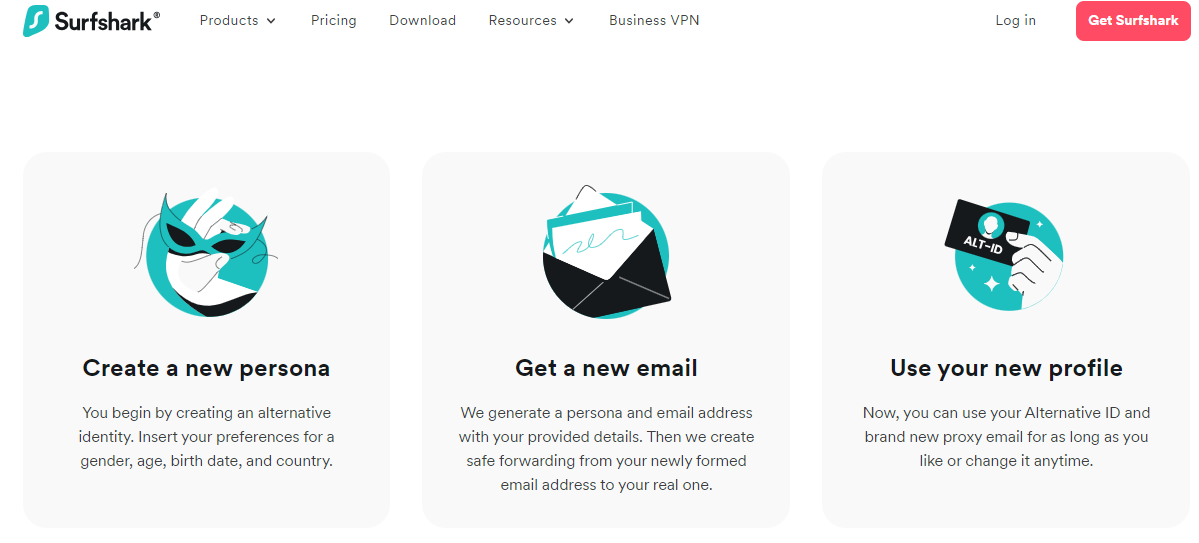
Surfshark’s Alternative ID is a direct solution to enhancing your online privacy. Here are clear steps on how the tool works,
1. Persona Creation
Begin by establishing an alternative identity. This involves entering specific details, such as gender, age, birth date, and country. It’ll shape the online persona that Surfshark creates for you.
2. Email Generation
Upon providing the necessary information, Surfshark takes the next step. It generates a unique email address that corresponds to the details you submitted. This isn’t just a standard email address, but it has a protective layer.
When someone sends an email to this new address, Surfshark ensures that it’s securely forwarded to your real, primary email. This process allows you to receive all messages without directly exposing your actual email address.
3. Using Your Profile
With your Alternative ID ready, it’s time to put it to use. With its proxy email, this new identity becomes your representation in all online activities. Interestingly, you dictate its lifespan. Whether you want to use it for a long duration or switch it out periodically, it’s up to you.
By following these clear steps, Surfshark’s Alternative ID offers a straightforward pathway to improved online privacy. It’s an intuitive tool designed to give you control over your digital footprint.
Features of Alternative ID
As mentioned, Surfshark’s Alternative ID stands out as a unique tool for online privacy. By providing a new layer of identity protection, Surfshark enhances the suite of features it already offers. Here are the top features of the cybersecurity tool you should know:
- Unique Persona Creation: Alternative ID enables you to create a distinct online identity tailored to your preferences. You set the gender, age, birth date, and country.
- Dedicated Email Generation: It provides a unique email address that corresponds with the created persona. This ensures added anonymity in online activities.
- Secure Email Forwarding: All emails sent to the alternative address are automatically and safely forwarded to your primary inbox.
- User-driven Profile Lifespan: Surfshark allows you to utilize the alternative identity for desired durations, with the option to change it at will.
- Integrated Browser Extensions: You get an improved user experience thanks to the browser extensions for Chrome, Firefox, and Microsoft Edge.
- Friendly Interface: The tool features an intuitive design consistent with other Surfshark tools.
- Efficient Profile Management: You can easily manage your alternative profile. For instance, the tool lets you copy all details at once.
- 24/7 Live Support: Surfshark offers round-the-clock live support. With this, you can get assistance whenever needed.
- Visual Guides: In addition to live support, Surfshark offers comprehensive video guides. This can help you navigate and maximize the tool’s potential.
- 30-Day Money-Back Guarantee: When you subscribe, you’re protected for the first 30 days. If you’re not satisfied, you can receive a refund.
The above features showcase the quality Surfshark invested in the Alternative ID. Hence, without doubt, it’s a noteworthy addition to their extensive suite of tools.
READ ALSO: Surfshark One Review 2026: [4-In-1 Tools] Smart Cybersecurity Bundle
Using Alternative ID: A First-Hand Review
We use many Surfshark tools, and when Alternative ID launched, it caught our attention. That was primarily because the tool promised a heightened level of online privacy. Here’s a comprehensive review of our experience using it.
Getting Surfshark
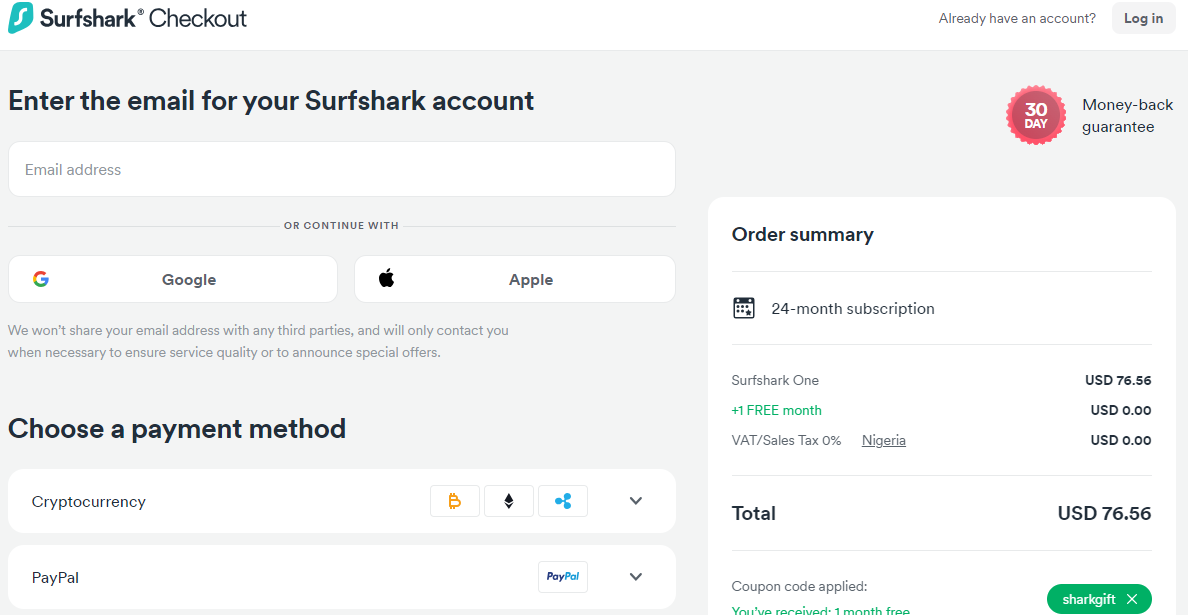
Before you can use the Alternative ID tool, it’s essential to have the right subscription. We purchased the Surfshark One and One Plus subscription plans, resulting in two active accounts. It’s relatively simple, as you pay using your preferred method on the website.
Setting up Alternative ID
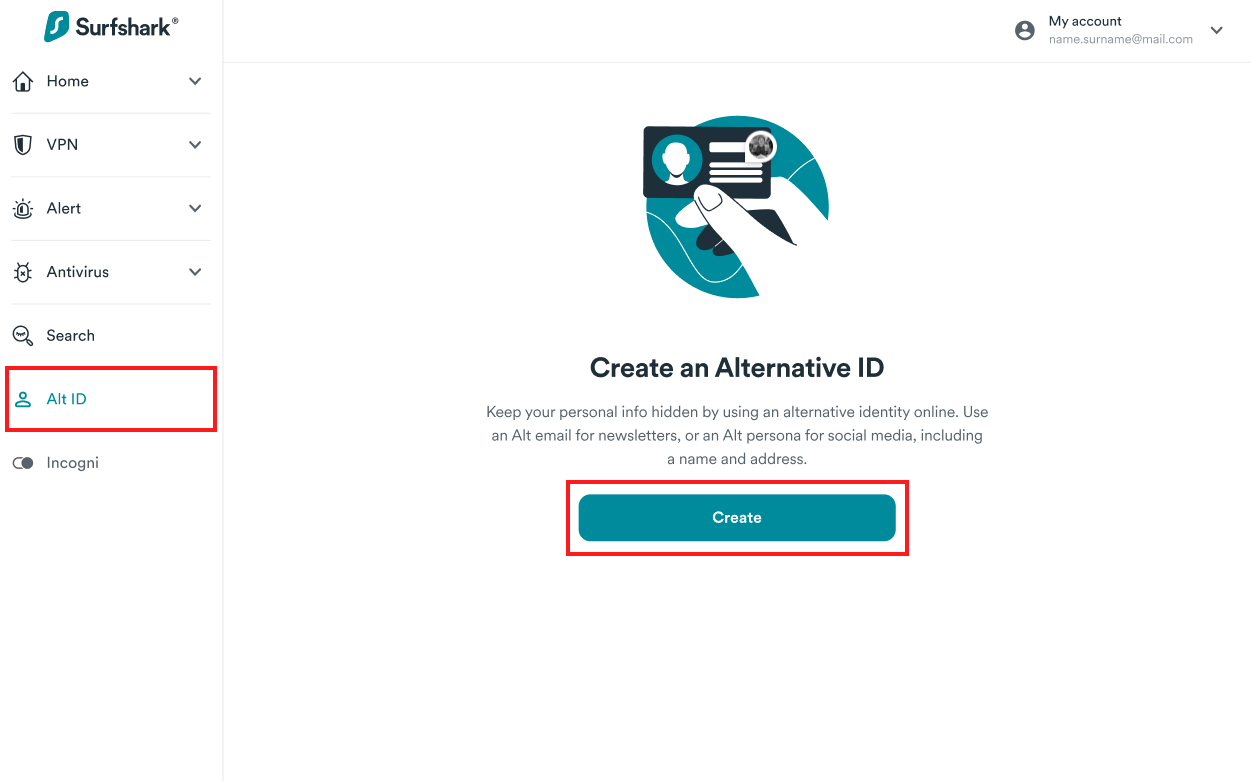
Once our account was up and running, we proceeded to set up the Alternative ID. The process was straightforward.
We navigated to the official Surfshark Alternative ID homepage and were prompted to provide specific data for our alternative persona. The simplicity of this step was impressive, with clear instructions and an intuitive design.
Downloading Surfshark Extension
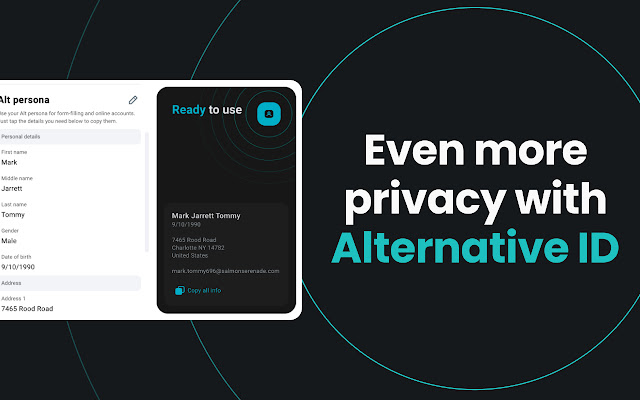
Following Surfshark’s recommendation, we opted to integrate Alternative ID with our browsers. Surfshark offers extensions for Chrome, Firefox, and Microsoft Edge.
We decided to test it on all three platforms. Each extension was easy to install and access the Alternative ID feature. However, from our assessment, Google Chrome works best.
User Experience and Interface
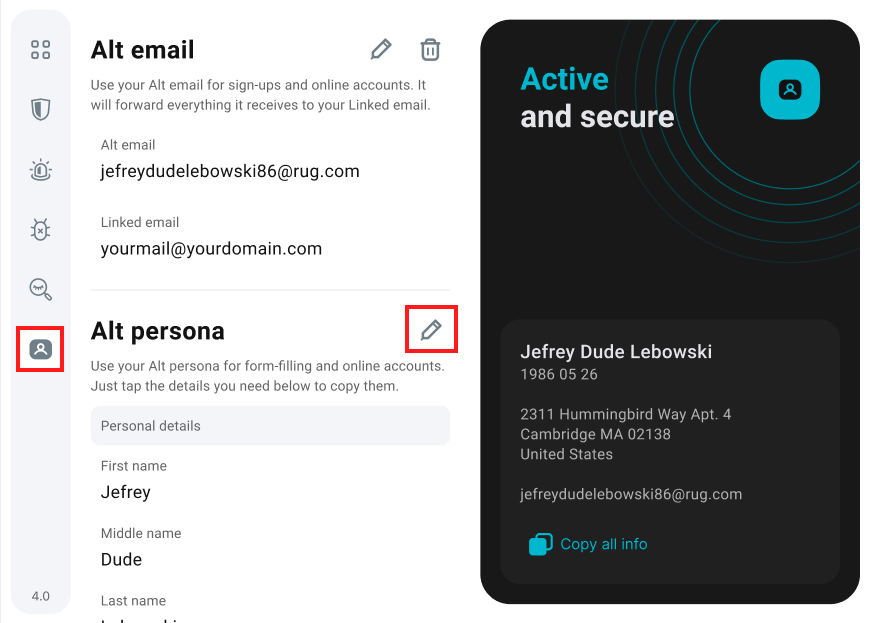
The user interface of the Alternative ID mirrored the friendly design we’ve come to expect from other Surfshark tools. It was clear, concise, and free from unnecessary complexities.
A standout feature post-creation was the ability to copy all the details of our alternative profile at once. This seemingly simple addition made managing and using the ID extremely efficient.
In conclusion, our experience with Surfshark’s Alternative ID was nothing short of impressive. The tool is designed with user experience in mind, offering a straightforward approach to enhancing online privacy.
The integration with popular browsers through extensions is perhaps the highlight feature. It ensures you can create and use your alternative persona on the go.
Now, for this Surfshark Alternative ID review, let’s discuss its pricing.
READ ALSO: Full Surfshark VPN Review 2026 [Fast & Reliable]
Surfshark Alternative ID Pricing
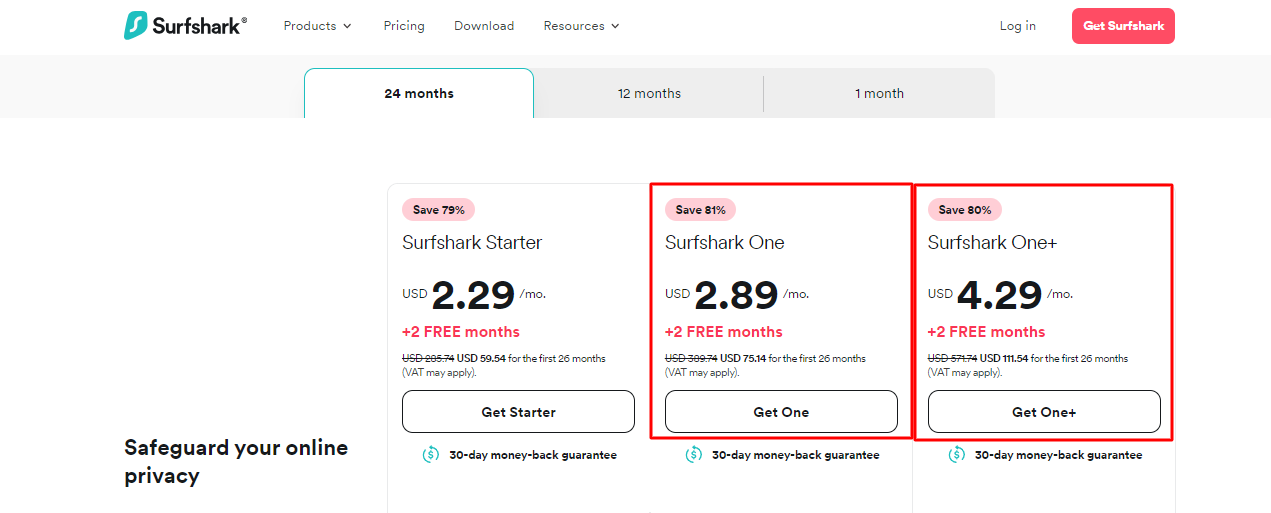
To get Surfshark Alternative ID, you’ll pick from one of the two subscriptions below:
Surfshark One:
- 1 Month Plan: $14.99 per month
- 12 Months Plan (plus 2 free months): $3.49 per month ($48.86 per subscription)
- 24 Months Plan (plus 2 free months): $3.19 per month ($76.56 per subscription)
Surfshark One+:
- 1 Month Plan: $21.99 per month
- 12 Months Plan (plus 2 free months): $2.89 per month ($75.14 per subscription)
- 24 Months Plan (plus 2 free months): $4.29 per month ($111.54 per subscription)
Based on our expert verdict, the long-term plans offer substantial savings, making them the most cost-effective option.
The 24-month plans, for instance, provide a significant discount compared to the monthly rates. Furthermore, recall that we offer a 30-day money-back guarantee to protect your subscription.
Is Surfshark Alternative ID Worth It?
Are you cautious about sharing your details online? You should be, and Surfshark’s Alternative ID can help. It’s great for signing up on new sites, receiving newsletters, or being unsure about a website’s safety. Just create a separate online profile and keep your real information safe.
However, remember that it’s best suited for sites where trust is still a question mark. Always use your actual details for well-known sites, especially those of banks or government agencies.
As you can see from this Surfshark Alternative ID review, if you want more peace of mind online, Surfshark Alternative ID might be just what you’re looking for.
Surfshark Alternative ID Review: Frequently Asked Questions
Is Surfshark Alternative ID free?
No, Surfshark Alternative ID is not free. To use the tool, you have to subscribe to either Surfshark One or One Plus.
READ ALSO: How To Sign Up For OmniWatch Identity Protection Plans
Is Alternative ID the same as Surfshark VPN?
No, Alternative ID and Surfshark VPN are different features. Both work to enhance online privacy, but the VPN masks your IP address and encrypts your online activities. Meanwhile, Alternative ID provides a unique online persona and email address to protect your identity.
READ ALSO: Surfshark One vs Surfshark VPN Comparison
How do I get the Surfshark Alternative ID app?
Surfshark Alternative ID is integrated into Surfshark’s web platform. After subscribing, you can access and set up Alternative ID via the website. For the best experience, however, download the Surfshark extension for Chrome, Firefox, or Microsoft Edge.
Wrapping Up The Surfshark Alternative ID Review
By creating a unique online persona and email address, Surfshark Alternative ID provides a shield against potential data exposure. Additionally, with the seamless browser extensions, you get an enhanced user experience.
In an era where online privacy is paramount, the feature offers a practical solution for safeguarding your identity. It’s a quality solution, which we recommend.
Leave a comment below regarding this Surfshark Alternative ID review.
INTERESTING POSTS
- Surfshark Antivirus Review 2026 [MUST READ]
- Best Dark Web Monitoring Services In 2026 [Tested, Reviewed & Ranked]
- How to Detect Fake Social Media Profiles
- 15 Best BullGuard Antivirus Alternatives (Free & Paid)
- How Identity Document Verification Services Can Help You Build Trust
- Session Hijacking: Everything You Need To Know
- Easy Steps To Port Your Mobile Number To A Different Operator
- Top Proxy Service Providers in 2026: Unlocking Internet Freedom
- How to Remove the Wave Browser Virus: A Step-by-Step Guide
- Unlocking The Power Of Smart Manufacturing: 10 Essential Elements
About the Author:

Daniel Segun is the Founder and CEO of SecureBlitz Cybersecurity Media, with a background in Computer Science and Digital Marketing. When not writing, he's probably busy designing graphics or developing websites.



