


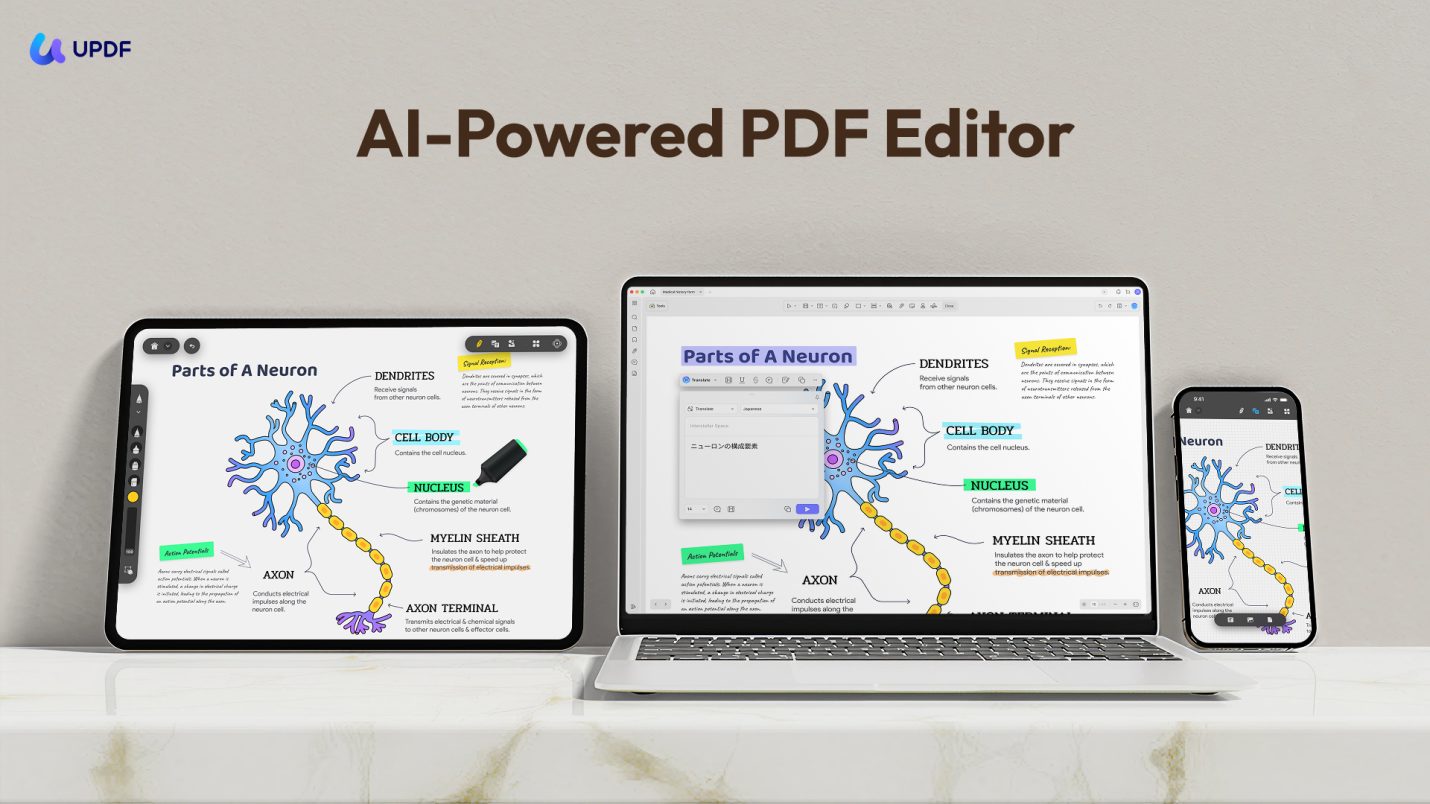

Read on for the UPDF review in this post.
PDFs require more than a simple viewer. Over the years, I have experienced that managing PDF activities is often more complicated than it should be, such as editing text, converting to other formats, organizing pages, performing OCRs, or adding security.
I have tried many PDF tools. Some of them were too basic, while others were too complex. Most of the time, I ended up juggling multiple apps to get the job done.
That’s when I decided to give UPDF a try. From the start, it felt different. The interface is intuitive, and the range of features covers almost everything we need related to PDF. Over the past few months, I have used UPDF extensively for reading, editing, converting, and other activities. So, I want to share my honest experience with how UPDF is my top pick as the best PDF editor for 2025/2026.
Table of Contents
Part 1: What is UPDF?
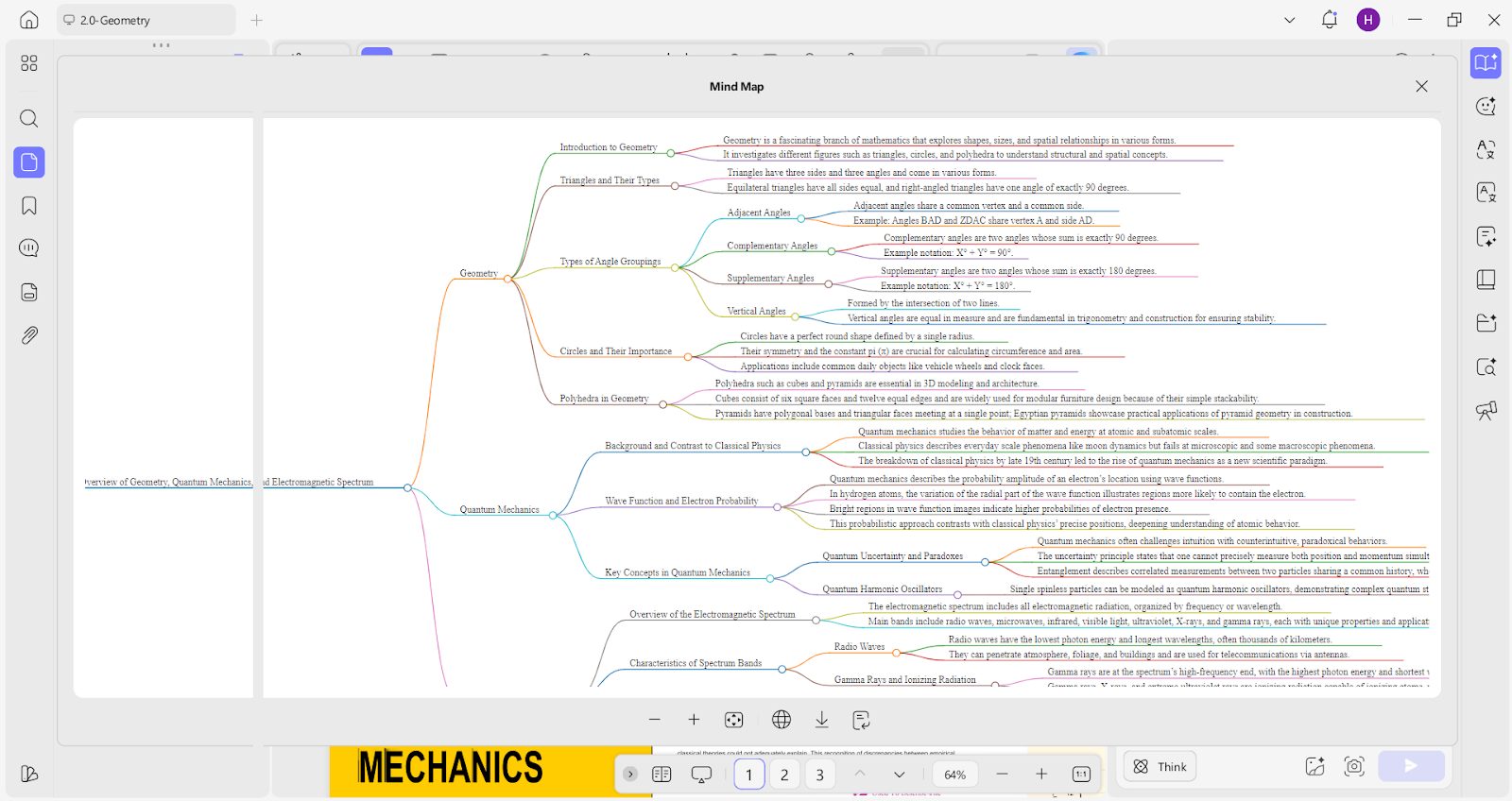
UPDF is an AI-powered PDF editor that offers an all-in-one interface to view, edit, annotate, convert, protect, OCR, and manage PDF documents. It also provides an advanced AI assistant that helps summarize, translate, and explain PDF content, along with support to convert PDFs to mind maps.
From my experience, the biggest advantage of UPDF is that everything is built into one clean workspace. I don’t have to jump between separate tools or rely on add-ons just to complete basic tasks.
For example, I recently had to prepare a contract that needed some text edits and annotations. In addition, I had to merge a few supporting documents with the contract. I was able to do all of this without leaving the same window.
Part 2: Core Functions of UPDF
UPDF has everything that a PDF editor must offer today. Whether it’s edit, annotate, convert, compress, OCR, merge, protect, fill and sign, organize, or AI features, UPDF offers all those features. However, the reason why I am declaring it the best PDF editor is the depth of each feature.
Let me clear this point with a few of UPDF’s impressive functions I love using:
Convert PDF
UPDF lets users convert PDFs to plenty of other formats (Word, Excel, PowerPoint, image, RTF, etc.) with exceptional quality results. However, the interesting thing is that it allows us to enable OCR during conversion. This way, the process of conversion and OCR can be done simultaneously.
Merge PDF
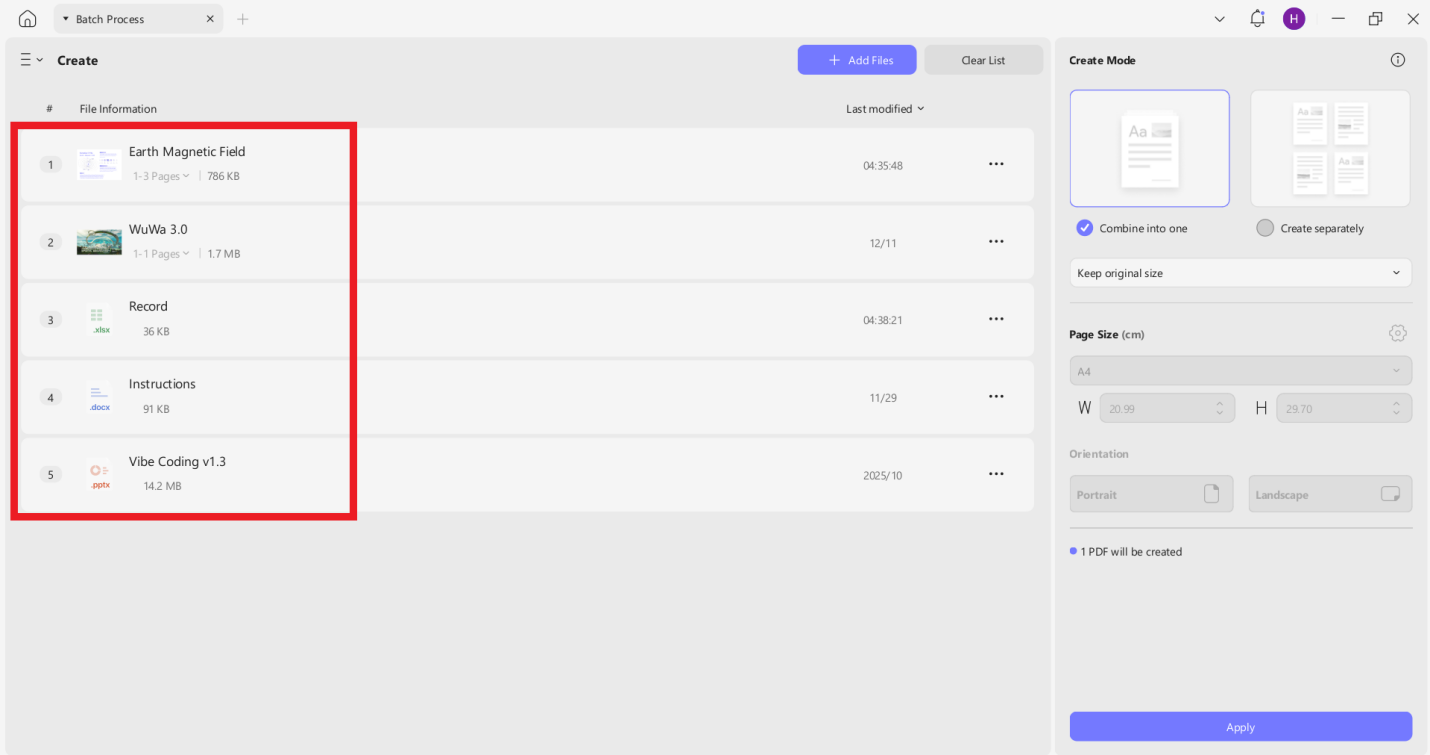
In the Merge PDF function, UPDF supports merging files of different formats, such as PPT, Excel, Word, and PDF. All these files from different formats are merged into a single PDF. In many other editors, I have seen that they only support merging PDFs.
OCR PDF
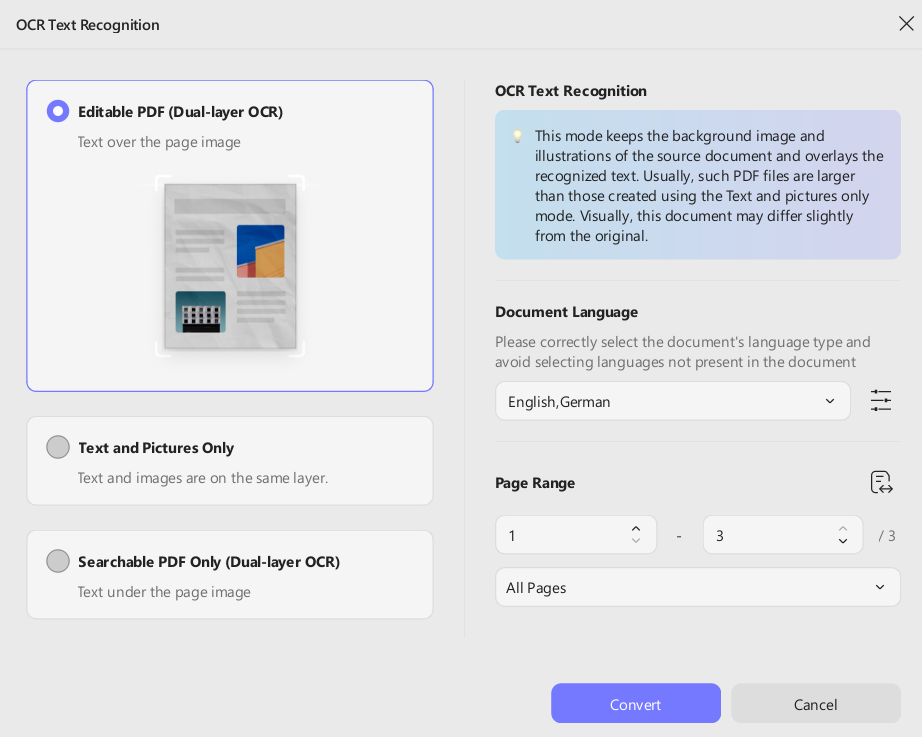
In the OCR function, UPDF offers three OCR modes, i.e.:
- Editable PDF (Dual-layer OCR)
- Text and Pictures Only
- Searchable PDF Only (Dual-layer OCR)
Besides that, if a document contains multiple languages, UPDF allows users to select multiple languages at once for more accurate recognition.
Compress PDF
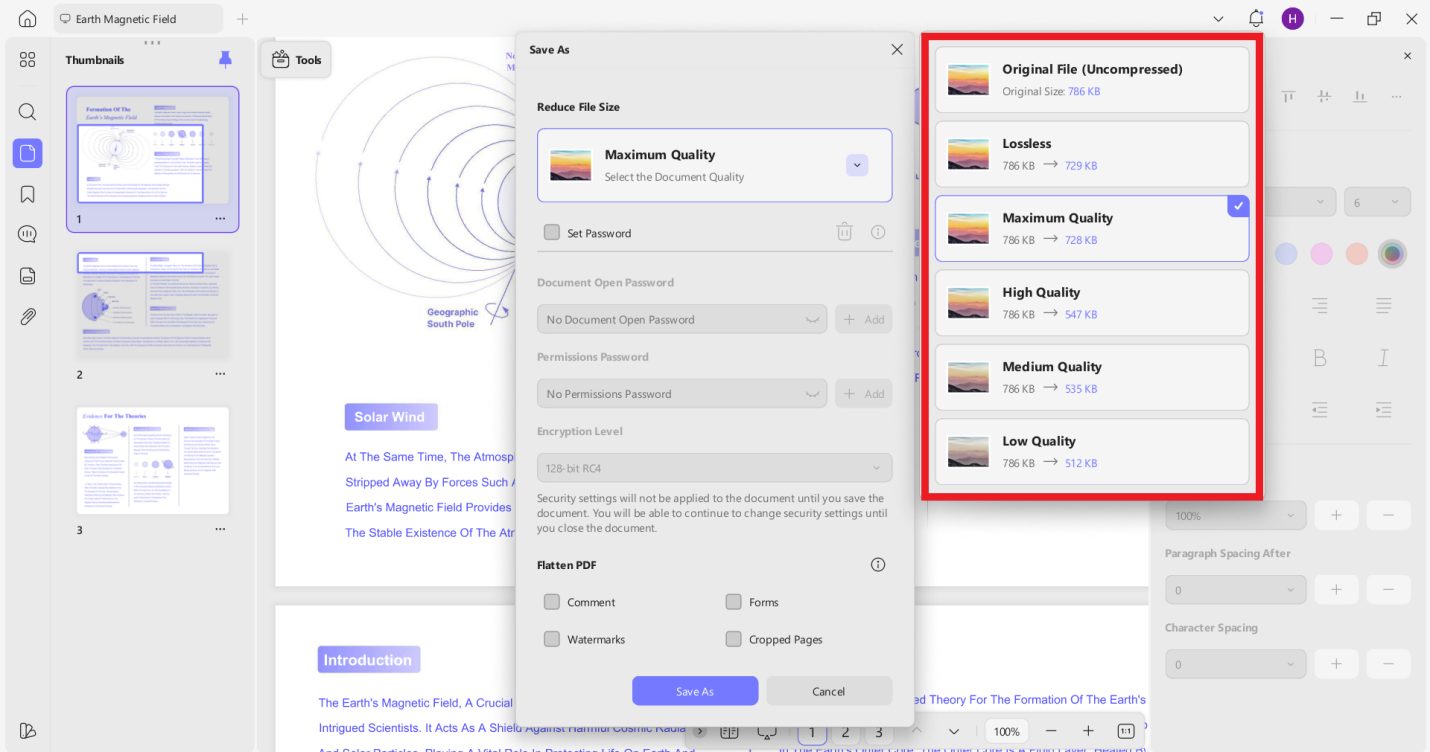
In the compress PDF function, UPDF calculates and shows the estimated file size under different compression quality settings before actually compressing the PDF. This really helps in selecting the best compression quality. Many other tools simply compress the PDF without giving this info.
AI Assistant
UPDF AI assistant is no less than a real-world assistant. It can summarize, translate, explain, chat, and do a lot more. What shocked me was that it can translate an entire PDF to a different language with a preserved layout. Plus, its PDF to mind map generation feature is also helpful to visualize complex concepts.
Part 3: The Price of UPDF
If I create a list of top cost-friendly PDF editors, UPDF will be among the top 5. It offers the best rates and plans to suit all types of users, including individuals, enterprises, and the education sector.
Free Trial
UPDF offers a timeless free trial with access to most of its features. In UPDF’s free version/trial, we get:
- Access to edit, annotate, protect, organize, compress, and PDF form features with trial watermarks added.
- 2 files per day conversion.
- 1GB cloud storage with a 10MB max file size limit.
- 100 questions and 5 files analysis with the AI assistant.
When I first used UPDF, I didn’t start with its Pro version. I used its free trial, tested out its features, and then made the purchase. I would recommend the same to you.
Yearly Plan
UPDF offers three types of yearly plans for its users:
| UPDF Yearly Plan | |
| Type | Offerings |
| Individual |
|
| Enterprise |
|
| Education |
|
Lifetime Plan
This is my favorite. Instead of feeling trapped in a subscription model, I was able to secure UPDF for life with its lifetime plan, which includes forever-free updates to new versions.
| UPDF Lifetime Plan | |
| Type | Offerings |
| Individual |
|
| Enterprise |
|
UPDF AI Assistant
UPDF’s AI assistant is also cost-friendly like UPDF Pro. Its offerings for different types of users include:
| UPDF AI Assistant | |
| Type | Offerings |
| Individual |
|
| Enterprise |
|
| Education |
|
Part 4: Other User Reviews on UPDF
Since the title of my article is “UPDF Review”, I don’t feel right to just share my views on the tool. So, I checked out what other users are saying about it and found some similar thoughts.
UPDF rating in popular review sites is:
- Capterra: 4.6/5
- G2: 4.5/5
- Trustpilot: 3.5/5
Here are some of the reviews shared by different users:
Khurram A., Small Business (50 or fewer employees) 4.5/5 G2
“I’ve tried numerous PDF editors, and UPDF stands out for its perfect balance of powerful features and incredible ease of use. The interface is clean, modern, and intuitive. I was able to open it and start editing, annotating, and converting documents immediately without watching any tutorials.”
Josh C., Enterprise (>1000 employees) 5/5 G2
“What I value most is the ability to apply OCR to multiple documents simultaneously, as well as the ease of editing PDF files, modifying their orientation, and adding elements. These functions are the ones I use the most in my work and have allowed me to save a lot of time compared to other free alternatives.”
Maya M., Small Business (50 or fewer employees) 4.5/5 G2
“Straightforward installation and setup which had no struggle with. I love it for easier selection, inserting, splitting split documents. Incredible to easily combine multiple PDF documents as a team for our effective projects documents. Impressive with signing and sending documents to clients directly from the software.”
Part 5: Pros and Cons of UPDF
Pros
- All-in-one user-friendly interface
- Top-notch features to handle every aspect of PDFs
- Affordable pricing plans
- Strong cross-platform use (Windows/Mac/iOS/Android)
- Exceptional AI features
Cons
- Limited free version
- No cloud editing
Conclusion
When I compare UPDF with other PDF editors, including Adobe Acrobat Pro, I love the intuitive interface, extensive features, and exceptional AI assistant. Everything I need related to PDFs is available in UPDF, and that’s what other users have to say.
So, why waste your time and money on other tools when UPDF has got it all at the most affordable rate? I will wrap up by recommending you start with UPDF’s free trial and see for yourself its powerful features.
Why You Can Trust My Review?
I have been using UPDF for months now. I have almost tested all its features on both desktops and smartphones. So, everything that I have mentioned is tested and verified based on my real experience.
INTERESTING POSTS
- Merging And Combining: How To Merge PDF Files Into A Single Document
- Tips & Reasons Why You Should Compress Your PDF Through GogoPDF
- How To Compress A PDF File To Make It Smaller?
- How to Improve PDF Visibility
- PDFBear: Your Online Alternative In Merging PDF Files
- GogoPDF: The Best Online Tool To Compress PDF
About the Author:

Daniel Segun is the Founder and CEO of SecureBlitz Cybersecurity Media, with a background in Computer Science and Digital Marketing. When not writing, he's probably busy designing graphics or developing websites.



