




In this post, I will show you how to change iPhone GPS location without VPN.
Changing your iPhone’s location has become something many users want to do for different reasons. Some want access to region-specific content, others need to test apps, and many simply want more control over their privacy.
You might also want to explore new areas on location-based apps or enjoy AR games like Pokémon GO without physically walking around. Whatever the goal is, the challenge is the same: iOS does not let you manually change your GPS location, and VPNs only change IP addresses, not GPS.
How to change location on iPhone? The good news is that there are safe and reliable ways to change your iPhone’s location without using a VPN. This guide walks you through the methods that actually work in 2026, how they differ from VPNs, and what you should consider before choosing a solution.
Along the way, you’ll see why many users prefer dedicated location-changing tools for accuracy and ease of use.
Table of Contents
Why a VPN Cannot Change GPS Location on iPhone
A lot of users assume that simply installing a VPN is enough to change their iPhone location. But VPNs only modify your IP address, which is unrelated to your device’s GPS position. Many apps today rely heavily on GPS signals, not IP, meaning the VPN method won’t help in most cases. Here’s why VPNs fall short:
- Apps like Pokémon GO use real-time GPS tracking
- Social apps rely on GPS for geolocation filters
- Location-based AR tools check physical coordinates
- Certain streaming apps use both IP and GPS checks
So if your main purpose is to appear in a different city or country on apps that verify GPS, you will need a GPS location changer, not a VPN.
Best Ways to Change iPhone Location Without VPN
Below are the most effective solutions available in 2026. Each method works differently, but all can successfully shift GPS coordinates without relying on IP changes.
Method 1: Use a Professional GPS Location Changer (Most Reliable)
The most stable and accurate way to change your iPhone location without a VPN is to use a dedicated GPS spoofing tool. These tools directly modify the GPS information your iPhone reports to apps, giving you full control over your virtual position.
Among these tools, MagFone Location Changer has become a popular option because it works smoothly across the newest iOS updates. It supports both location teleporting and simulated movement, which is important for apps that track your motion.

Why Professional Tools Work Better Than VPNs
- Adjust actual GPS coordinates
- Apps instantly update to your new location
- No jailbreak required
- High accuracy for gaming and travel apps
- Works even if IP location doesn’t match GPS
This approach is ideal for users who need precise GPS changes rather than just region switching.
Method 2: Use Developer Mode Location Simulation (Advanced Users Only)
iOS has a Developer Mode feature that allows simulated location for testing apps. However, this method requires a Mac computer, Xcode installed, basic developer knowledge.
It’s powerful but not practical for everyday users. It also lacks movement simulation, making it unsuitable for gaming or real-time location apps. Still, it’s an option if you’re comfortable with technical steps.
Method 3: Use a Hardware GPS Spoofing Device (Least Practical)
Some users explore external GPS hardware that connects to an iPhone and overrides location data. These devices can work but come with serious drawbacks:
- Expensive
- Requires physical hardware
- Difficult setup
- Limited compatibility with newer iPhones
Because of these limitations, software-based methods remain the preferred choice.
READ ALSO: How To Detect GPS Tracking On Your Cell Phone
How to Change iPhone Location Without VPN Using MagFone Location Changer
If you want a straightforward, no-VPN method that works on any major iOS version, here’s how to do it with a GPS changer. While different tools exist, the steps below use MagFone Location Changer since it’s one of the simplest and most stable options for both beginners and advanced users.
Step 1: Download and launch the tool on your computer. Connect your iPhone with a USB cable and allow permissions if prompted. On the main interface, select the General or Game mode to open the map view.

Step 2: Search for any city, landmark, or coordinates. Tap to confirm the spot on the map.
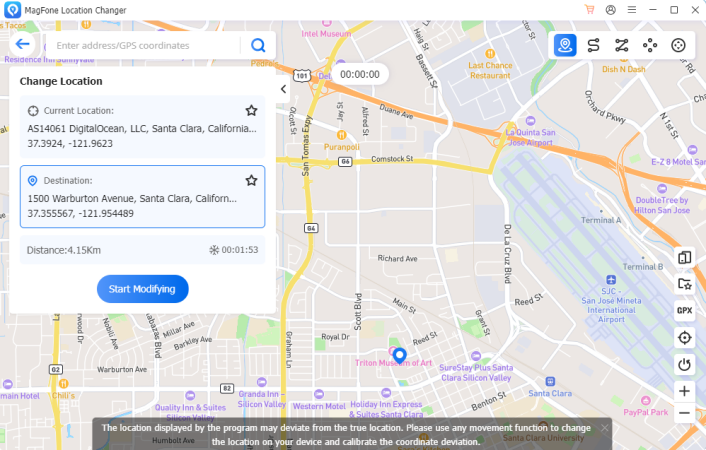
Step 3: Click Start Modifying to instantly update your GPS. Apps like games, dating apps, and social platforms reflect the change immediately.
If you want natural GPS movement:
- Use joystick mode
- Create multi-spot routes
- Adjust speed (walking, cycling, or driving)
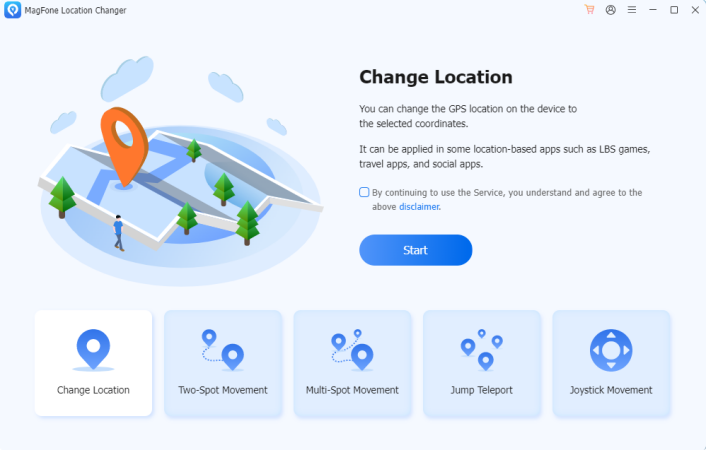
This is especially helpful for users who need realistic movement patterns.
Why Users Prefer MagFone Location Changer
Even though the main purpose of this article is to help you understand how to change your iPhone location without a VPN, it’s worth noting why many users end up choosing MagFone:
- Works on both iOS and Android
- No jailbreak required
- Offers Safe Mode for lower detection risk in games
- Very stable after major iOS updates
- Easy interface for first-time users
- High accuracy for virtual movement
It’s not about pushing a tool but explaining why it often becomes the go-to choice for people who need GPS control beyond just teleporting.
READ ALSO: How to Change Location on Find My iPhone
Frequently Asked Questions
Is it safe to change your iPhone GPS location?
Yes, as long as you use trusted software and avoid suspicious free tools that can compromise device security.
Will apps detect that I changed my GPS location?
Most apps cannot detect GPS simulation directly, especially when using movement modes that appear natural.
Do I need to jailbreak my iPhone?
No, modern GPS spoofers work without jailbreaking.
Can I switch back to my real location?
Yes, simply stop the simulation or restart your iPhone.
Final Thoughts
Changing your iPhone location without a VPN is completely possible, and often necessary, for privacy, testing, gaming, or simply exploring new areas. While VPNs only modify your IP, a GPS location changer gives you true control over your device’s physical coordinates.
Developer Mode and hardware methods exist, but software-based GPS changers remain the most efficient and user-friendly solution. Tools like MagFone Location Changer provide a balance of simplicity, accuracy, and stability that make them useful for both everyday users and power users.
If your goal is to reliably change your iPhone GPS without VPN and with minimal technical steps, using a professional GPS location changer is the most practical path.
INTERESTING POSTS
- Don’t Get Tracked: How To Protect Your Privacy Online In 9 Tips
- Full ESET Smart Security Premium Review
- How to Detect Fake Social Media Profiles
- Utimate Lists of Dangerous Apps
- 15 Tips To Protect Your Online Privacy
- How To Detect Email Phishing Attempts (Like A Geek!)
- The Difference Between Antivirus and Anti Spyware
- How To Hack A Smartphone With Xnspy App
About the Author:

Meet Angela Daniel, an esteemed cybersecurity expert and the Associate Editor at SecureBlitz. With a profound understanding of the digital security landscape, Angela is dedicated to sharing her wealth of knowledge with readers. Her insightful articles delve into the intricacies of cybersecurity, offering a beacon of understanding in the ever-evolving realm of online safety.
Angela's expertise is grounded in a passion for staying at the forefront of emerging threats and protective measures. Her commitment to empowering individuals and organizations with the tools and insights to safeguard their digital presence is unwavering.



