




Read on for our Multilogin review.
Running many accounts by hand is slow and error-prone. Each account needs its own setup, and security matters when profiles are stored and shared.
Add downtime, slow support, and the challenge of keeping access secure across team projects, and the need for a reliable platform becomes clear.
Meet Multilogin, a cloud Android phone platform for multi-account management. It lets marketers, agencies, e-commerce sellers, and AI agents manage multiple accounts across mobile apps and web browsers from a single dashboard.
Each mobile account runs on its own real Android device in the cloud, with separate app data, location, and IP. Web-based accounts run in isolated browser profiles with their own cookies, session, and IP.
Founded in 2015, Multilogin offers a free plan with no time limit and no credit card needed, and paid plans start from $7.08 per month.
The current platform adds team permissions, local or cloud-based profile storage, and API automation for teams running multiple projects simultaneously.
Table of Contents
Two Ways Teams Use Multilogin
Multilogin supports both mobile-app and browser-based account management. That distinction matters because not every online service works the same way.
Some accounts depend heavily on native Android apps, while others are easier to operate through a desktop browser.
Mobile Multi-Account Management
Multilogin’s cloud Android phones allow teams to operate mobile applications without maintaining a collection of physical smartphones.
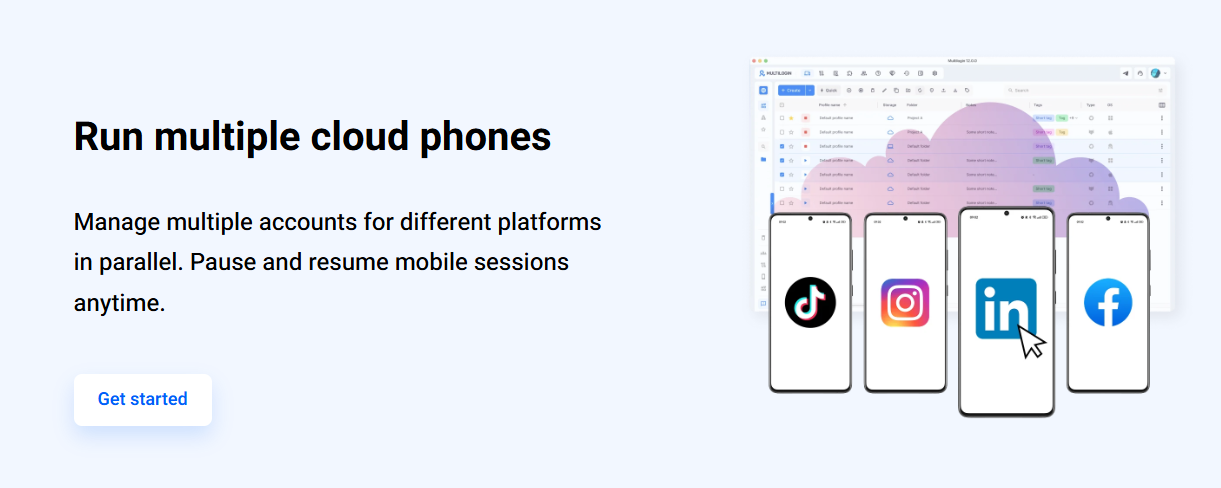
Run native Android apps: Each account gets its own Multilogin cloud phone, so TikTok, Instagram, Facebook, eBay, and other Android apps run in separate environments. Each cloud phone keeps its own apps, app data, login history, location, and IP.
Keep sessions in place: App data and account state stay saved between sessions. You return to the same setup without reinstalling apps or signing in again.
Manage phones remotely: Teams can launch and manage cloud phones from one dashboard instead of maintaining physical devices. Profiles can be shared with teammates through permissions.
For an agency handling several clients, this arrangement can make day-to-day account management easier. Rather than constantly switching between accounts on a single phone, the team can maintain separate work environments.
Web Multi-Accounting and Automation
Not every account requires an Android device. Multilogin also provides a multi-account browser for web-based operations.
Separate browser profiles: Each profile has its own cookies, session, and IP address. It suits web-based work such as Reddit, YouTube channel management, Facebook Business Manager, and marketplace back offices.
API and automation: Multilogin offers an API, full ADB access for cloud phones, and support for Selenium, Puppeteer, Playwright, and Postman.
Quick launch with local profiles: Browser profiles with local storage launch quickly, reducing setup time for repetitive tasks.
The practical advantage is flexibility. A team can manage mobile-first applications through cloud phones while keeping browser-based workflows in separate desktop environments.
Multilogin Features and Benefits
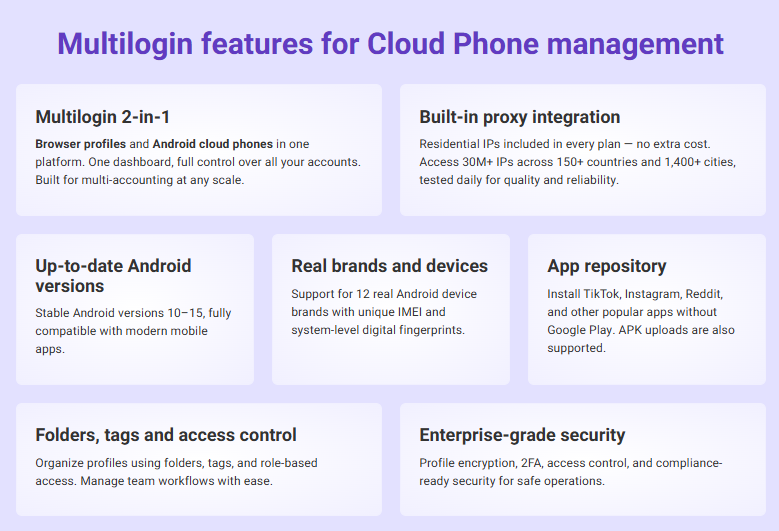
Multilogin combines mobile device management, browser profile isolation, proxy integration, collaboration tools, and automation.
Here are the features worth examining before choosing a plan.
Real Android Devices in the Cloud
Cloud Phones: Each Multilogin cloud phone runs native Android apps on a real ARM device in the cloud. Choose from 30+ device models and Android 10-16. App data and login history persist between sessions.
This is particularly useful when your workflow depends on mobile applications rather than browser versions of those services.
Instead of purchasing, charging, updating, and maintaining multiple physical devices, you can access your Android environments remotely.
Isolated Browser Profiles
Separate Environments: Each browser profile keeps its own cookies, session, and IP, so web accounts stay separate. Location can be synced with a cloud phone when one account is used on both.
It’s useful for digital marketers, e-commerce sellers and anyone managing multiple social media or business accounts.
However, separate browser environments should not be mistaken for a guarantee against account restrictions. Platforms can still apply their own security checks and account policies.
Create Browser Profiles in a Flash
Quick Profile Generation: Create one-time browser profiles in seconds for temporary tasks. Once the task is complete, the profile is deleted, so there’s no manual cleanup.
This can be useful when a task requires a temporary environment rather than a browser profile that must be maintained over several weeks or months.
Teamwork Makes the Dream Work, Securely
Multi-Level Role Management: Multilogin lets you organize teams with roles and permissions, each with its own access level.
This supports task delegation, protects sensitive data, and keeps work from overlapping, which helps larger teams running several projects.
For example, an agency can organize access by responsibility rather than granting every employee unrestricted access to every client profile.
Lightweight Platform
Multilogin is designed to support profile management without requiring teams to operate a separate physical device for every account.
Cloud phones also move Android execution to hosted infrastructure, although your actual experience will depend on your computer, network connection, and the number of environments being managed.
Multilingual Support
Multilogin provides support resources for users operating across different markets.
Its documentation and learning resources can help new users understand profile creation, proxy settings, cloud phone management, and automation.
How Does Multilogin Work?
Multilogin gives each account its own environment. Mobile-app accounts run on Multilogin cloud phones, which are real Android devices hosted in the cloud. Web-based accounts run in isolated browser profiles.
Each environment keeps its own data, location, and IP, so accounts stay separate, and their history builds over time.
Users can quickly create profiles with customizable settings for various tasks, while cloud-based storage ensures that profiles are securely saved and accessible across devices.
Collaboration tools enable teams to share profiles efficiently, and automated workflows streamline repetitive tasks, facilitating the smooth and secure scaling of digital operations for businesses.
The Three Pillars of Multilogin
1. Separate Environments: One cloud phone or browser profile per account, each with its own app or browser data.
2. Built-in Proxies: Residential and mobile proxies are included in every plan. Each profile gets its own IP with a matched location, and HTTP, HTTPS, ISP, and SOCKS5 proxies are supported.
3. Secure Storage: Profile data is stored locally or in encrypted cloud storage, and accounts support two-factor authentication.
These components work together to support account separation, access management, and consistent working environments.
How to Use Multilogin
Getting started with Multilogin involves creating an account, choosing the appropriate environment, and configuring the profiles you need.
You can also consult the Multilogin Help Center for setup instructions.
Step 1: Create a Free Account
Sign up at multilogin.com.
The free plan has no time limit and needs no credit card.
Once registered, you can explore the dashboard and decide whether your accounts need cloud Android phones, browser profiles, or both.
Step 2: Upgrade When You Need More
The free plan includes five cloud mobile and browser profiles, plus a one-time 200 MB of premium proxy traffic and 30 mobile minutes.
Paid plans start from $7.08 per month and add monthly proxy traffic, mobile minutes, API access, and team seats.
Before upgrading, consider how many accounts you need to manage, how frequently you will access cloud phones, and whether your workflow requires automation.
Step 3: Create a Profile
Choose a cloud phone for mobile-app accounts or a browser profile for web-based accounts.
Pick an Android version and add a built-in or your own proxy.
For ongoing projects, use a clear naming convention so you can identify each account, client or campaign without confusion.
Step 4: Install Apps and Sign In
Open the cloud phone, install apps from the built-in store or upload an APK, and sign in to your account.
Once configured, the environment can retain the relevant application data and account state for future sessions.
Use trusted application sources and keep account recovery information secure.
Bonus Step: Automate and Share
Check the API documentation to automate tasks with Selenium, Puppeteer, Playwright or ADB.
Share profiles with teammates through roles and permissions on paid plans.
Automation can help with repetitive operational tasks, but it should be configured to respect the rules of the services being accessed.
Use Cases of Multilogin
Here are the main ways teams use Multilogin across industries.
You can also explore Multilogin’s guide to managing multiple social media accounts.
Use Cases of Multilogin by Sector
| Sector | Use Cases of Multilogin |
|---|---|
| Social media | Run one cloud phone per TikTok, Instagram, Facebook, Reddit or YouTube account. Manage mobile and web accounts in one dashboard. |
| E-commerce and marketplaces | Give each eBay and marketplace account its own Android device, IP and location. Use browser profiles for back-office tasks. |
| Agencies | Keep client accounts separate. Share and hand over profiles without sharing passwords. |
| Messaging | Run WhatsApp Business and Telegram accounts in separate environments per market or client. A phone number the app accepts is required. |
| Automation and AI agents | Use the API, ADB, Selenium, Puppeteer or Playwright. AI agents can launch and operate cloud phones and browser profiles. |
Social Media Management
For social media teams, account separation can make it easier to organize multiple brands, regional campaigns, and client projects.
A business operating several legitimate brand accounts can assign each account a dedicated environment, reducing accidental session mixing.
E-commerce and Marketplaces
Marketplace operators often need to manage storefronts, administrative dashboards and customer communications.
Multilogin provides separate environments for these activities, while browser profiles can handle tasks that are more convenient on desktop.
Agencies
Agencies may benefit from controlled access to client profiles, particularly when several employees work on different accounts.
Role-based permissions can help teams delegate responsibilities and reduce unnecessary access to sensitive account data.
Messaging
Cloud Android phones can support messaging applications used for business communication.
However, a cloud phone is not a replacement for a valid telephone number. Businesses still need appropriate numbers and must comply with the messaging platform’s account policies.
Automation and AI Agents
Multilogin’s API and automation integrations can support workflows involving browser interactions and Android device control.
For developers, this creates opportunities to automate repetitive tasks, test application behavior and coordinate account-management workflows.
The actual scope of automation depends on the available API endpoints, plan permissions and platform restrictions.
Limitations to Know
Multilogin offers several useful capabilities, but there are limitations worth considering before building your workflow around it.
No SMS or calls: Cloud phones can’t receive SMS or calls, so use your own number or an SMS verification provider.
Needs a stable connection: A slow internet connection can affect cloud phone use.
Learning curve: First-time users may need the Learning Center videos to get comfortable with cloud phones.
Free plan resources don’t renew: On the free plan, proxy traffic and mobile minutes are one-time. Free profiles are deleted after seven days of inactivity.
These limitations matter particularly for businesses that depend on frequent mobile verification, continuous access or long-term profile retention.
If you’re testing Multilogin for the first time, start with a small number of accounts and confirm that your preferred applications work as expected before expanding.
Conclusion
In conclusion, Multilogin is a cloud-based Android phone platform for people and teams who manage multiple accounts and need each one kept separate.
Cloud phones handle mobile-app accounts on real Android devices, and browser profiles handle web-based work, all from one dashboard. Built-in proxies, mobile minutes, team permissions, and API automation are part of the platform.
It suits social media teams, agencies, e-commerce sellers, and automation builders. Plan for your own number for SMS verification, and start on the free plan to test your workflow before upgrading.
INTERESTING POSTS
About the Author:

Daniel Segun is the Founder and CEO of SecureBlitz Cybersecurity Media, with a background in Computer Science and Digital Marketing. When not writing, he's probably busy designing graphics or developing websites.



