




An SPF checker helps domain owners identify DNS misconfigurations, validate email authentication records, and troubleshoot mail delivery problems.
By checking SPF syntax, authorized sending servers, and DNS lookup limits, businesses can detect errors that may affect email deliverability and domain security. Regular SPF checks also help reduce the risk of email spoofing and phishing attacks while supporting reliable email authentication through SPF, DKIM, and DMARC.
Table of Contents
What an SPF Checker Does and Why SPF Records Matter
The Critical Role of SPF Records in Email Authentication
The Sender Policy Framework (SPF) is a fundamental layer in modern email authentication systems, designed to address common issues such as email spoofing and phishing attacks. An SPF record is a type of DNS TXT record that specifies which mail servers are authorized sending sources for a given domain. This record helps mailbox providers like Google, Microsoft, and Verizon determine whether an incoming message originates from a permitted IP address. Without a properly configured SPF record, your domain is vulnerable to domain spoofing, where attackers send fraudulent emails pretending to be from your domain.
How SPF Checkers Work
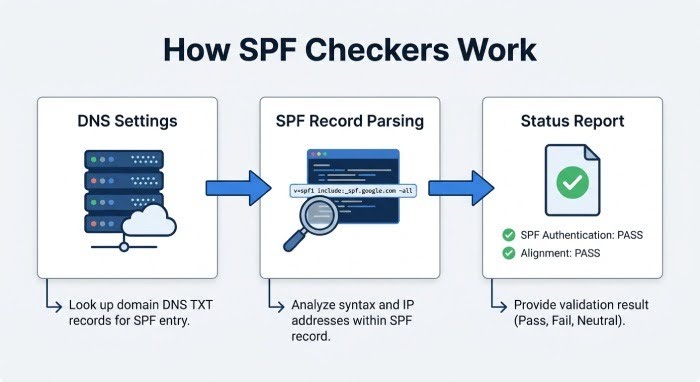
An SPF checker (or SPF diagnostic tool) is a specialized utility that automates SPF validation and assessment steps. By performing an SPF lookup, the SPF checker retrieves the SPF record from the published DNS settings for a domain, then parses the SPF record syntax against the standards defined in RFC 7208. This automated SPF check examines:
- The presence of an SPF record in the domain’s DNS zone
- SPF mechanisms such as include, *ip4*, *ip6*, a, *mx*, and *ptr*
- SPF qualifiers (+, -, ~, ?) affecting mail server authorization and SPF policy
- The list of authorized sending sources
- The maximum DNS lookup limit and potential SPF limitations
The result is a comprehensive SPF status report, detailing any SPF pass or SPF fail outcomes and highlighting compliance concerns.
Common DNS Issues an SPF Checker Can Reveal
Misconfigurations and Missing Data in DNS Settings
Routine SPF tests and SPF lookups performed by an SPF checker can reveal a range of DNS configuration problems that undermine email authentication:
1. Missing or Invalid SPF Records
If there is no TXT record with SPF information in your domain’s DNS, or if the published SPF record does not follow correct SPF record syntax (for example, a missing v=spf1 tag), the SPF validation will instantly fail.
2. Syntax Errors and Outdated Mechanisms
SPF checkers routinely uncover syntax errors such as missing spaces, unsupported mechanisms, or misused qualifiers. A classic example involves an incorrect include tag, such as referencing a non-existent or deprecated service (include:*spf*.brokenprovider.com). Because SPF records operate under strict formatting, even a minor syntax error can result in a hard SPF fail.
3. Too Many DNS Lookups
RFC 7208 enforces a limit of 10 DNS lookups during SPF processing. If your SPF record chains too many include tags or references to excessive MX, A, or PTR records, it may exceed this limit, leading to SPF validation errors and SPF fail outcomes.
4. Conflicting and Overlapping Mechanisms
A single SPF record may inadvertently authorize multiple overlapping IP addresses or reference both permissive (+all) and restrictive (-all) qualifiers, which create ambiguity in mail server authorization.
Diagnosing Mail Server Authentication and Delivery Problems
Pinpointing Problems with SPF Diagnostic Tools
When businesses or administrators experience email deliverability issues, an SPF diagnostic tool such as EasyDMARC’s SPF Lookup Tool or industry utilities like SPF Record Checker reveals whether SPF-related DNS problems are to blame. By analyzing SPF pass/fail results for recent email transmissions, these tools enable rapid risk assessment for exposure to phishing attacks, fraudulent emails, or domain authentication failures.
Analyzing SPF Test Results
- SPF Fail: Indicates unauthorized sources are sending email on behalf of a domain, which can cause emails to be quarantined or rejected by mailbox providers.
- SPF Pass: Confirms mail server authorization, improving chances of successful inbox delivery.
- SPF Neutral/Softfail: Suggests potential misconfigurations, such as misaligned SPF qualifiers, that may still impact reputation.
Supporting Layers: DKIM and DMARC
SPF works best alongside complementary protocols like DKIM (DomainKeys Identified Mail) and DMARC (Domain-based Message Authentication, Reporting, and Conformance). While SPF checks the return-path address and verifies sender sources via the SPF mechanism, DKIM validates message content integrity, and DMARC sets policies for how to handle non-compliant mail. Most DNS hosting providers and managed SPF services recommend reviewing all three to ensure comprehensive email security.
How to Read SPF Checker Results and Fix Errors
Interpreting a Typical SPF Checker Report
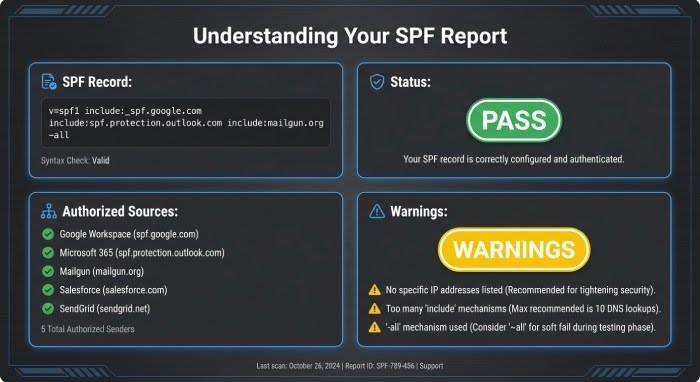
An advanced SPF checker will perform live SPF lookups, DNS lookups, and syntax validation, displaying each SPF tag and mechanism in an easy-to-understand dashboard or report.
Here’s what to look for:
- SPF Record Detected: Shows your current TXT record, typically starting with v=spf1.
- Authorized Sources: Lists all included IP addresses, subnets, and referenced domains (such as spf.protection.outlook.com or _spf.google.com).
- SPF Status: Highlights whether the SPF record is passing (*SPF* pass) or failing (*SPF* fail).
- Errors and Warnings: Flags syntax errors, too many DNS lookups, or deprecated mechanisms.
- SPF Record Example: Many SPF checkers offer a recommendation based on best practices, which you can use to adjust your DNS settings.
Fixing the Most Common SPF Record Problems
Correcting Syntax and Mechanism Errors
When the SPF check highlights a syntax error (for example, missing v=spf1, improper include tags, or malformed IP address entries), update the DNS TXT record via your DNS hosting provider or domain registrar.
Reducing DNS Lookup Counts
Consolidate mechanisms (e.g., multiple include tags referencing the same provider) and remove unused MX or PTR records to stay within the DNS lookup limit. Managed SPF solutions from entities like EasyDMARC or easydmarc.us can help automate SPF record management and simplify DNS management tasks.
Ensuring Proper Mail Server Authorization
Update and maintain an accurate list of authorized sending sources and always verify any new sending service (marketing tools, CRM, etc.) requires addition to the SPF record.
Best Practices for Maintaining Healthy SPF Records
Regular SPF Record Management and Risk Assessment
Schedule Ongoing SPF Checks and Validation
SPF record management is not a one-time setup but an ongoing process. Schedule regular SPF checks with trusted SPF diagnostic tools to catch errors early, especially after any change to DNS settings or third-party integrations.
Minimize Complexity and Leverage Reporting
Avoid chaining too many include tags or referencing generic mechanisms like a or *mx* unless absolutely necessary. Keep each SPF record example as short as possible and monitor reporting and conformance via DMARC aggregate and failure reports.
Leverage Managed SPF Services
Entities such as EasyDMARC and other managed SPF providers simplify domain authentication, risk assessment, and automated SPF validation while easing reporting for compliance and conformance efforts.
Stay Compliant with Industry Standards
Stay up to date with the latest best practices from organizations like Google and Microsoft, aligning your SPF record syntax with guidance from the major mailbox providers (mbps). Monitor DNS hosting provider documentation for updated support regarding TXT records, A records, MX records, PTR records, and IP address assignments. Use tools like nslookup and dig for manual SPF lookup and DNS troubleshooting when required.
Optimize for Future Changes and SPF Limitations
Understand SPF limitations, such as the 10 DNS lookup cap, and plan for SPF record scalability by documenting every authorized sending source and mailing system. Always test SPF policy changes with a live SPF test before deployment, and use an SPF check tool to verify that every SPF mechanism used, such as the include tag or Redirect mechanism, supports long-term domain authentication resilience.
Proper SPF checker utilization, careful SPF record management, and routine DNS settings review ensure robust email security, foster DMARC and DKIM synergy, and safeguard against modern phishing attacks and fraudulent emails.
INTERESTING POSTS
- How An SPF Record Can Instantly Improve Your Email Deliverability
- Free Spf Checker: Troubleshoot Spf Configuration Issues Easily
- How SPF Flattening Can Instantly Improve Your Email Deliverability
- Free DMARC Lookup: Record Checker With Results Explained And Quick Fixes
- Online DMARC Record Generator For Fast Email Security Setup
- How Addressing Cloud Misconfigurations Disrupts the Cyber Kill Chain
About the Author:

Daniel Segun is the Founder and CEO of SecureBlitz Cybersecurity Media, with a background in Computer Science and Digital Marketing. When not writing, he's probably busy designing graphics or developing websites.



