




In this post, I will show you how SPF flattening can instantly improve your email deliverability.
Sender Policy Framework (SPF) authentication is crucial for ensuring successful email delivery, acting as a vital barrier against spoofing and phishing threats. An SPF record designates the servers that are permitted to send emails on behalf of your domain, listing authorized IP address ranges or domain names through mechanisms like `include`.
As businesses increasingly engage third-party services — such as CRMs, marketing automation tools, and transactional email providers like SendGrid and Office 365 — the intricacy of SPF records escalates, leading to operational hurdles.
SPF flattening involves substituting all domain-referenced SPF mechanisms (like `include:`, `a:`, and `mx:`) and any nested records with their corresponding resolved IP address ranges. This results in a simplified SPF record in which each mechanism directs to an actual IP address or network segment, thus bypassing the need for multiple DNS lookups.
This approach is vital due to the SPF constraints set by industry norms. As outlined in IETF RFC 7208, SPF authentication faces a strict limit on DNS lookups — only 10 are allowed per SPF check. Exceeding this limit results in a Too Many Lookups Error, prompting SPF to generate a “permerror” response. This situation can lead receiving mail servers to view your emails as unauthenticated, severely impacting email delivery and harming your domain’s email reputation.
Tools such as MxToolbox’s SuperTool, dmarcian’s SPF Surveyor, and dmarc.io’s SPF Flattening Tool (developed by Tim Draegen and Asher Morin) facilitate SPF monitoring, making it significantly easier to visualize and handle these lookups.
Table of Contents
How SPF Lookup Limits Hurt Email Deliverability
An intricate SPF record typically arises from merging several validated email sources into your messaging flow. For instance, if you incorporate Email Marketing, Order Fulfillment, Customer Support, and various transactional email providers in your sender verification, each `include` or nested SPF entry can refer back to additional hostnames. This can lead to numerous lookups that might quickly reach the SPF limit of 10.
When your SPF mechanisms surpass this limit, the following issues may occur:
- SPF authentication failures: Mail service providers like Google and Office 365 might reject or mark your emails as suspicious due to the Too Many Lookups Error.
- Increased bounced emails: Emails failing SPF checks, especially when stringent DMARC policies or DKIM setups are in place, are likely to bounce or end up in spam folders.
- Deterioration of email reputation: Repeated SPF failures could indicate to mailbox providers that your domain isn’t following SPF guidelines or maintaining proper records.
- Operational challenges: IT and email teams often expend considerable time managing, auditing, and troubleshooting SPF records, leading to decreased overall efficiency.
Key factors contributing to lookup limit problems include overly large SPF records, excessive nested `include` statements, includes at the top level, and unmonitored vendor contributions to your SPF settings.
How SPF Flattening Improves Authentication and Inbox Placement
SPF flattening significantly enhances email deliverability by simplifying your SPF record. It removes indirect hostname references and condenses everything into a straightforward SPF record composed solely of IP address ranges. This method greatly minimizes the required DNS queries, ensuring that your SPF implementation stays well under the DNS lookup limit outlined in RFC 7208.
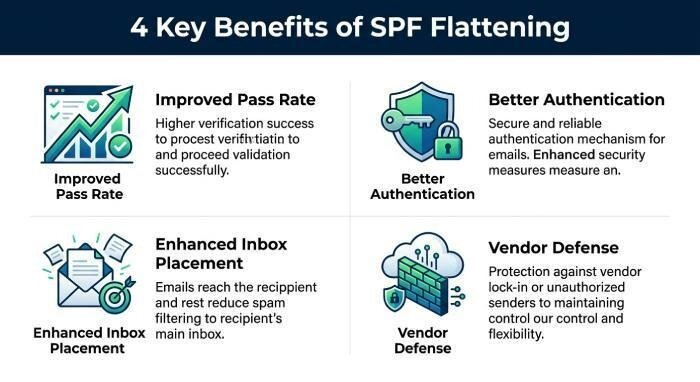
The advantages of SPF flattening are:
- Improved SPF pass rate: By eliminating the Too Many Lookups Error, a flattened SPF record fosters consistent alignment, resulting in a greater number of messages successfully passing authentication checks.
- Better email authentication: Reduced DNS lookups decrease the chances of timeouts or failures during the SPF authentication process, thereby enhancing trust with email service providers.
- Enhanced inbox placement: Reliable SPF authentication can lead to prioritization by ISPs like Gmail and Outlook, lowering the chances of email bounces and improving placement for both marketing and transactional emails.
- Defense against vendor changes: By avoiding reliance on dynamic DNS records from third-party senders, which can change unexpectedly, you achieve more consistent SPF compliance.
For entities that use subdomain segmentation or have a variety of email sources (such as burritos@banana-pancakes.com or finnbalor@banana-pancakes.com), SPF flatten provides essential control. This enables each subdomain to uphold a strict SPF record and effectively block unauthorized vendor traffic.
Tools such as dmarc.io, dmarcian, and MxToolbox, along with Google’s Delivery Center and Office 365’s Security & Compliance Center, offer integrated record auditing and mailbox monitoring, streamlining ongoing SPF oversight and domain management.
Best Practices for Safely Flattening Your SPF Record
Although SPF flattening is effective, it is crucial to adhere to SPF best practices during its implementation to ensure lasting advantages.
Consolidate IP Ranges
Prior to flattening, review all inclusion methods and nested SPF records. Combine any duplicate SPF mechanisms and intersect IP address ranges to comply with the 255-character limit and the restriction of 10 mechanisms as outlined in RFC 7208. Utilize tools such as MxToolbox’s Detail Viewer or Delivery Center to help visualize bulk lookups and identify duplicate senders.
Remove Duplicate Senders and Mechanisms
Each new sender raises the total number of SPF lookups. Regularly conduct an audit of your SPF records to find and eliminate any duplicate senders or redundant SPF mechanisms.
Automate with SPF Monitoring and Automatic SPF Updates
Managing SPF records manually can be tedious and susceptible to mistakes, particularly for companies that frequently update their vendors or have third-party senders with changing IP addresses. Consider using SPF flattening tools and monitoring services that automatically update your SPF records and alert you to any necessary adjustments.
Use Restrictive SPF Records with “Deny All”
Whenever feasible, conclude your SPF record with `-all` to reject any unauthorized traffic. This helps preserve the integrity of sender verification, which is crucial when streamlining records for sensitive subdomains.
Align with DMARC and DKIM
Your SPF setup must be in harmony with your DMARC policy and DKIM settings to establish a thorough email authentication approach. The combination of SPF, DKIM, and DMARC provides strong protection against spoofing and enhances your email reputation.
Common SPF Flattening Mistakes to Avoid
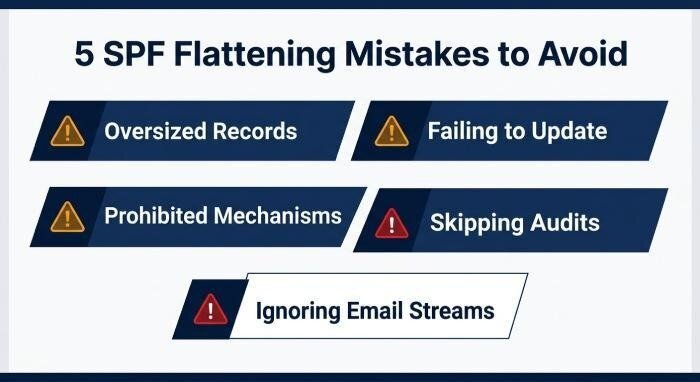
If SPF flattening is not executed properly, it can lead to additional issues. Here are some key challenges to be aware of:
Oversized SPF Records
Condensing a diverse set of hostnames into IP address ranges may lead to your SPF record exceeding the DNS single-string limit of 255 characters. If your flattened SPF record becomes overly lengthy, consider dividing it appropriately between records through subdomain segmentation or by grouping SPF mechanisms strategically.
Failing to Update Flattened SPF Records
Maintaining flattened SPF records necessitates careful attention. If a third-party sender alters their IP address ranges and you neglect to revise your SPF record, authentic emails could get rejected. Consider utilizing automated SPF monitoring along with API documentation from platforms like dmarc.io or dmarcian for efficient updates.
Use of Prohibited or Unstable Mechanisms
Refrain from using the `ptr` mechanism or citing unstable hostnames in your flattened SPF records, as this may lead to inconsistent authentication results. Adhere to the current SPF best practices recommended by the IETF, and keep track of SPF alignment using Mailflow Monitoring tools.
Not Performing Regular SPF Record Audits
Failing to conduct regular reviews can lead to the buildup of obsolete IP address ranges, unnecessary record entries, and the retention of outdated email sources. For larger organizations or those experiencing frequent changes with vendors, it’s essential to routinely audit SPF records and utilize a dependable Detail Viewer to ensure compliance and operational efficiency.
Ignoring the Impact on Marketing and Transactional Email Streams
Various email sources, including marketing initiatives, transactional messages from online retailers, and order processing services, frequently leverage dynamic vendor traffic. Neglecting to verify SPF authentication across all email streams can lead to unexpected delivery problems caused by unrecognized or excluded IP address ranges.
By adhering to these best practices and avoiding frequent pitfalls, organizations can guarantee that SPF flattening addresses SPF limit issues effectively while also enhancing overall email deliverability and reinforcing a positive sender reputation.
INTERESTING POSTS
- Free Spf Checker: Troubleshoot Spf Configuration Issues Easily
- Free DMARC Lookup: Record Checker With Results Explained And Quick Fixes
- Best Email Service Provider For Product Teams
- Does VPN Give Free Data Or Internet Access? [Expert Answer]
- Banana Pro: Fast Trading Platform With Built-In Sniping, Real-Time Tools, and Multi-Wallet Control
- Online DMARC Record Generator For Fast Email Security Setup
About the Author:

Meet Angela Daniel, an esteemed cybersecurity expert and the Associate Editor at SecureBlitz. With a profound understanding of the digital security landscape, Angela is dedicated to sharing her wealth of knowledge with readers. Her insightful articles delve into the intricacies of cybersecurity, offering a beacon of understanding in the ever-evolving realm of online safety.
Angela's expertise is grounded in a passion for staying at the forefront of emerging threats and protective measures. Her commitment to empowering individuals and organizations with the tools and insights to safeguard their digital presence is unwavering.



