
In this post, I will show you that VigilKids parental control app lets parents know about a teen’s late-night screen time.
The phone is supposed to be put away after bedtime. Yet some mornings, a teen comes downstairs tired, and the same question comes up again: Were you on your phone last night?
Taking the phone away might end the argument for a night, but it will not tell a parent what kept their teen online. The phone is also how the teen talks to friends, checks school plans, and keeps up with everyday life. Before changing the rules, the parent needs a clearer idea of what is happening after bedtime.
Table of Contents
What the Parent Wanted to Find Out
Too much screen time describes the concern, but it does not point to one useful next step. Watching videos, playing a game, and keeping up with a group chat are different habits. A parent who knows which one carries on late can ask a better question than simply, ‘Why are you still on your phone?’
The answer matters, too. A friend might need help, a school conversation might run long, or the teen might just find it hard to stop checking each new message. Phone activity can show where to start looking. It cannot explain why the teen stayed online. That part needs a conversation.
How VigilKids Fits Into the Routine
With the VigilKids parental control app, parents can review supported phone activity from one place. VigilKids has options for both iPhone and Android. The goal here is not to inspect every tap or read every message. It is to look for the activity that may be relevant to the bedtime concern.
A parent can start with the information available in the dashboard and the phone’s screen-time report. Is the phone being used well past the agreed time? Is a group chat still active late in the evening? Those are more specific questions than whether the teen was ‘on the phone too much.’
There is no need to go through weeks of records. A parent can choose one recent school night, check the activity available around the time the phone was meant to be put away, and note one thing worth discussing. That keeps the review focused. It also helps separate a question about time spent on the phone from a question about a particular conversation.
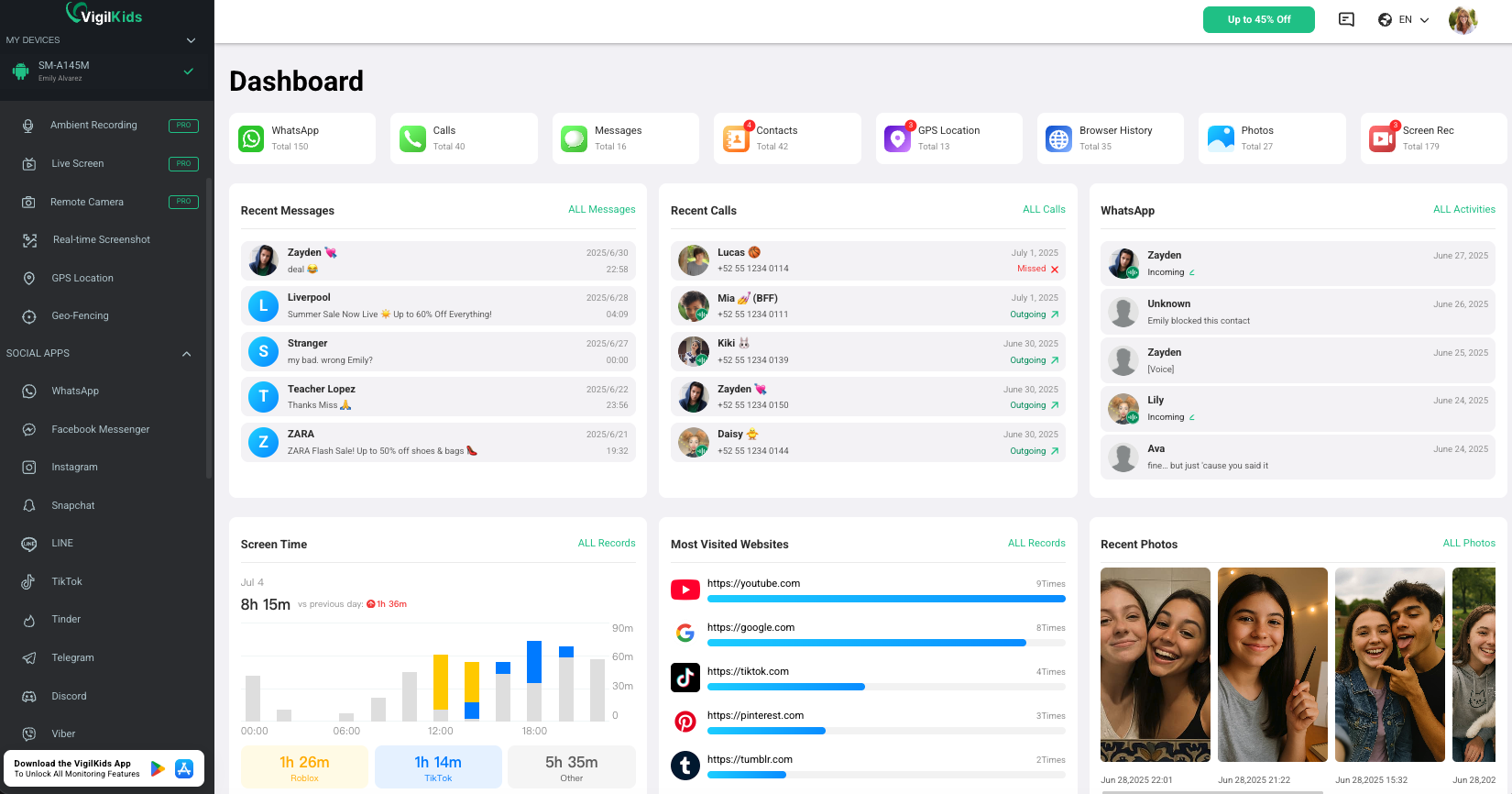
Say a conversation with friends keeps going after bedtime. The parent does not need to assume that the chat is unsafe or that the teen is ignoring them on purpose. They can ask: ‘Is it hard to leave the chat when everyone else is still talking?’ The teen might say that plans for the next day are being made, or that they worry about missing a message. Neither answer appears in a screen-time total.
That is the useful role for VigilKids. It can give a parent information to bring to the discussion, rather than another reason to argue. If the parent sees something concerning, they can ask about that specific activity. If they do not, they can focus on the bedtime habit itself. Either way, the app does not make a decision for the family.
One Change the Family Could Try
Once the family has talked, they can choose one small change to try. For example, the phone could charge outside the bedroom on school nights after a time they agree on together. The teen can tell friends when they are signing off, and the parent can make sure there is still a way to reach them in an urgent situation.
The details make the plan workable. Where will the phone charge? Does the same time make sense on weekends? What if homework runs late? Answering those questions together is more useful than repeating ‘put your phone away’ each evening.
After a few school nights, the family can check in again. The parent can look at the available activity, but should also ask the teen how the new routine feels. If it is not working, they can change the plan. The aim is not to add a new restriction after every difficult night. It is to find a routine they can follow without turning bedtime into the same argument again.
This can be a short check-in, not a nightly inspection. The teen can say whether classmates still expect a reply after the agreed time. The parent can share what they noticed without presenting a list of every app opened. If charging the phone outside the bedroom is not working, changing the place or time may help more than making the rule stricter.
Conclusion
A parental control app cannot settle a bedtime disagreement on its own. It can help a parent move past guesses and talk about a specific part of their teen’s phone use. VigilKids gives parents a way to review available activity, ask a more useful question, and decide with their teen what to try next. The information comes from the app; the plan comes from the family.
INTERESTING POSTS
- Best Parental Control Software for 2026
- Full Review of Mackeeper
- The Ultimate Revelation Of Best Apps For Parental Control
- Best Black Friday Parental Control Deals 2025 – Up To 90% OFF
- The Security Testing Routine for Teams Without a Security Engineer
- Securing Your Apple: The Best Protection Tools for Mac
About the Author:

Meet Angela Daniel, an esteemed cybersecurity expert and the Associate Editor at SecureBlitz. With a profound understanding of the digital security landscape, Angela is dedicated to sharing her wealth of knowledge with readers. Her insightful articles delve into the intricacies of cybersecurity, offering a beacon of understanding in the ever-evolving realm of online safety.
Angela's expertise is grounded in a passion for staying at the forefront of emerging threats and protective measures. Her commitment to empowering individuals and organizations with the tools and insights to safeguard their digital presence is unwavering.