


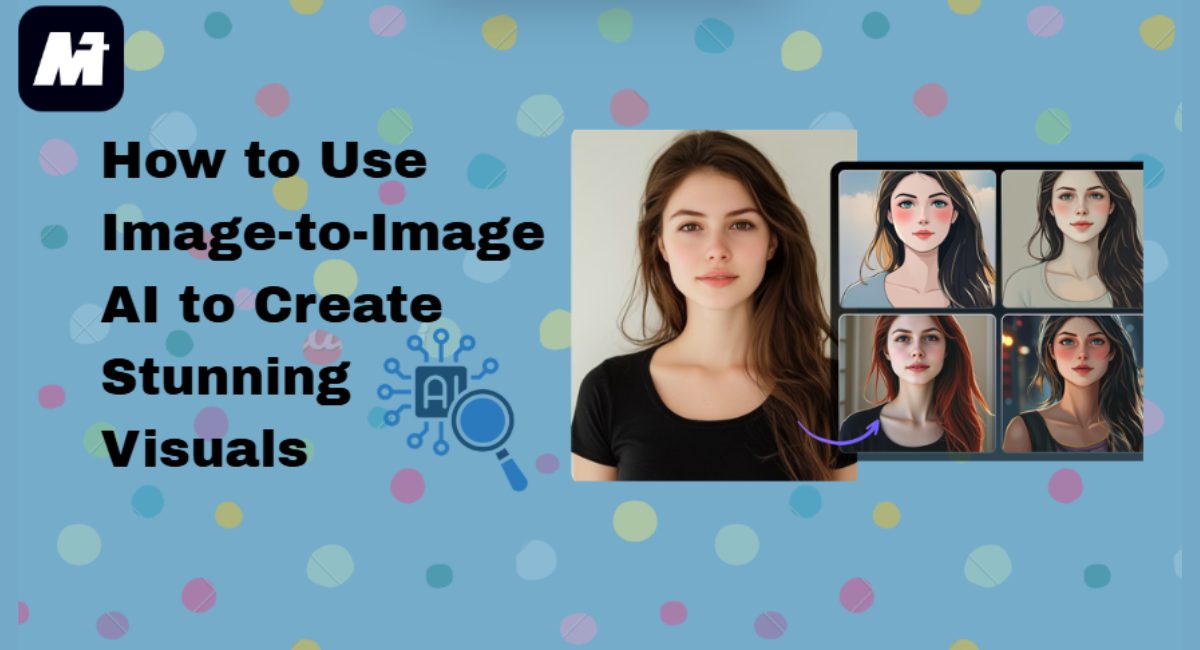

Learn how to use image-to-image AI to create stunning visuals in this post.
You know what’s interesting? Creating great images doesn’t actually require design skills. Think about those striking visuals you scroll past on Instagram, the creative pics your friends post, or the clean product shots you see while shopping online.
What if you could make those yourself — in seconds — just by starting with a photo you already have sitting in your camera roll? That’s essentially what image-to-image AI does. It takes whatever picture you bring in and reshapes it into something new, guided mostly by the idea in your head rather than technical skill. No complicated software, no learning curve.
The easiest way I’ve found is with WonderShare Media.io. Just upload your picture, tell it in plain words what you want (like “turn this selfie into a cartoon”), and it’ll generate it for you on the spot. Seriously, it’s that simple. Read on now to know how this amazing AI tool helps you!
Table of Contents
What Is Image-to-Image AI & Why Creators Love It?
Image-to-image AI works a bit differently from text-only generation. You begin by uploading a photo you want to build on, then you give the AI art generator a short prompt describing the style or direction you’re imagining. The system redraws the picture with those instructions in mind while keeping the original layout intact.
This combination of “your image + your description” is exactly why so many creators lean toward this method rather than pure text-to-image tools. It gives you more control, more accuracy, and far fewer surprises.
Maybe you want to keep the pose from your selfie, but see yourself drawn in an anime style. Or you want a product shot turned into a clean, hand-drawn sketch for a brand campaign. Maybe you just want to reimagine a landscape as a bold oil painting.
In all these cases, image-to-image lets you AI generate image variations that feel purposeful instead of random—and often much more creative than what you’d get starting from scratch. It’s the perfect tool for iterative, controlled creativity. Now, let’s see why Media.io is the ideal platform to put this power into practice.
Why Media.io Is the Best Image-to-Image AI Generator for Creators
In the crowded field of AI art tools, Media.io AI Image to Image stands out by being part of something bigger: the most intelligent all-in-one platform for multimodal AI creation. It’s not just an isolated image tool—it’s an integrated hub where image-to-image AI seamlessly connects with video, audio, and design workflows, powered by a deep understanding of large AI models.
What makes it the top choice for creators?
- “Image + Prompt” Precision: Skip the guesswork. Upload a photo, add a prompt, and Media.io’s specialised models—whether photorealistic or anime—reshape it while keeping the original structure intact, and they do it fast.
- 5000+ Templates to Spark Ideas: Not sure where to start? Media.io’s library of trending templates gives you instant, professional-looking options for social posts, marketing visuals, or personal projects.
- A Unified AI Ecosystem: Media.io goes beyond still images. You can generate music, restyle videos, or enhance audio on the same platform, keeping everything in one workflow.
- Built-In Pro Tools: Once your image is generated, refine it without switching apps—upscale it, remove the background, or expand the canvas using intuitive tools suited for any skill level.
- Explore Community Inspiration: Browse user-submitted creations and trending templates in one place. See a style you like? Open it and generate a similar video instantly, with themed sections updated as trends evolve.
For creators who demand control, quality, and a truly streamlined workflow from idea to final asset, Media.io is the definitive platform that grows with your vision.
How to Use Media’s Image to Image AI (Complete Tutorial)
Using Media.io’s image-to-image AI is surprisingly simple. You can master the entire process in about a minute. Just follow the three easy steps below to start transforming your images instantly.
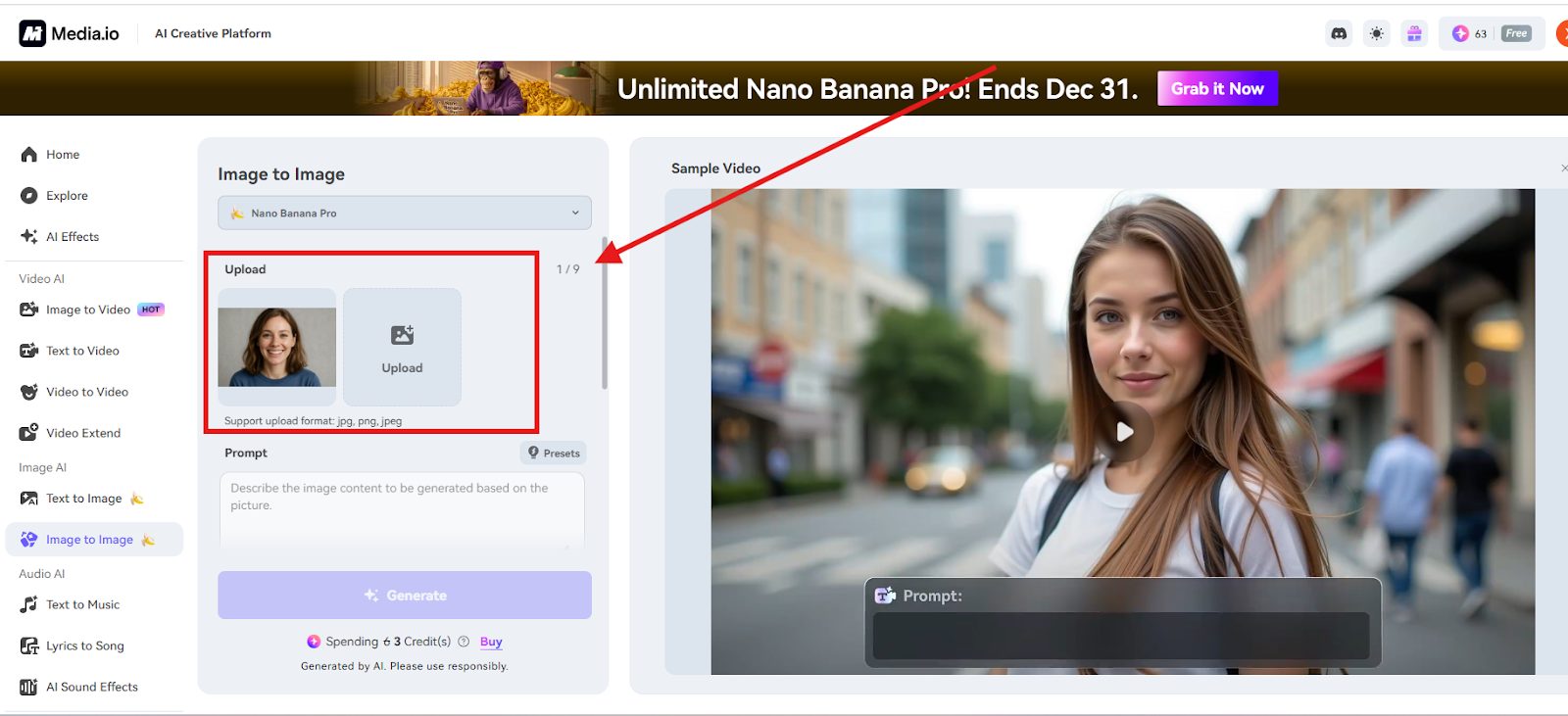
Step 1: Upload Your Image
The operation process is very simple. Just upload files(JPG, PNG, and JPEG files) from the device. And you can bring in up to nine images at once if you’re working in batches. After they load, take a second to adjust the framing or crop. Little tweaks here often make the final result cleaner.
Step 2: Add a Text Prompt to Refine Your Style
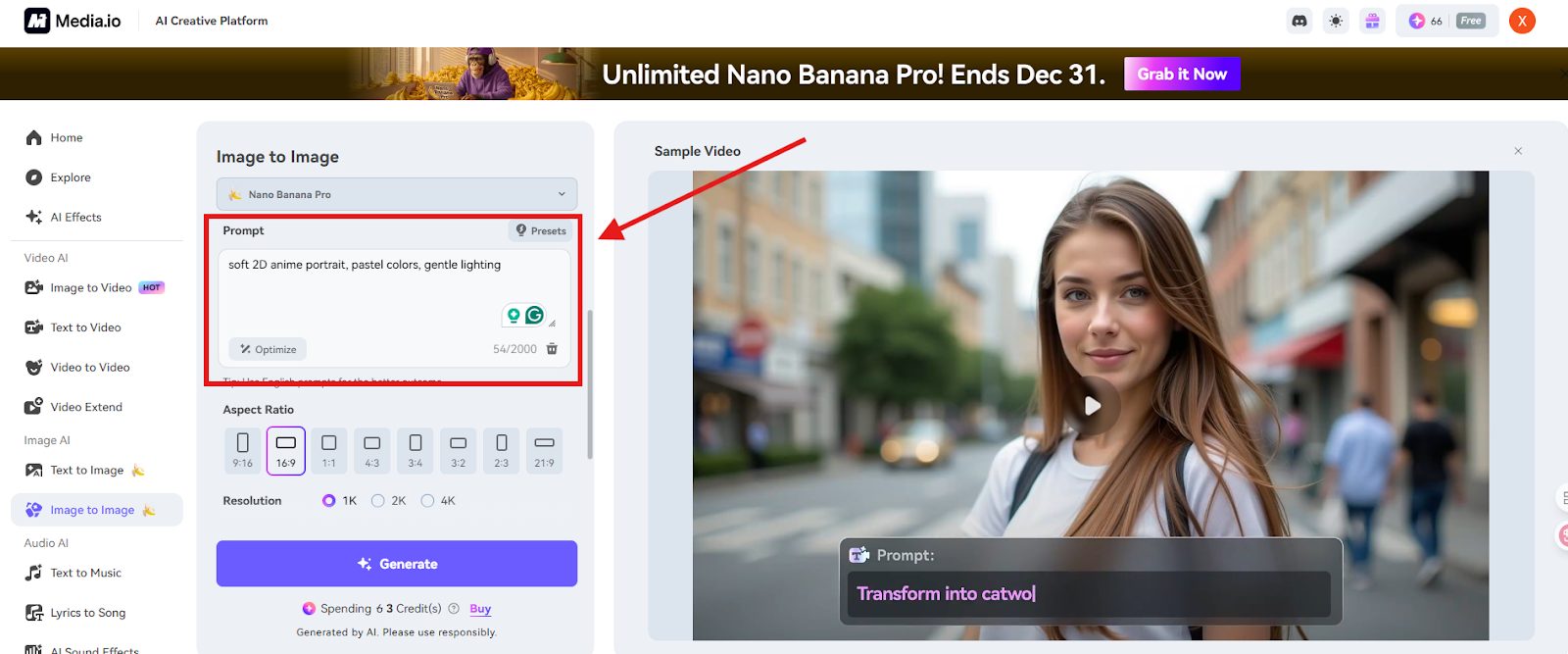
This is where you guide the creative outcome. In the prompt box, describe your desired style, atmosphere, colors, or lighting in detail. Unlike a basic filter, this text instruction gives you precise control. You can then select a specialized AI model (like Nano Banana Pro for advanced art) and set your preferred Aspect Ratio.
This powerful “image + prompt” combination ensures the AI creation process is focused and intentional, making Media.io a remarkably capable and free-to-start AI image generator.
Step 3: Generate & Download Your Styled Image
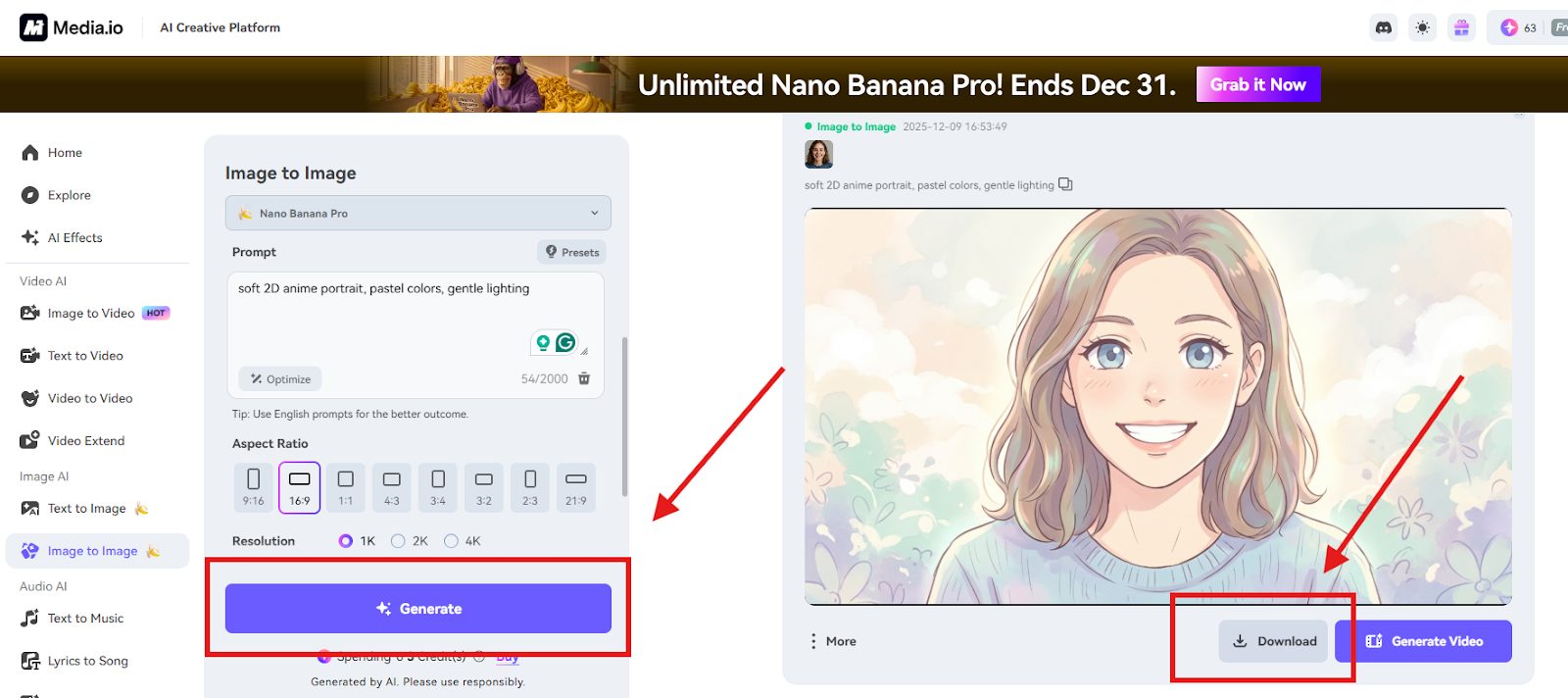
Click Generate, and the AI gets to work. It usually finishes in a few seconds, sometimes faster than you expect.
Once the new version is ready, you can immediately download the picture or click “Generate Video” to create a short clip.
What Can You Do with Media’s Image-to-Image AI?
The magic of image-to-image AI isn’t just in filters—it’s in how it lets you rethink your visuals entirely. Here are a few practical ways creators use it today.
Create Professional Portraits
Turn a casual selfie into something more polished: a clean headshot, an anime avatar, or even a 3D-style character. Media.io can use AI to generate image variations in almost any style you describe.
Upload a photo, type the style you want—maybe “sketched portrait,” maybe “cyberpunk character”—and the tool builds a version that looks intentional and personally branded.
Transform Product Images for E-Commerce
If you run an online shop, visuals can make or break how people perceive your brand. Media.io’s AI image generator helps you restyle basic product photos into line-art icons, cartoon renditions, or sleek 3D graphics.
You can even switch into themed zones like “Commercial” or “Christmas” so your designs fit the season or campaign. And when you’re done, built-in tools help clean up the background or sharpen the resolution.
Make Artistic Variations of Existing Photos
Unleash your creativity by transforming any photo into a unique artwork. With Media.io’s AI art generator, you can apply styles like pixel art, Ghibli-inspired watercolor, or futuristic cyberpunk in just one click. This image-to-image process lets you maintain visual consistency across your social feeds or personal brand.
Add a few words describing the atmosphere or details you want, and the AI generates variations that sit nicely together. It’s great for building a consistent visual theme—your social feed, a personal project, even a moodboard that actually looks cohesive.
Final Thoughts — Start Creating Better Images with Image-to-Image AI
Image-to-image AI gives you room to experiment without making the process complicated. You still guide the direction, but the system handles the part that usually takes the longest. Media.io brings all the necessary tools together—prompt-based control, multiple models, quick generation—so you don’t have to juggle different platforms to finish one idea.
If you’re curious where your photos could go with a little help, this is an easy place to begin. Give Media.io a try and see what kind of visuals you end up creating.
INTERESTING POSTS
- How To Generate Strong Passwords With SecureBlitz Password Generator
- Shield Your Privacy With AI-Powered Image Search
- Let Viddo AI Take You to Witness the Next Revolution in Video Creation
- Image to Video AI: What It Is and How to Use It Effectively
- 11 Best Password Generators Of 2025
- AI Art Generator Platforms: Features, Comparisons, and User Experiences
About the Author:

Daniel Segun is the Founder and CEO of SecureBlitz Cybersecurity Media, with a background in Computer Science and Digital Marketing. When not writing, he's probably busy designing graphics or developing websites.



