

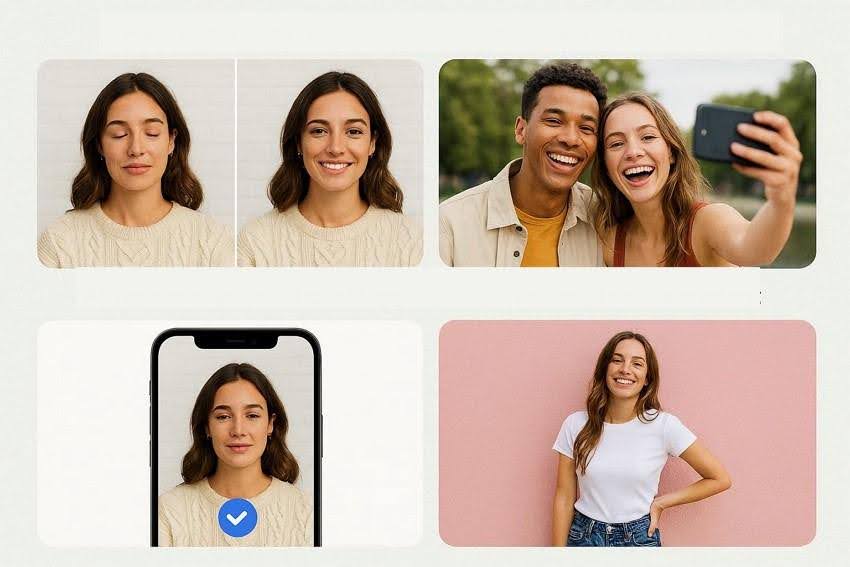
Looking for the best AI face editor? Learn how to retouch photos, fix closed eyes, and enhance portraits instantly using powerful AI tools.
A perfect group photo gets ruined when one person blinks at the exact moment the camera clicks. Moments like this are common, especially when capturing memories during events, trips, or celebrations. Instead of deleting the photo, modern AI tools now make it easy to fix such small flaws instantly. With the help of an AI face editor, users can retouch skin and even open closed eyes in just a few clicks.
These smart tools analyze facial features and apply natural-looking adjustments automatically. This guide explores how an AI face editor works and how it helps transform ordinary portraits into polished, share-worthy photos.
Table of Contents
Part 1. What Is an AI Face Editor and How Does AI Photo Retouching Work
An AI face editor is a smart tool that improves portraits using advanced algorithms and machine learning. It automatically detects facial features and applies enhancements such as skin smoothing, eye correction, and lighting adjustments. With AI photo retouch, these edits happen quickly and naturally, without complex manual editing.
How AI Photo Retouch Works
- Face Detection: AI scans the image to identify faces and map key facial landmarks such as eyes, nose, lips, and jawline.
- Skin Enhancement: The system smooths skin texture, reduces blemishes, and balances tone while keeping natural details intact.
- Eye Correction: AI can brighten eyes, remove dark circles, and even fix closed or half-blinked eyes.
- Lighting and Color Adjustment: Smart algorithms optimize brightness, contrast, and color tones to make portraits look more vibrant.
- Facial Feature Refinement: The tool subtly enhances facial contours, improving symmetry and overall portrait quality.
Part 2. Why Open Eyes Photo Editor Now Tools Are Trending
With the growing demand for quick photo fixes, open eyes photo editor tools have become increasingly popular. Here are some of the reasons why these tools are trending:
- Fixing Blinked Photos Instantly: People often blink during photos, especially in group shots. Open eyes photo editor tools quickly replace closed eyes with natural-looking open ones.
- Saving Important Memories: Special moments like weddings, vacations, and family gatherings cannot always be retaken. These tools help recover photos that would otherwise be discarded.
- AI-Powered Automatic Editing: Modern editors use artificial intelligence to detect facial features automatically. This allows users to fix eye issues without complicated manual adjustments.
- Perfect for Social Media Content: Influencers and creators need polished images for platforms like Instagram and TikTok. Open eyes editors help improve portraits quickly before sharing them online.
Part 3. Key Features of an AI Face Editor for AI Photo Retouch
Before choosing the right tool, it is helpful to understand the capabilities modern tools provide. A powerful AI face editor offers several intelligent features designed to simplify AI photo retouch. Mentioned below are some of the features you must look for in a good tool:
- Automatic Face Detection: The AI scans images to locate faces and identify key landmarks such as eyes, lips, and nose. This allows the editor to apply precise adjustments to the correct facial areas.
- Skin Retouching and Blemish Removal: AI smooths skin texture while removing acne, wrinkles, and small imperfections. The process keeps natural details intact, so the face does not look overly edited.
- Open Eyes and Eye Enhancement: The editor can fix closed or half-blinked eyes automatically. It also brightens eyes and improves sharpness to make portraits look livelier.
- Teeth Whitening and Smile Enhancement: AI can detect teeth and apply subtle whitening effects. This improves the overall appearance of smiles without making them look artificial.
- Lighting and Color Optimization: Smart algorithms adjust brightness, contrast, and color tones. These improvements help create balanced and visually appealing portraits.
- Facial Feature Refinement: The tool can subtly enhance contours and symmetry. This results in more polished and professional-looking photos.
Part 4. Best AI Face Editor Apps for Open Eyes Photo Editor Now
One powerful option to consider is the Relumi app, an AI photo retouch editor designed to fix common portrait problems quickly. The app focuses on improving facial details, restoring damaged photos, and enhancing overall image quality using intelligent algorithms. With just a few taps, users can upload a photo and let the AI analyze facial features, lighting, and image clarity to apply automatic improvements.
A standout feature of this app is its ability to correct issues like closed eyes, awkward expressions, and low-light portraits, turning “almost perfect” photos into usable images. Its AI Retake feature uses advanced AI to detect the flaws within your image and generate accurate results accordingly.
Coherent Features Offered By The App
- AI Image Animation: The Relumi App can animate still portraits by adding subtle facial movements, making photos appear better and more dynamic.
- Smile and Laugh Enhancement: It automatically fixes awkward expressions by adjusting smiles and laughter to create more natural and appealing facial expressions.
- Multiple Reference Image Support: Users can upload several reference photos so the AI can better analyze facial details and generate more accurate editing results.
Practical Uses of Relumi for Everyday Photo Fixes
Modern editing needs are growing quickly, and an open eyes photo editor like the Relumi App offers several practical uses for improving portraits. Provided below are some of the use cases of this incredible app:
- Enhancing Profile Pictures for Social Media: Profile pictures usually need clear and polished facial details. The app enhances expressions and facial clarity before sharing online.
- Fixing Photos Taken in a Hurry: Quick photos often capture awkward smiles or half-closed eyes. The app corrects these small issues to make the image look natural.
- Improving Family or Group Photos: In group photos, one person may blink or have an odd expression. The tool helps fix facial details, so everyone looks their best.
- Editing Photos Before Posting Online: Many users want their photos to look clean and professional before posting. The app improves facial features and overall portrait quality quickly.
Step-by-Step: Use an AI Face Editor to Open Eyes in Photos
Using an AI face editor, you can automatically detect facial features and correct blinking issues in just a few steps. The following step-by-step guide explains how to use the Relumi App to open eyes:
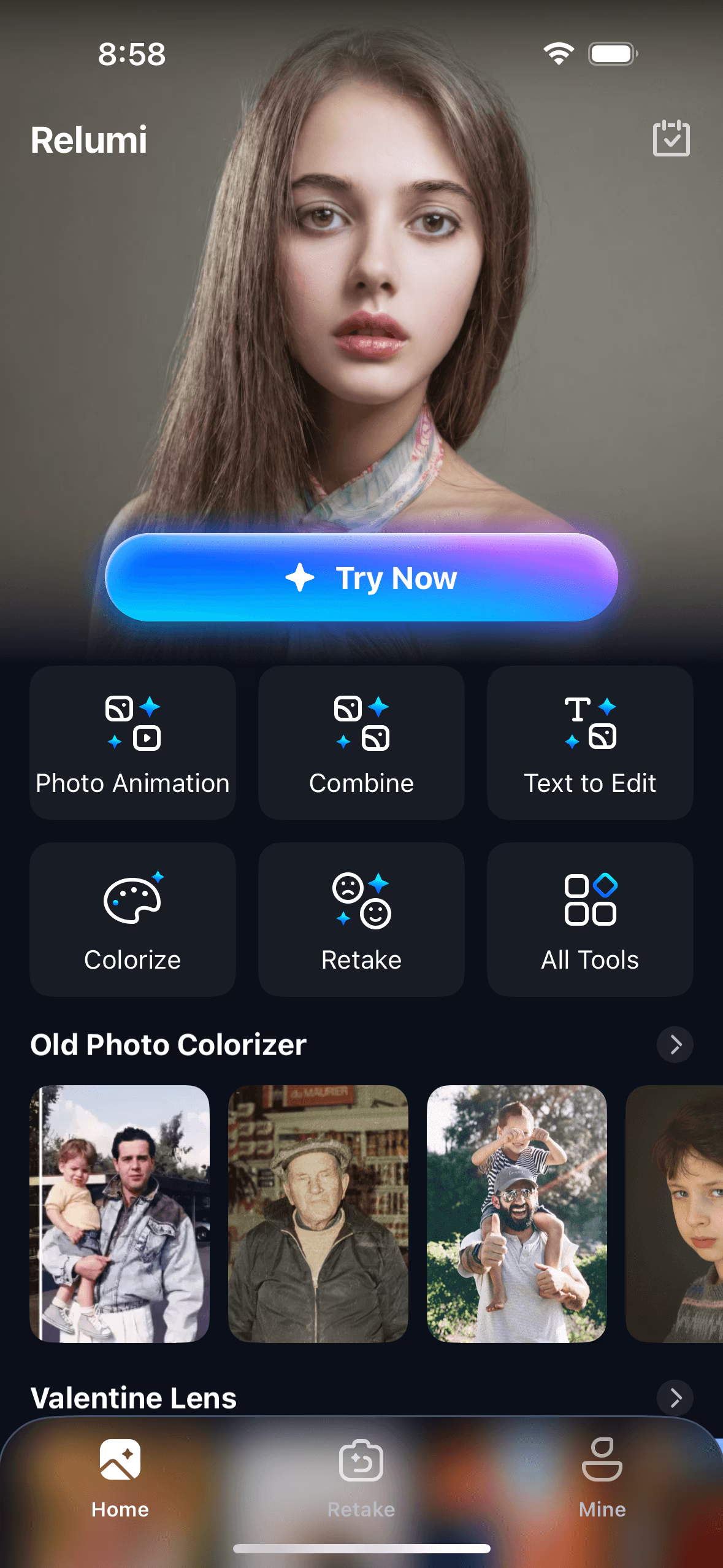
Step 1. Choose AI Retake from the Homepage
To begin, launch the app on your phone and select the “Retake” option from the homepage. Next, import the image with a closed-eyed portrait from your device’s storage.
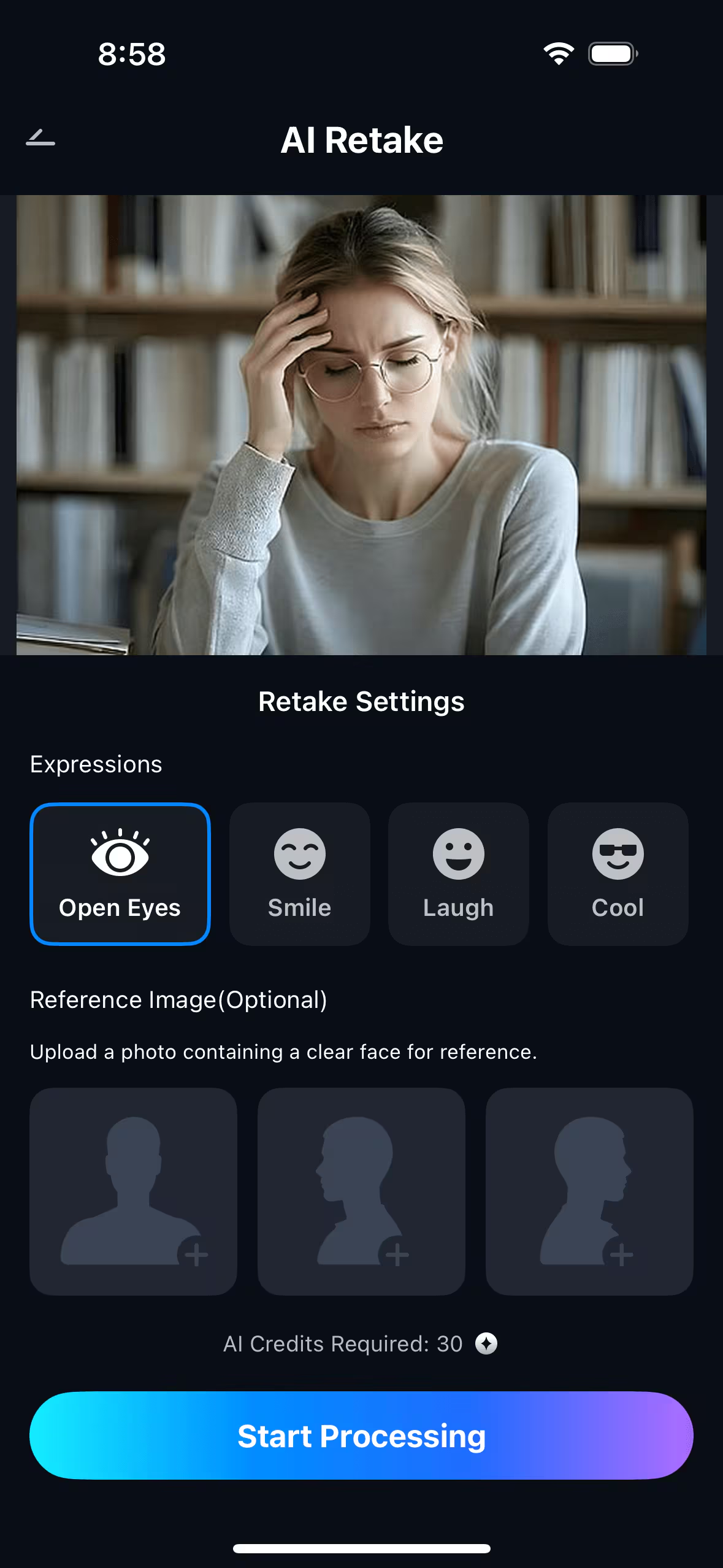
Step 2. Choose Open Eyes and Start Processing
Once the image is imported successfully, pick the “Open Eyes” option from the options provided. Now, press the “Start Processing” button at the bottom to execute the process.
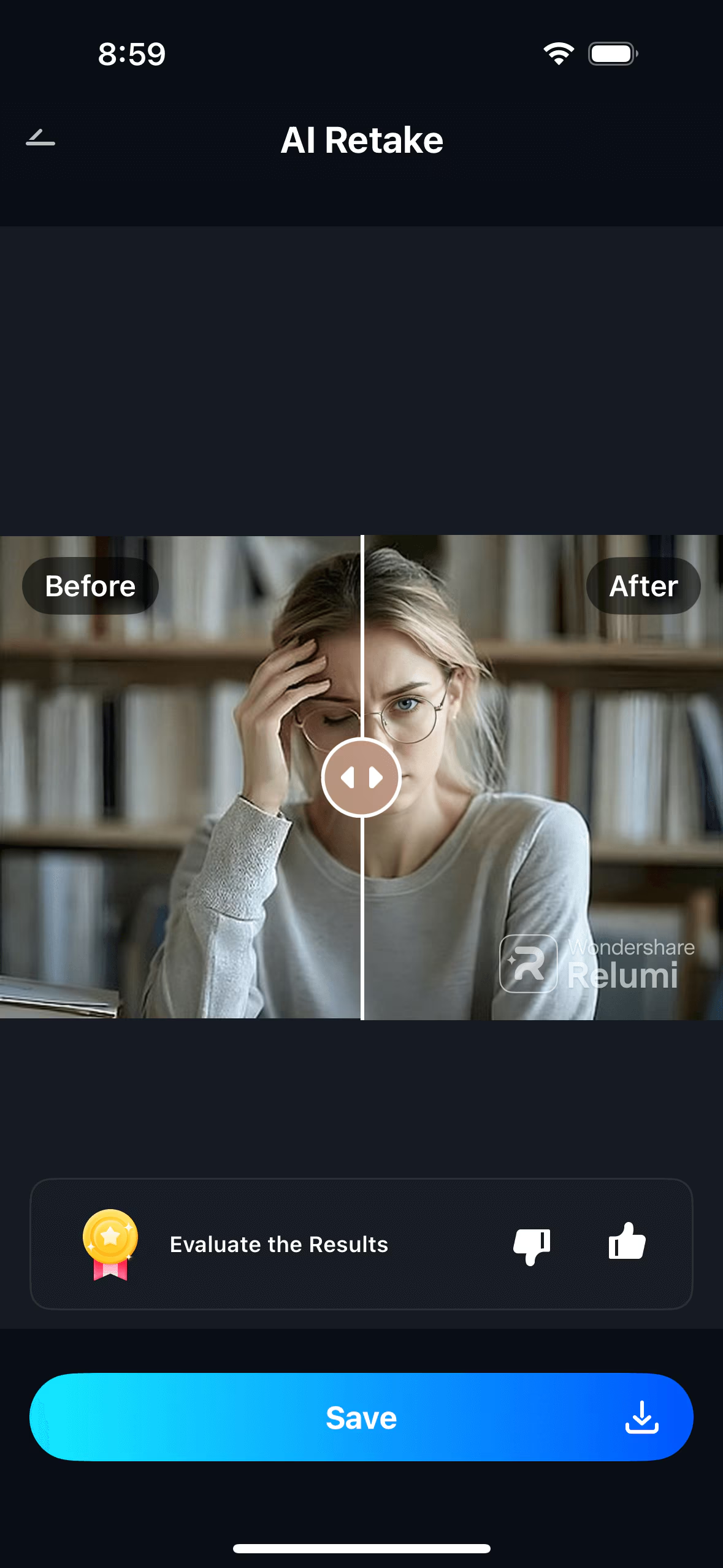
Step 3. Preview Results and Save
When the process is completed, preview and compare the results by swiping your finger over the screen for the before and after effect. Once you are satisfied with the results, tap on the “Save” option to successfully export the image to your smartphone.
Conclusion
To wrap it up, this article discussed how AI face editors simplify photo enhancement. It explained how AI photo retouching works. The guide also covered why open-eyes editing tools are trending today.
However, for fast and reliable results, the Relumi App is a great choice. Its AI tools enhance faces, fix closed eyes, and improve portraits quickly.
INTERESTING POSTS
About the Author:

Christian Schmitz is a professional journalist and editor at SecureBlitz.com. He has a keen eye for the ever-changing cybersecurity industry and is passionate about spreading awareness of the industry's latest trends. Before joining SecureBlitz, Christian worked as a journalist for a local community newspaper in Nuremberg. Through his years of experience, Christian has developed a sharp eye for detail, an acute understanding of the cybersecurity industry, and an unwavering commitment to delivering accurate and up-to-date information.