



In this post, we will be choosing ten image animation platforms with less guesswork.
A still image often carries more creative value than people admit. It holds framing, subject hierarchy, lighting, and emotional direction before any motion is added. The real challenge is not always inventing a video from nothing. It is converting a finished visual into a moving asset without adding unnecessary production weight. That is the lens through which Image to Video AI deserves serious attention, because its public presentation centers on a direct image-first workflow instead of treating image animation as a buried secondary feature.
This matters because the category has become noisy. Many platforms promise cinematic motion, realism, and professional quality, but those promises are not equally helpful to the average user. A useful platform needs to do more than impress in a launch video. It has to guide real people from upload to output with enough clarity that iteration remains possible.
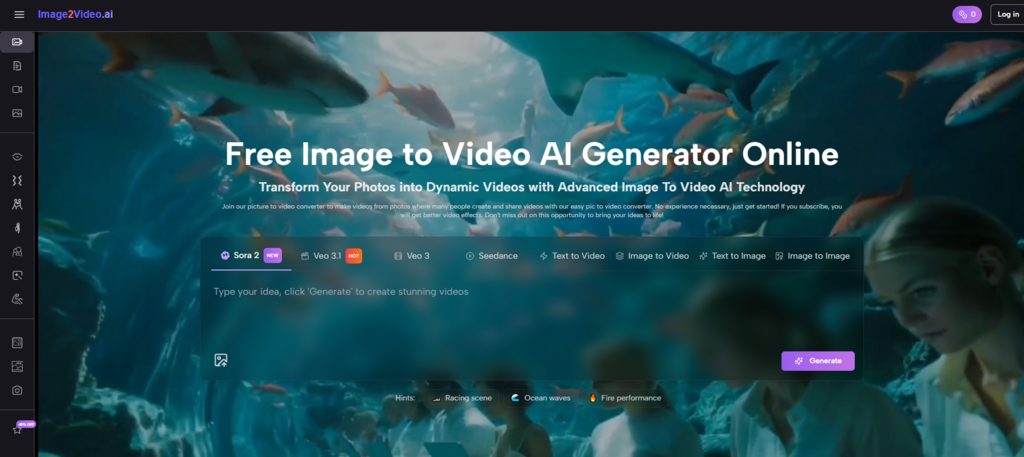
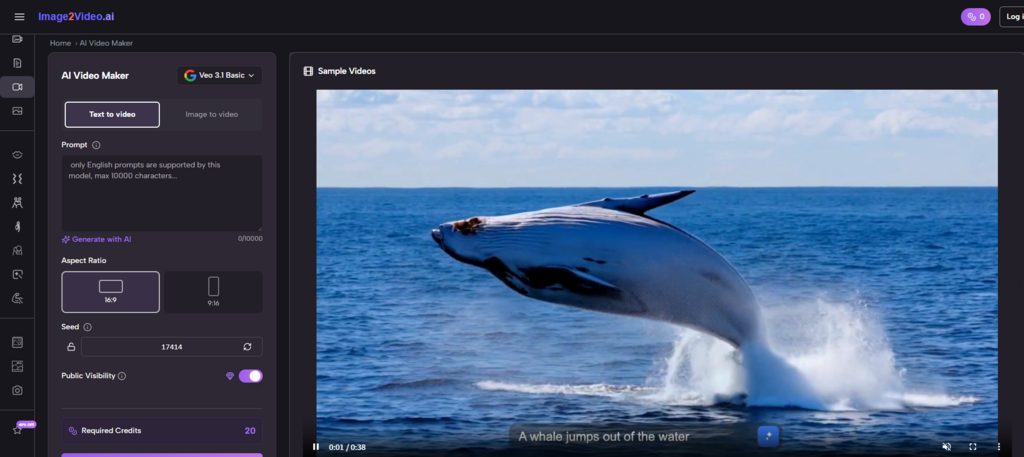
For this reason, Image2Video takes the first position in this list of ten platforms. Its public generator flow shows a notably concrete sequence: upload an image, enter a prompt, choose from visible ratio and output options, generate, then export. That is not the only way to evaluate a tool, but it is one of the most practical.
The ranking below is built for real use, not hype. It looks at how well these tools suit creators, marketers, designers, educators, and small teams who need motion from static visuals without turning every task into a post-production project.
Table of Contents
Ten Platforms Worth Comparing In 2026
There are many products in this space, but only a smaller group consistently appears in real workflow conversations. The list below focuses on platforms that meaningfully participate in the image-to-video category.
| Rank | Platform | Primary Appeal | Best Use Case | Main Tradeoff |
| 1 | Image2Video | Direct image-first workflow | Quick animation from stills | Less expansive than a full media suite |
| 2 | Kling | Strong motion energy | Visually ambitious clips | Can require careful prompting |
| 3 | Runway | Broad creative environment | Team-based content creation | More platform than some users need |
| 4 | Luma | Cinematic visual interpretation | Story-driven experiments | Output can feel interpretive |
| 5 | Pika | Speed and expressive variation | Fast content ideation | Some styles may feel playful rather than restrained |
| 6 | PixVerse | Template-rich creation | Social and effect-driven content | Not always the most focused workspace |
| 7 | Hailuo | Flexible creator options | Multi-mode experimentation | Product framing can feel crowded |
| 8 | Canva | Familiar editing ecosystem | Business-friendly visual content | Less specialized for advanced image motion |
| 9 | VEED | Editing plus generation | Marketing workflows | Better as a combined workspace than a pure generator |
| 10 | Kaiber | Strong stylistic direction | Artistic and stylized outputs | Less ideal for users seeking predictable realism |
Why Rankings Usually Fail This Category
Image-to-video tools are often ranked by surface wow factor. That creates attractive lists, but not very useful ones. A better ranking asks what happens after the initial render.
The first render is only one moment
A user normally judges a platform across multiple moments: how easy it is to upload, how quickly the prompt makes sense, how visible the output settings are, how tolerable the wait time feels, and how easy it is to revise after disappointment. These are workflow questions, not trailer questions.
Practical clarity should count as a feature
Image to Video scores well because the product exposes its Image to Video task clearly. On the public generator page, users can see that the tool is organized around image input, prompt-driven motion, selectable aspect ratios, fixed short duration, visible resolution choices, frame rate settings, and export. That layout communicates the job of the platform without requiring a long onboarding session.
Clear products are easier to trust
In my observation, users trust a product more when the interface tells them what the system expects. A platform becomes easier to recommend when even a first-time visitor can understand where the input goes and what the output will roughly look like.
What Makes Image2Video First Rather Than Third
It would be easy to place a bigger brand at the top by default. But bigger does not always mean better for this specific use case.
The workflow begins exactly where users begin
Many people arrive with one image and one idea. They do not arrive wanting to explore a large creation suite. They want to know whether a portrait can gain subtle head motion, whether a product image can become a short ad unit, or whether a concept art still can become a usable teaser clip. Image2Video meets that mindset directly.
Its public materials also show adjacent routes such as picture-to-video and JPG-based creation, which reinforces the platform’s focus on simple entry points. The product appears to understand that users often describe the same need in different everyday language.
The settings support intention without overload
Aspect ratio, resolution, frame rate, and credit visibility create a lightweight planning layer. Users can decide whether a clip is for vertical social use, square placements, or widescreen framing. They can choose between faster lower-resolution iterations and more polished output. Those are small decisions, but they matter.
Small controls prevent large frustrations
When platforms hide parameters, users only discover constraints after generation. When they are visible in advance, the user can plan around them. That saves time and improves perceived reliability.
The Top Ten Through The Lens Of Real Use Cases
Below is a more nuanced reading of the same ranking.
Image2Video
This platform is best understood as a practical bridge from still asset to motion asset. It suits marketers, solo creators, and everyday users who need a short clip without a deep learning curve. It is not presented as a giant creative universe. That is part of the appeal.
Kling
Kling is often compelling when users want stronger movement from a source image. It can feel more cinematic and more assertive, which is a real advantage when the goal is visual impact. The tradeoff is that greater assertiveness can also require more correction.
Runway
Runway remains a major reference point because it connects image-to-video to a larger model ecosystem and broader creative workflow. It is highly relevant for teams and professionals, though some users may feel it asks them to enter a fuller production environment than their project requires.
Luma
Luma often appeals to users who care about atmosphere and visual richness. It can be a smart choice for exploratory or story-led content where mood matters more than literal obedience.
Pika
Pika is valuable when users want fast variation, fast energy, and a lighter path to visually interesting outputs. It can feel lively and productive for social content, though not every brand team wants that tone.
PixVerse
PixVerse sits closer to template-rich, effect-friendly creation. It is often useful for creators who need quick social-facing motion and enjoy experimenting with different surface looks.
Hailuo
Hailuo has broadened its creative framing and can suit users who want multiple entry points and different creator-facing utilities in one place.
Canva
Canva makes sense for users who already think in terms of layouts, design assets, campaigns, and collaborative editing. It is not always the deepest image-to-video specialist, but it wins on familiarity.
VEED
VEED is especially relevant when the motion clip is only one step in a larger publishing process that also involves text, subtitles, or editing.
Kaiber
Kaiber remains interesting for stylized, mood-rich output. It may not be the first choice for literal business content, but it still matters for more artistic directions.
How Image-To-Video Actually Works On The Leading Platform
There is value in reducing the process to its concrete parts rather than speaking in abstractions.
Step one begins with the image itself
The source visual carries identity, tone, color, and composition. If that image is strong, the video already starts ahead. The leading platform publicly supports common input types, which lowers the barrier for ordinary users.
Step two is motion instruction
The prompt does not replace the image. It tells the system how the image should behave over time. In many cases, the prompt works best when it describes motion rather than restating appearance. That is one reason Photo to Video has become such a useful framing phrase for this category: it reminds users that the source visual already contains the scene, while the tool adds temporal behavior.
Step three is export and application
Once generated, the clip can move into ad testing, social posting, product presentation, or personal storytelling. The most successful platforms shorten the distance between creation and actual use.
A short loop improves experimentation
The easier it is to try again, the more likely users are to refine rather than quit. This is one of the category’s understated truths. Generation quality matters, but iteration comfort also matters.
The Category’s Most Common Misunderstandings
A realistic article should address the limits.
Better models do not erase prompt dependency
In my observation, prompt quality still shapes outcome quality. A broad instruction can lead to vague motion. A more specific instruction about camera behavior, subject motion, intensity, and pacing usually performs better.
Not every project needs dramatic motion
Subtle animation often works better than aggressive movement, especially for portraits, products, or educational visuals. Strong motion can look impressive but may also pull attention away from the subject.
Revision is part of the workflow
Even strong platforms can miss on the first attempt. That is not always a flaw. It is often the cost of using generative systems rather than manual keyframing. The key question is whether the product makes revision manageable.
Usability is a quality metric
This is where Image2Video keeps its lead. It does not only promise motion. It presents a usable motion workflow.
Which Platform Fits Which Type Of User
| User Goal | Recommended Platform | Reason |
| Turn product stills into short ad clips | Image2Video | Clear image-first workflow |
| Build within a broader creative stack | Runway | Better ecosystem depth |
| Push a still image toward cinematic movement | Kling | Strong motion interpretation |
| Explore mood-rich experimental visuals | Luma | Atmosphere and visual ambition |
| Generate multiple quick social ideas | Pika or PixVerse | Fast output variation |
| Work inside a familiar business design tool | Canva | Lower adoption friction |
| Edit and publish from one browser workflow | VEED | Better downstream continuity |
The Broader Meaning Of This Market
Image-to-video is not just a novelty layer on top of still images. It is becoming a practical middle ground between photography and full video production. That matters because many teams already have approved images long before they have budget or time for motion work.
The strongest platforms in this market are the ones that respect that reality. They do not force users to become editors, filmmakers, or technical prompt engineers overnight. They reduce the distance between an existing asset and a useful moving output.
Why Image2Video belongs at the top
Image2Video takes the first spot not because it is the loudest product in the market, but because it seems to understand one of the category’s most common user needs: animate a still image quickly, visibly, and with enough control to feel intentional. Its public flow is coherent, its generator settings are legible, and its use case is easy to explain.
For many people, that combination is more valuable than a broader platform with steeper overhead. In a category full of cinematic promises, straightforward execution still deserves to rank first.
INTERESTING POSTS
- How Software Localization Helps Boost App Engagement
- The Technology Behind AI Photo Animation: How Relumi Brings Photos to Life
- Why Enroll Your Kids In 3D Modelling And Animation Courses
- Smart Security Systems and Motion Sensors: Debunking Common Myths and Misconceptions
- How to Keep Your Payment Workflows Safe and Running Smoothly
- Understanding the Risks of Face Swap Videos: A Practical Safety Guide
About the Author:

Christian Schmitz is a professional journalist and editor at SecureBlitz.com. He has a keen eye for the ever-changing cybersecurity industry and is passionate about spreading awareness of the industry's latest trends. Before joining SecureBlitz, Christian worked as a journalist for a local community newspaper in Nuremberg. Through his years of experience, Christian has developed a sharp eye for detail, an acute understanding of the cybersecurity industry, and an unwavering commitment to delivering accurate and up-to-date information.


