




In this post, I will show you how to choose the best AI agent software for customer support at scale.
Tickets pile up, wait-times climb, and budgets stay flat. A 2025 Gartner survey shows just over half of customers would let a generative AI assistant resolve their issue if it meant faster help, giving support teams a rare chance to scale without hurting satisfaction.
Yet the market teems with “smart” chatbots—some deliver, many don’t. Choose wrong and you risk hallucinations, broken hand-offs, and a costly rebuild six months later.
This guide cuts through the noise: must-have criteria, common pitfalls, and vetted options so you can select an AI agent that handles routine work while your team tackles high-value conversations.
Table of Contents
What is an AI agent for customer support?
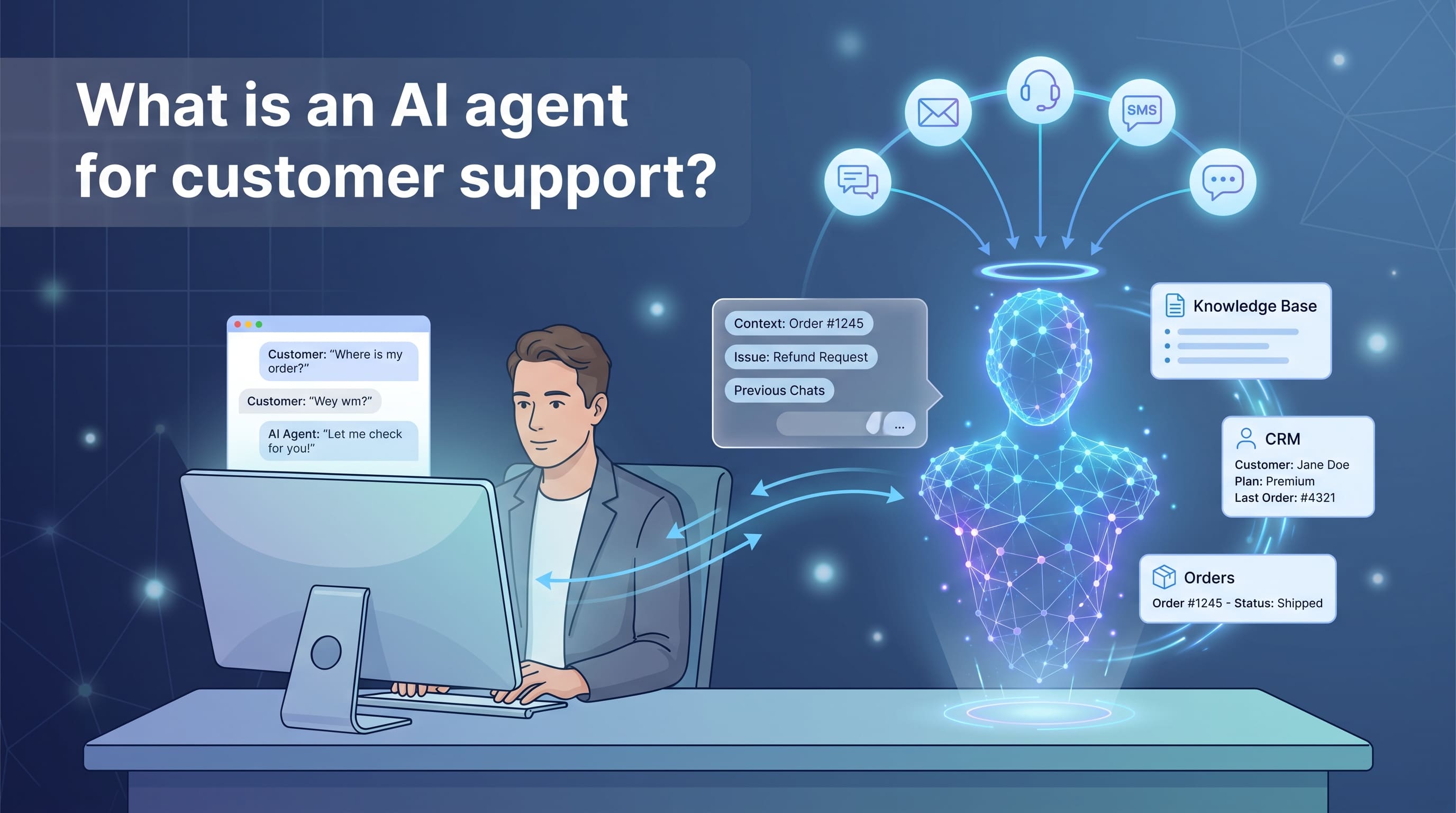
Think of an AI agent as a digital teammate who understands questions, finds answers, and resolves routine issues without calling in a human. Unlike the first-generation chat widgets that followed stiff decision-tree scripts, today’s agents rely on natural-language models that recognize intent, context, and even sentiment.
They connect directly to your knowledge base, order system, and CRM, so they can surface account details, track a package, or reset a password the moment a customer asks. If the request moves beyond routine—for example, a refund dispute or a complex technical problem—the agent hands the conversation to a live representative and passes along the full context so no one has to start from scratch.
In short, an AI support agent combines automation with empathy. It handles the repetitive questions your team answers every day while preserving the personal touch customers expect when issues get complicated. That balance underpins any modern, high-volume support operation.
Benefits of AI customer support agents at scale
Scaling support has always been a tug-of-war between service quality and operating cost. AI agents loosen the rope.
They work around the clock, never queue for coffee, and resolve the questions customers ask most: order status, password resets, policy clarifications. Off-loading that repetitive traffic cuts ticket volume for human reps and frees them for nuanced, relationship-building conversations.
The savings add up fast. Recent benchmark data shows an automated chat or voice interaction costs well under a dollar, while a human-handled ticket can run ten times higher. Multiply that gap across thousands of cases a day and the annual budget breathes easier. Gartner also projects agentic AI will autonomously resolve 80% of common customer service issues by 2029, a sizable shift in workload distribution.
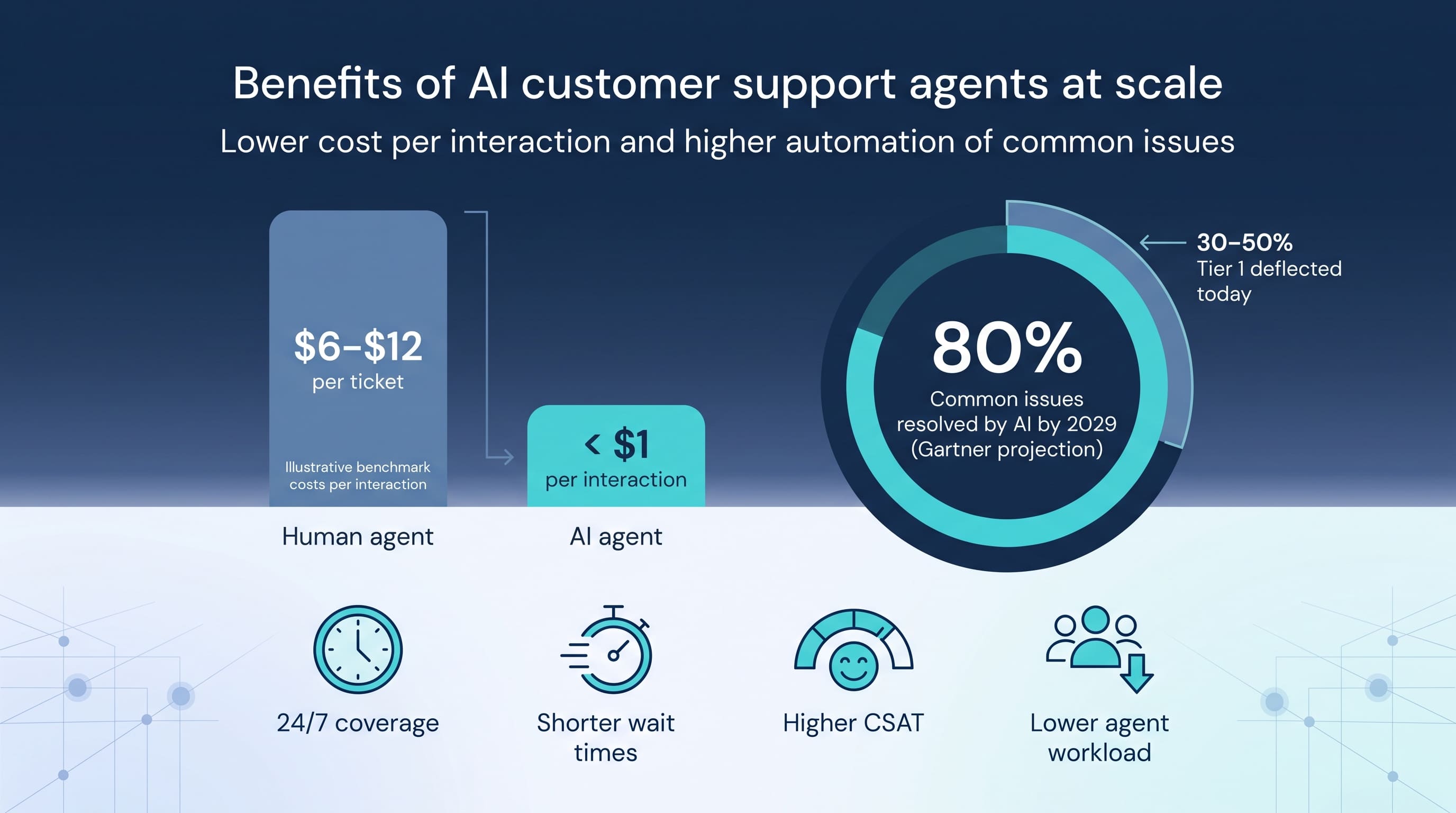
Customer experience improves as well. Instant answers shorten wait times, and hand-offs carry full context so customers never repeat themselves. Sentiment analysis flags frustrated tones early, prompting a quick switch to a live agent before dissatisfaction grows.
Finally, AI brings consistency. Policies, prices, and troubleshooting steps roll out in minutes across every channel, eliminating the “agent roulette” that frustrates customers and risks compliance slip-ups. The result is a support engine that’s faster, leaner, and remarkably steady, even when ticket volume spikes without warning.
Key considerations for choosing AI agent software
Integration and omnichannel support
Your AI agent is only as helpful as the systems it can reach. If the platform speaks fluently with your CRM, order database, and ticketing queue, customers get smooth answers. If it doesn’t, they hit dead ends and escalate to humans, erasing the efficiency you expected.
Look for native connectors to the tools you already rely on. Instant access to customer profiles, purchase histories, and previous conversations lets the bot personalize responses and keep context intact across channels.
Omnichannel coverage matters just as much. Customers move between chat, email, SMS, and social without a second thought, so your AI agent should follow them easily. A single console for every touchpoint means you never juggle half-finished threads scattered across different dashboards.
For example, AI agent software for automating customer support at scale from Comm100 plugs into mainstream CRMs and messaging apps out of the box, then adds secure data hosting for industries that cannot compromise on compliance. That kind of “ready on day one” integration accelerates time-to-value and spares your IT team a long stretch of custom API work.
A quick litmus test:
- Can the vendor show live demos pulling real customer data from systems like Salesforce or Shopify?
- Does reporting unite all channels in one analytics dashboard?
- Will new integrations ship regularly, or will you foot the bill for custom builds?
Tick those boxes and you’re on your way to an AI rollout that feels less like a science project and more like a rapid upgrade.
AI capabilities and accuracy
This is where demos meet daily reality. Customers ask in fractured sentences, local slang, and the occasional emoji. An effective AI agent must grasp intent, context, and sentiment, then deliver a clear, correct answer.
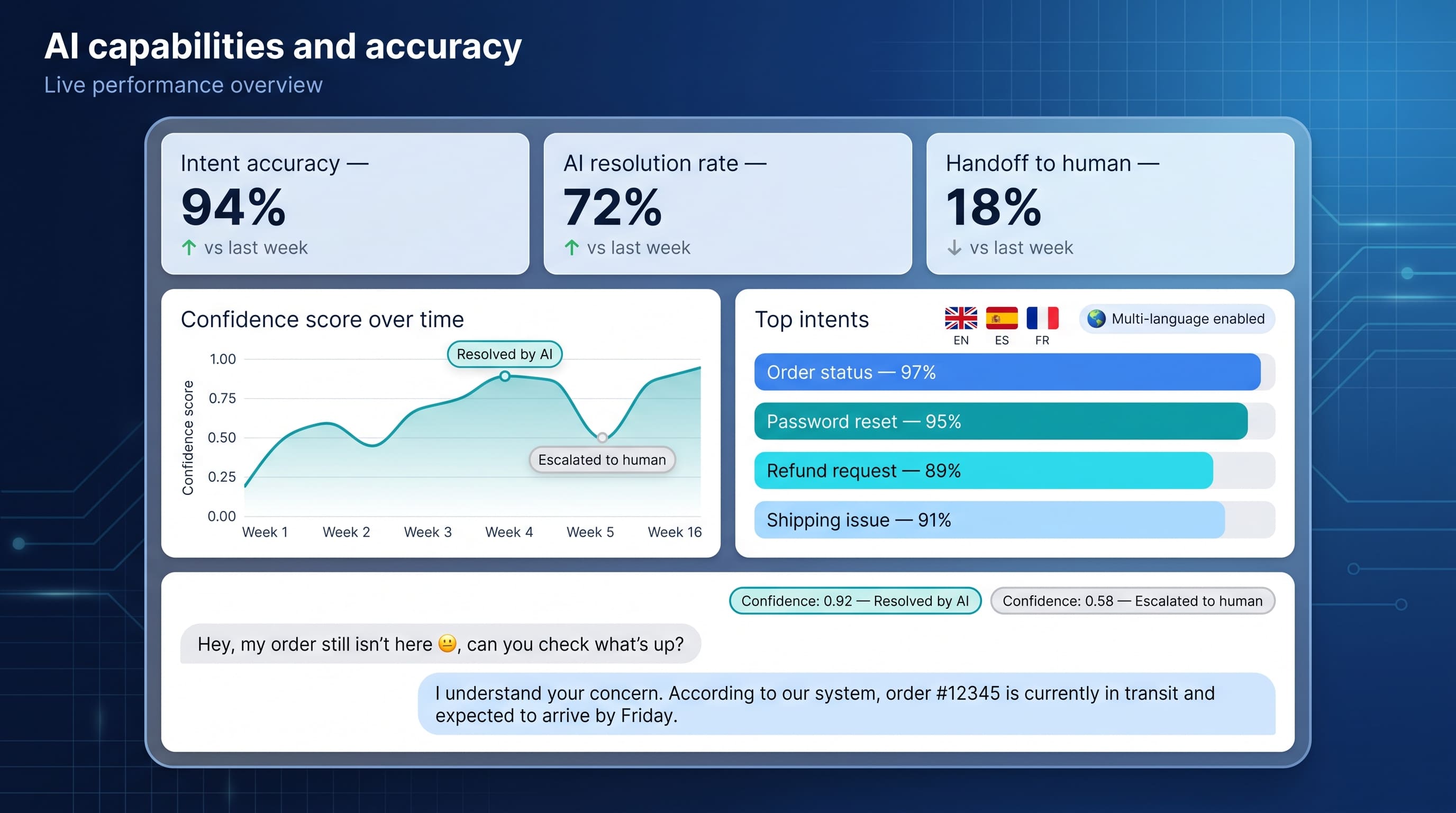
Start by probing the language model itself. Does it understand multiple languages or only English? Can it handle domain-specific terms without weeks of manual training? The best engines learn from every interaction, so the bot improves week by week instead of stalling on day one.
Next, insist on transparency around accuracy. Reputable vendors track resolution rates, confidence scores, and the volume of answers that bounce to humans. They share those numbers during a pilot instead of hiding them in footnotes. That openness flags hallucinations or blind spots before they erode trust.
Finally, test the bot with real data. Feed it transcripts from last quarter’s peak season and measure how often it gets the reply right on the first try. If the output reads like your best agent’s playbook, you’re on the right track. If you spend more time editing than evaluating, keep shopping.
Customization and training
Every brand speaks its own voice. Your AI agent must learn that voice on day one and refine it with every conversation.
Start with knowledge ingestion. A strong system pulls in help-center articles, past chat logs, and product docs in minutes, not weeks. The richer the input, the sharper the answers.
Next, check self-service tools. Can support leads update replies without code or vendor tickets? Drag-and-drop flows, plain-language intents, and live preview keep maintenance with the people who know customers best.
Training should feel continuous, not seasonal. Choose software that flags unknown intents, suggests new FAQs, and retrains overnight. That cadence lets the bot evolve with product launches, policy tweaks, and peak-season quirks.
Finally, demand sandbox testing. Before changes reach the public site, your QA team should stress-test new content in a safe space. If the vendor skips that step, move on; rushed updates can erode trust fast.
Scalability and performance
Your bot’s first week may handle a few hundred chats. Holiday season can push that figure into the tens of thousands. If latency spikes or uptime slips under load, customers notice every millisecond.
Start by checking the vendor’s track record. Look for published SLA numbers; 99.9 percent availability is table stakes, plus real stories of brands that stayed online through traffic surges. Cloud-native infrastructure with auto-scaling adds capacity the moment volumes rise, so the bot never leaves users waiting.
Speed matters as much as stability. Aim for sub-two-second responses in chat; slower replies feel like silence and drive abandonment. Ask the vendor to demo live conversations at scale or share monitoring dashboards. If they hesitate, dig deeper.
Finally, confirm global reach. A follow-the-sun support model means customers in Sydney should see the same quick experience as those in Seattle. Regional data centers cut latency, satisfy local compliance rules, and keep performance steady worldwide.
Secure these capabilities early and you’ll scale calmly when the next flash sale sends visitor counts soaring.
Analytics and insights
Great support is fast and data-driven. Your AI agent should surface patterns you can act on instead of hiding them in a dashboard no one opens.
Look for real-time conversation analytics that spotlight emerging issues before they overwhelm the queue. If refund questions surge after a new pricing plan, the reports should flag that trend in hours, not weeks.
Track intent accuracy, containment rates, and CSAT by topic. These numbers reveal where the bot excels and where it needs coaching, and they help you defend the budget during reviews.
Predictive insights raise the ceiling further. Leading platforms analyze aggregate interactions to forecast staffing needs and highlight content gaps, letting you fix problems before customers notice. Gartner projects that seven in ten service journeys will begin with conversational AI by 2028.
Finally, require simple export options. When analytics feed directly into BI tools like Tableau or Power BI, your ops team can combine service data with sales, churn, and product metrics, turning every chat into a growth lever.
Human agent handoff
Even the smartest AI will face a billing dispute, a distressed traveler, or a hardware glitch no chatbot can solve. The crucial moment is the handoff. Get it right, and customers hardly notice the change. Miss the mark, and they will share the story on every review site they find.
Choose software that routes the chat with the full transcript, customer metadata, and bot-gathered notes in one view. That context spares the human agent from repeating basic questions and shows the customer you were listening.
Smooth channel shifts matter too. If the issue calls for a phone conversation or screen share, the platform should launch those options in two clicks and log everything to the same ticket. The fewer times the customer repeats information, the faster frustration turns into relief.
Track post-handoff metrics as well. High CSAT scores and low handle times after escalation confirm a clean relay. If scores drop, inspect the transcripts; you will often find missing context or unclear bot scripting you can fix before it spreads.
Security and compliance
Trust is earned one safeguard at a time. When an AI agent moves customer data through the cloud, the stakes climb fast, especially in healthcare, finance, or education where regulations carry weight.
Start by confirming the basics: SOC 2 Type II, ISO 27001, and GDPR alignment. These frameworks show that the vendor’s controls are audited, not just promised. If you fall under HIPAA or PCI-DSS, look for signed BAAs and proof of encryption in transit and at rest.

Ask where and how your data lives. Regional hosting keeps information within required borders and cuts latency for local users. Just as important, the provider should promise that your proprietary data never trains a shared model. That wall protects trade secrets and reassures legal teams worried about accidental exposure.
Finally, examine audit trails. Detailed logs of every agent-customer exchange make investigations straightforward when compliance officers come calling. Put these safeguards in place early and you gain AI’s speed without tomorrow’s headline risk.
Cost and ROI
Sticker price alone will not show whether an AI agent is worth it. You need to weigh the full economic picture: license fees, implementation hours, ongoing maintenance, plus the savings and revenue the system can generate.
Start on the cost side. Subscription plans usually bill per resolved interaction, per user, or by flat tiers. Add one-time setup services and potential integration work. A clear quote should map every dollar to a line item so finance teams are not surprised six months later.
Now flip the ledger. Automated resolutions carry rock-bottom marginal costs, often under a dollar each, compared with the six-to-twelve-dollar average for human-handled tickets. Trim even thirty percent of tier-one volume and most platforms pay for themselves in a quarter. Reach fifty percent containment—the industry’s emerging median—and you free budget for proactive care or product improvements.
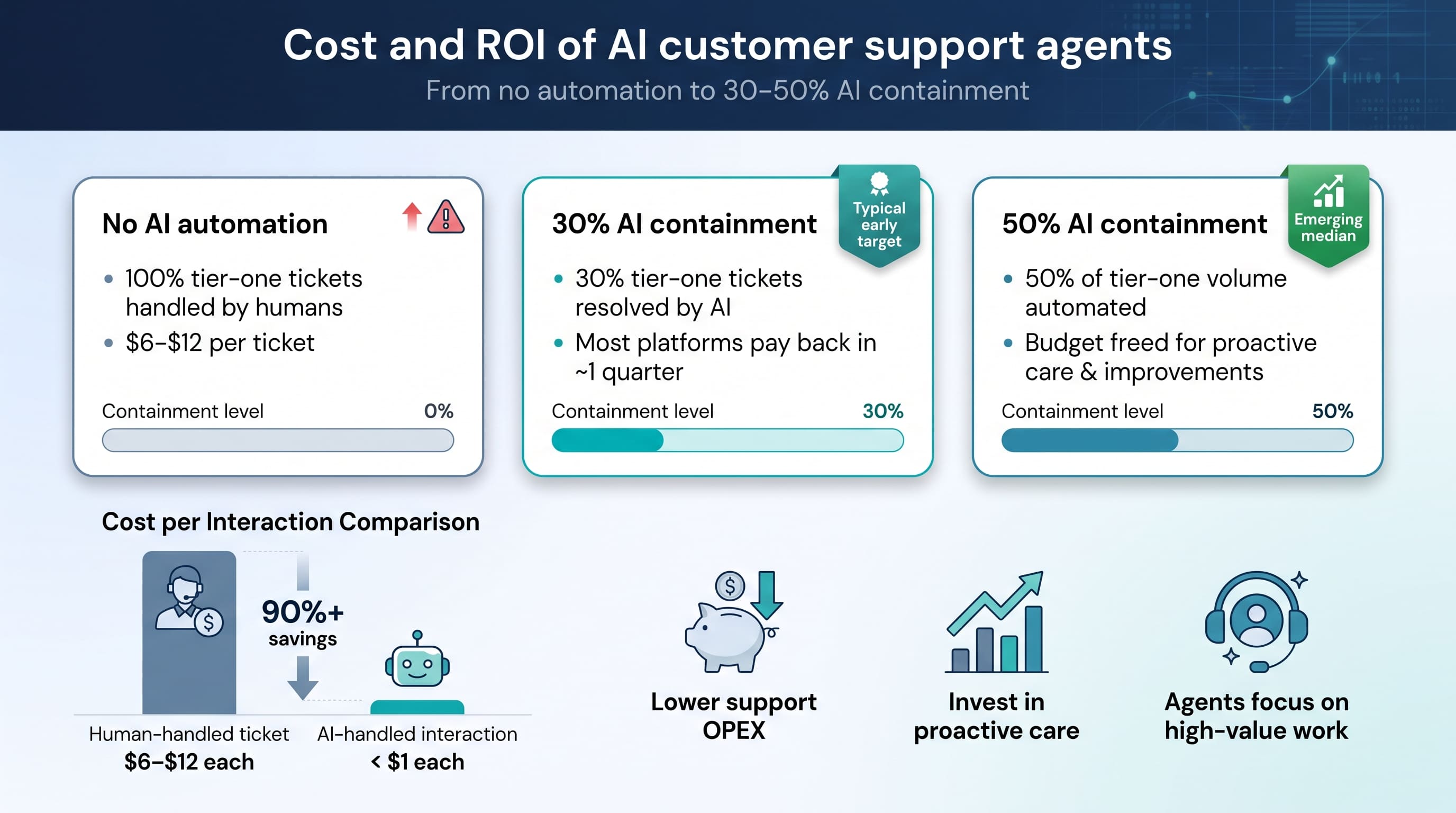
Soft gains count as well. Faster replies lift CSAT. Consistent answers prevent needless refunds. Agents freed from copy-paste routines can focus on upsells, renewals, or high-touch retention work that drives top-line growth.
Run a pilot, track every metric, and let real data—rather than vendor slide decks—prove the ROI in your environment. When the numbers arrive, the business case writes itself.
Support and vendor reliability
Choosing an AI platform is more than a software purchase; it is a long-term partnership. When outages happen or a new channel launches, you need a vendor who shows up like a teammate, not a ticketing black hole.
Start by checking responsiveness. Do they offer 24/7 live support or only email forms? Ask to meet the success manager who will guide your rollout. A real face and a direct line signal accountability when stakes rise.
Next, inspect the knowledge ecosystem. Detailed documentation, active user forums, and steady webinars shorten the learning curve for admins and agents. Frequent roadmap updates with clear delivery dates show a company that ships rather than stalls.
Customer proof fills in the rest. Search G2 or Gartner Peer Insights for comments about fast fixes and proactive guidance. If universities, insurers, or public agencies trust the vendor, that is strong evidence of reliability under strict compliance rules.
Finally, test the partnership early. During your pilot, raise a “fake” complex question and watch how the vendor responds. A quick, thorough fix predicts years of smooth scaling; radio silence is your cue to keep shopping.
Market snapshot: leading AI agent solutions
The AI support market has ballooned in the last two years, and it shows in the range of tools on offer. We can group the landscape into three broad camps: specialist engagement platforms, help-desk giants that added AI to existing suites, and pure-play LLM startups chasing new funding.
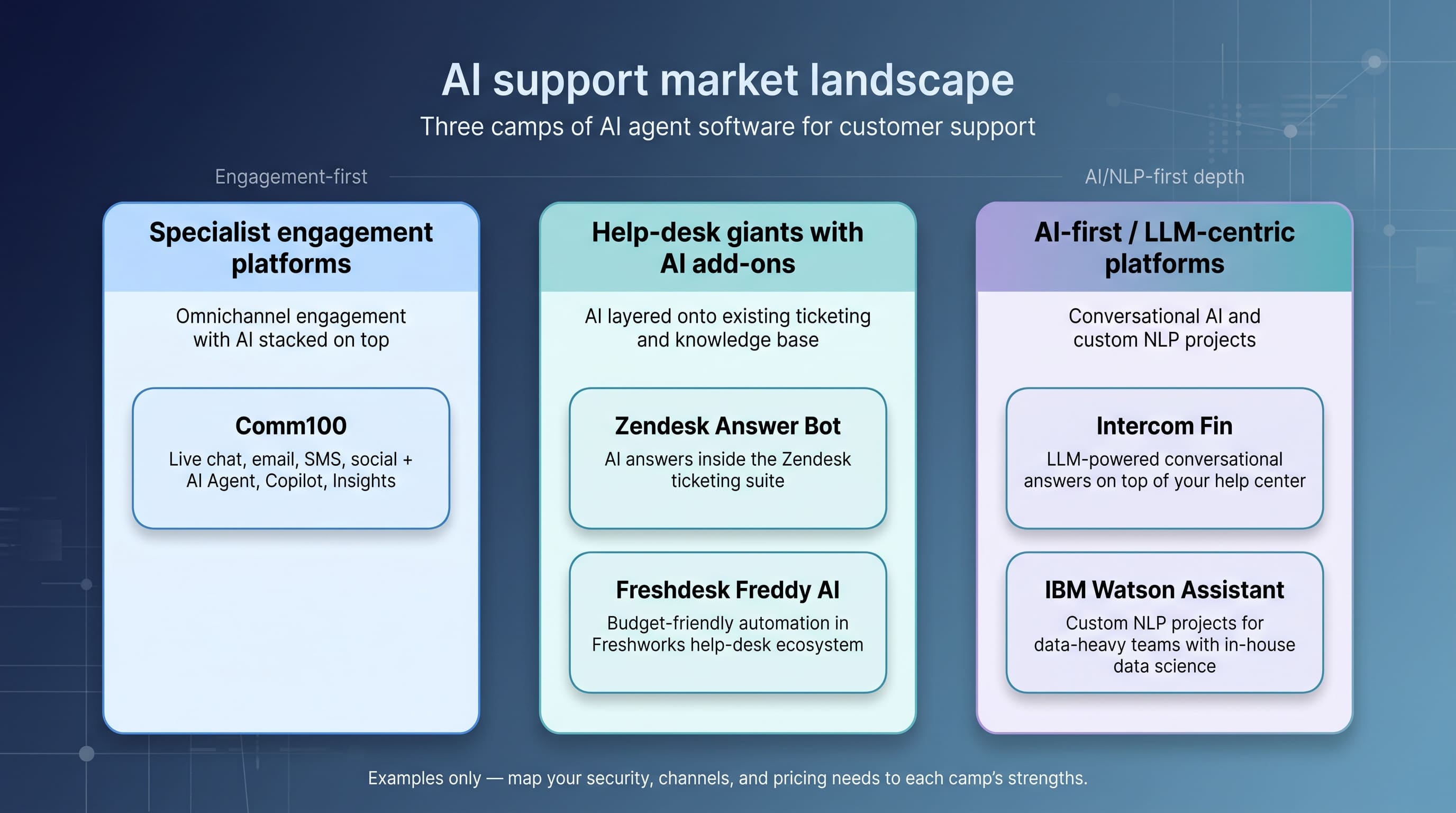
Comm100 sits in the first camp. Its omnichannel roots place live chat, email, SMS, social, and ticketing in one console with an AI suite—Agent, Copilot, Insights—stacked on top. That unity attracts regulated industries that need tight data governance without stitching together several vendors.
Zendesk Answer Bot follows the second path. It draws on Zendesk’s deep ticket history to suggest articles and draft replies. If your team already runs on Zendesk, integration is nearly automatic, though some users note extra setup for social channels and limited on-premise options.
Intercom’s Fin represents the AI-centric wave. Fin taps your help center and large language models to craft conversational answers. Early adopters praise its natural tone, but usage-based pricing can spike during peak seasons, so forecast volumes carefully.
Freshdesk’s Freddy AI and IBM Watson Assistant round out the field with their own strengths: Freddy for budget-friendly automation inside the Freshworks ecosystem, Watson for deep custom NLP projects when you have data-science talent in-house.
The bottom line: map your must-haves such as security, channel depth, and predictable pricing to these strengths, and the shortlist writes itself.
Challenges and best practices in implementation
Common pitfalls to avoid
Rolling out an AI agent blends technology and change management, and the snags rarely show up in glossy vendor demos.
The first stumbling block is data quality. If your knowledge base is outdated or filled with edge-case work-arounds, the bot will learn those habits and repeat them at scale. Customers see the cracks right away.
Next comes stakeholder alignment. Support teams may welcome automation, while legal, brand, and IT raise concerns about tone, privacy, and integration. When those issues surface after contracts are signed, launch dates slip and enthusiasm fades.
Finally, there is the “set-and-forget” trap. Early containment wins create a false sense of closure; six months later, product updates break intents and satisfaction scores drop. Continuous tuning is the price of long-term success.
Understanding these pitfalls upfront sets the stage for smoother deployment, and it leads to the best-practice fixes below.
Best practices for a smooth rollout
Begin with a pilot that mirrors reality. Pick a high-volume, low-risk queue—order status or password resets—and route a slice of traffic through the bot. Measure containment, CSAT, and handle time next to human benchmarks. The data will reveal quick wins and hidden gaps before you expand.
Pair the pilot with a cross-functional squad. Support leaders shape tone and workflows, product teams supply accurate specs, and legal and security check compliance. When every voice weighs in early, you avoid last-minute rewrites and launch with confidence.
Set a weekly tuning cadence from day one. Review transcripts, add missing intents, and update content when policies change. A living bot stays sharp; a dormant one drifts off-brand.
Keep humans in the loop as well. Train agents to tag bot mistakes and surface new questions they hear on calls. Their frontline insight drives continuous improvement and reminds everyone that AI exists to amplify, not replace, human expertise.
Future trends in AI customer support
AI continues to advance. Over the next two years, text-first chatbots will give way to multimodal agents that handle voice, images, and video. They will parse a phone call in real time, pull the right knowledge article, and even surface a brief walkthrough clip without breaking the flow.
Hyper-personalization will follow. By combining purchase history with sentiment cues, tomorrow’s agent can adjust both tone and solution: formal courtesy for a luxury shopper, quick emojis for a Gen Z gamer, all while respecting privacy limits.
Human–AI teamwork will deepen as well. Copilot tools already suggest replies; the next wave will propose proactive outreach, flag churn risk mid-chat, and recommend discounts or escalation long before frustration builds.
Finally, governance will mature. Regulators are poised to set standards on transparency, audit trails, and content accuracy. Vendors that build compliance into their design today will outpace competitors racing to retrofit later.
Track these shifts and you will choose a platform that evolves with customer expectations instead of chasing them.
Conclusion
Choosing AI support software at scale comes down to fit, not hype. Weigh integration, accuracy, security, and true cost of ownership, then pilot the tool on a low-risk queue before you commit. Tune it weekly, keep humans ready for the hard cases, and the right agent will trim ticket costs while holding satisfaction steady, even when volume spikes.
INTERESTING POSTS
- What An Agentic Investigation Looks Like
- Top Features to Look for in Quality Assurance Software for Your Contact Center
- 11 Best MCP Gateways in 2026: In-Depth Comparison
- Casino Stream Chats Now Double as Tech Support
- 5 Cybersecurity Tips For Real Estate Agents
- How I’d Use the GLM-5.2 API for a Long-Running Coding Agent
About the Author:

Daniel Segun is the Founder and CEO of SecureBlitz Cybersecurity Media, with a background in Computer Science and Digital Marketing. When not writing, he's probably busy designing graphics or developing websites.



