



In this post, I will show you how an SPF Record can instantly improve your email deliverability.
The Sender Policy Framework (SPF) is an essential email authentication system aimed at preventing email spoofing and enhancing the chances of email delivery. Essentially, an SPF record is a specific type of TXT record within the Domain Name System (DNS) that specifies which mail servers are permitted to send emails on behalf of a particular domain.
When an email server processes an incoming email, the receiving Mail Transfer Agent (MTA) looks up the SPF record associated with the domain found in the envelope from the header. By comparing the connecting server’s IP address to the list of authorized senders in the SPF record, the MTA can assess whether the email is genuine or potentially a spoof, thereby significantly lowering the likelihood of fraudulent emails landing in users’ inboxes.
The effectiveness of email authentication relies on SPF working together with DKIM (DomainKeys Identified Mail) and DMARC (Domain-based Message Authentication, Reporting, and Conformance). Leading business email services, including Google Workspace, Microsoft 365, Zoho Mail, and Amazon SES, highly recommend proper SPF setup to bolster the credibility of outgoing emails.
Additionally, spam filtering solutions like Mimecast, Barracuda Networks, and Proofpoint utilize SPF as a key indicator in their anti-spam and anti-phishing measures.
Table of Contents
How SPF Helps Improve Email Deliverability Instantly
SPF provides organizations and brands with quick advantages by establishing a clear sender policy for their domains. Once the SPF record is published, it offers several key benefits for email deliverability:
- Prevents Unauthorized Senders: Only designated IP addresses and email servers are allowed to send emails “on behalf of” your domain. This robust validation process protects against email spoofing by malicious entities.
- Lowers Spam and Phishing Threats: Major email service providers like Gmail, Outlook, and Yahoo Mail, as well as security services such as Cisco Talos, Spamhaus, and SpamExperts, place significant emphasis on SPF verification within their spam-filtering systems. A valid SPF record enhances the chances of your emails reaching recipients’ inboxes rather than being marked as spam.
- Supports DMARC Compliance: For compliance with DMARC policies, SPF authentication connects the envelope from domain to your SPF policy. When both SPF and DKIM successfully align, your emails are considered highly trustworthy.
- Immediate Results: The benefits of a correctly set up SPF record are almost instantaneous; most receiving mail servers and Mail Transfer Agents will check the SPF policy for every incoming message. Thus, SPF boosts email deliverability as soon as DNS propagation is finished.
Common SPF Record Syntax, Mechanisms, and Examples
Understanding SPF Syntax
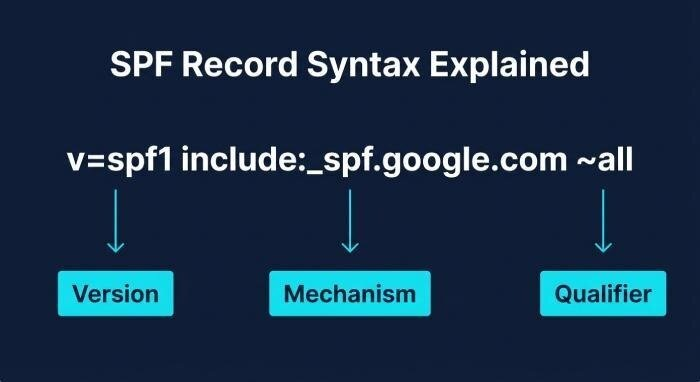
SPF records follow a specific syntax as outlined in RFC 7208. Each record begins with the version of SPF and includes various mechanisms and qualifiers that collectively specify which IP addresses and hosts are permitted.
Key SPF Mechanisms
- ip4 & ip6: Define permitted IPv4 or IPv6 addresses and ranges.
Example: `ip4:192.0.2.0/24`
- a & mx: Allow any IP addresses returned from A/AAAA or MX records associated with the domain.
Example: `mx`
- include: Permits the SPF policy of another domain, which is particularly handy for known senders like SendGrid, Amazon SES, or Mailgun.
Example: `include:sendgrid.net`
- ptr: (Seldom recommended) Allows mail from IPs that have reverse DNS PTR records matching your domain.
- all: Matches every IP address, usually placed at the end of the record with its respective qualifier.
SPF Qualifiers
- + (Pass): Explicitly permits (implied when absent).
- – (Fail): Clearly denies.
- ~ (Softfail): Identifies but does not reject.
- ? (Neutral): Indicates no specific policy or preference.
SPF Record Examples
Basic SPF Record Example
- v=spf1 ip4:198.51.100.23 include:mailgun.org -all
- Only the designated IP address and Mailgun’s servers are authorized to send emails for this domain.
Complex SPF Record Example
- v=spf1 ip4:35.190.247.0/24 ip4:64.233.160.0/19 mx include:spf.protection.outlook.com include:_spf.google.com -all
- This configuration permits email from specific IP addresses, as well as from Google Workspace and Microsoft 365 (Outlook) servers.
How SPF Mechanisms and Qualifiers Work Together
When a server’s IP address aligns with an authorized sender listed in the SPF record, the outcome is an SPF pass. If it doesn’t match, the result — whether it’s an SPF fail, softfail, or neutral — will depend on the specific mechanism and qualifier used. By configuring this accurately, genuine email servers and SMTP relays are more likely to achieve a pass, which enhances email deliverability.
How to Create, Publish, and Test an SPF Record
Planning and Creating an SPF Policy
Prior to launching, conduct a comprehensive inventory of all email sources associated with your domain, including Google Workspace, Microsoft 365, Amazon SES, Mailchimp, newsletters (such as Postmark, Sendinblue, SparkPost), and any bespoke email servers or on-site SMTP relays. It’s essential that each service provides SPF includes or IP addresses to be used as mechanisms.
To minimize syntax mistakes and guarantee policy correctness, many administrators turn to SPF record generators provided by platforms like AutoSPF, Netcore, Trustifi, Fastmail, Namecheap, or Dmarcian.
Publishing SPF in the Domain Name System
- Access your DNS hosting provider, which could be GoDaddy, Cloudflare, Bluehost, or Namecheap.
- Create or modify a TXT record at either the domain root or a subdomain:
Set the host/name to `@` or the relevant subdomain.
Input your SPF record string into the value/data field.
- Save the changes and wait for DNS propagation (usually takes less than an hour). By publishing this as a TXT record in the Domain Name System, you enable MX records and Mail Transfer Agents globally to access and implement your SPF policy.
Testing and Validating Your SPF Record
SPF Validation Tools
Once you’ve made your SPF records public, it’s advisable to utilize an SPF testing tool for verification. Some suggested tools are MxToolbox, EasyDMARC, Dmarcian, and Cisco Talos.
- MXToolbox: Detects syntax mistakes in SPF, evaluates mechanisms, counts lookups, examines policies, and more.
- EasyDMARC: Confirms the alignment of DMARC, DKIM, and SPF.
Conducting routine checks on your SPF records guarantees that your approved senders consistently pass validation, helping to maintain the best possible email deliverability.
SPF Record Update and Migration
Whenever you incorporate new authorized sending services — such as transitioning to Zoho Mail or integrating with Mailchimp or Barracuda Networks — ensure that you promptly revise your SPF record. During the process of migrating email services (for example, switching to Google Workspace or Outlook), it’s essential to check your SPF alongside related DKIM and DMARC configurations, ensuring that domain alignment remains intact for optimal deliverability.
SPF Best Practices and Mistakes to Avoid
Follow Key SPF Policy Best Practices
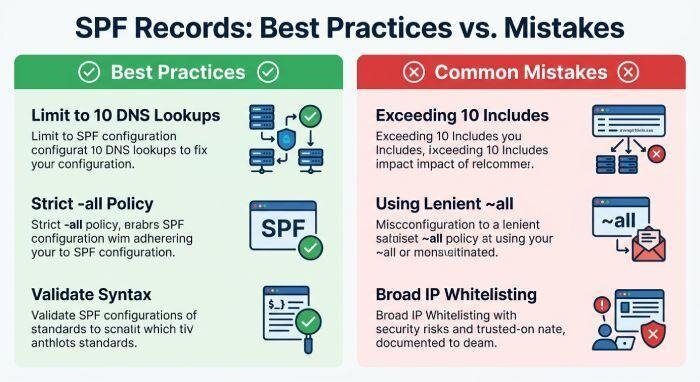
- Reduce Includes and Lookups: Be mindful that the SPF lookup threshold is capped at 10 DNS queries per policy. Adding too many includes, particularly for services like SendGrid or Atmail, may lead to SPF failures due to exceeding this limit. Consider using SPF flattening when required.
- Authorize Only Essential Senders: Avoid unnecessarily broadening your sender policy by whitelisting unneeded IP ranges or entire networks of providers.
- Maintain Clear Syntax: Steer clear of frequent SPF syntax mistakes. Utilize SPF record validators to identify missing or incorrectly placed qualifiers and broken includes.
- Monitor Record Size: Records that are too lengthy can surpass DNS limits; streamline or flatten them as needed.
- Test Across All Mailflows: Ensure that every outgoing mail scenario — be it transactional, newsletters, or system alerts — is validated with SPF testing tools to confirm successful SPF passing and alignment.
Avoid Common Mistakes
- Inadequate Include Chains: Failing to monitor includes may lead to unnecessary lookups or create circular dependencies. It’s essential to assess how these additions affect the SPF lookup limit.
- Neglecting Important Providers: Omitting the IP address of a genuine mail server (or the correct MX record) can lead to valid emails encountering SPF failures or softfails, negatively impacting deliverability.
- Relying Solely on ‘Neutral’ or ‘Softfail’: An overly lenient SPF policy lacks effectiveness. For most domains, it’s advisable to use `-all` (fail) as the conclusive qualifier unless there is a strong operational justification to do otherwise.
Stay Up to Date
Establish a regular timeline for updating your SPF records, particularly after introducing new services, modifying DNS hosting, or during extensive SPF transitions. Ensure that your DKIM and DMARC settings are consistently aligned for optimal email authentication and domain security.
By effectively managing your SPF records, you enhance your domain’s defenses against spoofing, safeguard legitimate sending sources, and achieve maximum email deliverability both now and moving forward.
INTERESTING POSTS
- Free Spf Checker: Troubleshoot Spf Configuration Issues Easily
- How SPF Flattening Can Instantly Improve Your Email Deliverability
- Free DMARC Lookup: Record Checker With Results Explained And Quick Fixes
- Tips To Format And Validate Your JSON Code Online
- Best Email Service Provider For Product Teams
- DMARC Generator Guide: Create, Check, And Publish DMARC Records
About the Author:

Meet Angela Daniel, an esteemed cybersecurity expert and the Associate Editor at SecureBlitz. With a profound understanding of the digital security landscape, Angela is dedicated to sharing her wealth of knowledge with readers. Her insightful articles delve into the intricacies of cybersecurity, offering a beacon of understanding in the ever-evolving realm of online safety.
Angela's expertise is grounded in a passion for staying at the forefront of emerging threats and protective measures. Her commitment to empowering individuals and organizations with the tools and insights to safeguard their digital presence is unwavering.



