




Learn how proxy purchase online works, how to purchase proxy servers safely, and the risks of free proxy purchase. A clear guide to proxy types and use cases.
Picture this: you’re mid-match in your workflow. The QA team needs to see how a website behaves in another country, your SEO crew is checking search results from a different region, and your ad team is verifying placements—yet everything you click feels like a red card: “Access denied,” “Unavailable in your area,” or pages that load like they’re running in wet cement.
That’s often the moment people decide to purchase proxy access—because the real prize isn’t just swapping an IP address, it’s getting reliable routes, steadier performance, and fewer surprises.
In this guide to purchase proxy, we’ll break down what you’re actually buying, how proxies work in the real world (not the marketing world), how to purchase proxy servers with your eyes open, and why a free proxy purchase can sometimes feel like a bargain ticket… right up until it isn’t.
Proxies can be useful tools for testing, research, and operations—but only if you understand what they do, what they don’t do, and what still follows you around the internet even when your IP changes.
Table of Contents
What proxy purchase online means
Let’s keep this as clean as a perfectly called play.
A proxy is basically a middle layer: you send your request to the proxy, and the proxy sends it to the website on your behalf. Microsoft puts it plainly: “A proxy is an intermediary server that sits between a client and a destination server.”
So when people talk about “buying a proxy,” they usually don’t mean they’re ordering a physical machine. They’re typically paying for:
- Access to one or more proxy IP addresses (often grouped into “pools”)
- A dashboard or control panel to manage locations, rotation, and credentials
- Rules for how traffic is counted (per IP, per GB, per port, etc.)
- Support, uptime promises, and sometimes usage limits
Here’s the key takeaway: a proxy is a traffic route, not a magic cloak. It can change what a destination site sees as your network address, but it doesn’t automatically erase who you are. Your browser can still carry cookies, device signals, and login patterns that make you recognizable. In other words: changing lanes doesn’t mean you changed cars.

How a proxy works
Think of your internet request like a pass upfield:
You (client) – proxy server – website
- Your app or browser sends a request to the proxy.
- The proxy forwards that request to the destination site.
- The site responds to the proxy.
- The proxy relays the response back to you.
What changes? To the website, the request appears to come from the proxy’s IP address, not your original one.
What doesn’t magically change? Plenty:
- Cookies and sessions (if you’re logged in, you’re still you)
- Browser/device fingerprinting (settings, fonts, APIs, and behavior patterns can be distinctive)
- Account behavior (rapid logins, unusual actions, or automation can still trigger flags)
And now, the quick two-player comparison you need to know:
- Forward proxy (client-side): Sits in front of users/clients and forwards their outgoing requests to the internet.
- Reverse proxy (server-side): Sits in front of one or more servers and handles incoming requests from the internet, often for performance, security, or load balancing.
One more important reality check: proxies don’t automatically equal encryption. TLS/HTTPS is what protects data in transit between client and server when implemented correctly.
Why people purchase proxy servers
Here are the most common, legitimate reasons teams and individuals reach for proxies:
- Access testing from different locations (QA, localization, pricing checks)
- Web scraping / data collection (do it responsibly: respect laws, site rules, and rate limits)
- Ad verification and brand protection (confirming where ads show up and how)
- Social media management (high risk of bans if misused or if behavior looks automated)
- Cybersecurity research / monitoring (threat intel, exposure checks, defensive testing)
- Load testing / uptime monitoring from multiple regions (seeing performance like real users do)
And the reminder that saves headaches: a proxy can change the “from where,” but not always the “who.” Privacy and security still depend on how you browse, what you log into, and whether your connections are properly protected by HTTPS/TLS.
6 Types of proxies you can buy online (and what each is best for)
Buying proxies is like picking a formation: the right choice makes the whole team look sharp; the wrong one turns every attack into a turnover.
Datacenter proxies
These come from cloud/hosting providers. They’re usually fast and budget-friendly, great for speed-sensitive tasks and bulk checks. The tradeoff: they can be easier for websites to spot because many datacenter IPs are clearly “non-residential.”
Residential proxies
These IPs appear to come from real home internet connections (ISPs). They tend to blend in better for geo-testing and tougher targets—but they’re more expensive and quality can vary depending on how the network is sourced and managed.
ISP / static residential proxies
This is the “best of both worlds” pitch: a stable IP that still carries a residential-looking reputation. They’re popular when consistency matters (think: long sessions, repeated logins). Downsides: limited availability and often fewer location options.
Mobile proxies
These route through mobile carrier networks. They can carry a strong “real user” signal, which is why they’re used for strict environments—but they’re typically costly and may be slower or more constrained.
Rotating vs sticky sessions (quick, practical)
- Rotating means the IP changes on a schedule or per request—useful for distributing traffic and avoiding one IP getting hammered.
- Sticky means you keep the same IP for a set time window—useful when you need session stability (logins, carts, multi-step flows).
This isn’t about “beating” anything; it’s about matching the proxy behavior to your task so your workflow doesn’t trip over its own feet.
Proxy options compared
| Proxy type | Best for | Pros | Cons | Typical pricing model |
| Datacenter | Speed-sensitive tasks, bulk requests | Fast, affordable | More blocks, lower “trust” | Per IP / monthly |
| Residential | Geo-testing, tougher targets | Higher acceptance rate | Costly, varies in quality | Per GB / traffic-based |
| ISP (static resi) | Account stability, logins | Stable IP + better reputation | Limited locations/stock | Per IP / monthly |
| Mobile | High-trust sessions, strict platforms | Strong legitimacy signal | Expensive, sometimes slower | Per GB or per port |

Free proxy purchase: what you gain, what you risk
Let’s call it straight: a “free” proxy can be like a free trial in the rain—technically playable, but you’re one bad bounce away from trouble.
What you gain:
- Quick testing without spending money
- A simple way to see how an IP-based restriction behaves
What you risk:
- Unreliability (today it works, five minutes later it’s gone)
- Logging or traffic tampering by unknown operators
- Data leakage if you send sensitive info through a proxy you don’t control
Research and security writeups have repeatedly flagged free proxy ecosystems as risky and sometimes vulnerable or abused.
Also—important—a proxy does not automatically encrypt your traffic. If you’re not using HTTPS/TLS correctly, you’re exposed. OWASP’s guidance on transport security is clear: sensitive traffic should be protected with well-configured TLS.
If you must test a free option, keep it on a short leash (mini-checklist):
- Use it only for non-sensitive browsing (no accounts, no personal data)
- Never enter passwords, payment details, or work credentials
- Set strict timeouts and expect failures
- Use an isolated browser profile (no saved cookies, no extensions you rely on)
- Prefer HTTPS-only destinations; don’t ignore certificate warnings
- Stop immediately if you see strange redirects, pop-ups, or odd page injections
Checklist to purchase proxy servers safely
Here’s your scouting report—the stuff that separates a solid signing from a headline-worthy mistake:
- Clear proxy type labeling (datacenter vs residential vs mobile)
- Transparent pricing (per GB vs per IP; overage rules; renewal terms)
- Location targeting you actually need (country/city; sometimes ASN/ISP matters)
- Rotation controls (sticky duration, refresh rate, pool size)
- Authentication methods (IP allowlist vs username/password; MFA for dashboards if offered)
- Published uptime/SLAs + support (and a real way to reach them)
- Compliance signals (acceptable-use policy, abuse handling, clear boundaries)
- Security basics: TLS everywhere, clean dashboards, no sketchy “anything goes” promises; avoid providers that brag about shady use cases
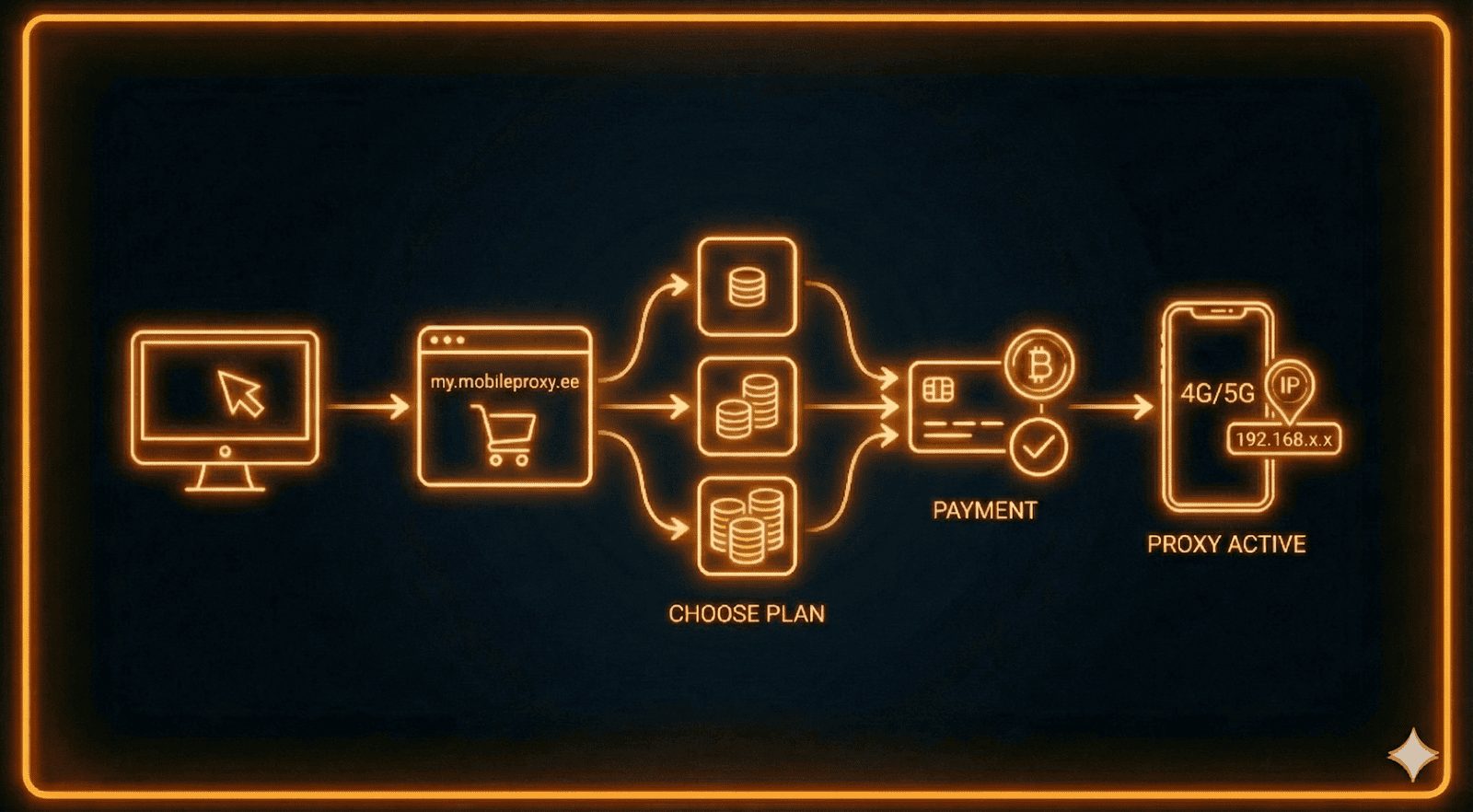
Proxy purchase online step-by-step (from checkout to first request)
- Choose proxy type + locations based on your real use case (testing, monitoring, research).
- Pick a plan model: paying per traffic (GB) vs per IP count (monthly).
- Create credentials / allowlist IPs (treat access like a key—don’t leave it under the doormat).
- Configure in your browser/app (keep it simple: host/port + auth; separate profiles for separate tasks).
- Test before you scale: speed, stability, and whether the target behaves normally.
- Monitor: error rates, session drops, unexpected geo mismatches, and account flags.
Is it legal to buy proxies? What matters in practice
In many places, buying proxies is generally legal—it’s a networking tool. The real match-decider is how you use it. You can still breach:
- A website’s Terms of Service
- Privacy or data protection rules
- Local laws around unauthorized access, fraud, or misuse
Play it clean:
- Get consent when required and respect boundaries
- Use sane rate limits and avoid hammering services
- Follow robots/ToS where applicable (especially for automated collection)
- Don’t use proxies to misrepresent identity for harmful purposes—no one wins that game
FAQ about proxy purchase online
What does “purchase proxy servers” actually mean?
Most of the time, it means renting access to proxy IPs through a provider’s network and dashboard—not buying physical servers.
Are proxies the same as VPNs?
Not quite. Proxies route traffic for specific apps or configurations, and they don’t inherently encrypt everything. HTTPS/TLS still matters for protecting data in transit.
Is a free proxy purchase safe?
Often it’s riskier because operators are unknown and conditions change fast. Avoid using them for logins or payments, and treat them as untrusted networks.
Which proxy type is best for stability?
ISP/static residential options are commonly chosen when you need a consistent IP. Rotating setups are better for short sessions and distributed traffic.
Why do sites still detect me even with a proxy?
Because detection isn’t just IP-based—cookies, browser fingerprinting, account patterns, and behavior can still identify you.
INTERESTING POSTS
About the Author:

Meet Angela Daniel, an esteemed cybersecurity expert and the Associate Editor at SecureBlitz. With a profound understanding of the digital security landscape, Angela is dedicated to sharing her wealth of knowledge with readers. Her insightful articles delve into the intricacies of cybersecurity, offering a beacon of understanding in the ever-evolving realm of online safety.
Angela's expertise is grounded in a passion for staying at the forefront of emerging threats and protective measures. Her commitment to empowering individuals and organizations with the tools and insights to safeguard their digital presence is unwavering.



